Fun With My New Phone

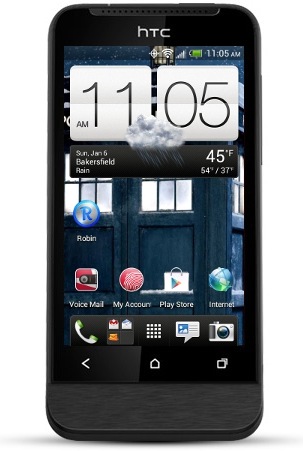
htconev Santa (or as I like him call him, me) gave me an awesome present for Christmas.  My first smart cell phone, a HTC ONE V Android from Virgin Mobile.  My previous phone was a Samsung T401G from Net10 which did absolutely nothing other than texting and making calls.  It did have games and internet, but they both sucked.

This new phone is better than my previous cell phones.  It’s not a high-end phone, but it is to me since I’ve never had a smart phone before.

cruiseSo far I have earned 11,067 Viggle points which I will keep earning and saving up to buy something very expensive.  They have a few cool items like a Kindle Fire, an iPod Touch and an Apple TV.  My partner doesn’t have internet on his TV and he has an iPhone, so perhaps he would appreciate the Apple TV.  I earned the 11K points in just 2 weeks, so can you imagine how many more I will earn by Christmas 2013?

They have one reward in there that is worth 4 million points which is a 4 or 5 night Caribbean, Europe or Bermuda cruise aboard a Royal Caribbean International ship.  Can you imagine winning a cruise just from watching TV?  I have never in my life been on a cruise and I have always wanted to.  I think it would be fun and I could take pictures and video with my new phone and post them daily lol.

I have many apps for losing weight which I haven’t really used because they are for cycling and walking and it’s been too cold (as you can see from the weather on the phone image above).  I will take advantage of them in the spring.  Actually, I may uninstall them because I found one that will do the work of all of them, it’s called Noom and it has a GPS and logs my walk, run, jog, cycling etc.  It’s free, but if I pay for it then it will do more.  One thing I love about it is that I can scan the bar code of the food (box, obviously) I eat so I don’t have to find it manually.  I also have a food scale to keep me honest lol.

There are reading apps like the Kindle and Nook apps as well as Aldiko, but I don’t think I will use it too often because it’s killer on the eyes.  I much prefer reading on my Nook WiFi when I do read because it’s e-ink.

I’ve been playing a few games like Megapolis and The Sims FreePlay and Tetris.  I like games that you play with your finger, but my fingers are too fat so I have a stylus to poke the screen with.

I love how it takes pictures and video.  Pictures are widescreen which is basically 4×6 which my other digital cameras never did.  Not that I ever have pictures developed, but if I did want to have a picture developed, I won’t lose anything when it converts the pic to 4×6.  I love that it has a flash which I also can use with video which again isn’t something my camcorder can do since I don’t have a flash for it.  I also love that I can take a picture and then post it directly to Facebook and Twitter without any steps.  Screenshots too.  I learned that just by pressing the power and the home button, it will take a screenshot which I can share in emails, Facebook and Twitter.

My last phone was okay for making calls, but this is perfect.  It has a speakerphone which only works by turning the phone upside down.  I don’t need to look at the screen while talking so that’s fine.  The 3G is great for internet.  My other phone had internet but it was a crap shoot.  It literally took 5 minutes to load a web page one time, and then it gave me a message that said there wasn’t enough memory, which means it didn’t really load the web page.  So I lost minutes and didn’t get anything in return.

My old phone is in good hands with someone I know.  It’s my partners late cousins life partner.  She had a cell phone, but she doesn’t have it anymore and she told me that this one is better than the other one anyway.  I feel sorry that she has to use it and not an Android, but it still works for phone calls and texting.  It’s not perfect, but it works.

I think I am too spoiled now lol.  I will get a ton more use out of this phone than my last which is a good thing.  I felt really guilty about buying it, but I don’t feel that way anymore.

How to make money with your cell phone – 7 apps

AndroidMoney

I have been getting paid to blog for many years using various IZEA websites, such as PayPerPost, SocialSpark and Sponsored Tweets, which by the way is the only reason I was able to buy myself a brand new Android phone for Christmas.

Since I have a new HTC ONE V from Virgin Mobile coming, I figured I would see if I could use that to my advantage to make more money.  The blogging for money is fine, but it has taken a few months worth of blogging and tweeting just to make $80 to buy my new Android phone.  It’s good pay, but it doesn’t come by very easily.

Naturally the first thing I did was go to Google and typed “Make money with android phone” and I found a bunch of things.  IZEA used to have a cell phone app called WeRewards which rewarded you every time you checked in at a store like Target, Walmart, Subway etc. as long as you took a picture of yourself, your receipt, the product and/or the store sign while in the store or in the parking lot.  They closed that down so there is one less thing to talk about, but they did replace it with Staree.

Ok so here are the things I have found.

ipinion 1. iPinion and iPinion+

iPinion is the most sophisticated survey app ever built for smart phones. It has exciting survey questions including several image interaction types. Users can take surveys on the go and earn rewards.  iPinion is non-intrusive, fun to participate and professional.

They have 2 apps and they each got good ratings and reviews, but iPinion+ doesn’t have as many as the other.

iconzoomer 2. IconZoomer

Become Trendspotter at Iconzoomer and receive cash for your photos.

Shoot it – Send it – Earn it

Each week you’ll receive assignments of basic topics such as: “Show us what you are eating for dinner?” or “Show the shoes are you wearing today?”

Pretty straight forward.  They ask you to take a picture, you do and you get paid for it.  That seems pretty good and the ratings and reviews are very good.

checkpoints 3. CheckPoints

Scan barcodes for products like Coca-Cola, Dreyer’s and more in any store for instant rewards! As seen in the Washington Post, NY Times, USA Today and CNN, CheckPoints is the “App That Pays You Back” with free rewards, no matter where you are!

You are going to the store anyway, why not open this app while you are there and scanning barcodes for rewards?  It seems really easy.  This app got a lot of good ratings and reviews.

shopkick 4. ShopKick

This holiday shopping season, join the more than 4 million shopkick users who get rewarded for the shopping they already do. It’s like a rewards program—only better. You get rewarded just for walking into stores like Target, Macy’s, Best Buy, Old Navy, American Eagle and Crate & Barrel. Get even more kicks when you scan items and make purchases. Forget sales and coupons. You can find great discounts and deals in the app. It’s a magical experience, and it’s free.

This is very similar to CheckPoints in the sense that you get rewarded for scanning barcodes, but you also get rewarded merely for walking into a store without doing anything.  So you could basically just go to the mall and walk around with this app loaded and go into the stores that they have listed in the app and start window shopping and scanning barcodes.  They got some good ratings and some reviews.

SwagBucks5. SwagBucks Search Swidget & SwagBucks TV Mobile

The official app from Swagbucks. Earn rewards & prizes by searching on your Android device.

I haven’t had much experience with SwagBucks Search Swidget because when I have tried it, it hasn’t really given me too many rewards.  I think the only way to get your SwagBucks with that is by making a purchase from whatever website you are searching for.  Like if you search for Target and you make a purchase, you get SwagBucks for every dollar that you spend.

SwagBucks TV Mobile on the other hand is a bit different.  You load the app and you choose which type of videos you want to watch and you just sit there and watch videos for however long of a time you have to sit there watching videos I guess.  There are music videos and movie trailers.  It’s a novelty that does wear off and you don’t get that many SwagBucks, but it still counts.  You can’t just load the app and have it run all day and all night because you have to tap the X in the top right of the screen in between videos.

Note that 100 swag bucks is basically $1 so it is a good idea.

Added 8-14-2013

viggle 6. Viggle

Viggle. Check into your favorite shows and get rewarded. Viggle makes TV better.

Watch TV. Get Rewards. Check into your favorite TV shows with Viggle and you’ll get real rewards from brands like Best Buy, Burger King, Fandango, Old Navy and more.

Viggle can automatically identify the show you’re watching. You get Viggle points for every show you watch which you can redeem for real rewards or convert into charitable donations.

Some people are saying bad things about this, like the app doesn’t recognize the show they are watching so they have to type it in manually, and others are saying it doesn’t give you money, you get coupons.  I would say to check it out and if you only get $5 gift cards for Amazon, then at least you are getting something.  I mean who cares if you are getting coupons, it’s the same as cash when you go to use it and you end up saving money on things you already want to buy.  Also, if you feel generous you could give the money to charity.

Update: I can tell you that this is good and you do get real rewards because I got a $25 gift card for Barnes & Noble to buy ebooks.  I used it to buy the Hunger Games ebooks for my Nook.

staree 7. Staree

Use the Staree app to upload photos and videos to your Staree.com profile.

To request a Staree account, please visit our website at http://www.staree.com!

I am loyal to IZEA so I am only adding this because they are an awesome company that always pays you.  They are 100% legit.  I have signed up for Staree and have uploaded a couple of photos, but I don’t know how it really works yet.  But it’s still worth giving a shot.  I really wish they would bring WeReward back though.

erewards icon8. e-Rewards

e-Rewards Mobile is now available for Android- now you can answer surveys and earn Rewards on the go!

I have used e-Rewards for many years and I can say that it is a good tool for making money, although you don’t actually make money so much as you get rewarded for your surveys with gift cards.  Some rewards are better than others, but the only reward that I am interested in is $25 Game Stop gift cards.  They have changed their reward system since the last time I got a $25 gift card for Game Stop.  It used to be that I would have to do $50 worth of surveys to cash in for the $25 gift card, but now you have to do $75 worth, so they are basically charging you $50 to cash in on $25.  I feel that is a huge rip off, but it’s still a reward.

It would be nice if they offered better rewards.  Most of their rewards are for hotels or airline rewards or magazines.  I don’t travel or read magazines, so those rewards are useless.  It would be nice if they had Amazon and Barnes & Noble rewards.

Added 8-14-2013

So these are all of the apps that I plan on installing when I get my new HTC One V from Virgin Mobile.  If you know of any more or better apps for making money please let me know in the comments and I will add them.  These were just all I could find from doing my own research, but I am sure there are better apps out there.

Thank you to IZEA for allowing me to blog for products and websites and paying me for it.  Now I will hopefully be able to make more money from my phone so that I can afford the monthly fee and/or to buy some accessories for it lol.