New Kindle, Kindle Touch and Kindle Fire

Amazon has done it again.  They have surprised us with new Kindle devices.  Not just a replacement for their popular Kindle but 3 all new Kindles.

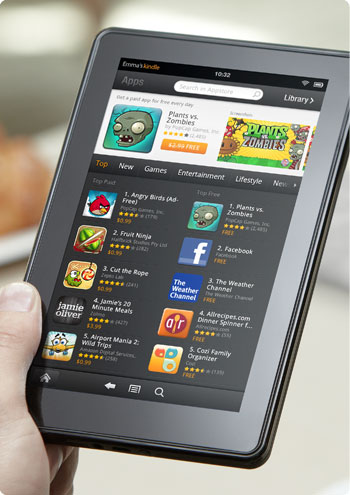
First there is the Kindle Fire (pic) which is more like a tablet and some people are calling it an iPad killer.  It’s battery lasts 8 hours which is pretty good for what it is.

The specs on the Kindle Fire is an 80GB hard drive for storing 80 apps plus either 10 movies, 800 songs or 6,000 books.  The Kindle Fire has a 7″ vibrant color IPS screen with multi-touch.

I had never heard of an IPS screen before so I had to look it up and I found some information on it on a message board.  This is what someone said it was.

IPS – in-plane switching…. the liquid crystals are aligned horizontally instead of on an angle. This process greatly increases vertical viewing angles. When coupled with the high brightness and contrast of the glaretype displays, color reproduction is almost perfect. Basically it becomes a 1/4″ professional graphics flat CRT monitor…. which is why the display is primarily for those in professional graphics.

Very interesting.

The new Amazon Kindle Fire is $199 and it is a WiFi only device.

The 2nd new Kindle is a smaller priced Kindle with no keyboard.  It is WiFi only, has a 6″ e-ink Pearl screen, 2GB storage for 1,400 ebooks and its battery life is 1 month.

The new $79 kindle doesn’t have a keyboard but it does have a 5-way controller at the bottom for navigating.  With no keyboard I would imagine that it would be a bit difficult to type in the name of a book you are looking for.

I noticed that it allows you to check out books from the library.  That was something that will make it easier on most people who can’t afford to buy a lot of books but don’t want to have to go to the library for their books.  I looked that feature up when I was researching last year and our library is not in the system so it wouldn’t work for me unless they changed that in the last year.

They still have their Kindle with the keyboard which they have 2 versions of, a WiFi only version for $99 and a WiFi and 3G version for $139.  That went way down in price since last year when it was $150 for WiFi only and $200 for 3G.

Now they have a new Kindle touch in WiFi only for $99 and WiFi and 3G for $149.

The battery for both the Kindle Keyboard and Kindle Touch lasts for 2 months which is longer than before.

All of the kindles use the Amazon cloud storage for unlimited amazon content and they have an experimental browser with the exception of the Kindle Fire which uses their new Amazon Silk cloud-accelerated browser.

I remember when e-book readers first came out.  I had just made my new years resolution to start reading in December of 2005.  I saw the Sony reader at Costco for about $500 or $550, I can’t remember.  I do remember thinking how cool it was that they were coming out with them but I didn’t think they would catch on at that price.

I started reading the Harry Potter books in January 2006 and got hooked on reading.  I was reading all the time after that.

Then Amazon came out with their first e-book reader which if I can remember was almost as high as the Sony Reader but eventually they lowered the price down to $250.  Then B&N came out with their Nook after a little controversy with another e-book reader with a color screen at the bottom.  The nook was also $250.

The war was on and every year these 2 rivals have come out with a new version of their e-book reader with a lower price.

The Kindle has dropped from a high $500 all the way down to a low $80.  I never thought the day would come and it has.  Before you know it there will be another Kindle or Nook on the market that will be as low as $50 and every kid will have one in school with their textbooks on them.

My question is, what ever happened to the Sony reader touch?  That was a good one and it’s a shame it’s gone because you could write on the screen.  I seriously thought that the Sony Reader would evolve into the Sony Trapper Keeper where you would have all of your textbooks in there as well as a notebook with tabs for each subject and you could write your notes on a notepaper screen and have it turn it into typed text that you could save.  That would’ve been awesome.

Maybe that will be the next evolution for the Kindle or the Nook, or who knows, maybe even both.  It would be much easier for a child to carry to school rather than a heavy 20lb backpack filled with books and a notebook or a laptop.

Ice Cream Scoops

I love ice cream, I love it so much that when I eat it, I don’t just have 1 serving, I usually fill a bowl with it.  I guess you could say that ice cream is my downfall.  Despite my diabetes, I can’t just say I’ll quit eating it because when I quit something then I’ll end up sneaking around and cheating.  So it’s better to continue eating but moderate how much I eat.

It’s like when I quit smoking with the patch, I didn’t toss out all of my cigarette paraphernalia because I knew if I wanted to cheat I’d end up buying another pack so I might as well keep my current pack so if I do cheat then it won’t end up costing me more money.  I did cheat, twice but I still ended up quitting and haven’t looked back, that was in 1996.

I decided to try a little experiment.  I bought some ice cream cones at the grocery store because I figured if I ate an ice cream cone then I would be ok right?  The only thing was, our ice cream scoop sucks ass.  It’s this plastic see through piece of junk that you are supposed to fill with hot water to keep it warm so you can use it but I can’t take the cover off to fill it.  So the only way to use it is to soak it in hot water but as soon as it touches the ice cream, it gets cold and is hard to scoop again.

I wanted this to work but that ice cream scoop just wasn’t working.

I’ve been looking around the internet for an ice cream scoop like the one they have at Thrifty’s drug store which we all now know as Rite Aid.  They still sell Thrifty ice cream and still use the iconical gun that has the flat top making it easy to add more layers.  What I found was the Cuisipro Scoop and Stack Ice Cream Scoop on Amazon.com for $14.99.  It has the free shipping option if you buy something else valued at $10.01 with free shipping available but that means I have to spend $25 and all I want is an ice cream scoop.

Last night I was looking at my options that would cost $10.01 because I wasn’t about to spend $8 for shipping and not get anything except for the ice cream scoop.  I’d rather spend $10 and get something I can use.  But the problem was, everything that I wanted cost either $15 or $20 which made my shopping cart higher than I knew I could afford.  All this for 1 ice cream scoop.

Screw it!  I went to Albertson’s this morning and they had this heavy-duty ice cream scoop made by Good Cook on the 50% off rack and all I paid was like $1.70.

The thing is, I have a problem with scooping ice cream because of my carpal tunnel syndrome.  My hands pinch in the palms and wrists from the stress of scooping ice cream so I have to wait for it to melt and use a spoon.  Well, the Cuisipro was supposed to be easy because I just push it down into the ice cream, pull it back up and viola, ice cream for a cone.

The one I bought from Albertson’s is actually a lot easier to use.  You know that as soon as I came home from the store that I used it to make myself an ice cream cone lol.  It was so easy to use that it made a perfect ice cream ball and my hands didn’t even feel anything.  And what was awesome was that the ice cream didn’t even stick to it like it does with my cheap plastic ice cream scoop.  I was always having to use a spoon that I had to soak in hot water to remove the scoop from the scooper lol.

All this trouble for an ice cream scoop and I end up buying one for way less than I thought I would.  I win!  I’ve already lost 11lbs in the last month because I have cut way back on my ice cream intake by having ice cream cones instead of a huge bowl of ice cream so you tell me if the experiment was worth it or not.  Actually, I also quit drinking soda, coffee and iced tea but towards the end of the month I started drinking coffee and tea again but still lose 11lbs.  I was surprised when I weighed myself this morning that I was no longer 260lbs but 249.

I can’t say that the Cuisipro ice cream scooper would have worked out for me as much as this Good Cook one does but it’s cheaper and I’m glad I didn’t rush myself to buy it from Amazon.  I read a few customer reviews of the Cuisipro one and people were leaving negative reviews so maybe I am better off with the one I ended up with.  Either way I’m happy now with what I have and I hope the weight loss continues.

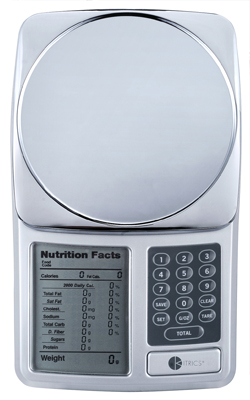
Kitrics Nutritional Label Scale

I remember reading about this scale last year and thinking how cool it was and how it’s a shame I will never be able to buy one because of the $50 asking price. Well, that is no longer a worry because a friend of mine found one in a shop in St. Louis, MO for less than $10, bought it and mailed it to me.

The problem was, there was no manual or food list but luckily they had one and made copies for me. Unfortunately I can’t read them so I found them online in pdf format so it’s a win win. I’d love to turn them into epub format one of these days to make it easier to read on my Nook. Maybe one of these days I’ll get around to it.

This is the description and info from the Kitrics website:

A scale and a calculator all in one, this essential dieting tool calculates portion weight, and displays all the information the way you’re used to seeing it on food packaging labels: an at-a-glance breakdown of calories, fats, carbs, proteins, fiber, sodium, cholesterol and sugars. You can also total your daily nutritional intake, and store up to 99 of your own food entries into a database of nearly 1000 others. So the experience is always customized to you, your goals and your lifestyle. Ideal for: portion control, medical requirements, type A personalities.

Bottom line:
Not just the weight, but the total breakdown. Calculates calories, carbs, fat and more.

– Weighs in grams and ounces
– Maximum weight: 72 oz/2 kg
– High precision: +/- .05 oz/1 g
– Automatic power off
– Requires 2 AA batteries, included

What’s great about this is that you can weigh your food and it tells you all the information you need so you can make sure you either go under the recommended or stay within the range, you’re choice. Personally, I don’t know if I want to know all of this information and so far I’ve only used it to weigh chicken so I have exactly 1lb for the chicken helper which I’m sure trumps the diet lol.

When I start my diet back up, I will start taking it seriously again. In fact, I will probably take it so seriously that I will be storing my own food entries in there for some of the diet recipes that I have so I can weigh my plate as I’m putting the food on it. That will make counting calories so much easier because I know how much food I’m eating by the exact weight.

I have a regular food scale that isn’t digital, it just has a bowl on the top and I’ve been balancing plates on it for the last few years and not knowing the exact measurement so this is much better.

So thanks Sue for sending me this scale.

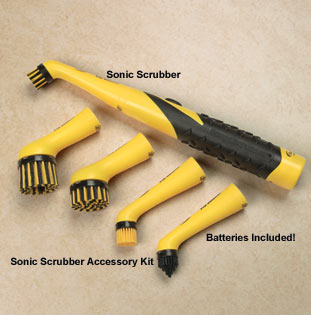
Sonic Scrubber

I am fascinated by all of the “As Seen on TV” products because they all look like they are good products that will help people, especially people who have arthritis or carpal tunnel syndrome which I have.

I’ve wanted to buy this for such a long time because I hate to scrub grout and having to scrub with a regular bristle brush hurts my wrists, pinches my palms and hurts my shoulder as well.  I’ve been afraid to buy it because I’ve bought a few as seen on tv things and not all of them work out with the exception of the one touch can opener which is really good for my condition.

I saw this Sonic Scrubber at Christmas time at the Walgreens but didn’t get it because I didn’t have the money.  Well, I decided today that I would go see if they still had it because I really need to clean the grout in the shower because we have guests coming next month and I don’t want to have to scrub.  So I bought it and it really works.

I opened the glass shower door and with the Scrubbing Bubbles Extend-A-Clean Power Sprayer I sprayed the tiles where you step into the shower, it was really bad.  I gave the scrubbing bubbles some time to work and then I came back in and started scrubbing and within seconds the dirt started coming out of the grout.  That would’ve taken me forever with the regular scrub brush which is why it has gotten as bad as it is, it is too painful for me to clean so I can’t clean it and now I can.

I bought the Sonic Scrubber as well as the attachments because I figured I might as well get them while they had them.  The one I bought isn’t yellow and black like the image above, it is orange and blue, attachments are the same color combo so it all matches lol.  Also when I went to look at their website it shows me that it’s now owned by Scrubbing Bubbles – SC Johnson & Son.  This must be from when they first came out because the packaging has no mention of Scrubbing Bubbles or SC Johnson and the date on it is 2007.

This product is great and I highly recommend it if you have bad hands and can’t clean with as much elbow grease as you used to when you were younger.

:Cue Cat

Do you remember the :Cue Cat?  It was made in the late 90’s by a company called Digital Convergence and was given away for free at Radio Shack in the early 2000’s.  When they first came out with them I got one and installed the software that came with it and had a jolly good time scanning boxes of cereal and cans of Chef Boyardee and my soda.  But that became boring after 5 minutes and it sat there plugged in for months until I decided it wasn’t doing me any good at all.  I unplugged it, removed the software and put it in a drawer never to be seen again.

Today I was sitting here and I saw it sitting on a shelf and I thought, I wonder what good that thing is anymore, should I just toss it or what?  Then I got to thinking, I kept it all these years because it scans bar codes, I wonder if it still does that but for other things like placing things on eBay or adding books to my Anobii account.

I did a little Google search and I actually found more information than I thought I would about it.  Apparently people were upset that the Cue Cat was sending information to Digital Convergence every time you used it and someone hacked it and made it impossible for them to get any information.  They found out and tried to sue that person but ended up going out of business instead which is why the software doesn’t work anymore.  You can’t use the software on the cd because it doesn’t have a website to connect to anymore.

But it still works, if you have a Cue Cat plug it in and try scanning something into Notepad.  You will get some long numbers because it’s made to send encrypted code to the Digital Convergence software to bring up a website.  You can’t use the software but the scanner works and there is a website at LibraryThing.com that can read that encrypted code to add your book to their website.  Although I tried it and only 5 out of 32 books would scan properly.  So my search continued.

I found the CED Magic website which gave me a bit more help with a program called CatNip which will remove that encryption from the bar code information so you can get the proper numbers to scan.  I tried it and it works.  I went to Anobii and scanned a book and it automatically added it to my bookshelf.  I removed it of course because that book was already there.

What I want to use it for is so that I can add things to eBay without going through the hassle of having to type everything in.  Even the bar code itself, I’d rather just swipe the bar code, since I already own a Cue Cat, then just go from there.  Darrin owns hundreds of LP’s and wants to sell them on eBay but figured it’s such a hassle typing in all that information.  Now it’s easier.

I don’t buy physical books anymore since I own a Nook so I really don’t have a need to scan book bar codes for Anobii but you never know what might happen in the future.  I might get a bug up my ass and want to scan all of my books, dvd’s, cd’s, and pc software bar codes for a catalog program lol.  Crazier things have happened.

Well at least if you have an old Cue Cat that you got for free 10 or 11 years ago, you can take it out of moth balls and hook it up again and scan to your hearts content lol.

Mister Steamy

I’ve seen the commercials for this steaming pile er um I mean ball and decided I would give it a go.  I really bought one because I am always forgetting about the last load that I do and it always ends up sitting in the dryer for days before I remember it’s in there.  I end up having to soak something then put it in there so it gets everything else wet so it dries everything so there are no wrinkles.  I thought this might be easier and faster.

So I bought one today and I didn’t know they are hard plastic, almost hard as a rock.  It has a sponge inside of it and you pour 2-4oz of water in there, you can’t just pour it from the tap like the commercial (or picture) shows because it says do not over fill it.  So I used a measuring cup because I don’t want to disobey a direct order from the directions lol.

The dryer only had 3 dress shirts in there and I tossed the rock hard ball in there and turned the dryer on.  Oh my goodness, it was banging in the dryer and it was freaking me out so I went into the bedroom so I wouldn’t have to hear it.  I go back in the kitchen and the dryer isn’t even going anymore.  I open the door and to my surprise everything is wrinkle free.  So all is well afterall.

So I guess if you put it in a dryer filled with towels and shirts and what not then it will be enough to keep it from banging all over the place, I highly doubt it but you never know.

I think what happened was it was so unbalanced that it just stopped.  Thank goodness it has that function to prevent the dryer from breaking down.  So I think from now on when I use it, I’ll only use it on a full load, not just 3 shirts.  Good to know.

The box was $15 at the grocery store and it comes with 2 balls.  I guess if you’re buying something with balls you need a complete pair otherwise you feel off balance.  Hmmm maybe that’s why my dryer shut down, it didn’t have the balls to finish it’s cycle.

Our Roku Boxes Arrived Today… They’re Going Back Tomorrow

It was on Christmas Eve, more than a week ago when we were told by Darrin’s family members that we should cancel our cable to get an Xbox to watch Hulu and Netflix instead. I researched my options and found Roku. I researched to find out if it was worth it and when I thought it would be, I rushed Darrin into making the decision to buy some Roku boxes, 1 for each TV in the house so that we would get a $10 discount per box.

I waited on pins and needles all weekend until they finally arrived this afternoon with the regular mail and was like a kid opening up his Christmas presents.

I opened one of the Roku boxes and connected it to the living room TV because I wanted the living room to be the first room that was connected with the Roku so Darrin would have it to watch when he got home. Problem… it wouldn’t connect to our network.

I brought it into the bedroom so that I could at least connect it with the network cable because I figured that maybe it needed to be connected with the wire first, then I could get it connected wirelessly. I get it connected and updated and all seemed fine but when I tried to get it to connect with the wi-fi, it just wouldn’t work.

So I got on the Roku website on the laptop and go to the help page to chat with a technician who can help me figure it out. We’re chatting for maybe 1 hour and 45 minutes and I lose the connection to the internet which means I lose the chat with “Sam”. I reconnected the laptop to the Verizon 3G network because I wanted to make sure I wouldn’t get disconnected again. I had to wait 20 minutes to talk to another person, I told them I was talking to Sam but he was already with someone else so that person tried helping me.

Another 45 minutes later and I finally figured it out, got it online then went into the living room and hooked the other one up to the tv and it connected without much trouble at all. I say thanks and goodbye to the person I was chatting with and I think I had a good 30 minutes to play with it when all of a sudden my internet goes out.

The problem is, “Sam” had me change my network name, the channel it was connected with,change it from WPA2 to WEP, change the password and everything. Now, nothing will connect. I spend the next 2 hours by myself trying to get it all back online.

This just isn’t working out so I unplugged both Roku boxes, roll up the AC wires, tie them up with the twist ties and put everything back in their boxes and spend another hour trying to get the network to work again and it did. I tried going back to my original settings but it just didn’t want to connect.

How I got the Roku boxes connected is with the mac address. I had to force the network to only accept the devices with their mac address. I’ve never had to do that before. I have connected my PSP, Nook, Chips computer and the CR-48 Laptop to the network and have never once had an issue with the mac address so why would I ever think that the Roku boxes would need me to do that?

So the Roku boxes go back tomorrow. We have to call the phone number and tell them that it just didn’t work out for us and we’re returning them. They give us a 30 day money back guarantee minus the shipping charges.

You know, I got to thinking, I can’t live without live TV. We need to be able to see the news or weather alerts that scroll on the top of the screen. It’s just not for us, we like it the way it is, no need to change it. Someone wise said to me on Twitter today “*whistles the old familiar tune* Why fix what ain’t done broke…..*snorts*”. It’s so true. And our system of watching TV on cable wasn’t broken, switching to the Roku only, now that’s broken.

I looked at Hulu plus and they only had maybe 10% of the shows that I watch. I installed PlayOn.tv and it ran so slow on the Roku because my processor wasn’t fast enough. It would’ve been ok for me if that worked but it didn’t.

I am not saying the Roku is a bad product but it just doesn’t work for me. It most certainly doesn’t work with my network but getting rid of cable and going with internet tv is just not what I want now. I still can’t afford $110 cable but we’re going to look into thinning out some of our services to make things easier on me.

I am not going to keep Hulu Plus after my 30 day trial is over nor am I keeping Netflix because I just can’t afford to have this additional expense on top of my cable. I will continue to use regular free Hulu if I miss a show but Hulu can’t replace cable for me.

Who knows, maybe one day I might get an Xbox or a PS3 or even a Blu-ray that will connect to Hulu and/or Netflix. If that day comes then it will be a nice addition but not replacement.

Is Getting a Roku Worth It?

Our Roku boxes are supposed to be coming today and I’m starting to freak out a little bit. I mean on one hand I have nothing to worry about because we can try the Roku boxes for 30 days and if we aren’t satisfied with the service then we can return them for a full refund. I’m not freaking out about the Roku box and what channels they provide but more about what Hulu Plus doesn’t provide.

I wish that I had done all of this research 100% before I bought the boxes but I was so gung-ho on getting them to get the $20 New Years Eve discount that I just wanted to buy them before that sale was over. This is what I’m finding out about Hulu Plus.

If you visit the Hulu Plus page they show all these pictures of their shows but if you click “alphabetical” then check the box that says “currently airing” you will notice the list shrinks.

This is the main reason I bought this box. I thought I was going to be able to watch all of my shows that are on Hulu (in my TV page) but as it turns out, I’m only going to be able to see my fox cartoons minus the Simpsons, the event and that’s it. Why would I pay Hulu $7.99 a month to watch 4 shows? I’m gonna end up having to watch the majority of my shows on my laptop which is not what I thought I was signing up for.

The reason Hulu Plus doesn’t have all of the shows they have on their regular Hulu service is because they can’t legally stream everything to your TV, they aren’t licensed for that. So why bother showing a few shows at all if they can’t stream them all? I mean, Chuck and The Event are both on NBC and Hulu is owned by NBC. What confuses me about that is they can stream The Event but not Chuck? That doesn’t make any sense. And they have all those Fox shows but no Simpsons? What?

I also signed up for a month of free Netflix and they have a lot of shows I can stream through my Roku box but they aren’t current seasons. They probably can’t stream those until the very end of the season, in the summer time. I don’t want to have to wait until summer to watch my shows.

Ok so another thing I found last night was this program that you install on your PC but run the app or channel through the Roku is PlayOn. That gives you a 14 day free trial then it’s $39 for 1 year then I believe it said $20 a year after that. So it’s only a couple of bucks per month and it allows you to stream regular Hulu, Netflix, CBS, Fox News, TBS etc through your Roku box (or other devices).

I’m really hoping this works out for me because I need for it to work. I don’t want to feel like I have wasted my money on the Roku boxes so I can just get Netflix. The trouble with PlayOn is that I have to use my desktop as a server which means I can’t use it for anything else while we’re watching it on the Roku. That’s fine because I’m using the CR-48 laptop now primarily but I do use the desktop for TweetDeck. Unfortunately, it says my CPU is Low when it does the tests which means we’re probably not going to get a very good stream. But we won’t know until we get the Roku boxes in the mail.

Ok so I’m still waiting for the box to come with my mail, I checked the tracking and it is here in Bakersfield at my local post office so it looks like I will get it.

Our cables next billing cycle begins on Thursday so we have 3 days to try the Roku box to see if we are happy with it. If not they are so going back and we are going to keep cable. I’m just hoping they refund the money right away but I have a feeling it will take them awhile to send us the refund.

When the package has come and I have everything hooked up and have played around with it then I will come back and give more feedback.

I Won’t Miss My Shows!

Since we’re getting our Roku box tomorrow and we’re canceling our $110 a month cable on Thursday, I’ve been kind of worried because not all of my shows are on Hulu and Netflix.

True Blood is one major reason why we have HBO. If I cancel our cable and I lose HBO then what am I going to do? I’m going to miss True Blood when it comes on. I really am not too keen on downloading it with P2P but what else could I do? Well, I just found out that Amazon Video On Demand will have it for only $2.09 an episode. WHEW! What a weight.

That’s not all though because even though Hulu has a BBC America page, they don’t have my BBC America shows on there like Doctor Who and Primeval. Last night was the season premiere of Primeval and this morning BBC America tweeted that the episode is available on iTunes and Amazon Video On Demand. Ok so I’m gonna have to pay $1.99 to buy (not rent) the episodes, fine, I don’t care as long as I get to see them. When Doctor Who comes back I will be way more than happy to buy each episode for $2.

There are certain shows that I will be missing that I have mentioned like Smallville, Supernatural and Vampire Diaries because CBS (who owns CW) refuses to get on the Hulu bandwagon. Well, luckily they have those shows on the CW website so I’m good there. They also have them for sale on iTunes and Amazon VOD but I refuse to pay for something that I can see for free on the CW website. If it’s a network show then why should I have to pay to watch it? If it’s a premium channel like HBO then I certainly don’t mind paying for it. Even BBC America, I’m good paying for it.

So now that I have this knowledge that I won’t miss them I am very pleased with our decision to cancel our cable.

We Are Officially Switching Our Cable

Now didn’t I tell you the other day that we were thinking about switching to the Roku player for watching TV instead of paying our cable company $110 every month? Well, it’s official. We bought our Roku boxes this morning at 10am. And since I bought it before 11am it’s going to be shipped out today and we should get it next week. They said it should take 3-7 days but the confirmation email included an address which I google mapped and they are only 4 1/2 hours from our house. I’m expecting it to be here by Monday.

Our cable cycle begins on January 6th and ends on February 5th according to the cable bill I got in the mail today. That means if we cancel our cable before Thursday of next week then when we cancel it we won’t have to worry about any new charges. I’ll be free and clear.

Ok so I’ve already been adding shows to my favorites on the Hulu website so whenever a show has a new episode then it will automatically go into my queue. I don’t know how queues work with Hulu on the Roku but I hopefully won’t have to do much searching when my shows come back on, just play my queue.

We got a code for a free month of Hulu Plus which I won’t do anything about until the Roku box actually comes. I wouldn’t want to waste a few days of Hulu, besides, I want my monthly payments to start AFTER I get my monthly checks, not before.

Even though I’m kind of PO’d that I’m going to be missing some of my shows, I’m still really excited about saving money every month. I mean, I have wanted BBC America, Logo and G4 for years and never had them until last year when we finally got HD and got the new channels. Well, it turns out that even though I have those channels now, I hardly ever watch them.

The shows that I’m going to miss on G4 are Attack of the show and Web Soup which aren’t really on Hulu. I mean they are but only clips. I can live with that I guess.

The shows that I’m going to miss on BBC America are Being Human, Doctor Who and The Graham Norton Show. As far as I know those aren’t on Hulu at all. I know Doctor Who is on Netflix but I might have to wait just a little bit longer for the new episodes to come.

I didn’t mention HBO but there is a show that I will definitely be missing and that is True Blood. That’s one of my favorites and I will definitely be missing it but it is on Netflix. Of course I will miss seeing it when it’s on, I can certainly wait until it’s on Netflix. Or just find a friend who still has HBO and watch it over there lol.

I’ve been telling everyone about this because I think it is so cool to get Hulu and Netflix and watch all of my shows without paying high cable prices. I just have to wait for them to show up in my Queue.

I have mentioned that not all of my shows are going to be on there but I’m not too worried because those shows are on their networks websites. Like CW, I’m going to be missing Smallville, Supernatural and Vampire Diaries. Well, luckily they are on the CW website. And I just started watching Glory Daze on TBS, well that is also on the TBS website. So, I won’t really be missing anything, I just can’t watch them on my TV that’s all.

So, until I get my box then..