Self-Lacing Sneakers?

Nike’s Plans For “Back To The Future” Self-Lacing Sneakers — via Deadspin.com

Remember the self-lacing shoes that Marty McFly put on in Back to the Future 2 when Doc Brown brought him into the future to save his son from getting arrested? He stepped out of the DeLorean and Doc handed him a jacket and shoes. He slipped the shoes on, pressed the button and they tightened around his feet.

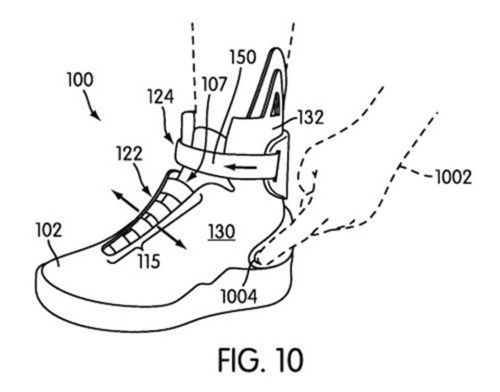
This could be reality soon. Nike has filed a patent to make these shoes 5 years before it was destined to be reality along with the flying cars and no door handles on all houses. Here is a quote:

“The automatic lacing system provides a set of straps that can be automatically opened and closed to switch between a loosened and tightened position of the upper. The article further includes an automatic ankle cinching system that is configured to automatically adjust an ankle portion of the upper.”

And check out this video:

httpvh://www.youtube.com/watch?v=ROEZs0HpFQc&fmt=18

For clarification, the above video is NOT from Nike but a DIY video found on YouTube.  Nike would not sell shoes with a huge motor in the back lol.

Cool eh? Now if we can just get to work on those flying cars, door handles, tv screen windows,fax machines in every room including the closet and bathrooms, pizza hydraters, hovering wheelchairs, hover boards and everything else we will be set.

Albertson’s 1 Penny Cookware

About a month or so ago, Albertson’s our local grocery store started this new campaign.  Cookware for a penny. It’s as close to free as it gets. Collect stickers & redeem in-store for your pots and pans.

The problem is, you only get 1 sticker for every $10 you spend. If you spend $15 you still get 1 sticker and what sucks even more is if you spend $19.99 you still only get 1 sticker. That number has to go up to $20 before you can get a 2nd sticker. So I guess when you are at the store buying groceries, keep in mind how much moneys worth of groceries you have in your cart so that you either don’t go over or under a $10 increment. Even if it means buying a candy bar or a bag of M&M’s or a bottle of water or package of cookies at the check stand.

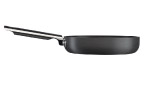
7.8″ Non-stick fry pan. It’s 1¢ with 50 reward stickers or you can purchase it for $5.49 with 25 reward stickers. Retail price is $29.99
10.2″ Non-stick fry pan. It’s 1¢ with 60 reward stickers or you can purchase it for $8.99 with 30 reward stickers. Retail price is $39.99
7.8″ Casserole with Lid. It’s 1¢ with 70 reward stickers or you can purchase it for $9.99 with 35 reward stickers. Retail price is $44.99
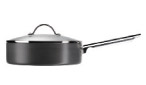
9.4″ Saute Pan with Lid. It’s 1¢ with 80 reward stickers or you can purchase it for $11.99 with 40 reward stickers. Retail price is $49.99
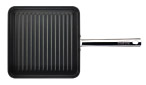
10.6″ Square Grill Pan. It’s 1¢ with 80 reward stickers or you can purchase it for $11.99 with 40 reward stickers. Retail price is $49.99
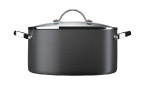
9.4″ Dutch Oven with Lid. It’s 1¢ with 90 reward stickers or you can purchase it for $12.99 with 45 reward stickers. Retail price is $54.99
11″ Non-stick stir fry pan with Lid. It’s 1¢ with 90 reward stickers or you can purchase it for $12.99 with 45 reward stickers. Retail price is $54.99
13.7″ X 10.1″ Roasting Pan with Rack. It’s 1¢ with 110 reward stickers or you can purchase it for $19.99 with 55 reward stickers. Retail price is $89.99

I will be saving up for the 9.4″ Saute Pan with lid but I’m going to go the easier route by turning in 40 stickers and buying the rest with $11.99. I may also save up for the first 2 pans, the 7.8″ and 10.2″ frypans using the same deal with half the stickers and paying for the rest.

The little pan is great for omelette’s and the biggest one with the lid is great for hamburger helper or something like that which needs a lid. I’m not sure if I will have the stickers for all of these things by the deadline which is the end of January but one could hope.

Update 2011-01-24: We ended up getting the 9.4″ Saute Pan with Lid and the 9.4″ Dutch Oven with Lid.  We really didn’t need all of these and I’m very satisfied to have the 2 pots and pans we ended up with.

Scary Kisses

Anybody who knows me knows that Halloween is my favorite time of year despite the fact that I sit in my room with all the lights off because I can’t afford to buy candy for the little brats that don’t even bother to dress in costume.

It’s my favorite time of the year because I just love carving pumpkins, I love the funny spooky Disney channel movies, special Halloween episodes of my tv shows and well, and frankly, I love candy.

Unfortunately this year the Halloween candy is off-limits because I am diabetic now. I can’t say that the candy contributed to it because I only eat candy 3 times per year, Easter, Halloween and Christmas. During those holidays I don’t eat enough candy to have caused the diabetes, it’s everything else that I eat that did it.

This year I will not be able to indulge which is sad because of this…

Candy Corn Kisses, Pumpkin Spice Kisses and Caramel Kisses. I do love me some caramel but this I can have every day, how often can I have a candy corn kiss or a pumpkin spice kiss? Now only on Halloween.

Sorry sugar-filled blood in my system but some of your friends are gonna come for a visit tomorrow lol. Don’t worry, I wont be inviting too many of them over, just a few. I can still eat sugar in moderation which means when I buy these candy I gotta buy a safe then forget the number.  Or maybe give the rest away.  I have no self control lol.  I wish they didn’t have to sell them in such big bags, why can’t they sell these in little bags at the check out counter with the other candy where I can get a small bag with 3 or 4 pieces in the package?  It’s totally unfair.

Nook Fun

I’ve been having a bit of fun with my new Nook. Since I’ve learned what makes it freeze I have learned to avoid certain ways of handling it and it hasn’t frozen all day.

Today I read 2 more chapters from “Dead Until Dark” and I finally came across a word that I wasn’t sure about. I’d heard it before but wasn’t quite sure what it’s meaning was for that particular sentence and/or circumstance. I happily touched the screen to make it light up and inthe menu was able to put the cursor in front of the word to look it up.

Don’t ask me what the word was because now I forgot but then I found 2 more words and although the definition of the 3rd one didn’t make much sense I just happily kept reading.

Reading with such big text means I have to turn the page a lot more than if I were reading an actual book but I don’t mind waiting the 1 second it takes for the screen to refresh.

When I was finished reading for the day I decided to crop and resize some images that I found on a website called nook-Look. They are True Blood images and I don’t know why they weren’t cropped or resized properly to 600×800 but whatever. I put them on the Nook and went to the settings and made them my screen saver. Every time I turn it off (or in standby) it loads 1 image. The next time it loads a different image. It keeps loading a different image in the folder that you have chosen and then eventually goes back to the very first image.

I was looking at one of the images and it was basically all black, it was an image of a werewolves eyes with the true blood logo at the bottom but the image was all black except for the eyes and the logo. It then occurred to me that “screen burn” might happen. You know when you have an image on the screen for so long then the next time you turn it on you see that image all the time because it got burned into the screen.

I decided to go searching the internet and found a nook message board and apparently I wasn’t the only one who was concerned about it because there was an active post.

Fortunately they said that e-ink screens don’t do that like an LCD screen might. WHEW!

So after I got that off my mind I was able to move on to other things and started looking around for Xanth images so that when I read the next Xanth novel I can use that for my screen saver too. Unfortunately I couldn’t find very many, only a few really. I did find enough that I am satisfied though.

I went back to that nook-look site and started going crazy downloading different screen savers lol. I think that I will not put too many on there until I am ready for them. I know they don’t take up too much space but still, I think that I’d rather not take up any more space than I really have to until I really need to.

One cool thing that I did find while browsing the Nook store via the Nook is they have some books listed through Google books and they were all free. I wasn’t expecting that. Although I didn’t download anything because I have enough books in my queue as it is but knowing that I have the option available makes me happy.

Oh and the Lend feature, I don’t know if I mentioned before but it’s kind of bogus. You can only lend a lendable book to 1 person… ever. Once they borrow it, when they lose it and it’s back on my Nook they and nobody else can ever borrow it again. It becomes unborrowable forever. That sucks so I really have to pick and choose who I lend anything to because what if I lend it to someone who decides they don’t have time to read it but then someone who actually wants to read it can’t have it because I lent it to some dipwad who couldn’t be bothered. Like I said before… LOTTERY lol.

I changed my “I am reading…” widget in my sidebar to the anobii.com image of my current book reading because for some strange reason the e-book pages are different from an actual book. Like Dead Until Dark has like 336 pages but in my Nook it only has 222 pages. So if I say I’m on page 92 you might think I haven’t gotten very far but really I have. Also, there are some books that can’t be listed through that widget that I have to enter manually in anobii. And anyway, who really needs to know what page I’m on? I mean sheesh.

So if you see the book that I am currently reading then you’ll know I’m still on that one but I highly doubt anyone really cares lol.

In my previous post I spoke of how I made my own book cover for my Nook. Well, a friend of mine who sent me all the Xanth novels in the mail last year also sent me a “Mighty Bright” lightwhich clips on the book but I thought I couldn’t use it any more because it might crush the Nook lol. Well, I was pleased to know that it clips to the cardboard of my book cover right behind the Nook. So it’s centered in the middle of the top of the Nook allowing me the brightest of lights to read in my poorly lit bedroom.

Well, tomorrow is another day to explore more of my new toy hehe. My ambien are kicking in so I better go to bed. Tootles!

My Nook Observations and Irritations

I finally did it! I finally bought a Barnes & Noble Nook last night. It didn’t take me very long to figure out how it works but here are my observations and irritations.

I bought the first Sookie Stackhouse novel and at first I was put off by the fact that swiping the touchscreen wasn’t working but I finally got it to work and now it works all the time. Sometimes I accidentally brush my finger on it and it turns the page lol. Oops.

I was reading this morning and my dog came to me to pick her up so I sat the Nook down on my desk and when I went to pick it up again I couldn’t turn the page. It was frozen. And that happened to me a few times last night but I didn’t understand why.

My observation from that irritation is that instead of setting it down, I’m gonna have to turn it off with that metal power button on the top and watch it go into screen saver mode then lay it down. When I pick it back up it I have to push the power button again.

I was playing with the Sudoku game last night and having fun actually but sometimes if I pushed the arrow button on the touchscreen on the left side it goes to the menu and I’m forced to start a new game or go into the menu. I think that if I just go into the menu then go back to the game it might continue but that wasn’t the case for me. And when the nook shut down completely when I turned it back on, it erased my game completely forcing me to start over. HOW IRRITATING!

I probably won’t be playing it that often because of that very reason.

It seems to freeze on me a lot and at first I started to think that I may have gotten a defective one but what are the odds that I would get a defective one? I always seem to think that an electronic is defective so I return it for another and it shows the same sign of defectiveness. I don’t want to have to go all that way back to B&N just to suffer the same pains especially if that’s normal for the Nook.

When you are in your B&N library you can choose to see the little covers on the bottom to choose a book to read or you can just push the arrows up or down to choose a book. Although it’s faster to choose from the book covers. However, when you have put your own books in the Nook via the USB cable, you don’t get that option. There are no little book covers. I kind of figured that it wouldn’t show them but that’s fine, I don’t care.

I do like being able to highlight a word or type out a note but unfortunately when you go to highlight things, if it’s down at the bottom you have to push that bottom arrow and it can take forever. That’s one thing that impressed me with the Sony that you could use the stylus to tap on the word but unfortunately the touchscreen makes it hard to read books. Typing is a bit of a chore too because my fingers are so fat that I can’t even see if the letter lit up or not when I press it so I’m constantly having to look up at the e-ink to make sure I pressed it lol. I definitely need a stylus.

I also bought the King James version of the Holy Bible because you never know when you’re gonna need it. Unfortunately, navigation is a biotch. When you go to a book it shows links for all the chapters. If you want chapter 1 then perfect, it’s on that same page but if you want chapter 21 then you gotta push the arrow button twenty million times to get all the way down to 21. Ok so twenty million is an exaggeration but you know what I mean.

Once you finally get to your chapter you just have to turn the page to the verse you want.  That’s a good time to bookmark it for when you are at church and you are supposed to turn to that page.  You can just wake up the Nook and go to your bookmarks.

Highlighting is kind of a bitch if you are highlighting something at the bottom of the page because as with finding the bible chapter you have to press the arrow button many times to get to it before you can start selecting the text.  When you do go to select the text you can highlight it and you have the choice of writing a note or just hitting submit.

Unfortunately, and this is an irritation, you can’t look up your highlighted notes from the beginning of the book.  The only way you will be able to find that note is by making a bookmark.  The Nook for PC software allows you to find all your notes.  I don’t know about the Nook software for other devices such as iPhone, iPad, blackberry etc.

Despite my irritations, I’m glad that I bought it because now I can enjoy reading books that I would otherwise have to read on my computer monitor which is not very comfortable on my eyes or my back.

Cool Nook Skins

Now that I’ve made my choice to buy a Barnes and Noble Nook, it’s time to think about giving it a cool look. I found this website called DecalGirl that has cool skins for many gadgets and this is the skin that I want to buy. It’s only $15 plus shipping and it adds a lot of character to the nook.

They have many other skins that all look good but I really like this one. Who knows, I may get tired of it one day and want to take it off and buy a new one. While I’m there I might get a cool skin for my PSP. The PSP skins that I was looking at are $10.

What I love about these skins is that the screen matches the skin. They give you a code when you buy it to download the image so when you turn it on you automatically see that image. That’s pretty cool. Now I wish I had an iPod and a iPhone that I could skin lol.

My Final Decision – Nook

I’ve made my final decision about which e-book reader I want to buy. I said in my last post about waffling that I really wanted the Kindle because it’s the iPod of the e-book reader world but then last night I found out that Calibre will convert many e-book file formats to the .epub file format.

I’ve literally spent the entire day today trying to figure that program out and came to the conclusion that .epub is the best file for the Nook. When I tried converting my ebooks to .pdb file format (which is Nooks familiar format), the table of contents were always screwed up. It worked but it wouldn’t just say chapter 1, it would have the word Calibre with the chapter title.

The .epub file format works so much better and it’s the first choice in Calibre when you are converting a file so it makes it that much easier.

Of course Calibre probably won’t work with DRM books, the books I buy from Rainbow eBooks don’t have that restriction on them (yet). Although if a book I buy from them is already in the .epub file format then I won’t have to convert any of their books for the Nook. I can just buy,download, upload and read.

Although the book “Fell” did come in epub but it didn’t work on the Nook for PC program. So there is a good chance that I will still have to convert other file formats for the Nook.

And yes, I know, I can do the same thing with the Kindle but I think I’m going to get the Nook WiFi despite the fact that it’s $10 more than the Kindle and if I buy it at Barnes and Noble, chances are I’m gonna pay even more with taxes. The issue that I’m having with the Kindle is how it’s sold out lol. I don’t want to buy a Kindle if I can’t get it for another month. I also don’t want to buy something that I can’t return to the store.

There are a few features of the Nook that I like and don’t care for. For example you can replace the battery, it has an Expandable micro SD slot. I’ve seen in a video how slow the color screen is when sliding your finger to find a book, that is a bit irritating to me but I think I can get past that. The lend feature won’t do me any good but on the other hand who knows what might happen in the future. The very fact that we can walk into a B&N and I can bring a Nook with me and be able to read a book for free for 1 hour is appealing.

The main thing is that I can convert my existing e-books to the .epub format that I can read on a Nook and be able to use the dictionary, look up words, highlight and annotate. That’s all I wanted. That’s all I needed.

If I do get one, I’m going to buy 1 copy of the Los Angeles Times so that Darrin can see if he likes reading it on the Nook. If he does then I’ll get him the monthly subscription.  I’m tired of having to pick up his newspapers lol.  I don’t read so much that I will monopolize it from him, although I can’t say that he won’t monopolize it from me lol.  If that is the case I will suggest he buy himself one with his credit card.

I think I was wrong when I said that the Kindle is the iPod of the e-book world because it’s not sold in stores, it’s only online.  My Dell DJ was only online and they screwed me over on that because I can’t take it to any store to have it fixed but the Nook has a store.  So I think the Nook is really the iPod of e-books.

Shopping for an eBook Reader

Someone I follow on tweeted this link today. Engadget’s back to school guide: E-readers. Naturally I had to look because I too want to buy an e-book reader. I have wanted one ever since they first came out but never could afford one because they were in the $400 – $600 range (around 2006).

In November 2009 I started blogging for pay (via PayPerPost and Blogsvertise) with the intention of saving money for buying an e-book reader, Kindle or Nook. Preferably a Nook because of the color screen at the bottom but it didn’t really make any difference. They were both around $265 or so back then.

I had a lot of trouble saving the money for one because my monthly income is so low that when I run out of grocery money I ended up taking the blogging money from PayPal to buy food. Since I have a PayPal debit card it makes it so much easier to spend the money.

9 months has gone by since I made the commitment to save the money and I still don’t have an e-book reader. However, the thing that I wanted the most out of an e-book reader was a lower price to justify my purchase.

eBook readers such as the Amazon Kindle, Barnes and Noble Nook and Sony Reader have all gone dramatically down in price, down to a price that I can finally afford.

Unfortunately, they still don’t fit my needs. What I want is an e-book reader that will accept a lot of formats like .lit, .prc, .pdf, .mobi and .epub. What I want is for an e-book reader that would allow me to read those formats and still be able to use their dictionary. I don’t know if they all let you to use the dictionary with just a .pdf file which is what makes my decision so difficult.

Kindle Wireless Reading Device, Wi-Fi, 6″ Display, Graphite – Latest Generation:

Pros: The new Amazon Kindle is stylish. I love the graphite color. I like the keypad on the bottom, it’s small enough that I’m ok with it considering I would probably be typing on it occasionally when searching for keywords, making notes and searching for books in the Kindle store. They have games on it, which I don’t really care about, I just want it to read but it is good to know. The price dropped down to $139 and has free 2-day free shipping which is awesome. The battery works for a full month without charging with the wi-fi turned off which is great.

Cons: It does allow me to view my .pdf books but that’s it and I can’t use the dictionary for definitions which is a big negative for me. I mean sure I can’t do that with a paper book but this is electronic and I want that ability. Also, it does not have an SD card for adding more books.

NOOK Wi-Fi, eReader, eBook Reader – Barnes & Noble:

Pros: The B&N Nook is also very stylish with its cool color touchscreen at the bottom which also has a keyboard. The screen goes black while you are reading to keep you from being distracted. It does allow me to add a .pdf, .epub and .pdb file and has a MicroSD slot. The cool thing about the Nook is that you can lend books to your friends and if I had any that had a Nook then we could lend each other books. If you are in the B&N store you can browse through a book for free for 1 hour per day. The price dropped down to $149 and although it’s $10 more than Amazon it is still a good price.

Cons: The Nooks battery is only 10 days unlike the Kindle which is 30 days. The color touchscreen on the bottom is too slow for impatient people like me. Although as I said it allows .pdf, .epub and .pdb files it doesn’t allow the others. All my ebooks are in all the other formats I mentioned above.

Sony Digital Reader Pocket Edition – Dark Blue:

The price of this is different at the Sony site as opposed to the Amazon site. Amazon charges $136.99 with free shipping but according to the Sony site it’s $149.99. I would buy it from Amazon.

Pros: Although it is a little bit stylish in the dark blue color, it isn’t as stylish as the Kindle or Nook. The Sony Pocket Edition does allow multiple formats such as .pdf, .epub, MS Word, BBeB Book (?) and other text file formats. It doesn’t say the others. The ebook store Sony uses is the Reader store which I assume is from Sony, check out books from public libraries and access over one million free public domain titles from Google Books, sharing sites and other online stores and publishers websites.

I don’t know if that means I can access the Rainbow eBooks website or not, I hope it does because that is what I want.

Cons: One of the things I don’t like about this is that it doesn’t have a keyboard for typing and I don’t know how you type anything when looking up a book to buy.

I don’t know if this should go in pro or con, it’s charge only lasts 2 weeks but I mean seriously, I can charge it every 2 weeks.

This is a tough and huge decision, one that I can think about until the first week of September when I will finally have the money saved up to buy one. I’m leaning more toward the Sony reader though but I would like it if people would leave a comment telling me what they think of each of these readers to give me more to think about. Keeping in mind that I buy a lot of books from Rainbow eBooks and ebooks.com.

My Dell DJ Battery

On July 2nd I bought a battery for my Dell DJ on eBay from the seller battery.search who has a feedback score of 9122 with 98.9% positive feedback which is a pretty good.  That’s the only reason I bought my battery from them.

They told me in the confirmation email that it would take anywhere from 7 to 20 business days which means I could wait a month for the battery to come.  It has clearly been over a month and still no battery.

I contacted that seller yesterday telling them that I am still waiting.  The only thing I can think of is that the shipment was taken from Customs and never released because it shipped from Hong Kong.  But why would customs take the battery and never release it?  It’s a harmless battery that isn’t even charged when it ships out.  When it arrives I have to charge it fully because it won’t work right out of the box.

So the sellers response to me is “can I refund to you???”  My response was NO, I don’t want a refund, I want my battery.  I’m afraid that if they give me a refund then my battery shows up tomorrow and they are out $15 but on the other hand if it never shows up then I’m out $15.  So, after they asked me a 3rd time I responded with a yes, I would like a refund.  But if it shows up then I will issue them a refund lol.

Whatever…

So now I’m back at square one where I was a month and a week ago, with no battery for my Dell DJ and now I don’t want to buy another one because they are all coming from freakin’Hong Kong.  Aren’t there any sellers in the US who sell batteries for the 2nd gen Dell DJ?

I guess the only thing I can do is if I ever want to ride my bike with tunes, bring my PSP with me.  It really sucks because I’m so paranoid I’m going to break it.  The Dell DJ is old enough that even though I don’t want it to break I would feel worse if my PSP broke.  I’m sure the Dell DJ is tougher than a PSP is so I never worry about it.

The Dell DJ battery was my reward for losing my first 27lbs and I never got my reward which sucks.  So since I’ve decided to start wearing jewelry early which would’ve been my 2nd reward for losing another 25lbs, I guess my rewards have switched.  Although now I have to change my 2nd reward to something else, I think a Kindle would be something I can change that to.

Weider Total Body Works 5000

I bought this home gym from the Wal-Mart website a couple of years ago called the Weider Total Body Works 5000 and at the time it was $99.  I forgot how much the shipping was though.  But I just went to do a search on that particular brand that I have to see if there was any new information such as blogs or instructional videos or whatever to give me more of an insight into this gym which houses more dust and spider webs that it should and I find that they dramatically raised the price to $174.  It looks like I bought it just in the nick of time.

My friend Sue calls it my Weider Total Towel Rack 5000 lol.  My aunt Betty has a treadmill in her living room and when I was there the last time it was folded it and it actually did have towels hanging on it lol.  I had to joke with her about that.