My New Virgin Mobile Cell Phone

Well I finally did it, I bought a new Android based cell phone from Virgin Mobile.  Well, I bought it from Amazon, but it is a Virgin Mobile phone.

We were at the mall today and they have a Best Buy mobile store where you can buy cell phones from all the different mobile companies, and they had the Virgin Mobile phones, but they were more than they are at the Virgin Mobile website.

Like take this phone, the HTC One V that I just bought on Amazon for example.  At the Best Buy store they were selling it for $149.99.  It’s on the Virgin Mobile website on sale for $99.99 and I told the clerk that.  He scanned the barcodes and he said nope, it’s $149.99.  I told him to check the Virgin Mobile website and he said it’s $149.99.  I knew it was a bad investment to buy it from there because I could have saved $50 by buying it online.  When we came home I checked and sure enough I was right, it was on sale for $99.99.

Before I made the commitment to buy it, I wanted to check with Amazon first to make sure I could get a better deal and it was on sale for $93.41.  So not only did I save money by buying it at home, but I saved nearly $60.  That’s good because I still have to buy the phone card to activate it which is another $35.

This isn’t the phone that I wanted, but it was the phone that I could afford to buy and sometimes we have to make sacrifices like this.  The reason I didn’t want this one was because it doesn’t have a front facing camera which means I can never video chat with it, but that’s why I have a webcam on my Netbook and my Desktop computer.  But it would have been nice to have the front facing camera for those times when I don’t have a mirror and I need to check to make sure I don’t have food on my face when I’m eating.  I know, I’m strange, but that does come in handy lol.  I’m sure the front facing camera wouldn’t be great for taking self pictures anyway since it is probably a 1MP camera and the regular camera on it is a 5MP.

Besides the front facing camera issue, I did like this phone in the reviews that I saw.  It doesn’t perform as great as the most expensive phones, but it does perform well, from what I’ve seen.  I will have to find out for myself.

I didn’t opt for the 1-day shipping for $18, instead I got the 2-day shipping for $10 which means I will get it on Monday, December 24th which means I will get it just in time for Christmas lol.  If I had gotten the free 5-day shipping, I’d have to wait until the end of next week.  I guess that would be ok to wait, but I don’t want to wait lol.

So yay, welcome to the year 2012/13 lol.  I have been using an old type of phone for such a long time that I won’t know what to do with myself.  I’ve never had an android phone so I’ve never known the joys of apps like the rest of the world does.

I will be giving my phone away to someone who needs it which means I will be getting a new phone number.  That kinda sucks but I wasn’t married to the one I have now anyway, I still don’t remember what the number is lol.

So until Monday…

Could the Star Trek comm badge become a reality?

tng comm badges

I saw a picture on Facebook today of the Starship Enterprise from the original series, but it was all made of Christmas lights.  That got me thinking about comm badges.  I consider myself to be a nerd, but I don’t have a Star Trek uniform or a comm badge, so perhaps I should either buy one, or turn in my nerd membership card.

As I was browsing Google, it came to me.  I wonder if they make a Bluetooth enabled comm badge that looks exactly like the Star Trek comm badge that actually works with your phone.  Most phones now have voice recognition right?  So I wonder if they have made a comm badge that when you tap it, you can say “Call Aunt Louise” and it places the call.

comm badge

Guess what… I found it!  It’s not exactly what I had in mind, but it is a step in the right direction.  This is called “CommBadge” and it works with your iPhone and Android phone using BlueTooth technology.  It isn’t in the shape I was hoping, but how can I expect them to legally use that licensed design without incurring lawsuits?

This is a start up company, so they don’t actually sell these yet, but if they can get their funding with Indie GoGo, then they will be able to make and sell these and perhaps every person in the world will have one.  They have 10 days as of this posting and have only raised $18k of $100k, so unless people help them out, we will probably never see this awesome design.

May I convince you?  They have several different models.  One without anything that just has the regular features, then they have others that have a badge holder for work and one that has the retractable badge holder for perhaps those who need to swipe their badge.  It all does the same thing whether you have the badge holder or not and that is almost exactly what you think the Star Trek comm badge would do.

You press the button (the speaker) and you hear that iPhone Siri ding ding sound and you tell it what you want and it responds without you ever having to take your phone out of your pocket.  Android has something similar to Siri, but they don’t show that in the video (below).  You can tap the CommBadge and say “Call Sally” and it will dial her number and you and everyone else around you can hear Sally answer the phone and talk and you can talk back to her.  I assume when the conversation is over you hang up by pressing the button again.

What is more exciting is that you can chat with your phone just like you normally do.  Like my partner likes to talk to his iPhone to text people.  He will say “Text Mike” and then he will say what he wants to tell me and the words spell out on the screen.  I assume it would do the same thing, without you having to look at it.  Of course Siri’s voice recognition software isn’t exact every time so there might be some confusion when I receive the actual text, but I won’t know until this thing ever comes out.

I am also assuming that you can get directions too, but I don’t think Siri will tell you to go here and turn there and get you to your destination just by using the CommBadge.  I have tried it by looking at the phone and there weren’t any turn by turn directions from Siri, I had to actually look at the screen.  But that would be cool if she gave you a heads up while you were driving without looking.

Anyway, here’s the video, perhaps if you like it you might want to help their cause to get this thing started.  I’m sure whatever you donate, you will get that product if and when they launch it.  I think it’s awesome and I would help if I had the money, but it’s Christmas.  How do they expect people to have money this month?  I mean seriously lol.

Tell me what you think.  Would you use this?  If I had an android phone, I certainly would.

A New Phone for (a belated) Christmas

I wrote about how I wanted to buy myself a new cell phone from Virgin Mobile for Christmas, but I can’t seem to settle on which phone I want and I keep changing the phone in that post.  I said I am not getting it for games, but here’s the thing, it doesn’t matter if I play games on it or not, if it can’t play games well, then what hope do I have for it running apps?  So I want a phone that is capable of running apps as well as well as it runs games because I don’t want to be in an app and suddenly the phone freezes up.

The phone I wanted in the beginning was on sale for $49, but after seeing a video review on YouTube for it, I decided that it wasn’t what I wanted.  They always say you get what you pay for, and for $50 you are probably getting a piece of crap.  The phone is normally $100, but still, if they show a game freezing in the review then that’s enough for me to say no.

I have been watching other reviews for other phones and even though they are good phones, none of them compare to the quality you get with the most expensive Android phone that they have.

The HTC EVO V 4G is on sale for $189 and takes 3D pictures and video, which is nice and all, but where else am I going to see those besides the phone?  I can’t print the 3D images and I can’t watch the videos on my 2D TV, so what’s the point?  Plus it only takes 5MP pictures.  The most expensive one takes 8MP pictures and it doesn’t have 3D.  So I would say screw the 3D, I don’t need it.

The HTC One V and the Samsung Galaxy Reverb are both good phones, the HTC One V is on sale for $100 and the Samsung Galaxy Reverb is on sale for $150, but again, not as good as the most expensive one which I now see is no longer as cheap as it was yesterday.  It is the Samsung Galaxy S II 4G.  I can’t afford that for a phone.  So my 2 choices are now down to the HTC One V and the Samsung Galaxy Reverb.

I still can’t afford anything until next month.  I have already set aside $40 and I will have more than $100 coming to me next month for blogging and tweeting which is at least 6 months worth, so it’s not a lot lol.  Whatever amount I have will determine which phone I get.  I want the HTC One V because it seems like a much better phone, even though it’s cheaper than the Samsung Galaxy Reverb.  Of course, neither of them are as good as the Galaxy S II, but if that is all I can afford, then that’s all I can afford.  I will probably most likely have to pay separately for the plan after I buy the phone, so whatever it is I can add $35 to the price.

The toughest part is that by the time I have the money for the phone, they won’t be on sale anymore so I will end up paying more for the phone.  I’ll probably end up checking Amazon and VirginMobileUSA.com every day to see if they have a sale and which one is worth getting.  Who knows, maybe by the time I have the money saved up, they might have new phones that are better than the 2 I’m torn between.

I don’t really need a new cell phone because I hardly ever use the one I have, so this isn’t a necessity, but I would like to have a new one because I feel like I’m stuck in the dark ages with the one I have, even though I’ve only had it for a year and a half lol.  It’s like having a black and white TV when everyone else has color, or having a Nintendo 64 when everyone else has PlayStation.  This is starting to sound like an Alanis Morissette song.  It’s like 10,000 spoons when all you need is a knife lol.

My phone never has a good signal, so whenever I call anyone with it, I feel like I’m going to get cut off so that’s why I don’t like to use it.  I know it’s not the phones fault, but how do I know it’s not?  It’s a Samsung T401G from Net10.  I have had trouble downloading games for it because of the bad signal.  I have to wait until we go to a doctor’s appointment or to the mall to get a good enough signal just to download games, and forget about checking email because every time I try to do that, Gmail has to send me a new code which comes in a text so I have to leave the browser and read the text and try to remember the code so I can enter it when I go back to the browser.  It’s just a horrible phone lol.  I want a new phone because I feel if I had a better phone I might use it more.  I may not call people, but I will use the apps.

Another reason I want a smart phone is so that I can use Twitter and Facebook when we’re not home and I can’t get to a computer or I don’t want to be rude enough to take out my Chromebook.  It will be so much easier to pull my phone out and do a quick Facebook update or tweet and then put it back in my pocket.  It will also be so much easier and faster to tweet pictures that I have taken with my phone instead of having to upload pics to Picasa to edit before uploading to Facebook and Twitter.  It will take so many long steps out of the equation.  Also I can read email and respond right away, not that I get a lot of emails anymore since Facebook and Twitter came out, but still.

I will have to wait and see what happens in January before I can make a firm decision on whether I will get a new phone and which one it will be.  I hope it’s a good one and is 100 times better than the one I have.

Virgin Mobile

Virgin-Updated-Logo-300x300I bought my first cell phone in 2002 against my partners wishes because he didn’t think I needed a cell phone, which if truth be told I really didn’t.  I mean, I don’t go to work everyday and need to make important phone calls, in fact I really hate talking on the phone lol.  I will call people from time to time, but I don’t spend a lot of time on it.  The main reason I wanted one was because I was traveling to visit family on the Greyhound and Amtrak busses back then two or three times a year and I didn’t like having to use dirty pay phones when I got there to have them come get me.  It was also difficult making and receiving long distance phone calls on their home phones, so I needed my own cell phone to call home.

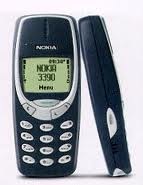
nokia 3390 The cell phone that I bought was with T-Mobile and it was the Nokia 3390 which was fine at the time.  I had that phone for maybe 8 years and I hadn’t really used it for the last 4, but I kept paying for it just in case I needed it.  I had Gold Rewards, so I only had to pay for 1 month, but got a whole year of time.  I forgot to buy another card for another year and lost the number and the phone was no longer valid.

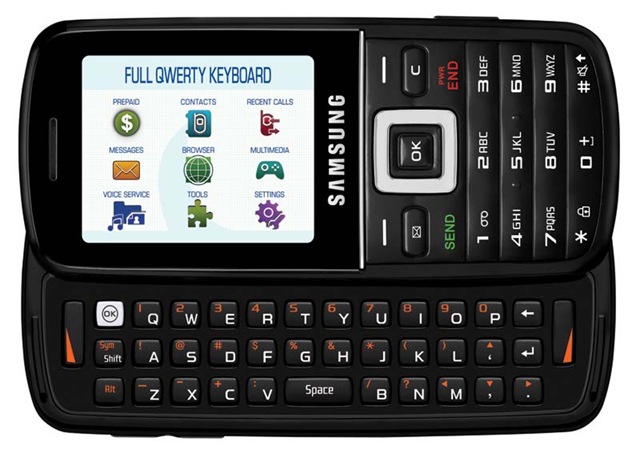
samsung-T401G-net10-hero-lg My next phone, which I am still using is a Samsung T401G, which is a great phone for texting, but the internet sucks on it and my signal is so weak that it drops calls on me all the time.  I got a “Are you there?” thing going on.  I have it with Net10 so I don’t have Gold Rewards which means I have to buy a $20 card every month to keep it even though I never use it.  I would use it more if it had more features though.

That’s where I am at now.  I really want to buy a smart phone to keep up with the times.  I have been shopping around, but nobody has given me any really good prices.  My partner has an iPhone with Verizon and he pays more than $100/mo for his service and he is stuck in a 2 year contract with 1 more year to go.  I don’t like that their smart (Android) pre-paid phones are $50 a month.  Net10’s smart (Android) pre-paid phones are also $50 a month, but they won’t sell one to me through their website and they are too expensive in the stores.

That brings me to Virgin…

I saw a commercial for Virgin, and even though I have seen this commercial a million times, it never clicked until last night.  They have Android smart phones and you never have to sign a contract.  You get 300 minutes with unlimited data and unlimited texting for only $35 a month.  That’s $15 more than I pay for my Net10 phone.  They also have another plan which is the same, except you get 1200 minutes for $45 a month and then unlimited everything for $55 a month.  That’s not bad.  Although I would get the $35 plan since I never use my minutes, I just want to use the apps with the unlimited data and texting.

What I really want a smart phone for is for certain apps that will make me money.  Like Staree which pays you when you take a picture and share it on Facebook and Twitter.  Viggle also pays you (with gift cards) when you check in when you are watching TV.  I mean, it’s not a steady income, but anything helps.  Plus I would like to read Kindle ebooks that aren’t available for my Nook without needing to buy a Kindle.

I also want a smart phone so I can do Facebook and Twitter updates and check email when I am not at home and don’t have a computer nearby, like at the doctor’s office while I’m waiting for him to come in the room for example.  I would also like to be able to play certain games that are only available on cell phones too.  My Samsung T401G has games, but they are nearly impossible to play with the numpad.

htcevov-gallery-angle-3 So, this is my Christmas wish.  I want a new HTC EVO V 4G Prepaid Android Phone (Virgin Mobile) .  Right now, this phone is $249.99 but on sale for $189.99 on the Virgin website, but it is on sale for $199.99 on Amazon.  Of course I don’t have the money for it now, but I will put money in PayPal every month until I can afford it.  I’m always broke so it’s difficult to save any money, and paying this much money up front for something like this would break me for the rest of the month. It’s not easy to just make a decision to spend that much money when I really don’t need to lol.

I chose this phone because it looks like a good phone.  It has a front facing camera and a 3D camera for video and pictures in the back.  According to a review, it’s good for playing games.  Even though this isn’t my main focus, I’m not going to buy a phone that doesn’t want to play games, because if it doesn’t play games well, then how would I expect it to run apps very well?

If/when I do buy this phone, I will probably give my current phone away to someone who doesn’t have a cell phone.  I won’t be able to keep my phone number, but I haven’t really given it out to too many people anyway, so changing my number won’t be a real issue.

I really don’t need this, but I want it, and why shouldn’t I have something cool, eh?

Oh and by the way, this is my commentary on my experiences and my wish for a new phone.  I am not getting paid for this.  It’d be cool if I were (hint hint wink wink Virgin Mobile).

Update: This is edited.  Previously, I chose the Kycera Rise and then I decided on the HTC One V.  I then decided that I wanted to spend a bit more and buy the HTC EVO V 4G.

Obviously I don’t have the money for this phone, but like I said in the paragraph with the phone, I will have to save up the money for it because this is a good phone.  Who knows, maybe by the time I have the money saved, it will go down in price and I’ll actually be able to afford it.

My memory is not as good as it used to be

Memory has been a huge issue with how slow my computer is because I only have 1GB of ram.  EverQuest play OK, but it’s not great.  Lord of the Rings Online is really bad because as I’m running through a zone or area, the screen will freeze up every ten seconds for up to a second or two which can be a bad thing, especially if something is chasing you.  It can be a matter of life and death, well, for your character anyway.

I recently discovered that EverQuest 2 is free, so I installed it and went into the game and it immediately froze up on me.  In order for me to get out of that I had to hit the reset button on the front of my tower to reboot the computer.  I figured it was slow because I had just installed it, but that wasn’t the case at all because I tried to run it again and it froze up again.  That told me that I definitely need more memory for my computer.

I have been doing research over the last few days to find the most inexpensive memory because I just don’t have a lot of money to spare right now.  My go-to website used to be TigerDirect, but when I discovered how quickly I got my orders from NewEgg, that became my go-to site, but they are too expensive for 4GB.  A friend told me to try the Fry’s Electronics website so I checked it out and they are way cheaper than NewEgg.  I did go to TigerDirect and they aren’t too expensive, but I don’t want to have to wait a whole week when Fry’s is in Los Angeles and I could get it as quickly as NewEgg.

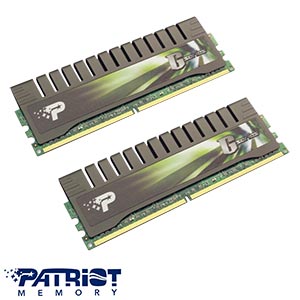
My ideal brands are Kingston and PNY, but they don’t have any available that will ship out immediately.  Fry’s Electronics also had some other less expensive brands that I would have liked, but shipping was unavailable, so I chose the Patriot Extreme Performance PC2-6400 (800MHz).

My motherboard will accept PS2 memory up to 8GB.  I can’t afford to buy 8GB so I am buying 4GB for now and then I will buy another 4GB later when I can afford it again.  What I love especially about this memory I am buying is the heat sink.  The memory I have doesn’t have that.  This is the description of this memory, and it really fits for what I use my computer for too.

“Patriot Gamer Series (PGS), part of the Extreme Performance (EP) Enhanced Latency line is engineered to expand your gaming options. These modules are designed to operate at 800MHz at 5-5-5-12 timings and is available in 4GB kit capacity. Equipped with lightweight aluminum heat-dispersing shields, these modules are designed for maximum performance and stability under extreme overclocking conditions. Engineered with quality and Performance in mind, Patriot Extreme Performance line is the ultimate solution for extreme overclockers, gamers, and PC enthusiasts.”

I think that “Extreme overclockers, gamers, and PC enthusiasts” really fits me lol.

Another issue I have with memory is Hulu, YouTube and Facebook games.  I don’t really care too much about Facebook games, but it is fun to play them every so often, you know?  I can’t play them at all because they freeze up my computer.

I will  order this memory now and then see how it works out.  I really hope that it’s as fast as it says it is, and it if is fast, I may just forego buying the other 4GB, but can you imagine how much faster it will be with 8GB?  I actually would love to see how much faster it would be so let’s hope I can afford that next month.

I will let you know how fast my computer becomes when my new memory comes.  I can’t wait!

Update: I ordered it early this morning and it has already shipped.  WOW that was fast!  I don’t have a tracking number yet, but if they ship it from Los Angeles, I should get it by tomorrow, that is if the mail comes on the 4th of July.

Update 7/13/2012: I called Fry’s a couple of days ago asking them why the tracking isn’t working and where my package is since I bought this on the 3rd, but they told me there was a tracking number, it just wasn’t listed yet because it wasn’t working on the UPS website yet.  I told the woman who I spoke with that it’s supposed to come USPS, but she said they ship it out with UPS, then they hand it over to the post office to send it to me.  Well, I was finally able to check the shipping on the UPS website, and the tracking says it should be here on 7/16/2012, but we will see if that is true on Monday, I won’t hold my breath.

My reason for buying this through Fry’s instead of NewEgg or TigerDirect was that I thought they were shipping it from their LA store, but they are really shipping it from back east, which wasn’t what I had thought.  If I knew I would have to wait for 2 weeks for my memory, I would have gone with TigerDirect which only takes 1 week.  They had the same prices, NewEgg was more expensive.  So this is the first and last thing I will ever buy from Fry’s.  I wanted to buy the other 4GB from Fry’s with my next check, but I think I’ll just live with 4GB.

New Kindle, Kindle Touch and Kindle Fire

Amazon has done it again.  They have surprised us with new Kindle devices.  Not just a replacement for their popular Kindle but 3 all new Kindles.

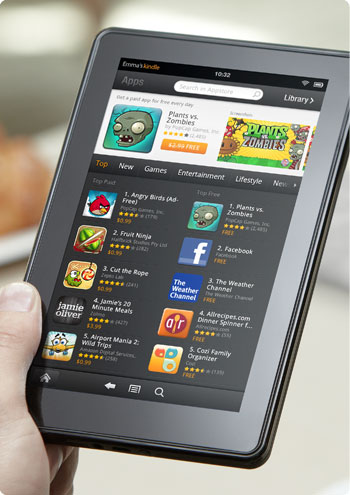
First there is the Kindle Fire (pic) which is more like a tablet and some people are calling it an iPad killer.  It’s battery lasts 8 hours which is pretty good for what it is.

The specs on the Kindle Fire is an 80GB hard drive for storing 80 apps plus either 10 movies, 800 songs or 6,000 books.  The Kindle Fire has a 7″ vibrant color IPS screen with multi-touch.

I had never heard of an IPS screen before so I had to look it up and I found some information on it on a message board.  This is what someone said it was.

IPS – in-plane switching…. the liquid crystals are aligned horizontally instead of on an angle. This process greatly increases vertical viewing angles. When coupled with the high brightness and contrast of the glaretype displays, color reproduction is almost perfect. Basically it becomes a 1/4″ professional graphics flat CRT monitor…. which is why the display is primarily for those in professional graphics.

Very interesting.

The new Amazon Kindle Fire is $199 and it is a WiFi only device.

The 2nd new Kindle is a smaller priced Kindle with no keyboard.  It is WiFi only, has a 6″ e-ink Pearl screen, 2GB storage for 1,400 ebooks and its battery life is 1 month.

The new $79 kindle doesn’t have a keyboard but it does have a 5-way controller at the bottom for navigating.  With no keyboard I would imagine that it would be a bit difficult to type in the name of a book you are looking for.

I noticed that it allows you to check out books from the library.  That was something that will make it easier on most people who can’t afford to buy a lot of books but don’t want to have to go to the library for their books.  I looked that feature up when I was researching last year and our library is not in the system so it wouldn’t work for me unless they changed that in the last year.

They still have their Kindle with the keyboard which they have 2 versions of, a WiFi only version for $99 and a WiFi and 3G version for $139.  That went way down in price since last year when it was $150 for WiFi only and $200 for 3G.

Now they have a new Kindle touch in WiFi only for $99 and WiFi and 3G for $149.

The battery for both the Kindle Keyboard and Kindle Touch lasts for 2 months which is longer than before.

All of the kindles use the Amazon cloud storage for unlimited amazon content and they have an experimental browser with the exception of the Kindle Fire which uses their new Amazon Silk cloud-accelerated browser.

I remember when e-book readers first came out.  I had just made my new years resolution to start reading in December of 2005.  I saw the Sony reader at Costco for about $500 or $550, I can’t remember.  I do remember thinking how cool it was that they were coming out with them but I didn’t think they would catch on at that price.

I started reading the Harry Potter books in January 2006 and got hooked on reading.  I was reading all the time after that.

Then Amazon came out with their first e-book reader which if I can remember was almost as high as the Sony Reader but eventually they lowered the price down to $250.  Then B&N came out with their Nook after a little controversy with another e-book reader with a color screen at the bottom.  The nook was also $250.

The war was on and every year these 2 rivals have come out with a new version of their e-book reader with a lower price.

The Kindle has dropped from a high $500 all the way down to a low $80.  I never thought the day would come and it has.  Before you know it there will be another Kindle or Nook on the market that will be as low as $50 and every kid will have one in school with their textbooks on them.

My question is, what ever happened to the Sony reader touch?  That was a good one and it’s a shame it’s gone because you could write on the screen.  I seriously thought that the Sony Reader would evolve into the Sony Trapper Keeper where you would have all of your textbooks in there as well as a notebook with tabs for each subject and you could write your notes on a notepaper screen and have it turn it into typed text that you could save.  That would’ve been awesome.

Maybe that will be the next evolution for the Kindle or the Nook, or who knows, maybe even both.  It would be much easier for a child to carry to school rather than a heavy 20lb backpack filled with books and a notebook or a laptop.

OnLive Cloud Gaming System

I watched this yesterday on Attack of the Show and wanted to blog about it but I really didn’t know much about it at the time to really blog about it.  After looking at their website though I discovered that it’s a pretty cool service.

When you play video games how long do you play them before you stop playing it FOREVER?  And how much do you want to kick yourself because you couldn’t afford to spend $80 on a new game every time one comes out that you want?  Isn’t that just the most frustrating?

You could rent them with GameFly but then you have to wait for the next one to come in the mail 2 days after you’ve shipped out the previous one.  OnLive is a GameFly killer!

You get the little OnLive box that is the size of your hand and plug it into your network.  I don’t know if it has WiFi but if it’s anything like the Roku then you’re probably better off just plugging it into the router anyway.  Start up your service and you are on your way to playing as many cool new video games as you like.

Here is that Gadget Pron video from Attack of the Show via Hulu:

http://www.hulu.com/embed/XHi-t64QEBl67tCDWxwG2Q

Trust me, if I had $100 for the box, I would definitely buy this.  There are so many games out there that I want to try but can’t because I just don’t have the money for the gaming system and even if i had the system, I still couldn’t afford the games.  So this will be a great way for anyone to try out any game that is available to users to see if it’s worth the sometimes $80 cost of the game.

The game controller looks very sleek and shiny and Kevin said you’re better off using another game controller from another system and if the controller that comes with it sucks then great, do that if you have one.  If you don’t then go to Game Stop and buy a refurbished one for an x-box or PS3 or whichever one is compatible.

They only give this a 3 out of 5 but considering it will probably save you thousands of dollars on games that you buy and never play again I’m going to give it a 5 out of 5 just for the money you will be saving.

My Old Dell Inspiron 1100

Yesterday I decided that I wanted to bring out my old Dell Inspiron 1100 laptop and see if I can get it working. The computer works, it’s just that the screen doesn’t. When you turn it on the screen lights up and you can see everything but then it dims out and you can see shadows of what is on the screen but only if you have a bright light on it. I had to use my desk light so I could see the screen.

Normally I sit here with the CR-48 (the smaller laptop) and the desktop going so it was a bit strange having this bigger laptop on my desk taking up so much room.

What’s the point of bringing it out if it doesn’t work you ask? Well, I was trying to see if I could hook it up to my TV. I have a Panasonic HDTV that I can plug a PC into. The laptop has a monitor plug as well. In fact when Chips computer wasn’t working and he needed a computer, he was using the laptop until the screen decided to go black then we hooked his monitor up to it so he could still use it.

Well, it works great on monitors but not so great with my HDTV. In fact my TV didn’t recognize it at all. I think maybe because it’s an old laptop from 2004.

My point for wanting to hook it up to the TV was so I could use that as my internet tv box. I could have it hooked up to the tv and watch Hulu and Netflix with it. If it was slow (which it is) then I would reformat it so I could have a faster laptop for this purpose. Unfortunately since it doesn’t connect with my TV then there’s no real use for it so I may as well toss it back in its laptop case in the closet.

I would like to buy a new screen for it and while I’m at it upgrade the hard drive and give it more memory. If I couldn’t use it as my internet tv for my HDTV, then at least Darrin would have a computer to bring with him to work but that’s gonna cost a lot of money that neither of us have. He has a desktop at his job but I figured he could use a laptop as well for when he’s out and about.

The whole exercise wasn’t a complete waste of time though, at least I learned that it does not work on the tv and I got to give it some windows updates. One of the windows updates was for the video driver which apparently did no good since the screen is still black.

I paid $700 for this laptop in 2004 and today since the screen doesn’t work the laptop is probably worthless. Then again what else is new lol.

Our Roku Boxes Arrived Today… They’re Going Back Tomorrow

It was on Christmas Eve, more than a week ago when we were told by Darrin’s family members that we should cancel our cable to get an Xbox to watch Hulu and Netflix instead. I researched my options and found Roku. I researched to find out if it was worth it and when I thought it would be, I rushed Darrin into making the decision to buy some Roku boxes, 1 for each TV in the house so that we would get a $10 discount per box.

I waited on pins and needles all weekend until they finally arrived this afternoon with the regular mail and was like a kid opening up his Christmas presents.

I opened one of the Roku boxes and connected it to the living room TV because I wanted the living room to be the first room that was connected with the Roku so Darrin would have it to watch when he got home. Problem… it wouldn’t connect to our network.

I brought it into the bedroom so that I could at least connect it with the network cable because I figured that maybe it needed to be connected with the wire first, then I could get it connected wirelessly. I get it connected and updated and all seemed fine but when I tried to get it to connect with the wi-fi, it just wouldn’t work.

So I got on the Roku website on the laptop and go to the help page to chat with a technician who can help me figure it out. We’re chatting for maybe 1 hour and 45 minutes and I lose the connection to the internet which means I lose the chat with “Sam”. I reconnected the laptop to the Verizon 3G network because I wanted to make sure I wouldn’t get disconnected again. I had to wait 20 minutes to talk to another person, I told them I was talking to Sam but he was already with someone else so that person tried helping me.

Another 45 minutes later and I finally figured it out, got it online then went into the living room and hooked the other one up to the tv and it connected without much trouble at all. I say thanks and goodbye to the person I was chatting with and I think I had a good 30 minutes to play with it when all of a sudden my internet goes out.

The problem is, “Sam” had me change my network name, the channel it was connected with,change it from WPA2 to WEP, change the password and everything. Now, nothing will connect. I spend the next 2 hours by myself trying to get it all back online.

This just isn’t working out so I unplugged both Roku boxes, roll up the AC wires, tie them up with the twist ties and put everything back in their boxes and spend another hour trying to get the network to work again and it did. I tried going back to my original settings but it just didn’t want to connect.

How I got the Roku boxes connected is with the mac address. I had to force the network to only accept the devices with their mac address. I’ve never had to do that before. I have connected my PSP, Nook, Chips computer and the CR-48 Laptop to the network and have never once had an issue with the mac address so why would I ever think that the Roku boxes would need me to do that?

So the Roku boxes go back tomorrow. We have to call the phone number and tell them that it just didn’t work out for us and we’re returning them. They give us a 30 day money back guarantee minus the shipping charges.

You know, I got to thinking, I can’t live without live TV. We need to be able to see the news or weather alerts that scroll on the top of the screen. It’s just not for us, we like it the way it is, no need to change it. Someone wise said to me on Twitter today “*whistles the old familiar tune* Why fix what ain’t done broke…..*snorts*”. It’s so true. And our system of watching TV on cable wasn’t broken, switching to the Roku only, now that’s broken.

I looked at Hulu plus and they only had maybe 10% of the shows that I watch. I installed PlayOn.tv and it ran so slow on the Roku because my processor wasn’t fast enough. It would’ve been ok for me if that worked but it didn’t.

I am not saying the Roku is a bad product but it just doesn’t work for me. It most certainly doesn’t work with my network but getting rid of cable and going with internet tv is just not what I want now. I still can’t afford $110 cable but we’re going to look into thinning out some of our services to make things easier on me.

I am not going to keep Hulu Plus after my 30 day trial is over nor am I keeping Netflix because I just can’t afford to have this additional expense on top of my cable. I will continue to use regular free Hulu if I miss a show but Hulu can’t replace cable for me.

Who knows, maybe one day I might get an Xbox or a PS3 or even a Blu-ray that will connect to Hulu and/or Netflix. If that day comes then it will be a nice addition but not replacement.

Google Chrome Laptop

Google announced this week on Tuesday that they are going to give 60k laptops away to groups and people so that they can test out the new Google Chrome OS. People aren’t testing the laptop, they are testing the operating system itself. These laptops have a 12.1 inch widescreen monitor, built-in webcam and mic on the top of the screen, 8-hour battery, WiFi and 3G with Verizon where they give you 100mb of data for $9.99 each month for 2 years.

The test itself is only supposed to last for 6 months which makes me wonder if they will be asking for the laptops to be returned but the statement that they are giving you 2 years at $10 a month for 3G tells me that perhaps these laptops aren’t going to be taken away after 6 months. But I can’t tell for sure. I mean, what are they gonna do with 60k used laptops? They can’t sell them and they’re not going to take the time and money to refurbish them are they?

In case you are wondering why I am blogging about this all of a sudden, well, I have one. I signed up to be a beta tester last year but I don’t know if that’s why I got so lucky. I got an email from Google on Wednesday inviting me to apply to get one. Friday morning I went to the grocery store for an energy drink and found it on my doorstep when I came home.

At first I didn’t know what it was because I didn’t order anything. It didn’t even occur to me that I got approved for a laptop. As I’m opening the box I see this diagram of a helmet that an evil scientist mouse would build for world domination. Or at least cat domination. As I opened the box I see the battery pack then the laptop itself.

My first thought was “WOW I was approved? NO FREAKIN’ WAY!”

I took a picture of the keyboard, screen, top and bottom. It looks navy blue in the image for some odd reason when in reality it’s more of a charcoal color. Click it to see it full size which is 1280×768.

By the way, this is not a product review, it’s more of a bragging post :p lol. This is not what is going to be for sale in 6 months when the beta testing will be finished and as I said I am not testing the laptop but the operating system.

One of the rules about being in this program is that I use this as my primary machine. I’m not sure if blogging about it is allowed but since I’ve seen other blogs talking about it and a few YouTube videos (as I write this 1,130 videos) showing it off and people talking about it, I figure it might be ok.  Since this is going to be my primary computer for the next 6 months I figure I might as well talk about it.

I have used Google Chrome as my default browser for over a year now so it’s not a difficult adjustment for me. Although this new keyboard and touchpad are adding to the challenge. I am getting used to it tough.

I have not actually timed it but when you first turn the computer on by either opening the lid or pushing the power button, it gives you this cool Chrome logo then within seconds you are in your login screen.  When I see my image with my Gmail account name, I type in my password and I’m in.  Instant desktop, no waiting.  When I close the lid while it’s turned on then come back to it later, it loads instantly back to where I left off.

My desktop is a Chrome browser like you would see when you first open your browser but it’s always there.  Instead of having the most used websites on that window, it has icons like you would have on your desktop.  There is a new Google Web Store where you can search for extensions, apps and themes.  When you find the one you want, just click install and viola it’s installed.  No muss no fuss.

If it’s an app then you will have a new icon on your “desktop” but if it’s an extension then you will have a new icon on the top of your browser next to the wrench and bug report link.

Since it’s a website based computer, it’s really fast.  I’m telling you, it is so fast that it puts my desktop computer to so much shame.  Like when I watch a YouTube video it’s very smooth.  It plays the video from start to finish without any interruption like my desktop does.  I’ve gotten to the point where I hate watching videos on my computer because of how they keep pausing and I’ve recently reformatted it too so this new laptop is very welcome on my desk.

I haven’t tried the webcam yet but as soon as one of my friends and/or family members logs into Skype then I can try it.  Oh, since Skype is obviously not a web-based app, I had to find a web-based IMing website that allows you to Skype.  I found imo.im in the web store and I’ve been using it for all of my IMing.

I have been able to use the webcam with taking pictures with Picnik so I can tell that the webcam built into the top of the screen isn’t very good quality.  Then again like I said, I am not testing the laptop but more the OS so it doesn’t have to be great quality, although it is much better quality than my current webcam but I digress.

I have had a few crashes but it turns out to be my fault because I’m not used to the touchpad.  It doesn’t have any buttons, it’s just a touchpad.  You can press on it and the whole thing clicks on the bottom but you can also lightly tap on it which is how you click.  The problem I have with it is that it’s so freaking huge that when I type, my hand is constantly moving the cursor and clicking things.  I have to learn to lift my right hand while I type to avoid that.

It’s an awesome computer and I will be very happy with it just as long as they don’t take it away from me lol.  I don’t know how much it is going to cost when they start selling it in the summer of 2011 but it is worth every dime considering it is the easiest computer for anyone to use.  You don’t have to know anything about computers, all you need to know is what website you want to look at.

There is still some time if you want to get in on this.  All you have to do is go to this website http://www.google.com/chromeos/ and apply for the pilot program.  The deadline is 11:59:59 on 12/21/2010.  Good luck.