Scan Your Barcodes and Save Meals with Noom

noom scanner

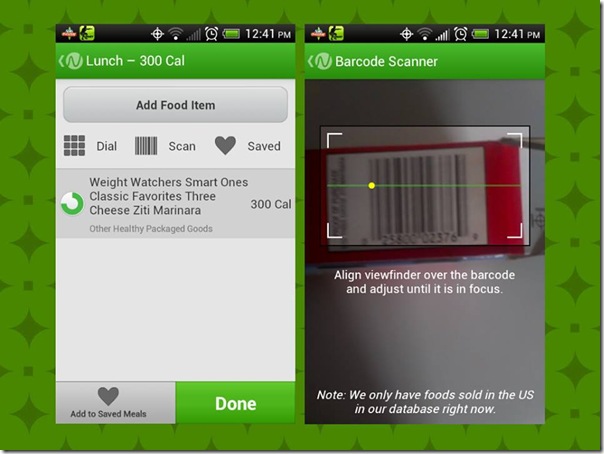
Did you know that with Noom, you could scan barcodes from the boxes of food that you eat?  Two people have told me that they didn’t even know you could scan the barcodes to enter the food that they eat for their meals.

Yesterday I was talking with someone on Facebook and she told me that she had no idea, so I took a screenshot like the one on the left in the image above, and told her to look at the buttons below “Add Food Item” that say Dial, Scan and Saved.  I told her that all she has to do is click Scan and the image to the right will come up.  It scans the barcode and this was the result of the barcode you see in the picture.  “Weight Watchers Smart Ones Classic Favorites Three Cheese Ziti Marinara” for 300 calories.

I have known about it since I first started using Noom because the scan button is in plain sight, so it was a no brainer to me.  That’s not meant as an insult by the way, I just see things more than most do.  I am very visual, I look at everything.  Have you seen the show The Mentalist?  I’m like that guy, I look at everything.

Did you also know that you could save your meals too?  When you enter certain items like for example, if you are making a peanut butter and jelly (or jam) sandwich, you scan the bread, the jar of peanut butter and the jar of jelly or jam, but you don’t want to have to do that every time you eat a sandwich, so after you enter all the information, click “Add to Saved Meals” at the bottom and type PB&J, so the next time you eat that, just click “Saved” at the top and find PB&J, click it and it will automatically add it for you.  It’s really that easy.

So there you have it, the barcode scanner and saving meals with Noom.  You’ve been looking at it everyday and you didn’t even notice it lol.  I hope this helps.

My New Virgin Mobile Cell Phone

Well I finally did it, I bought a new Android based cell phone from Virgin Mobile.  Well, I bought it from Amazon, but it is a Virgin Mobile phone.

We were at the mall today and they have a Best Buy mobile store where you can buy cell phones from all the different mobile companies, and they had the Virgin Mobile phones, but they were more than they are at the Virgin Mobile website.

Like take this phone, the HTC One V that I just bought on Amazon for example.  At the Best Buy store they were selling it for $149.99.  It’s on the Virgin Mobile website on sale for $99.99 and I told the clerk that.  He scanned the barcodes and he said nope, it’s $149.99.  I told him to check the Virgin Mobile website and he said it’s $149.99.  I knew it was a bad investment to buy it from there because I could have saved $50 by buying it online.  When we came home I checked and sure enough I was right, it was on sale for $99.99.

Before I made the commitment to buy it, I wanted to check with Amazon first to make sure I could get a better deal and it was on sale for $93.41.  So not only did I save money by buying it at home, but I saved nearly $60.  That’s good because I still have to buy the phone card to activate it which is another $35.

This isn’t the phone that I wanted, but it was the phone that I could afford to buy and sometimes we have to make sacrifices like this.  The reason I didn’t want this one was because it doesn’t have a front facing camera which means I can never video chat with it, but that’s why I have a webcam on my Netbook and my Desktop computer.  But it would have been nice to have the front facing camera for those times when I don’t have a mirror and I need to check to make sure I don’t have food on my face when I’m eating.  I know, I’m strange, but that does come in handy lol.  I’m sure the front facing camera wouldn’t be great for taking self pictures anyway since it is probably a 1MP camera and the regular camera on it is a 5MP.

Besides the front facing camera issue, I did like this phone in the reviews that I saw.  It doesn’t perform as great as the most expensive phones, but it does perform well, from what I’ve seen.  I will have to find out for myself.

I didn’t opt for the 1-day shipping for $18, instead I got the 2-day shipping for $10 which means I will get it on Monday, December 24th which means I will get it just in time for Christmas lol.  If I had gotten the free 5-day shipping, I’d have to wait until the end of next week.  I guess that would be ok to wait, but I don’t want to wait lol.

So yay, welcome to the year 2012/13 lol.  I have been using an old type of phone for such a long time that I won’t know what to do with myself.  I’ve never had an android phone so I’ve never known the joys of apps like the rest of the world does.

I will be giving my phone away to someone who needs it which means I will be getting a new phone number.  That kinda sucks but I wasn’t married to the one I have now anyway, I still don’t remember what the number is lol.

So until Monday…