New Samsung Galaxy III

samsung galaxy s3

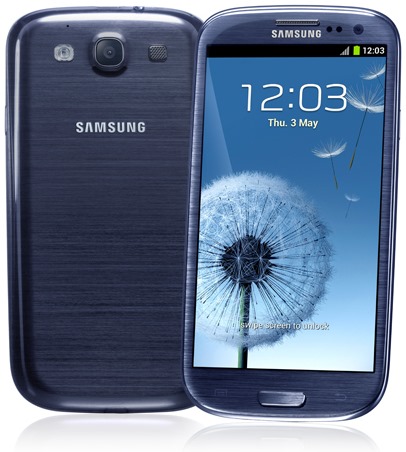
My new Samsung Galaxy SIII from FreedomPop finally arrived via FedEx today. I am very happy with it because it actually installs the apps. The Refurbished Samsung Galaxy SIII (white one) that I bought from NoMoreRack now Choxi would allow me to install apps, but it just didn’t install all the files, only 1 file. It also didn’t allow me to tweet pictures. I did have some sound issues, but that cleared up after some tweaking with the settings.

This new phone actually installed Terraria and Minecraft PE and I can actually play the games without any problem. Although, now that I had to start over with the new phone, I have to start new worlds and characters, but that’s ok, I didn’t really have that much time invested in the game on the white one anyway.

What really pisses me off is that I spent $99 on this phone from NoMoreRack, and it turned out to be a piece of dog poop and I lost my money because I broke the phone before I could send it back for a full refund. I should have handled it differently and just sent the phone back and gotten a brand new one from FreedomPop instead. Oh well, it’s a learning experience.

The only issue that I am having with this new phone is the call quality. I mean, it’s a phone, you would think that a phone would be able to make phone calls and the call quality would be excellent since that’s it’s main purpose. They do offer premium voice quality for an extra $3.99 every month with a free trial, which I have activated only because what’s the point of a phone if people can’t hear you? My service was unlimited voice and text for $5 a month and unlimited data for $15 a month, so you get what you pay for with the voice. I’ll gladly pay $4 more so people can actually hear me talk.

I’m sure this phone will last me a long time, just as long as I don’t lose or break it.

Update: Ok so I’m having a bit of an issue with this new phone. First off, it rebooted once, and I started to freak out because that’s what my HTC One V was doing, which is why I had to buy a new phone. Then it just started shutting off on its own. The other night as I was going to bed I went to look at my phone one last time and it was off. I tried to turn it back on but it wouldn’t come on. It showed that the battery was completely drained, which I knew for a fact it wasn’t dead. I kept trying and it would show the battery as being dead, but then it would come on and show that the battery was 3/4 full, then it would show me the Samsung logo, then it shut off again. I was really freaking out. It was a good thing I saved the battery from the other one that I bought from NoMoreRack. I switched the battery and I haven’t had an issue with it turning off or rebooting on its own since. So basically FreedomPop sent me a bad battery.

The other issue I’m having is that when I called my aunt when I first got the phone, she told me that I was breaking up, so I had to call her on the landline. I noticed they have for $3.99 more per month an upgrade called Premium voice, so I bought that, but little did I know it has nothing to do with the issue that I am having. phone bars This is my problem, I have no bars in the house. If I ever want to call someone, I have to go outside and make sure I have enough bars, and when I was talking to my aunt, I WAS outside, and I was breaking up out there. So that means that I have to not only leave the house, but walk to Albertson’s where the cell tower is to be able to talk to her. I mean, I could just call her on the landline, but I have a cell phone for a reason lol. I’d like to be able to call people when my partner is using the landline.

So those are my problems. I solved 1 problem, and I tried to solve the 2nd problem at $4 extra per month, but now my problem is bars. Ugh! I can’t win. The only way I will have good service is if I have Verizon or AT&T. My phone is FreedomPop, but it uses the Sprint network, which apparently doesn’t give me any bars. I can’t afford anything else. My voice and text is $5 a month, now $9 a month with the premium voice. I guess like everything else in my life, I’ll just deal with it.

Minecraft Pocket Edition Issues with Samsung Galaxy S3

Screenshot_2015-04-30-11-51-40

I blogged the other day that I was having issues with Minecraft PE on my new phone, but I didn’t really get into what the problem was. I bought Minecraft PE on the Google Play Store about a month or 2 ago for $6.99. I have a app called Google Rewards that reward me in actual cash for surveys, and I don’t even have to wait a month for it, I can use the money to buy Android apps.

So I bought Minecraft PE specifically for when I’m not home and I am having Minecraft withdrawals. The struggle is real people LMAO!!! Of course when I bought it, I intended to only play it on my Nook HD+ because of the bigger screen, but as it turns out, I don’t bring my Nook to doctor’s appointments. My old HTC One V smart phone was a bit small, but it installed just fine and I have played it there with no issues. When I bought my Samsung Galaxy S3, no bueno! It installs, as you can see from the image above, but it just won’t play. Let me show you the screens that I get screen by screen.

Screenshot_2015-04-30-11-51-40Screenshot_2015-04-30-11-51-56

Screenshot_2015-04-30-11-52-03Screenshot_2015-04-30-11-52-11

So the first screen you see is the main screen when you first load the game. You click the Play button, obviously. The next screen is supposed to show your worlds, if you have created any, so you click the world, but since it’s new to my phone, I haven’t created any yet. So I click NEW at the top right corner and you get the 3rd image above. You can choose survival or creative, you can hit advanced and go through that menu. Once you hit Create World, you should see a world come up on the screen and you rush to get your shelter in order to stay alive, but instead, I’m seeing the 4th image. No bueno!

Screenshot_2015-04-30-12-06-45Screenshot_2015-04-30-12-09-31I’ve researched the issue, and one admin of a website mentions files, or the lack of rather. I went into the file manager and sure enough, in every folder where I see the word Minecraft, there are zero files. And there are several folders too, but what’s odd is that it shows that there are 44.38mb total, 14.69mb is application and 29.50mb is SD card app. Then of course the data, which should show a number since I tried creating a world, or 20.

I know people are going to suggest that I clear the cache and clear this and clear that, but trust me, I have done that. I have even copied the files from my Nook and even copied the worlds from my Nook to the Samsung phone and they still don’t work.

Just so you know, this is NOT a huge issue or deal. I can still play this game on my Nook HD+ and my PlayStation 4, but it’s just the idea that something won’t install that bothers me. I can’t upload images to Twitter and I’m not sweating over that one, it’s just that I don’t have an addiction to tweeting pictures as much as I have an addiction to games.

I am still researching every time I remember to and I’m hoping I can find out how to fix it because it does bother me that I bought something that I can’t even use on ALL of my Android devices.

Once again I am using a Samsung Galaxy S3 with Snapdragon. It’s a refurbished phone that I bought for $99 from Choxi (formerly Nomorerack). I’ve tried all the tricks I’ve seen in the message boards like uninstalling it and reinstalling it, unmounting the SD card, installing, then remounting the SD card. I’ve tried rebooting, then installing. Nothing works because it is not installing specific files, remember the empty folder? Every folder that has the word Minecraft in the title is empty on the device and on the SD card.

If anyone has answers, please comment. In the meantime, I’ll continue with Minecraft for PS4.

Minecraft Pocket Edition

MinecraftPocketEdition

What is the easiest way to spot an addiction? When you have Minecraft on your PlayStation 4, then you also buy Minecraft for your tablet/cell phone. Yeah… I have an addiction. I have it bad.

imageMinecraft Pocket Edition was $6.99 on Google Play, but I actually got it for free. Let me explain that. I have an app on my tablet called Google Opinion Rewards and they send me a survey every couple or few days that may pay .10 cents or $1 and change. The surveys are mostly 1 question, but occasionally they will have 3 or 4 questions and I may get more or less. I’ve been using this app since November and I’ve earned enough that I was able to buy Minecraft PE.

Today I decided that I would go to YouTube and check out some videos. I have to be honest, I only watched 1 video, and it was enough to sell me on the idea. The guy was talking about how easy it was to play on his Apple iPad Mini. He kept having issues where the game was running out of memory, and he couldn’t believe it because he had an iPad Mini. You’d think those would have more memory to play a simple game. Then again, it was from June 2014, so the game was probably buggy.

So I bought the game with my Google Opinion Rewards and I installed it on my Nook HD+ because it has more space and it’s faster than my Android cell phone. The game is very awesome and it does take a few minutes to really get the hang of since I’m so used to the PlayStation 4 controller, and not at all familiar with using 2 fingers (left thumb and right index) to control my character. I’m getting the hang of it.

The first thing I noticed was sunflowers. My PS4 version doesn’t have sunflowers! I would love sunflowers lol. It also has some other materials that my game doesn’t have, such as Diorite, Andesite, Poppy, Blue Orchid, Allium, Azure bluet, Tulip, Oxeye Daisy, Lilac, Rose Bush, Peony and one thing I noticed in the crafting table was Stonecutter. I’m not sure what the Diorite or Andesite is, but it sure would be nice if I did lol. I cheated, I had to look on the Minecraft Pocket Edition wikipedia page to get those names because I forgot them and their spelling. I saw the poppy, tulip and sunflower, but not the rest of the flowers I listed. I only saw them in the wiki page. I mentioned them because again, I’ve never seen those in the PS4 version.

I created a world and used an app called Minebot to mine 100 blocks down. Little did I know he would leave all of the good stuff free floating in the air in their original space. How the hell am I going to get all of that stuff? I didn’t think of that, so I’m not going to use that app anymore. I deleted that world because when I play the game, I want it to be completely honest. I want to earn every iron ore, gold, diamond, and whatever else I would normally have to mine for months to get. It’s less fun if I already have everything available to me. It means more to me if I have to work hard for my rewards. That’s why I don’t like to play in creative mode. What’s the point if I start off with a mansion with all the diamonds I could ever ask for? It ruins the fun.

I will most likely not play this game that often and save all the fun for when I’m either on the stationary bike or bored in a waiting room. Who am I kidding? I’ll probably be on this just as much if not more than I am on the PS4. I am that addicted lol.

This game doesn’t seem to have the option to share video and/or pictures on YouTube, Facebook or Twitter, so I guess if I really want to take a screenshot, I’ll have to do it the old fashioned way and manually share it through social media. I probably won’t do that too often, but never saw never right?