Universal Chat Program

When I stopped using my laptop I installed all the IM programs to the desktop such as AIM, Yahoo IM, MSN Messenger and MySpace IM.  Well, all of a sudden I’ve noticed how slow my computer got from running all those IM programs.

So I went on Google and did a search for IM programs and found Pidgin.  This is a universal chat program that lets you see your buddy list from 16 different IM programs.

AIM, Bonjour, Gadu-Gadu, Google Talk, Groupwise, ICQ, IRC, MSN, MySpaceIM, QQ, SILC, SIMPLE, Sametime, XMPP, Yahoo! and Zephyr

There is one other that I wish it had which is Facebook.  eBuddy has Facebook, I use that IM program when I’m on my PSP.

Well this definitely helps and all the IM’s are tabbed so if you are in more than 1 conversation it’s tabbed for you in 1 window.  It also has chatrooms, the only thing it doesn’t have is webcam.  You can either have 1 universal icon for all to see or you can choose an icon for each IM service that you use.  And it uses the smileys that you would normally see only in like AOL or Yahoo or MSN, so you can’t use special smileys that you wouldn’t see in AOL that you would see in MSN.  I think it’s pretty cool.  I like it.  My computer isn’t slow any more.

EverQuest for PSP

Untold Legends which I got today at Game Stop is very similar to EverQuest.  So I finally got the PSP’s answer to EQ.  I read that Sony wanted to create a version of EQ for the PSP but they couldn’t or something like that but they made Untold Legends.  It is very similar to EQ.  There are quests and merchants and you go up to people and talk to them and you got people following you and helping you fight.

Although nothing beats being able to chat with people but there is a multiplayer mode via lan or adhoc.  I don’t know how it works with the Lan though.  Maybe you gotta be chatting on the phone lol.  Who knows.  Or maybe you can use the headset with the mic.  With Adhoc you are sitting in the same room as the person you are playing with.

But I don’t know anyone with a PSP so it doesn’t matter.  I will always have to choose single player lol.

New PSP Games

We went to Game Stop today and I picked out 2 games.  Untold Legends: Warriors Code and Ratchet & Clank: Size Matters.

They were both used so I got a good price, Untold Legends was $12.99 and Ratchet and Clank was $14.99.  Because I had a $25 gift card I only had to pay $5.01 extra.  It’s nice to get a new game but these don’t scratch very easily so used PSP games aren’t a big deal.  I usually keep my games in their cases so they never get scratched.

I can’t wait to play these new games.

WTF?

wtfIt’s not what you think.  WTF stands for Work Time Fun.  I got this game last night because I have been extremely bored.  I can’t crochet anymore and all the games I have I’ve played and even though I’m not finished with them I wanted something new.  I still have that $25 gift card for Game Stop but I don’t know when I’ll be able to use it so until then I got this.

It was only $9.99 at the PlayStation Store and it has all these mini games inside it like counting chicks for example.  There are 3 types of chicks.  Male, Female and Dead lol.  You push the chicks over with the right arrow button on the left side of the PSP then you decide where it goes.  If it’s a female chick you press the X, if it’s male you press the O and if it’s dead you press the triangle and it goes to heaven.

There is also a game called Pendimonium (I think that’s the name) where you work in a pen factory and you have to put the caps on pens.  But some come out upside down so you have to turn it right side up, put the cap on it then go to the next one.

Yeah, it does strain your eyes and it does seem to be strange but oddly addictive.

One of the games is similar to frogger, you have to get this little guy safely to the other side and keep him from getting hit by a car and you gotta eat the mushrooms in the road along the way.  Yeah, you have to be doing mushrooms to play this one lol.

There is a baseball one which I am terrible at and a boxing game where all you do is press the x button many times but I never win that one.

Oh talk about winning, WTF is like a job, you have to “go to work” by doing these mini games and you get a paycheck depending on what tasks you’ve done.  Since I just got the game I’m not that far into it so I can’t explain what you get in this game but one of the things I saw from YouTube is you get this fun little thing that is eyeballs and from what I’ve seen on YouTube that is really fun especially for parties lol.

Don’t Text and Drive

As of January 1st 2009 it is illegal to text while driving.  Ok, who does this?  Seriously.  I have trouble picking up a drink while driving then trying to find the place to put it back.  I can’t even eat an ice cream cone while driving without worrying I’m going to end up in a ditch if ice cream drips and falls on my leg when I’m wearing shorts. (This was my experience while doing a driving lesson, Darrin insisted on buying me a soda and ice cream on my first lesson… nice eh?  lol)

Well, now that you can’t text and drive anymore you have much more time to watch tv or play Daxter on your new PSP-3000.  Just make sure you look over the PSP every once in a while to make sure you see the road but of course pause your game first if you think about it.  And while you’re at it, shave while driving or if you are a woman,  put on your eye liner in the mirror.  Don’t forget to make sure you have a lot of sloppy food while you eat.

Seriously though, it’s so dangerous, keep your eyes on the road and don’t get ME killed because you have to text something to someone.  It’s so stupid.

Skype Vs. Vonage

I’ve been seeing these commercials for Vonage constantly on tv about how they are better than the telephone company because they only charge you $30 per month and you use your current internet connection to connect to your phone service.

What about Skype?  Skype has phone service that works with your WiFi connection and it’s only $2.95 a month.  Since it works with your WiFi connection at home you can also use it at WiFi hotspots like the cloud (whatever that is) and t-mobile hotspots. They have a USB phone, 2 WiFi phones, even a video phone. You can call anyone who uses Skype for free if you only want to call other Skype users.  Or you can also call landlines and cell phones for $2.95 per month.  You get a phone number that only costs $30 per year.  Their best phone is the black WiFi phone that is on sale right now for $129.99.

They have a phone that is currently only in europe right now that uses the 3G network but I guess you can use it like a cell phone because you can make a call anywhere, you aren’t limited to WiFi hotspots like the ones I just talked about in the above paragraph.  I look forward to that coming to the states.

Right now I use Skype on my PSP to make phone calls.  I don’t have a phone number for it but I do have the option and since I am signed up with their unlimited calls to US and Canada they have given me a $30 coupon for a phone number for 1 year.  I don’t want to use it for my PSP because I won’t have it turned on long enough to receive phone calls.

Personally, if I had to choose between Vonage and Skype, I’d choose Skype, especially if I was on a budget.  Also I can take my Skype WiFi phone with me wherever I go because it will work wherever there is a hotspot like Starbucks, McDonald’s, Hotels, Airports, your friends and relatives houses etc.  With Vonage you are limited to only being able to use it at home.

Edit:  Ok I was looking at the Skype phone on their website and was watching a video (take a tour) and it was saying “for just pennies a minute”.  So maybe you have to do the Skype as you go or I don’t know, maybe it works with the monthly subscription.  The only way to know for sure is to get the service and find out I guess.  Skype as you go gives you a bit more freedom to be able to call other countries if you have to call people who are in another country and you only pay a few cents to about 20 cents a minute depending where you are calling.

Christmas Eve

T’was the night b4 Xmas and all thru the house, not a psp was stirring, not even a chihuahua.

Hehe.

I just figured out how to make paragraphs with my psp so I’m taking full advantage.

Tomorrow were all going to Sarah’s house and we’re probably going to be there for a while so i will observe blog silence until we get home.

Merry Christmas to all, don’t drink too much egg nog.

We Arrived in San Diego

After 5 1/2 hours in the hot car holding a hot chihuahua we arrived in Lakeside (San Diego). We had to have the heat on because of the cold from the rain and the defroster to keep the windows from being foggy. A lot of the trip was foggy but not because of the windows. There was snow on the ridge. I was told to mention that. Well since I’m using my PSP to blog I’m going to cut this short.

PlayStation Store Finished

Well Sony finally finished the PlayStation store for the PSP.  Instead of buying stuff on their website they gave everyone Media Manager for PSP 3.0.  I bought Media Manager for PSP 2.0 for $20 or $25, I forgot.  But I guess it’s ok because this is an upgrade and I don’t have to pay to upgrade it.

If you have a PSP you don’t need to use this to buy and download games.  All you do is just go online with the PSP and go to the PlayStation Store.  That is if you have WiFi access at home.  If you don’t then you don’t have any other choice than to use the Media Manager with a USB cable.  However if you want to buy/rent movies or tv shows you can only download them using the Media Manager.  They don’t offer this feature on the PSP.  I’ve been looking at it since the firmware update.

The only problem with this is that in order to buy a lot of the games or movies/tv shows you must have more than just 1GB memory stick.  They offer 16GB from San Disk now and they really aren’t that much money.  Some games and movies are more than just 1GB so you must have a 4GB, 8GB or 16GB memory stick for those.  The good news is that you can transfer games/movies/tv shows to your computer or maybe to a dvd-r and when you aren’t going to play the games or watch the movies etc you can just delete them from your memory stick so you can make room for other things.  Or if you have a disposable income just buy many memory sticks.

PlayStation Store and New Keyboard Screen

Well I guess the new firmware update for the PSP was yesterday, I guess I missed it.  I’ve been so focused on the PlayStation Store website on the PC that I didn’t even notice that it is already on the PSP.  It’s so awesome too because now when I want to download a demo, wallpaper or game or whatever they have all I have to do is turn on the PSP and go right there.  I no longer have to plug my PSP into the computer to download it.

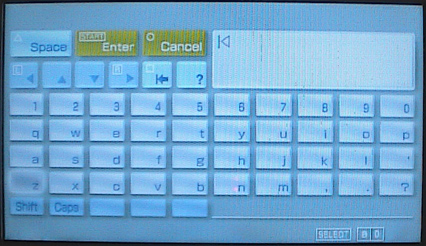
They also added a cool new keyboard instead of having 12 buttons like a phone where you have to press each button 4 times to get 1 letter like you do with a cell phone.  So annoying.  Now the new keyboard thing makes more sense.  To use the symbols and go caps all you do is click the shift button.  Like the old style the triangle button is your space key and the square button is the delete.  Below is a picture I took of the new keyboard.