Scan Your Barcodes and Save Meals with Noom

noom scanner

Did you know that with Noom, you could scan barcodes from the boxes of food that you eat?  Two people have told me that they didn’t even know you could scan the barcodes to enter the food that they eat for their meals.

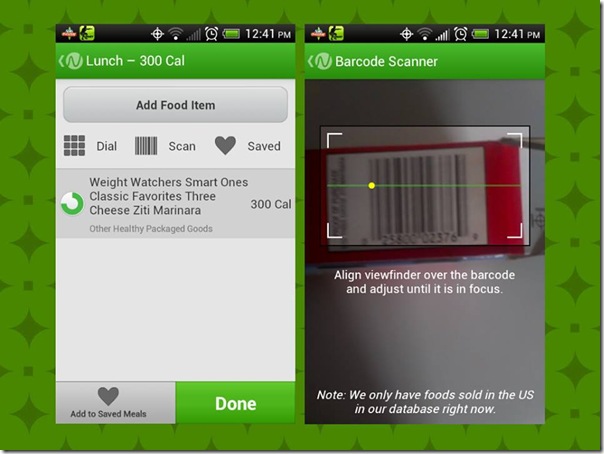
Yesterday I was talking with someone on Facebook and she told me that she had no idea, so I took a screenshot like the one on the left in the image above, and told her to look at the buttons below “Add Food Item” that say Dial, Scan and Saved.  I told her that all she has to do is click Scan and the image to the right will come up.  It scans the barcode and this was the result of the barcode you see in the picture.  “Weight Watchers Smart Ones Classic Favorites Three Cheese Ziti Marinara” for 300 calories.

I have known about it since I first started using Noom because the scan button is in plain sight, so it was a no brainer to me.  That’s not meant as an insult by the way, I just see things more than most do.  I am very visual, I look at everything.  Have you seen the show The Mentalist?  I’m like that guy, I look at everything.

Did you also know that you could save your meals too?  When you enter certain items like for example, if you are making a peanut butter and jelly (or jam) sandwich, you scan the bread, the jar of peanut butter and the jar of jelly or jam, but you don’t want to have to do that every time you eat a sandwich, so after you enter all the information, click “Add to Saved Meals” at the bottom and type PB&J, so the next time you eat that, just click “Saved” at the top and find PB&J, click it and it will automatically add it for you.  It’s really that easy.

So there you have it, the barcode scanner and saving meals with Noom.  You’ve been looking at it everyday and you didn’t even notice it lol.  I hope this helps.

My New Website

new website home

My website has been under construction for quite some time now.  I’ve been trying to think of something interesting to do with it.  My problem was, I had so much crap in my old website that I felt overwhelmed.  It’s kind of like I had a hoarding problem, but I was hoarding old images and old information that is no longer relevant.  I decided the best thing I could do was to back everything up on my computer, then delete it all on the website and start from scratch, and this is the result.

The index page is just an image that says welcome to the page, I didn’t take a screenshot because it’s a temporary image.  I will have to work on that page some more.  The home page is like a Windows desktop with icons and wallpaper.  I wanted to make it so that no matter what screen resolution you are using, you could see the full image and it will resize when you resize the browser.  It’s also stationary so when you are scrolling through a page, the wallpaper is always there.  Although the icons on the home page don’t go down that far that you need to scroll if you are using Google Chrome with a resolution of 1280×768 if you have a widescreen monitor, and 1024×768 if you don’t.  Of course the wallpaper is 1280×768 so if you don’t have a widescreen monitor, the wallpaper is squished lol.

Right now (in October) there is a picture of 2 pumpkins for Halloween, but I will change it for each holiday.  I figured it would be easier to use a desktop image for the home page than to have to keep changing the theme for the whole site every holiday.  When I was using FrontPage themes, I would have to change the theme, and then go to each individual page and adjust things.  Sometimes it could take hours or days, so this is just one page I have to change the wallpaper on.

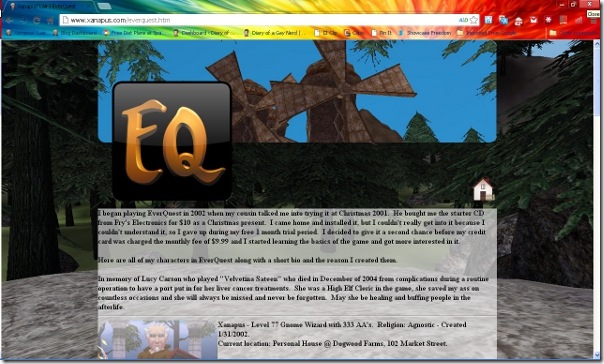
new website eqWhen you click one of the icons on the home page, you will get a page that looks like this.  I decided that I wanted to emulate the Facebook Timeline idea, but with a thinner banner and a 256×256 icon which is the same one you see on the “desktop.”  The game pages (EQ, EQ2, LOTRO and DCUO) all look the same where you see a 256×256 icon of all of my characters images with a bio.  I also thought it would make them more interesting if I gave them a story.  I haven’t finished them all, but I’m working on it.

I don’t really have to have all of this information out there, but it’s fun.  Even if nobody ever looks at it, it’s still something that makes me happy.

I haven’t quite figured out what I want to do with the crafts page, whether I want to add patterns or just images of the things I have made in the past, or both.  I am still waiting for inspiration.  My Holiday page is still empty, but I am working on that.  I made the icon with 4 holidays, Halloween, Thanksgiving, Christmas and New Years, but I mean what information could I possibly have for anything but Halloween?  All I have are my pumpkin pictures, so perhaps I will change that to a Halloween only page.

Update, I made the change already.

I would love to get some feedback, so please tell me if you like it or hate it and why.

Moon Glow

Darrin went out to the car then came in the house and told me to come look at the moon.  I was like yeah yeah yeah I’ve seen it and he said no really, come look, it has a cool glow around it.

I went in the house and got my camera but it didn’t come out too great so I had to do a video in order to take a screenshot to get a good image.  The glow was so huge that my camera couldn’t get the whole thing in the frame so I just got the bottom of it.

I don’t know if this is visible to everyone but it certainly is visible here in Bakersfield right now.

Lord of Ultima

Here is my latest obsession. I know that Lord of Ultima is not new, it has been around for several months but thanks to the Google Chrome Web Store, I have found it and am now playing it with my CR-48 laptop.

Today is only my 3rd day of playing so I’m not going to give a rundown of how you play the game but I will say that it is fun and kind of addicting. Not in a negative way because it does get boring after a while. You have to place buildings in your city and keep upgrading them which can take a long time. The more you upgrade things, the longer it takes to upgrade to higher levels.

When you send your army to raid dungeons, you have a long waiting game. You can’t actually be there with them, you can only wait until they get back to see what they brought you.

I wanted to play a game that was like EverQuest but something that was browser-based and although this is nothing like EQ, it is browser-based and works on the CR-48 laptop. If it can play on this computer then I’m good to go for a while.

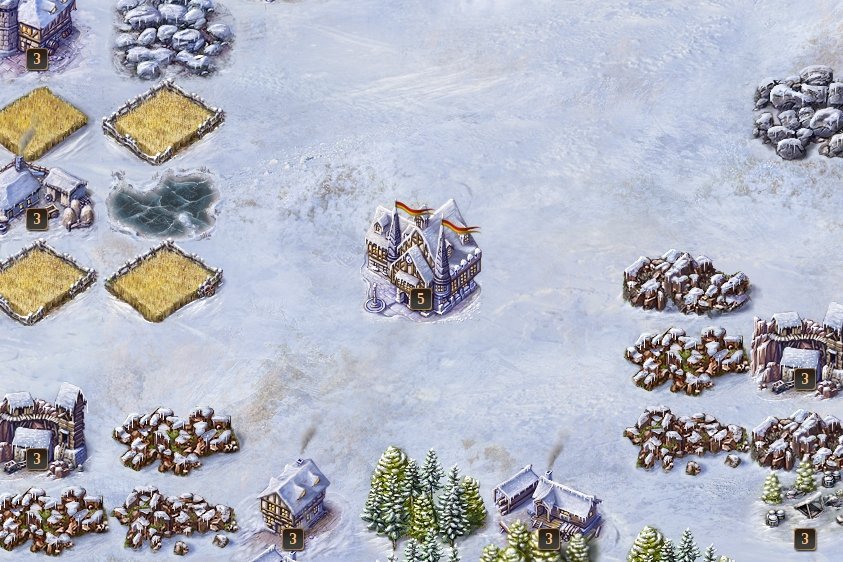
The screenshots below are covered in snow because it’s winter now. If I had known they were going to do that I would’ve taken some screenshots yesterday when the ground was dry and green.

The one on the top is just an image of the center of my city. You got the town hall in the middle then a farm with the lake, an iron mine and a cottage on the bottom left and the right.

The one on the bottom is an image of the region where my city is. You see a dragon on that mountain, well it’s in the screenshot but it’s gone from the game now. I don’t know where it went but they removed it. It’s a good thing I already raided it lol. They had a minotaur dungeon but it was gone before I could even react. Oh well, my loss.

What I like about this game is that 1 its browser-based so it works on the laptop and 2 it’s FREE to play. So if you want to join me in playing Lord of Ultima, click the link with my referral number to make sure I get the credit for inviting a friend. If you already play the game, my name in there is Xanapus so say hi when you get in the game.