Saliraptor Mount in EverQuest 2

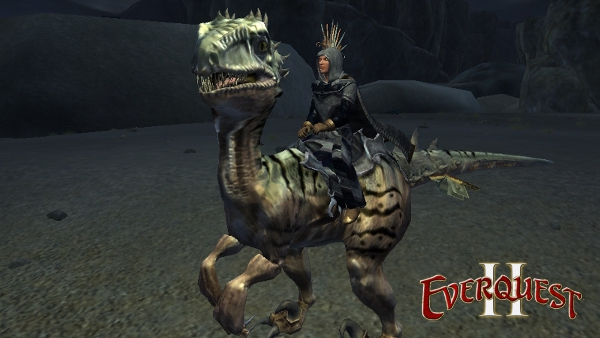
I have been loving my new Saliraptor mount in EverQuest 2.  But the only problem that I have faced was how slow it was.  It says that it only increases ground speed by 60% compared to my mount which was 130 % and because I had them both equipped I was still getting the 130% in my stats section, but I just wasn’t seeing the speed.  The Saliraptor said that it gives you 200% air speed (flying) which for some reason I assumed meant for riding griffins, but then I saw someone flying with a Saliraptor today and it got me thinking, how do I do that?

I went to YouTube and found a video of someone flying with their Saliraptor mount and I was kinda frustrated.  I nearly left a comment asking how they did that, but I remembered that every time I do that, I end up finding the answer somewhere else and then regretting my question because it makes me look like an idiot.

There had to be a way that I could get it to work so I went back to where I got it from and I clicked the Saliraptor that is still there and it gave me instructions.  All I have to do is hit the space bar while running.  Well, I’ve been doing that and I barely make it off the ground.  I thought, how in the heck is this not working?  I decided perhaps my horse was the problem, so I right-clicked him and turned him into a house item and then tried it and I actually flew into the air.  So it was the horse that was hindering me that whole time.

The only reason I kept the horse was because he ran faster than the Saliraptor, but he doesn’t run anywhere near the same speed as the Saliraptor does when he is soaring through the zone.  So my beloved horse is relaxing inside of my house, probably pooping all over the furniture as we speak.  Oh well.

This is not my video, but this is the video that I found earlier today demonstrating how you fly with a Saliraptor.  It’s pretty awesome.

httpvh://www.youtube.com/watch?v=31LBYs8nAso&feature=g-hist

DC Universe Online

I know I am late to this party, but I finally discovered DC Universe Online.  Since I have the station pass, I now have complete access to all of Sony Online Entertainments online PC games such as EverQuest, EverQuest 2, Planetside, DC Universe etc.  I do play EverQuest and EverQuest 2 and I’ve always wanted to play DC Universe and now I finally get that chance.

I thought that since it was the same company that made EQ, I figured the game play would be the same where I just hit the arrows to move forward, backward and so on, but this is way different.  In order for me to move, I have to move the mouse for direction (forward and side to side) while hitting the forward key.  That’s kind of difficult to do considering the mouse is on top of the desk and I use my right hand, and the arrow keys are on the right side of the keyboard in the keyboard tray.  Since my right hand is on the mouse, I have to reach my left hand over to the arrows.  I’m sure there is an easier way, maybe I can hit W or something to move forward, I don’t know.  In EQ and EQ2 you can hold both mouse buttons to move, but with DCUO, the mouse buttons are for fighting, not direction.  It’s very confusing and will take awhile to adjust.

The game is very fun and I’ve already gotten to level 5.  There are only 30 levels in the game, but I think I’m fine with that.  I mean, I don’t plan on playing this game for the rest of my life.

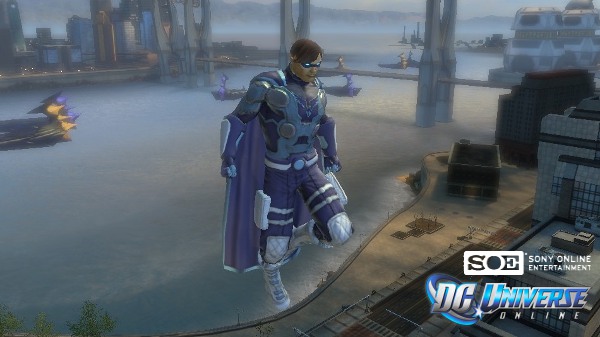
My character is a superman type of character where I can fly and he is fire based, so all of my abilities involve fire, obviously lol.  I can’t run fast like other people who I have seen playing a “Flash” type character, but I’m good with what I have.  I have found that the space bar sends me up in the sky, so when I am about to die, I just start pounding on the space bar to save myself.

This game takes a lot of skill to play, but my main reason for wanting to play it is because I have always wanted to be involved in something where I am a superhero, like Superman.  I would eventually love to create a Wonder Woman type of character, male or female, yes I have that option as a male.  I would also like to try a Batman type character and even an evil villain type of character.

Oh, just in case you are wondering what my character’s name is, it’s Xanapan.  I tried Xanaman, but that was taken, so I just changed the “M” to a “P.”  I know, it’s not very clever, but I’m hooked on the Xana name lol.

Well, I am off to go save some innocent citizens.