My Final Decision – Nook

I’ve made my final decision about which e-book reader I want to buy. I said in my last post about waffling that I really wanted the Kindle because it’s the iPod of the e-book reader world but then last night I found out that Calibre will convert many e-book file formats to the .epub file format.

I’ve literally spent the entire day today trying to figure that program out and came to the conclusion that .epub is the best file for the Nook. When I tried converting my ebooks to .pdb file format (which is Nooks familiar format), the table of contents were always screwed up. It worked but it wouldn’t just say chapter 1, it would have the word Calibre with the chapter title.

The .epub file format works so much better and it’s the first choice in Calibre when you are converting a file so it makes it that much easier.

Of course Calibre probably won’t work with DRM books, the books I buy from Rainbow eBooks don’t have that restriction on them (yet). Although if a book I buy from them is already in the .epub file format then I won’t have to convert any of their books for the Nook. I can just buy,download, upload and read.

Although the book “Fell” did come in epub but it didn’t work on the Nook for PC program. So there is a good chance that I will still have to convert other file formats for the Nook.

And yes, I know, I can do the same thing with the Kindle but I think I’m going to get the Nook WiFi despite the fact that it’s $10 more than the Kindle and if I buy it at Barnes and Noble, chances are I’m gonna pay even more with taxes. The issue that I’m having with the Kindle is how it’s sold out lol. I don’t want to buy a Kindle if I can’t get it for another month. I also don’t want to buy something that I can’t return to the store.

There are a few features of the Nook that I like and don’t care for. For example you can replace the battery, it has an Expandable micro SD slot. I’ve seen in a video how slow the color screen is when sliding your finger to find a book, that is a bit irritating to me but I think I can get past that. The lend feature won’t do me any good but on the other hand who knows what might happen in the future. The very fact that we can walk into a B&N and I can bring a Nook with me and be able to read a book for free for 1 hour is appealing.

The main thing is that I can convert my existing e-books to the .epub format that I can read on a Nook and be able to use the dictionary, look up words, highlight and annotate. That’s all I wanted. That’s all I needed.

If I do get one, I’m going to buy 1 copy of the Los Angeles Times so that Darrin can see if he likes reading it on the Nook. If he does then I’ll get him the monthly subscription.  I’m tired of having to pick up his newspapers lol.  I don’t read so much that I will monopolize it from him, although I can’t say that he won’t monopolize it from me lol.  If that is the case I will suggest he buy himself one with his credit card.

I think I was wrong when I said that the Kindle is the iPod of the e-book world because it’s not sold in stores, it’s only online.  My Dell DJ was only online and they screwed me over on that because I can’t take it to any store to have it fixed but the Nook has a store.  So I think the Nook is really the iPod of e-books.

Leggo my ebook

I feel so stupid for waffling so much on this issue. I want a Kindle real bad because it’s the iPod of the e-book reader world. When I got my mp3 player I bought the Dell DJ but I was stupid, I should’ve gotten an iPod. Now, Dell doesn’t support fixing the Dell DJ. Heck, they don’t support anything with that product anymore. They won’t give you software updates, firmware updates, nothing. Not even tech support. They won’t even help me get a battery that works. I’m on my own with that and I can’t even find a company that will send me one that fits. I bought one in July and it still hasn’t shown up. I did get a refund though.

I got a tweet from Sony when I asked someone on Twitter if I should get Kindle or Nook and Sony said to get Sony Reader. So I thought ok I’ll check out their website. I did look at the Sony Pocket reader and although they have a good e-book reader it’s not as good as the touch BUT I did see some video reviews on that and they say that you can barely read the screen because of the touch feature. Also I can just see the screen getting so marked up from using that stylus pen that I won’t be able to read anyway. You know I’m gonna be drawing on it all the time on the books and on the drawing screen.

The Sony touch is what I really want BUT I wish they had an online store that I can buy books wirelessly through the reader and not have to plug it in every time I want to buy a book. I don’t want to be visiting family and have to use their computer to buy a book and have to install the software on someone elses computer. Ya know?

In their tweet, Sony told me about being able to check out library books and so I downloaded their software to check it out and went to the library link and they said I can only check out library books if I have a library card which I do for the Kern County Library which unfortunately is not in their system. So that feature is 100% useless for me.

The review I watched, the e-book reader was flawless but then when I watched another video, the Sony touch was slow to turn the page. He would swipe the screen and the page didn’t turn at all. He had to swipe again and other times he swiped the screen and it took 10 seconds to turn the page. I am way too impatient to wait 10 seconds for the page to turn.

Also, they said that they do supply a USB for it but that’s it. No A/C adapter for charging. Hello? They said that is a $30 accessory. What? Seriously? Although I did read that it uses the PSP power cable which I do have but I find that ridiculous that they are charging so much money for an e-book reader and they won’t even supply you a freaking a/c adapter.

The Sony touch has some good and bad and the bad outweigh the good for me.

I really want a nook or kindle because of the wi-fi feature and online store. I don’t care about 3G, I really don’t. I just want to be able to connect with a WiFi connection at home or at a friend’s house using their WiFi or if we’re out and about then I can use the public WiFi at a Starbucks or McDonald’s.

The Nook has the lend feature which is totally useless to me as well. I don’t know anyone who has a Nook and I highly doubt that me buying a Nook is going to bring me Nook buddies. Also the little screen on the Nook is too slow for me.

Although, the good thing about the Nook is that if I have an issue with it I can just bring it to a Barnes and Noble and maybe they can help me with it. I do want to go to a Barnes and Noble to play with one to see how fast or slow it is. Not just the color screen but page turns and startup and all. I want to be convinced with a in store demonstration.

If I don’t like it then I will go Kindle. But, there are still 2-3 weeks to waffle er um I mean decide.

Money Saved for ebook Reader

I officially have the money saved up for an e-book reader. Although I can’t really buy it yet because I have to make sure we have enough money for food for the next 2 weeks before I can spend the money I am saving. I have to get my priorities straight lol.

So I’m leaning towards the Amazon Kindle. I wanted to get the Nook because of its color screen but heard how slow it is and it’s not worth my time. I don’t need little icon book covers to make me happy.

I didn’t want a Kindle because most of my e-books are in pdf, .prc, .lit, .mobi and .epub format. I know you can read pdf files on a Kindle and I’m ok with not being able to use the dictionary I guess. I probably won’t have that feature with a Nook with pdf files anyway. I don’t really care for a Sony because I don’t really care about library books, oh and I don’t care about lending books with Nook as I have no friends with a Nook anyway lol.  And the Nook, Sony and Kindle stores all have pretty much the same prices for e-books anyway so store options don’t matter.

So, Kindle it is. But, again, I have to wait until I get my next check to make sure I have the money and then some.

Although I still have a lot of regular books in paperback and a hardcover book coming that I won from GetGlue.com. No not the zombie one, they offered me another one. But when I do get the Kindle the first e-book I will buy will be the first Sookie Stackhouse novels books 1-8 despite it’s hefty $55 price tag. I say hefty because it’s paperback version is only $35 so I’m over spending on it. Although, who knows what I will do. I’m unpredictable lol.

Oh and I’m going to also buy the Kathy Griffin book “Official Book Club Selection” and her moms book Tip It. Although, those 2 in e-book format are expensive so not right away.

After those then I will start buying the charmed novels and maybe more buffy novels. I have a few in paperback but not in order. Also there are star wars novels and star trek novels, let’s see, supernatural, smallville, roswell… too many to list. Let’s just say I’m going to be pretty busy. Oh and that’s not including all the books I plan on buying from Rainbow ebooks too lol.

Will I have enough time to read all these books that I plan on reading?

I do have a LOT of e-books on my computer right now so I’m not exactly sure how much money I will be spending on e-books right off the bat because I will be converting all of them to Kindle format so I can finally read them. Yes, I have a lot of unread e-books waiting for me. So the only money I’ll need to spend right away is on the Kindle then I won’t have to spend any money for quite a while until all of my current books have been read.

Ah the life of a book-worm.

Update: Ok so I was wrong, check this out.  The new kindle has this –  Enhanced PDF Reader – With dictionary lookup, notes, and highlights.  That’s perfect!  That’s all I wanted to know lol.  Now the Kindle IS my choice to buy.  Cool, now I can buy all .pdf files anywhere and transfer them over to my Kindle.  This way if one store has an e-book cheaper than Amazon then I can buy it’s pdf file.  And I can buy Rainbow ebooks in all pdf file formats and not worry that I can’t read them.  Awesome!

True Blood on Twitter

You know, I’ve been a fan of Vampires my entire life, anything supernatural actually. I make it a point to watch any movie or tv show that has vampires, witches, werewolves and anything else that is supernatural.

When True Blood came on HBO I was psyched that I had HBO to watch it on lol. But mainly I was just psyched because it was a new vampire show.

I’ve only recently discovered the awesomeness of even though I’ve been on Twitter for a couple of years now. Since I started following Sam Merlotte on Twitter I noticed that he was role-playing. I started following another True Blood character that he mentioned and notice that person was role-playing too.

Thanks to Sookie Stackhouse, I discovered there is a website with all the True Blood character twitter names. “You can find all of us here: http://tweepml.org/?t=460087 #TrueBlood”. Go there and follow them all.

I also created and then some. If you check out that list you can see that the characters are actually tweeting each other. It’s like watching the show but all text, no visual. It’s sort of like reading a book.

I love the role-playing, it’s the best way to get my True Blood fix during the week. Since there are only 3 more episodes it will be interesting to see if they continue to role-play after the season is over until the next season.

I have not started reading the Sookie Stackhouse books yet but I will be buying the 8 book boxed set soon. I was hoping that it would be the first book(s) I bought on a Kindle that I plan to buy in the next month or 2 but considering the Kindle version is $55 and the actual paper book version is $35, I might just buy the paper book version instead.

Well, back to the drama on Twitter.

Shopping for an eBook Reader

Someone I follow on tweeted this link today. Engadget’s back to school guide: E-readers. Naturally I had to look because I too want to buy an e-book reader. I have wanted one ever since they first came out but never could afford one because they were in the $400 – $600 range (around 2006).

In November 2009 I started blogging for pay (via PayPerPost and Blogsvertise) with the intention of saving money for buying an e-book reader, Kindle or Nook. Preferably a Nook because of the color screen at the bottom but it didn’t really make any difference. They were both around $265 or so back then.

I had a lot of trouble saving the money for one because my monthly income is so low that when I run out of grocery money I ended up taking the blogging money from PayPal to buy food. Since I have a PayPal debit card it makes it so much easier to spend the money.

9 months has gone by since I made the commitment to save the money and I still don’t have an e-book reader. However, the thing that I wanted the most out of an e-book reader was a lower price to justify my purchase.

eBook readers such as the Amazon Kindle, Barnes and Noble Nook and Sony Reader have all gone dramatically down in price, down to a price that I can finally afford.

Unfortunately, they still don’t fit my needs. What I want is an e-book reader that will accept a lot of formats like .lit, .prc, .pdf, .mobi and .epub. What I want is for an e-book reader that would allow me to read those formats and still be able to use their dictionary. I don’t know if they all let you to use the dictionary with just a .pdf file which is what makes my decision so difficult.

Kindle Wireless Reading Device, Wi-Fi, 6″ Display, Graphite – Latest Generation:

Pros: The new Amazon Kindle is stylish. I love the graphite color. I like the keypad on the bottom, it’s small enough that I’m ok with it considering I would probably be typing on it occasionally when searching for keywords, making notes and searching for books in the Kindle store. They have games on it, which I don’t really care about, I just want it to read but it is good to know. The price dropped down to $139 and has free 2-day free shipping which is awesome. The battery works for a full month without charging with the wi-fi turned off which is great.

Cons: It does allow me to view my .pdf books but that’s it and I can’t use the dictionary for definitions which is a big negative for me. I mean sure I can’t do that with a paper book but this is electronic and I want that ability. Also, it does not have an SD card for adding more books.

NOOK Wi-Fi, eReader, eBook Reader – Barnes & Noble:

Pros: The B&N Nook is also very stylish with its cool color touchscreen at the bottom which also has a keyboard. The screen goes black while you are reading to keep you from being distracted. It does allow me to add a .pdf, .epub and .pdb file and has a MicroSD slot. The cool thing about the Nook is that you can lend books to your friends and if I had any that had a Nook then we could lend each other books. If you are in the B&N store you can browse through a book for free for 1 hour per day. The price dropped down to $149 and although it’s $10 more than Amazon it is still a good price.

Cons: The Nooks battery is only 10 days unlike the Kindle which is 30 days. The color touchscreen on the bottom is too slow for impatient people like me. Although as I said it allows .pdf, .epub and .pdb files it doesn’t allow the others. All my ebooks are in all the other formats I mentioned above.

Sony Digital Reader Pocket Edition – Dark Blue:

The price of this is different at the Sony site as opposed to the Amazon site. Amazon charges $136.99 with free shipping but according to the Sony site it’s $149.99. I would buy it from Amazon.

Pros: Although it is a little bit stylish in the dark blue color, it isn’t as stylish as the Kindle or Nook. The Sony Pocket Edition does allow multiple formats such as .pdf, .epub, MS Word, BBeB Book (?) and other text file formats. It doesn’t say the others. The ebook store Sony uses is the Reader store which I assume is from Sony, check out books from public libraries and access over one million free public domain titles from Google Books, sharing sites and other online stores and publishers websites.

I don’t know if that means I can access the Rainbow eBooks website or not, I hope it does because that is what I want.

Cons: One of the things I don’t like about this is that it doesn’t have a keyboard for typing and I don’t know how you type anything when looking up a book to buy.

I don’t know if this should go in pro or con, it’s charge only lasts 2 weeks but I mean seriously, I can charge it every 2 weeks.

This is a tough and huge decision, one that I can think about until the first week of September when I will finally have the money saved up to buy one. I’m leaning more toward the Sony reader though but I would like it if people would leave a comment telling me what they think of each of these readers to give me more to think about. Keeping in mind that I buy a lot of books from Rainbow eBooks and ebooks.com.

$99 Color E-Reader and Social Platform to Challenge Amazon, B&N This Fall

via $99 Color E-Reader and Social Platform to Challenge Amazon, B&N This Fall.

I like this idea that the Copia is a $99 color e-book reader. However, I don’t like the fact that it’s an LCD screen and has a battery time of 4 hours. Those are the only 2 things I don’t like about it. When I’m reading an e-book, I don’t want to screw my eyes up more than they already get with an actual book. Reading from a LCD screen isn’t going to help my eyes at all.

The Copia does have a lot of cool functions though but personally I think it’s all too distracting from what you’re true intentions are when turning it on, reading. If I want to read reviews or recommendations on a book I can do that on the computer. When I want to read a book I want to read it without the temptation of all the other functions. By the time I’m ready to start reading the battery is already dead because I’ve been looking at reviews for the last 4 hours. Then I’m back at square one, no book to read despite my prior intentions.

Although the $99 price is very tempting, I think that I would rather spend the extra $30 or $50 for a Kindle or aNook.

Rainbow eBooks – My Heart is Within You

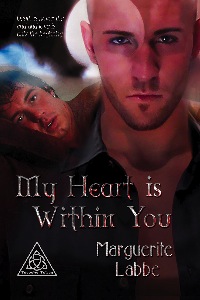
I said that I would buy a book from Rainbow eBooks on August 3rd and I did just that. The book that I chose was a vampire novel because I love vampires and since this website sells gay ebooks then I get the best of both worlds, a gay vampire story. “My Heart is Within You” is part 1 in a 3 part series called the Triquetra Trilogy.

It took me a week to read it because I could only read a few chapters every day. The reason is that I had to read the e-book on my computer via Mobi pocket Reader. If I had an e-book reader then I probably would’ve finished a lot sooner but my eyes can only take staring at the computer for so long.

I loved this book. It was a bit strange at first because every chapter was through the eyes (or mind) of a different person. Well, the 2 main characters anyway. The first chapter was Kristair (the vampire) and the second chapter was Jacob. When I started reading chapter 2 I was very confused because I wasn’t expecting the book to be on Jacob. After the 3rd chapter when I was back on Kristair I knew that it was going to be this way throughout the rest of the novel and I learned to adapt.

It is listed under gay, fiction, romance, fantasy and horror. I would have to say that if you are a gay man who loves Vampires, this book is for you.

Every vampire story ever told seems to be different and this is no exception. In Twilight the vampires skin sparkles in the sunlight and they don’t burst into flame for some odd reason. In Buffy the Vampire Slayer (and Angel) the vampires burst into ash when they get killed. Just as any vampire novel, they need blood and this was no different.

The main character, Kristair, who is an ancient vampire can do things that not a lot of vampires can do such as being able to walk through walls and communicating with their vessels (Jacob) with their minds. He also passed along a lot of abilities to Jacob when he gave him his heart (hence the title) such as being able to heal right away after being bitten and evidently his blood must regenerate too because he doesn’t die from lack of blood. Jacob also has a lot more strength than most humans do because of these new abilities.

Unfortunately the end of this novel came to a grave ending with the death of Kristair. This isn’t the end of the story though, it’s just the beginning. There are 2 more books, Haunted By Your Soul is the 2nd book and Our Sacred Balance is the 3rd and final book.

I won’t be able to get the 2nd book right away because I have some other books in line but I will buy it in September. I’m doing that to give my eyes a rest from the LCD screen. I would much rather read natural paper or an e-ink screen.

The Four Fingers of Death

via The Four Fingers of Death – Hachette Book Group.

A few months ago I won a book on GetGlue called The Living Dead by George Romero and then I found out in a stage Q&A video on YouTube that he knew nothing about the book and denied it’s existence. Today I got an email from GetGlue telling me that the Hatchette Group who I apparently won the book from has offered 4 other alternatives. Here they are:

ADAM by Ted Dekker
A serial killer known only as Eve is on the loose. The victims are sixteen young women, each murdered on the night of a new moon. Special Agent Daniel Clark is determined to find Eve at any cost, even if it means he might be the next target.

THE FOUR FINGERS OF DEATH by Rick Moody
Rick Moody’s masterful new novel vividly imagines a lowdown, darkly comic future, as inspired by a drive-in movie classic.

THE CAPITOL GAME by Brian Haig
New York Times bestselling author Brian Haig returns with a riveting new thriller about a man caught between the politics of big government and the corruption of big business.

POSTCARD KILLERS by James Patterson and Liza Marklund
James Patterson teams up with #1 European bestseller Liza Marklund to create the scariest vacation thriller ever.

I think it was very cool that they offered a new book instead of making me wait for the book that they offered me a couple of months ago. Since I already knew that The Living Dead wasn’t going to happen, I gave up on waiting for it.

The only issue that I have with these 4 books is that they are not an equal alternative to “the livingdead”. They aren’t zombie books which is what I won for being the guru of a zombie book.

So because I had to choose 1 I chose The Four Fingers because it sort of has a zombie in it, the reanimated arm with the middle finger missing. That should be interesting to read about considering it is the remains of an earth human who went to Mars and the only thing that came back was his arm. I’d also like to see how the arm came back to Earth lol.

The other 3 books seemed suspenseful but I’m not into murder mysteries. The book genre I’m really into is fantasy and horror. You know, vampires, demons, zombies, magicians, wizards and witches.  If it is supernatural then I like it. Those other 3 did not seem very supernatural to me.

It is hardcover which is a bit of a bonus and I look forward to receiving it but I won’t hold my breath for too long.

Update 2011-01-27: I still have yet to receive this book

Update 2012-10-03: I STILL have yet to receive any book.  I gave up a long time ago.  In fact, I totally forgot about it until I received an email saying that 2 of the links from this post were broken.  I tried to fix them, but 1 of them isn’t even on the Hatchette Group website anymore.  The Capital Game.  Oh well.  I guess after nearly 3 years I might as well just give up ever expecting to receive any “free” gift other than stickers from GetGlue.

Night Mare

I started reading Night Mare which is the 6th book in the Xanth series on Wednesday, hoping it would only take me 2 days if I read half one day and half the next.  Unfortunately it did take me 4 days.  I read as much as I could in the time that I had allowed myself since I am a devoted viewer of certain tv shows that are on every night.  After my shows I tried reading a chapter or 2 so I was able to continue trying to meet my ridiculous quota lol.

As with all Xanth novels I loved it.  It certainly was difficult considering it was all about war.  I had to keep telling myself that it would all work out in the end and all the lost kings would not be lost forever and everyone will live happily ever after until the next book.  That did help.

The book did indeed have a happy ending, ok not that kind of happy ending… you know what I mean.

My next book is Dragon on a Pedestal, Xanth novel #7.  I’ll start it tomorrow and hope that I haven’t burned myself out on reading, or reading Xanth novels for that matter.

PSP eBook – NIMS PSP eBook Reader

I’ve finally figured out how to turn my PSP into an eBook reader.  I’ve googled the term “PSPebook reader” before with bad results.  You know, those homebrew programs.  Yeah, that’s a bad result.  I refuse to brick up my PSP just so I can see if I can read an e-book on it.

In my google search I did find a message board where they talked about a PSP e-book reader so I checked out a couple of ideas, this is one of them.

NIMS PSP Ebook Reader .  This is a little different although not quite better.  If you google the title you may find that it is found in homebrew websites.  However, it does not need a homebrewed PSP to work.  It does work with a regular PSP because all you are doing is loading an html file in your web browser as your reader then putting your e-book files in another folder.

It has a dos program that you run where it will convert PDF files.  I tried it and the output was terrible.  It wasn’t what I had hoped it would have been.  It’s supposed to convert your pdf e-book file into html files along with some other files I don’t know.  Anyway, it wasn’t good.

I did take their index file though and made my own little version of an e-book reader.  I changed the text and gave it a background so it looks snazzy but it works better.

Ok here is what you do.  File: PSP_ebook.zip This is safe, scan the file with your virus software, all it is, is a zip file with 2 files in it.  1) index.html file and 2) the background image.  You unzip the files and put them in your PSP in the folder – PSP/books.  You have to create that books folder.  I did that to make it easier to find the file in your browser so you don’t have to type too much to find it.

When you buy ebooks you might be able to buy them in pdf format, if you can here is a sweet utility that will convert them to html.  If the e-book store offers an html version then all the better for you because you won’t have to worry about converting anything.

When you have your html files of your ebooks you put them in your PSP in the folder – PSP/COMMON/books.  You will have to create that books folder.  When you open an e-book file you cannot choose to find them in the same location as the index file, they have to be in a higher folder like Common.

Now here is what you do.  Go into the browser of your PSP, type this in the address bar:

file:/PSP/books/index.html

Now bookmark that so you don’t have to type it in every time.  Now just click Browse, scroll down to /PSP/COMMON/books and click that then find the name of the book you uploaded into the PSP and click it and viola, your PSP is now an e-book reader.

There is a downside, you won’t be able to bookmark at all.  Fortunately when you leave the browser, once you go back into it you will be right back where you left off.  That is if you didn’t load an actual website which would close the point you stopped reading.  If you did that then you would have to scroll down to where you left off at.

If your PDF had chapters with links then you can use those links to find the chapter you were on.

I give the NIMS program a 1 out of 5 for the fact that the e-book I chose to convert looked terrible as an e-book in my PSP.  I give my conversion of their program a 4 out of 5 because it has no bookmarking ability but it works better than their idea.