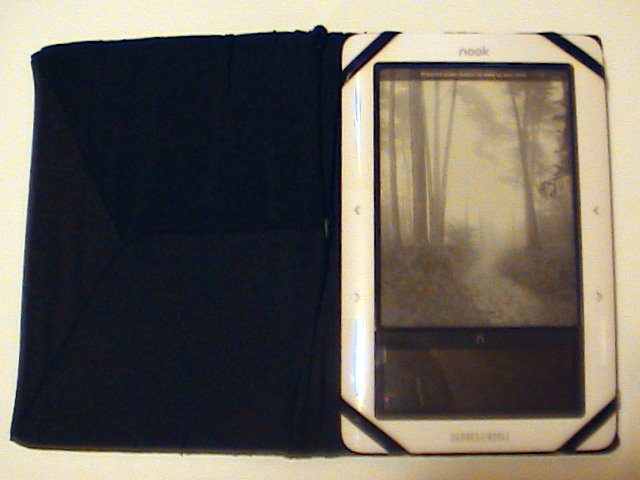
My Free Nook Cover

Last night while we were at Barnes & Noble, after I had already paid for the Nook, Darrin asked if I bought a cover for it. Well naturally I didn’t. I had only saved up just enough money to buy the Nook. I didn’t even buy the extended warranty (which I have 30 days to buy), how could I afford a cover?

We went over to the Nook display and I was looking at their prices. Some of them were $50. Some were as low as $10 but those were rubber and didn’t cover the book like a book cover. I don’t want that. We left with the thought that ‘I will eventually buy one’ in mind.

I’m sitting here looking at the Nook and thinking, I really wish I had a cover for it because now that I’m thinking about it, it starts to worry me. How can I possibly feel safe with the limited warranty that I get if I don’t have a cover to protect it if something happens.

As I’m looking at the covers available I’m noticing that they are basically just cardboard with plastic or fabric sewn onto them. I could do that. Could I do that? Yes, I think I can.

For some odd reason we still have the big box that Chips HDTV came in. The cardboard is really thick but it’s not too thick and it’s not too thin either. I want the cover to be strong enough that it won’t bend easily. I cut the top flap and the side in a book V shape. Although I needed to add another bend because this thing is a bit thick and I need it to wrap around in more of a U shape.

I have these book covers that I bought at the grocery store in 2007 when the final Harry Potter novel came out. Luckily it came out around the same time they started stocking the back to school stuff. It’s a stretchy fabric so it starts out small but stretches enough to fit a big history or science book. I bought 2 of them, black and red. They were cheap so I bought 2. They had some other colors but black and red were my favorite.

I’m really glad I’ve held onto them all these years because I was able to finally utilize one of them. I got the cardboard cut up perfectly so it’s just the right size for the Nook. I stretched the book cover over the cardboard and although it’s a bit long it fits and it kind of looks cool at how loose it is. It looks like it was on purpose that it’s so loose.

Ok, now I have a cover but how the heck is this thing supposed to really hold it? I’m gonna need some corners to hold onto it. How do I do that?

Solution. You know Rexlace? You know, the stuff that you use to make those cool key chains? Well, in 2004 (I think) I remembered how I learned how to make those key chains when I was in the cub scouts and I wanted to see if I could learn again. I bought a bunch of rexlace, even megalace. I thought the megalace would be really cool but it turns out that it was even more difficult to make that I thought.

I’ve held onto all that rexlace and megalace all these years. When I buy craft stuff, I may not use it all up right away but eventually I will have a need for it and tonight I had a need for it.

I have some black megalace and I pulled some of it out and held it up to the corner and measured how much I would need and cut 4 pieces. Ok, I have the pieces but how to sew it on? I started using a needle and thread but that was very difficult and time-consuming and the thread kept breaking.

Solution. I have a sewing awl. AHA! That works perfectly because the needle is thick enough to go through the cardboard and the handle makes pushing it through a breeze and the wax thread is thick enough that it will hold better than plain old sewing thread.

It took me awhile and since the thread was black, the megalace was black and the book cover was black, it made it very difficult to see in the poor lighting in my room. But it worked out. I have my book cover, the nook stays in place and I saved $50.

The only issue that I have is that the cover won’t stay closed so in order for it to stay closed I have to lay it down so that the weight of the Nook lies on the front cover to keep it closed. That’s fine though. I may eventually figure out a way to sew a latch on the front and back, like a buckle or something. I don’t know. I will figure it out, I always do.

So now my Nook is protected when not in use and when in use as well. I am very happy and satisfied with my handy work.

My Nook Observations and Irritations

I finally did it! I finally bought a Barnes & Noble Nook last night. It didn’t take me very long to figure out how it works but here are my observations and irritations.

I bought the first Sookie Stackhouse novel and at first I was put off by the fact that swiping the touchscreen wasn’t working but I finally got it to work and now it works all the time. Sometimes I accidentally brush my finger on it and it turns the page lol. Oops.

I was reading this morning and my dog came to me to pick her up so I sat the Nook down on my desk and when I went to pick it up again I couldn’t turn the page. It was frozen. And that happened to me a few times last night but I didn’t understand why.

My observation from that irritation is that instead of setting it down, I’m gonna have to turn it off with that metal power button on the top and watch it go into screen saver mode then lay it down. When I pick it back up it I have to push the power button again.

I was playing with the Sudoku game last night and having fun actually but sometimes if I pushed the arrow button on the touchscreen on the left side it goes to the menu and I’m forced to start a new game or go into the menu. I think that if I just go into the menu then go back to the game it might continue but that wasn’t the case for me. And when the nook shut down completely when I turned it back on, it erased my game completely forcing me to start over. HOW IRRITATING!

I probably won’t be playing it that often because of that very reason.

It seems to freeze on me a lot and at first I started to think that I may have gotten a defective one but what are the odds that I would get a defective one? I always seem to think that an electronic is defective so I return it for another and it shows the same sign of defectiveness. I don’t want to have to go all that way back to B&N just to suffer the same pains especially if that’s normal for the Nook.

When you are in your B&N library you can choose to see the little covers on the bottom to choose a book to read or you can just push the arrows up or down to choose a book. Although it’s faster to choose from the book covers. However, when you have put your own books in the Nook via the USB cable, you don’t get that option. There are no little book covers. I kind of figured that it wouldn’t show them but that’s fine, I don’t care.

I do like being able to highlight a word or type out a note but unfortunately when you go to highlight things, if it’s down at the bottom you have to push that bottom arrow and it can take forever. That’s one thing that impressed me with the Sony that you could use the stylus to tap on the word but unfortunately the touchscreen makes it hard to read books. Typing is a bit of a chore too because my fingers are so fat that I can’t even see if the letter lit up or not when I press it so I’m constantly having to look up at the e-ink to make sure I pressed it lol. I definitely need a stylus.

I also bought the King James version of the Holy Bible because you never know when you’re gonna need it. Unfortunately, navigation is a biotch. When you go to a book it shows links for all the chapters. If you want chapter 1 then perfect, it’s on that same page but if you want chapter 21 then you gotta push the arrow button twenty million times to get all the way down to 21. Ok so twenty million is an exaggeration but you know what I mean.

Once you finally get to your chapter you just have to turn the page to the verse you want.  That’s a good time to bookmark it for when you are at church and you are supposed to turn to that page.  You can just wake up the Nook and go to your bookmarks.

Highlighting is kind of a bitch if you are highlighting something at the bottom of the page because as with finding the bible chapter you have to press the arrow button many times to get to it before you can start selecting the text.  When you do go to select the text you can highlight it and you have the choice of writing a note or just hitting submit.

Unfortunately, and this is an irritation, you can’t look up your highlighted notes from the beginning of the book.  The only way you will be able to find that note is by making a bookmark.  The Nook for PC software allows you to find all your notes.  I don’t know about the Nook software for other devices such as iPhone, iPad, blackberry etc.

Despite my irritations, I’m glad that I bought it because now I can enjoy reading books that I would otherwise have to read on my computer monitor which is not very comfortable on my eyes or my back.

Dead Until Dark by Charlaine Harris

One of the books that I bought for my new Nook is the first Sookie Stackhouse novel, Dead Until Dark by Charlaine Harris.

I wasn’t going to start reading it until today because I got my Nook late at night, after 8pm, and it usually takes me awhile to read a chapter and I didn’t want to read it until I had a fresh start early in the day. However, I was impatient so I started reading it.

One of the reasons I wanted to read it is because it’s the first True Blood novel. I knew that it would be different from the actual show because people keep telling me that it has more detail and that’s almost always the case with books. A friend of mine told me that they are nothing like the show and that it has nothing to do with True Blood.

I’m a little confused why she told me that because as I was reading half of the first chapter last night, it seemed to me that not only was this exactly like True Blood but it was almost the first episode verbatim. In fact, it was the first episode verbatim.

The end of the chapter didn’t give me a cliffhanger like the first episode did, Bill fed Sookie and she got better after being beat up by the “Rat’s” and he confessed to her that he killed them. In the show, at the end of the first episode, she’s getting beat up and they go to credits then the 2nd episode he saves her.

I’m very happy that this first novel is turning out to be exactly what I had hoped it would be but I’ve only read chapter 1 so far. While I’m reading it I had the actual voices and accents of the characters from the tv show playing out each scene in my head with visuals.

When I’m reading I try to give the characters voices that I would imagine that they sound like but sometimes if I can’t imagine it then it’s just my own voice in my head. But I do try to picture the characters and their surroundings as I’m reading because it gives me a better idea of what I’m reading so I understand it better.

Sometimes I can’t and it confuses me and I tend to take longer reading but it seems that since I already have a visual from True Blood on HBO I tend to be able to read faster.

One of the things I do hate about reading and is why it took me 35 years to start reading is that books have big words and it seems like you would need a college education to understand what you are reading. What I like about these books are that I have not come across this issue. Although, now that I have a Nook if I do come across a word like that then I can look it up and get the definition then continue reading.

Obviously this is not a book review and who the hell am I to give one, I’m just saying I’m reading it now and I’m very happy with it and happy I have it on my Nook.

Los Angeles Times for Nook

One of the reasons I wanted to buy the Nook is so that I could get Darrin a subscription to the Los Angeles times. A monthly subscription is only $10 but he buys it every day despite him having a subscription to the Bakersfield Californian. He reads BOTH! If he got the Nook subscription he would save $20 per month because they cost $1 per day and $2 on Sundays.

I was looking at the customer reviews on the Barnes and Noble website for the Los Angeles Times for Nook and because customers had given them such a bad review I decided that I wouldn’t get it.

Although, now that I have my Nook I still wanted to see what it would look like so I bought todays paper for .75¢.

You know it’s not that bad. The customer reviews said that they don’t have chapters but they do. The chapters are the different sections of the newspaper like Calendar, Sports etc.

The front page shows what I assume to be the main article that you see on the front of the actual newspaper, the headliner. It’s not the entire article, it’s a picture then a title and the first paragraph from the article. If you want to read it you can push the little button on the touchscreen for opening a book, although in this case it’s opening an article or you just push the buttons on the side to turn the page for more articles which have the same deal. You aren’t forced to read any article you don’t want, just turn the page until you find the one you want to read then click it to read.

I read a few articles already and it actually reads very well. I’m glad that I was persistent enough to actually buy an article before giving up on the whole idea.

Although, Darrin still doesn’t want it. He much prefers to read the actual paper. But that’s good for the Los Angeles times because they are still making money off him with the $8 a week he spends on the paper.

And they say print is dead, HA it’s alive and kicking in this household.

Barnes and Noble Nook

Well I did it. I bought my Barnes & Noble Nook tonight. I bought the Nook WiFi for $149 because I really don’t want to pay $50 more just for the convenience of having 3G.

I haven’t read anything on it yet as I just bought it but I’ve been playing around with it while it has been charging. The guy at the store told me I should charge it for a few hours before using it but it’s charging very fast. The last time I looked it was at 88% and it’s only been plugged in for 30 minutes. I think they give you a 70% charge because it didn’t start off with 0%.

I didn’t do an “unboxing” video because how many of those are there on YouTube? Hundreds, I don’t want to add to it with more of the same exact thing.

It’s a lot heavier than I was expecting but it isn’t that heavy that it will cause an issue for me.

When I signed into my account and registered my new Nook I went to my library and was surprised to see that all the books in my account were already downloaded into the Nook. I didn’t have to wait at all.

People are always complaining about how long it takes to turn the page in these things, it’s really very fast. The time it takes to change to a new page is the same exact amount of time it takes for me to turn the page in a real book so I don’t see an issue. Also one of the videos I saw on YouTube said that when you change the font size it could take up to 20 or 30 seconds to do that because it has to refresh the entire e-book but that isn’t so with mine, it took the same amount of time as turning a page.

It finally charged to 100% so I plugged the USB cable into my hard drive and it installed the driver immediately. It even popped up the explorer window so I could add my own files to it. I have a few books that I’d like to add to it from Rainbow eBooks and it’s only taken a few seconds to do that. I’m also going to add some 4×6 images for the screen saver. Although they have to be 6×4.

I did the tutorial when it came up and it showed how to do things and one of the things I like was that when you turn the page you could either use those buttons on the right and left or you could just swipe the touchscreen with your finger. Yeah, swiping doesn’t work… That would’ve been cool but it doesn’t work for me.

I loaded a PDF file, that James Potter e-book… yeah… pdf files suck. I’m gonna have to figure out a way to convert that to .epub format so it’s readable. The only way I know how is to use calibre but that has issues but I will figure it out because I really want to read those.

It’s too late at night for me to start reading a new book so I’m going to just wait until I get up in the morning and start reading Dead Until Dark, the first Sookie Stackhouse novel.

It’s Hard to Convince People

Ever try to convince someone that some “thing” is better than the other? It’s very difficult especially when that person is adamant that they do not want this new thing. They give you an excuse and you have an answer but they give you another excuse and you have an answer for that too. They can’t win this argument lol.

I’m trying to convince Darrin that when I buy my Nook he might get some use out of it too. Not just books but newspapers and magazines as well.

He said that he likes to read a regular newspaper and magazine because he can find things easily but my response was that you can find things much quicker with a Nook. All you have to do is type in a keyword and it will find every instance of that word. Or you can highlight articles that you want to go back to and then go into your highlights to find them.

He said that he likes the feeling of a newspaper or magazine, yet he has trouble letting them go. When he buys a magazine he doesn’t like to toss them afterwards because he paid a lot of money for them. Have you seen the cost of magazines? My god, those things are expensive.

A LA Times newspaper is $1 a day and I think it’s $2+/- on Sundays. Well, if he got a subscription to the LA Times on the Nook, it’s only $10 per month. I don’t know if that includes Sundays though. I checked to see how much home delivery of the LA Times is and it’s about $11.96 per month. You are only saving $1.96 per month but that’s $23.52 per year and you are saving trees at the same time. If you were to recycle all those newspapers you probably wouldn’t get that $1.96 back for a month worth of newspapers since they are thinning out so much these days. Then again I don’t know that for sure, they pay you by weight, not by how many you have.

I was looking at the eMagazines they have and they really aren’t anything that I would be interested in and Darrin never reads what they have available. The only one that would interest me is PC Magazine but I wouldn’t read it that much. He likes magazines like Time, People and Architectural Digest. Those aren’t available for Nook. So since nothing really good is available I won’t even try to convince him on that aspect.

But the key points that I was trying to convince him on is that you can look up articles by keywords, highlighting and making notes. When you write a note in an article you can refer back to your notes and it will bring that particular article up.  He said he could look something up fast in a magazine or newspaper but I bet him anything that I could find it faster on a nook.

He goes to Church, not every Sunday but most Sundays and he loves to bring his own bible that he had his name engraved on. There is no way I can convince him with a Bible for Nook. He saw how one guys bible was weathered and falling apart and all this stuff was highlighted and he made a remark about how he couldn’t wait for his bible to be as used as his was. So that I won’t even try to convince him of. Besides, when he is at Church is the perfect time for me to read and I wouldn’t like it if he had my Nook during those times lol.

There are so many things that make me giddy about electronic toys that he could care less about. Although when I actually get it he might feel differently but until then he couldn’t care less despite how much I try to convince him.

He was impressed when I told him that you could make the text a lot bigger to make it easier to read and the fact that you could visit websites and write emails and I could even blog from the Nook.  Although I don’t know if I would want to because of the touchscreen keyboard but if we were visiting family it would be a lot easier than using the mobile dashboard with my PSP.  I could also type more than I can on the mobile version.

There are some things that you have to see for yourself and when we get to the Barnes & Noble next week he can see how cool they are with the display that they have.  He’ll realize they are a lot better than he wants to give them credit for.  He’ll see.

Amazon Kindle 2 Review – An In Depth Amazon Kindle 2 Review

Before I ordered my Amazon Kindle 2 from Amazon, I read several reviews on the web. There are literally hundreds if not thousands of people out there that have written their own personal Amazon Kindle reviews. But, there are some people that truly do not understand the magnitude of this new innovative device (it’s current stage in development and how fast it’s market is growing) and there are some that do. While reading these reviews, it becomes very clear which category people fall in. To put it in another perspective, I work at top well-known investment research firm and without getting into too many specifics, lets just say we are very bullish on AMZN stock most specifically because of the huge potential of the Amazon Kindle in the emerging e-reader market. No I am not trying to give investment advice (that’s not part my job) but I just want to make it very clear how excited I am about the product and its market in general. My Amazon Kindle 2 review is no holds barred and no BULL SHIP!

In the few weeks prior to the announcement of the Amazon Kindle 2, you couldn’t turn a virtual corner without stumbling over alleged rumors and “insider” information regarding the new innovative device. Last month, having played with my boss’s Amazon Kindle 2 at the office, I found myself in absolute lust for this gadget. Before I decided to order the Amazon Kindle 2 as Christmas gift for myself;), I reviewed, reviewed, and REVIEWED several Amazon Kindle 2 websites, articles, and reviews. This is my personal take / response to some of those good andbad reviews. The following is my Amazon Kindle 2 review:

1. The Amazon Kindle 2 is not cheap! First of all, let’s not beat around the bush; I certainly wanted to know how much I was in for right away! As is the case for all other new / “hot” items, such as the iPhone 3Gs, Playstation 3, and LCD tv’s, (which were originally priced for hundreds more than the Amazon Kindle 2), the Kindle 2 is priced a little on the high-end. Currently, the Amazon Kindle 2 is on sale for $259. Recently, Amazon’s CEO announced an “amazing” deal for Kindle 1 owners at a press conference: If they ordered within the next 24 hours, they could jump to the front of the line for pre-orders! There wasn’t even a discount offered, just the “privilege” of spending $259 quicker than non-existing Amazon Kindle 1 owners. What a great deal huh?? Later though, I considered some other factors. Relative to purchasing new books and best sellers on a regular basis, the Amazon Kindle 2 really isn’t that expensive. Have you looked at the price of new books lately?? They can be pretty expensive themselves, especially at big name stores like Barnes and Noble and Borders. Even online at Amazon, you’ll pay $50 for the Twilight Saga Collection and $15 for Sarah Palin’s new book (not that I would want to read her book anyway but you get the point!). Most e-books are $9.99 or less. Over the long-run, especially if you are enthusiastic book reader like me, the Amazon Kindle 2 is essential.

2. What does it look like? According to its creators, the key design objective was to make the Amazon Kindle 2 “disappear”. When we read a good book, we tend to get so immersed into the author’s world / story that the physical book eventually disappears. The thinking behind the Kindle was to make sure we are still able to get lost in the reading, not the technology. The Kindle 2 has a black-and-white 6″ screen and uses electronic-ink display technology: the screen displays ink particles electronically to make it look like real books, newspapers, magazines, etc. As aforementioned, I sit on my butt all day in an office in front of a computer screen. During my lunch breaks and when I get home, the LAST thing I want to do is look at a computer screen!! However, I actually found that the Kindle’s screen has a pretty soothing contrast and looks like a real page. Also, the Kindle 2 does not use backlighting which eliminates glares for daytime / outdoor reading.

The Kindle also has six adjustable font sizes and utilizes 16 shades of gray. So when your eyes get tired or if you have a book that has small font, you can make it bigger on the Kindle screen. Compared to the first version, the Amazon Kindle 2 is MUCH slimmer and more refined. It is about 1/3 of an inch in profile and weighs 10.2 ounces. That’s about the size of most magazines, only this gadget can hold up to 1,500 books in one!

3. The five-way joy stick: piece of crap?? The five-way navigation is like those pencil-eraser mice that come on laptops (in between the keys); I found it pretty intuitive but not that convenient. Sometimes I felt that the joystick was a little slow, but not a deal breaker. Something like a track ball on the Blackberry would probably be a better solution. A touch screen would be ideal! There are also page-turning buttons located on both sides and the screen can be rotated from portrait to landscape views for optimal comfort.

4. “Monotasking Hardware”. I read several reviews and comments on how the Amazon Kindle 2 only does ONE thing. First of all, let me just say that the Amazon Kindle 2 is NOT, I repeat NOTan iPhone!! Most cameras do only “one” thing, but like the Kindle, they do one thing very well. The bottom line about my digital camera is that as long as it takes high-quality pictures, I am perfectly content. The 2 GB storage capability is not for storing all kinds of content (music, maps, FaceBook, Shazam, Table Tennis, Air Hockey, ESPN, etc.), it is for storing 1,500 BOOKS! If you’re in the market for an innovative reading device, why would you want to have all the aforesaid distractions? When you finish a book, you simply download another one and begin again. In short, the Amazon Kindle 2 may have one main function (reading) but you can still download a number of different formats in addition to books, like newspapers, magazines, and blogs.

5. Simplicity. The Amazon Kindle 2 is simple and easy to use. It is wireless and ready to go right out of the box; there are no cables, no setup, and no software to install. During the Amazon Kindle 2 review presentation, Amazon’s CEO showed a video where one lucky tester said he never read manuals (who does??), and he had no trouble at all using the Amazon Kindle 2 right away. The design team also claims to have improved the battery life on the Kindle 2. The Kindle 2 will stay charged for a week with wireless on and two weeks with wireless off (varies based on usage). However, I did see a few comments on the web that since both the Kindle 1 and 2 have long battery lives, the difference is hardly noticeable.

6. Is the Kindle too fragile? This is a touchy subject for some people. I read several reviews regarding the durability of the Amazon Kindle 2 and I found that it really depends on the person using it. Some people go through their day worrying that their Kindle may be too flimsy and that it might break in their bags. Of course nothing can replace the durability of a good-old-fashioned book; you can drop it, throw it, use it as a door stopper, and it will still be readable. Personally, I didn’t think it is that flimsy at all. I guess I can see how jamming a few books and magazines into your bag, and even the laptop (all together with the Kindle) can cause apprehension. However, when I have my Amazon Kindle 2, I’ll be carrying half as many magazines and books. Sounds like the problem is solved to me! On a side note, just like cell phones and laptops, there are also various Kindle cases you can buy separately for more protection.

7. The Amazon Kindle 2 can read to you! True. With the Text-to-Speech feature, the Amazon Kindle 2 can read English books, newspapers, magazines, and blogs out loud while you’re on the train, as you’re walking, or when it gets too dark outside, at which point you can turn on the audio and listen to the rest of the chapter. You can even have the Kindle read to you while you drive from point A to point B. You can also choose between a male and female voice that can be sped up or slowed down according to your preference. Every now and then however, the reader will mispronounce items and may give wacky emphasis. For example, the reader has been known to pronounce “dash” instead of pausing at one; still not a deal breaker though.

8. eBooks are the FUTURE. The Amazon Kindle 2 review presentation featured testimonials from Kindle 2 users, saying that they read now more than ever. I concur with this because I often leave books, magazines, and articles behind because I simply can’t carry all of them. Plus, I only read what I have on hand… doesn’t everyone?? The Amazon Kindle 2, with its instant access to over 390,000 books, will surely expand my reading horizons as well as yours as popularity continues to intensify.

As is the case with all new cutting-edge technology, the Amazon Kindle 2 has several negatives, but in my opinion, the benefits far prevail. Amazon has nailed the eBook market and will probably dominate for several years. I expect that we’ll be reading eBooks while we rocket to Mars in 2100. Whether you join the bandwagon now or later, it is inevitable. Send me a message at my website if you have any questions regarding my Amazon Kindle 2 review.

Lately, I’ve been working on a website that reviews the Amazon Kindle 2 even further: reviewing Amazon’s main e-reader competitors, emerging issues / stories, Kindle accessories, and user tips!CLICK HERE to get the latest scoop / reviews on the Amazon Kindle 2 and related products.

Author: Aaron Espinoza
Article Source: EzineArticles.com
Low-volume PCB Assembly

Barnes & Noble Nook Vs Amazon Kindle – Which is the Best eReader?

Amazon’s Kindle eReader has been the leader, at least in the US, of the eReader market since the introduction of Kindle 1 in 2007. Sony has held 2nd place with 30 – 35% of the market.

But now there is a new kid on the block. In October ’09 Barnes & Noble announced its nook eReader that sold out on pre-order within a few weeks.

The nook is revolutionary primarily in its looks. It will be hard for your average gadget boy/girl to see one and not develop a serious craving. But does this mean that the nook is the best thing since the printing press for bookish boys and girls?

Let’s look at and compare some of the features of the nook and the Kindle eReaders.

For the most part reading on the nook’s e-ink screen is very similar to reading on the Kindle eReader’s e-ink screen. Both eRreaders use the same or a very similar reading screen.

What is dramatically different, and what in fact attracts many people to the nook eReader is the small LCD touchscreen under the e-ink screen. On the Kindle, navigation is accomplished by using the chicklet keyboard and the 5-way controller. The controls for the nook are mostly accessed through using the LCD touchscreen.

The nook’s touchscreen is also used for browsing books in your library or for selecting books to purchase from Barnes & Noble over the wireless connection. A virtual keyboard is available on the LCD screen for typing.

The nook’s color LCD screen looks really nice and would seem to be a very desirable feature, but there are problems with the software implementation, which we will get to in a bit.

Connectivity:

The Kindle eReader has a 3G wireless connection through AT&T for the Kindle Global, and Sprint for the Kindle 2. Amazon calls its wireless service “Whispernet”. Using Whispernet, you can usually purchase and download a book within a minute or less. You also can use the somewhat clunky but functional browser to access the internet, check email, research your reading on Wikipedia, even access another online ebook store than Amazon to purchase and download books, etc. With Kindle Global you also have access to the Kindle store in many other countries besides the US, though you have to pay a surcharge for downloading a book on the Whispernet outside of the US.

The nook eReader has both a WiFi connection and a 3G AT&T wireless connection. The difference is that the nook’s connection can only be used for purchasing and downloading books from Barnes & Noble. No internet, no Wikipedia, you cannot use it to connect to another online ebook store and purchase books.

The nook’s WiFi connection will be useful if you carry your nook eReader into a B&N store as it will download coupons and special offers to your eReader. You can also use the WiFi to browse ebooks while in a B&N store, but you can only read each book for a maximum of one hour in a 24-hour period. These in-store features are not yet fully implemented so we don’t yet know how useful they will prove to be.

Sharing

One of the nook eReader’s features that received a lot of press coverage is the ability to lend your ebooks to friends. Unfortunately, this feature is not as great as first thought. For one thing, publishers must opt in to let their books be loaned. Some have said they will not allow this. Also there are restrictions: you can only loan a particular book once ever, and only for 14 days. While a book is loaned out you cannot access it on your own nook.

The Kindle does not at this time allow this type of lending. However, you can share ebooks with up to 6 (it can vary by title) Kindles that are registered to the same account. This works well for multi-Kindle families. It is even possible to set up a reading club with your Kindle owning friends if you feel comfortable sharing a single credit card to register your Kindle eReaders to.

Other Features

One nice feature that the nook eReader has is a user replaceable battery. The Kindle’s battery is hardwired in and therefore will need to be sent back to Amazon for replacement ($60). Amazon says that even after 500 charges (ten years or so) these batteries will still hold 80% charge, so this may not be an issue for most people.

The nook also accepts an SD card for additional storage. The Kindle only has its internal storage, but that is enough to hold around 1,500 books, so this may also not be an issue for you.

A nook feature that has not received any official Barnes & Noble acknowledgment is the ability to borrow ebooks from your local library if they use Overdrive’s digital distribution service. To do this you need to install Adobe Digital Editions on your computer and use that to sideload the ebook onto your nook. You can borrow an ebook from the library for 14 days, after which it will be automatically deleted. You cannot renew library ebook checkouts. To find out how useful this feature will be in your case you should check your local library website. Most libraries do not have a large catalogue of ebooks yet. Kindle does not support borrowing library ebooks at this time

The eBook Stores

No matter how attractive the hardware, an eReader’s primary purpose is to read books. Since today’s eReaders tend to be tied to proprietary DRM formats for current titles, you want to make sure that the hardware that you choose is backed up by the best ebook store(s).

The nook’s primary ebook supplier for DRM’ed ebooks will of course be Barnes & Noble. You can also purchase DRM’ed ebooks from other online sellers that support Adobe Digital Editions. The nook is also compatible with non DRM’ed EPUB and PDF format.

With Kindle you will purchase most if not all of your DRM’ed titles from Amazon’s Kindle store. Kindle also uses a few other formats for non-DRM’ed ebooks such as MOBI and PDF. Public domain ebooks are also available for the Kindle eReaders. I suspect that at some point Amazon will also have to allow EPUB compatibility for the Kindle, as there is increasing pressure for this.

Many people disparage the Kindle’s being locked into Amazon’s ebook store for DRM’ed ebooks. While this may be true to a large extent, the fact is that the Kindle store has more titles available than B&N and all of the online stores selling ADE format ebooks put together. In most cases Amazon’s prices are less as well, although Barnes & Noble has been trying to match their prices.

If you primarily read books on the current best sellers lists you will likely be able to find these available in most formats at similar prices. The more off the beaten path your reading is however, the more likely you are to find what you are looking for at the Kindle store.

So Which eReader is Best – Kindle or nook?

If the nook eReader had not been rushed to market to make the holiday 2009 season, and if Barnes & Noble had waited until they had the software ready and the bugs worked out, then I would say that the nook would have been a very close second choice and maybe even equal to the Kindle.

In fact, the nook at present is crippled by its faulty release version software and unless B&N gets it fixed in a timely fashion the nook will be leapfrogged by the next Kindle release. Barnes & Noble has said that they are working around the clock to update the software and fix the current nook problems; and to their credit they have released a couple of updates as of this writing. However there are still lots of bugs and the nook is slower than the Kindle, which will be distracting when you are trying to immerse yourself in that next great book. In its present state the LCD screen does not play well with the e-ink screen and can be very frustrating to use.

Also, I prefer the Kindle store. My reading tastes may be different than yours however, so I would suggest you make a list of books you want to read and make a price and availability comparison between the Kindle store and B&N’s offerings. Higher ebook prices can add up pretty quickly.

The Kindle’s ability to connect to the internet and Wikipedia, etc. is also not to be underestimated.

I think that the nook eReader has the potential to be a great eReader and possibly equal the Kindle, but it is something of a gamble buying one now and waiting to see if Barnes & Noble can get all of the glitches fixed in time and also match the Kindle store’s offerings.

For more ebook reader news and reviews, please visit me at  http://www.findebookreaders.com

Author: Richard Greenlee
Article Source: EzineArticles.com
Provided by: WordPress plugin Guest Blogger

Pubit!

I was just browsing the Nook page on the Barnes and Noble website when I came across this new thing called “pubit!”. It’s a thing that will allow regular people like me write their own book and upload all the files to the pubit page and they will sell your book and give you a cut of the money.

You know it’s funny because I am in the process of writing an autobiography. I’m not famous enough to write one but people have been telling me for years that I should write a book with all the stories I have told about my messed up childhood. So why not write a book?

Well, I’ve been thinking, if I do write this book I have no guarantee that a publisher will publish it for me. I could spend the next 6 months to 2 years writing just to be turned down. So, this gives me a chance to do it and make it happen.

So I signed up. It’s not available yet but they say to sign up and I will be told when they start-up so I can begin uploading all my files. Well, I still have awhile. I’m only in the middle of my first chapter and who knows how long this book will end up being with all the stories that I have to tell.

One thing I’m going to do is read an actual autobiography from someone who is famous to give me more of an idea of what I should put in it and what I should leave out. Oh there are a ton of things that I’m not going to reveal only because it’s very sexual. Yeah that part of my life will be left out lol.

Amplify’d from www.barnesandnoble.com

See more at www.barnesandnoble.com

See this Amp at http://amplify.com/u/96cc

James Potter

I accidentally found a book that J.K. Rowling wrote that was a prequel to the Harry Potter novels, it was called Chapter Zero. Apparently it was a prank that J.K. Rowling was playing on her fans but that’s quite alright, I can take a joke.

While searching for the name James Potter I stumbled onto this website which is a fan novel series called James Potter by G. Norman Lippert. These novels are based on J.K. Rowling’s novels but they are not hers. It’s a fan fiction novel(s) based on the wizarding world of Harry Potter.

So far there are 3 novels. James Potter and the Hall of Elders’ CrossingJames Potter and the Curse of the Gatekeeper and James Potter and the Vault of Destinies.

I have not read them yet because they are in pdf format and I really don’t like reading pdf files on the computer screen. It’s too hard on my eyes and I’d much rather be able to lay down on my bed and read it. When I get my Nook I’ll be able to read them on that.

I am really excited about reading these books because 1 I’m a huge fan and 2 they are FREE! Who doesn’t like free?

The one thing about these books for those who are unaware, James Potter is not Harry’s father, he’s his first-born son.

“Your Father’s Battle is Over. Your’ Begins.”

If you are interested, they did some videos for YouTube to advertise the first book. You can click the big picture for “James Potter and the Hall of Elders’ Crossing the FULL FILM” I have to warn you though, the acting isn’t A grade but it’s something. And it’s not a full 90 minute or 3 hour movie, it’s 5 videos all under 10 minutes. Watching it will give you an idea of what’s coming in the story.

As soon as I get my Nook I will add it to it after I convert the pdf files to epub format then I will add it to my very long list of books to read. I’ll push it up near the top because I am very interested in it.