Terraria mobile issues resolved

Screenshot_2015-05-04-23-30-38

I’m doing a little happy dance right now because I was finally… sorry, that was weak. I was FINALLY able to get Terraria to play on my refurbished Samsung Galaxy S3, and I will tell you how I did it.

The Issue was that when it installed the game, it only installed the obb file in the Android/obb folder. It didn’t install any of the actual game files in the Android/data folder. Every time I tried to load the game, it would give me this message (below). Try as I might I could not figure it out. I didn’t realize the data folder was lacking files. The OBB data file is fine, it installed all 52mb of that, it’s just that it didn’t install the rest of the data.

Screenshot_2015-05-02-19-33-57

The Fix. My phone came preinstalled with a file viewer called My Files, but that isn’t enough. I have an app from Cheetah Mobile called File Manager and that did the job. So what I did was I zipped the data files from my Nook and uploaded the zip file to my OneDrive so that I could download it on my phone. I downloaded it and then went into the File Manager and located the zip file in my downloads folder. I copied the zip file and pasted it in the Android/Data folder, but it kept saying 0kb. So it was showing a file name, but it wouldn’t allow actual data to be inserted in that folder. I then figured out (after days mind you) that in the File Manager there is a option in the settings for Root Settings (Advanced Users). Root Explorer and Change System Folders. Check both of those.

Screenshot_2015-05-04-23-27-29

Once those two options were checked, I copied the zip file again and it actually unzipped all of the files, but for some odd reason all of the files were 0kb. So then I decided to paste the zip file in the SD Card Android/Data folder and it pasted with all 52mb in tact. I then unzipped it and it actually unzipped. I find that to be amazing because before it wouldn’t unzip onto the SD card. So once I had all the files in the SD card, I went into the folder with the files and I tapped (and held) on one file to select it, then I clicked that little icon at the top with 4 squares and it selected the entire directory, then I clicked copy at the bottom of the screen and went in the Device to the Android/Data/com.and.games505.TerrariaPaid folder and hit paste and all of the files actually pasted with actual file sizes too.

To prove it worked, the Terraria image at the top is the actual screen shot from my phone. I cannot believe I finally got it to work. Now, I’m worried about if/when there is an update in the Google Play store and it installs all the files again, but this time it deletes all the files, or it makes them all 0kb lol. If that happens, I still have it on my Nook, so I’ll just be able to copy it over.

I really hope this has helped someone out there who has been just as frustrated as I have been. If you have a second Android device that it actually works on, you will be fine.

Minecraft Pocket Edition Issues with Samsung Galaxy S3

Screenshot_2015-04-30-11-51-40

I blogged the other day that I was having issues with Minecraft PE on my new phone, but I didn’t really get into what the problem was. I bought Minecraft PE on the Google Play Store about a month or 2 ago for $6.99. I have a app called Google Rewards that reward me in actual cash for surveys, and I don’t even have to wait a month for it, I can use the money to buy Android apps.

So I bought Minecraft PE specifically for when I’m not home and I am having Minecraft withdrawals. The struggle is real people LMAO!!! Of course when I bought it, I intended to only play it on my Nook HD+ because of the bigger screen, but as it turns out, I don’t bring my Nook to doctor’s appointments. My old HTC One V smart phone was a bit small, but it installed just fine and I have played it there with no issues. When I bought my Samsung Galaxy S3, no bueno! It installs, as you can see from the image above, but it just won’t play. Let me show you the screens that I get screen by screen.

Screenshot_2015-04-30-11-51-40Screenshot_2015-04-30-11-51-56

Screenshot_2015-04-30-11-52-03Screenshot_2015-04-30-11-52-11

So the first screen you see is the main screen when you first load the game. You click the Play button, obviously. The next screen is supposed to show your worlds, if you have created any, so you click the world, but since it’s new to my phone, I haven’t created any yet. So I click NEW at the top right corner and you get the 3rd image above. You can choose survival or creative, you can hit advanced and go through that menu. Once you hit Create World, you should see a world come up on the screen and you rush to get your shelter in order to stay alive, but instead, I’m seeing the 4th image. No bueno!

Screenshot_2015-04-30-12-06-45Screenshot_2015-04-30-12-09-31I’ve researched the issue, and one admin of a website mentions files, or the lack of rather. I went into the file manager and sure enough, in every folder where I see the word Minecraft, there are zero files. And there are several folders too, but what’s odd is that it shows that there are 44.38mb total, 14.69mb is application and 29.50mb is SD card app. Then of course the data, which should show a number since I tried creating a world, or 20.

I know people are going to suggest that I clear the cache and clear this and clear that, but trust me, I have done that. I have even copied the files from my Nook and even copied the worlds from my Nook to the Samsung phone and they still don’t work.

Just so you know, this is NOT a huge issue or deal. I can still play this game on my Nook HD+ and my PlayStation 4, but it’s just the idea that something won’t install that bothers me. I can’t upload images to Twitter and I’m not sweating over that one, it’s just that I don’t have an addiction to tweeting pictures as much as I have an addiction to games.

I am still researching every time I remember to and I’m hoping I can find out how to fix it because it does bother me that I bought something that I can’t even use on ALL of my Android devices.

Once again I am using a Samsung Galaxy S3 with Snapdragon. It’s a refurbished phone that I bought for $99 from Choxi (formerly Nomorerack). I’ve tried all the tricks I’ve seen in the message boards like uninstalling it and reinstalling it, unmounting the SD card, installing, then remounting the SD card. I’ve tried rebooting, then installing. Nothing works because it is not installing specific files, remember the empty folder? Every folder that has the word Minecraft in the title is empty on the device and on the SD card.

If anyone has answers, please comment. In the meantime, I’ll continue with Minecraft for PS4.

Epoch-Man Arrived

IMAG0896

I received my Epoch-Man several days ago, but I didn’t blog about it immediately because, well, I mean who really cares? Am I right? Do you? Probably not.

When I bought my Epoch-Man, I blogged that I bought it from eBay really inexpensive for only $10 plus shipping from Japan. The reason it was only $10 was because it has scratches and some of the LCD graphics don’t show up when you are playing the game. Well, I discovered that if you press the front and back near the Alarm button, those graphics will appear. I noticed that the case isn’t completely closed from the bottom, and I thought perhaps if I unscrewed it and took it apart, perhaps I might relieve something that is stuck inside the game that is causing this to happen, but as I was trying to open the case, the sides started to crack, old plastic and all, so I aborted the mission and put the screws back in. It’s not like I’m going to be playing the game or anything.

Anyway, it’s wonderful to actually have it in my hands and to be able to look at it once again after all these years, even though my original Epoch-Man game did not say Pak Pak man on the top in red letters, it said Epoch-Man. That doesn’t matter, it’s the same thing, so who cares.

I am very happy that I was able to get it and at such a great price. I will keep it in the plastic to keep it from getting dirty and dusty and to prevent more scratches.

Minecraft Pyramid

pyramid

I recently blogged about finding my old home in Minecraft. Well, near that old home is a NPC village which is right next to a desert. I wanted to build something that you would normally see in a desert, but wasn’t quite sure what to build. I heard someone say something about Egypt on TV, so that brought my mind to Pyramids, so that’s what I started to build.

This pyramid has taken at least more than a week to build. There was a sand mountain in the spot where I built my pyramid that I basically had to demolish while I was building the pyramid around it. The reason I chose this location was because it was right next to the NPC village, and I could use the material from the mountain to build the pyramid. First you have to turn 4 blocks of sand into 1 block of sandstone. To make the stairs you need 6 blocks of sandstone just to make 4 stairs. There is a specific block that I like to use called Chiseled sandstone that has a Minecraft logo on it. I use that for the floors and for the middle of the walls throughout the pyramid. I use the chiseled sandstone for the floors because the regular sandstone looks dirty on the bottom, and you don’t want a dirty ceiling. The chiseled sandstone is clean on the top and bottom.

Pyramid walls

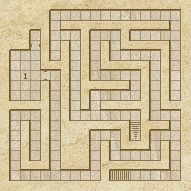
I found a video on YouTube of a person who was showing off a game generated pyramid (from a mod) where it has mazes and a treasure room at the top, so that gives me an idea of what to put inside the pyramid. At first I wasn’t sure what I was going to do with it, because I’m not that creative, but I found a website that generates random labyrinth’s, so I will use that as a guide for each floor. The labyrinth’s have long hallways and rooms and dead ends. It’s similar to a maze, but with rooms.

mazeHere is just an example of how the labyrinth will look. I think it will be very neat to build. It would be neat if people could actually come visit my pyramid and walk through my labyrinth. I’m sure it will take me another month just to gather the material (mining sand and sandstone) to build the labyrinth on all 6 floors. There will be 7 floors, but the very top floor will most likely be a treasure room since it’s going to be very small. Of course, that requires treasure, of which I am very limited lol. I guess I could add some emeralds, gold and iron ingots and some food. I don’t really have anyone who will visit my world who would benefit from it.

Well, hopefully it won’t take me too much longer to finish this. This is the biggest building project I’ve worked on so far. I’ve actually gotten kind of bored with it because it’s such a huge job. I find myself falling asleep while my fingers are pressing the button to mine the sand and end up going deeper than I wanted.

I will post a video when I am finished with the labyrinth, but in the meantime, here is a video I made a couple of days ago before I finished the outside of the pyramid.

Lego Games

lego games

When I was a child, I LOVED playing with Lego’s. I mean, sure I loved playing with a lot of my toys like Light Bright and my Construction Set, but Lego’s were what I really had fun with. I would literally be in my bedroom playing with them for hours. You know when you don’t hear a child, something’s up, they are doing something bad, but I wasn’t because I was building houses or robots or whatever.

I don’t recall when it happened, but my mother took away some of my toys to make room for newer, more mature toys, and the Lego bricks all disappeared. Sad but true Sad smile .

I have loved video games since I was 12. When I was 37 and bought my PSP, I found out they had Lego games. I was sure they were too juvenile for my age, then again I was a grown ass man age 37 playing video games, so I’m pretty sure I was the juvenile one lol. I actually loved it more than words can say. That first game by the way was Lego Star Wars II. I bought more as they released them.

This Christmas I got a PlayStation 4 and naturally I wanted to buy some Lego games. I was a bit disappointed that they were $60 though. Lego The Hobbit was $50, and I had $10 credit with my new PlayStation and I had $20 in PayPal, so all I needed was $20 which came out of my bank account. I just had to buy it. Lego Marvel Super Heroes was only $23.89 on Amazon and The Lego Movie Videogame was only $24 during a recent flash sale in the PlayStation store.

There is a huge difference in the games design from the PSP and the PS4 Lego games. For example, in the PSP Lego games, you find yourself in a specific building, or in the Star Wars case a ship and the Harry Potter games you are at the school. The PS4 Lego games are different in the sense that when you finish your level, you are back on the trail onto the next spot. I’ve played the Lego Hobbit game all the way to the end where you see the credits, as if it were the ending to a movie, but I’m only 23% into the game. I’ve finished story mode, I just haven’t gotten to any of the free play modes. I am not quite sure how to go into free play though. I did figure out how to get back to Hobbiton since they have a spot where you can fly with an eagle to wherever it is on the map that you want to go, but I still don’t know how to get to the free play mode. I have only finished the first level in the other two Lego games.

There are more Lego games I want to buy, like Lego Batman, but I will wait for that to either drop in price or be on flash sale. Lego Jurassic Park is coming this summer, and that will also be $60, so I will most likely have to wait for that to be on flash sale or $20 – $25 on Amazon.

I really love the Lego games, unfortunately I can’t afford to pay $60 for a game that I may or may not play and/or finish. I say that because I still haven’t finished any of my PSP Lego games. I’m at 98% with the first Lego Star Wars game, and around 95-98% with the first Lego Indiana Jones game. I haven’t finished them because it’s hard lol. Most of the other ones aren’t even close to 60% because I may have gotten bored with them or because I was more interested in something else.

IMAG0876IMAG0877IMAG0878

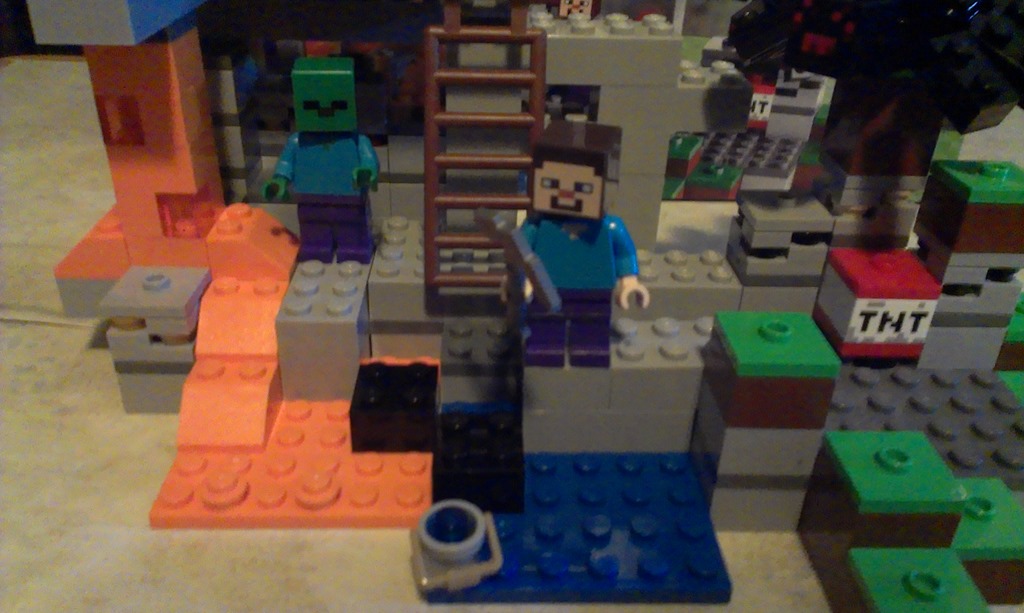
Lego Video games are cool, but I really wanted some actual Lego bricks, so I bought this little Minecraft Lego set. It’s very small and it sits on top of my PlayStation 4 on my desk. I really like how it looks and I would love to buy more sets, the only issue is that they cost a lot of money. This set was only $20 and I was very shocked at how expensive it was, but when I saw how expensive the other sets were, I was like screw that noise, I don’t want them THAT bad lol. I saw many Lego Star Wars sets for $10 each, and those would be cool to buy, except where do I have room for them? No where, that’s where. My bedroom is already bordering on hoarding. I think the Lego video games are the best use of space for me lol.

Lego’s are awesome.

Update: I finally figured out the PS4 Lego Games. You have to travel via eagle, which I figured that out already, but then you have to go on the map and click on the white bricks and the doors and the people and anything else that is on the map, then have it lead you to that spot. Once you get the white bricks, they disappear from the map. Once you get to a person and buy that person, I know that sounds funny, then that person disappears from the map. Once you get to a door and go into freeplay mode, well, that door doesn’t disappear because you have to have many chances to get in there, even if you’ve gotten everything out of there in story and freeplay mode. I went back to the very first thing in the story, but in freeplay mode and I missed something, so I have to go back. I did manage to get about 4 white bricks while I was back in Hobbiton. When I finished that freeplay, they teleported me back to the end of the game at the mountain where you find Smaug. It just sucks they didn’t add the 3rd movie to the game.

I’m sure it will take me a long time to finish the game. It took me about 6 months to get where I am in the Lego Star Wars II game on my PSP. That’s what I love about these games, they keep you playing for a long time, unlike some games that are so easy that you end up finishing them in no time.

Minecraft PlayStation 4 Maps

maps small

I got my PlayStation 4 in December, the week before Christmas. Why a week before? We like to exchange gifts earlier than most “normal” people because, well, that’s just how we roll lol. Actually, my partner decided on a whim that he would take me to go buy it and he didn’t know what I wanted, so he told me he was getting it. After a few “Oh no we can’t afford it” he said shut up, you’re getting it lol.

Ok, so back to the subject at hand. I got Minecraft and played for maybe a few weeks on this little beach. I didn’t know I could even play the game in peaceful mode, and I died so many times trying to escape the skeletons with their damn bows and arrows. I even got blown up by creepers every now and then. I worked so hard to build the house that I built with what little experience I had with the game, and I think I did pretty good. I felt like exploring, so I would leave my home with my bed and I would sleep when the sun went down. I would explore, return home, explore, return home etc. You get the idea. I saw something so neat that I had to explore it, and I went a bit too far and got turned around and couldn’t find home. I wandered around in a complete panic for literally a couple of hours trying to find it, but never found it, so I decided to find a new spot that I liked and built a new home.

Over the last couple of months I went exploring knowing I could find my way back home with maps, but I never did find my home. I’ve even gone as far as going into creative mode to fly around looking for my original home, but that didn’t work. Finally tonight I thought, let’s try it again, so I did, and I finally found it. Check out the picture below which is a close up of the giant map at the top. The star on the top is where I live now, and the bottom star is where my original home. It’s funny because they are so close to each other too. That white part at the bottom is where I got turned around. It was the first snow I saw and it really messed me up lol.

maps

So now that I have finally found my original home, I can relax. I mean, I was relaxed before. I honestly don’t care about the house or any of the crap in the chests and in the house, it’s just the idea that I lost something that I worked so hard to build that I couldn’t find, and it bothered me to no end. I have it back now and I can use it to my advantage. I don’t know how, but I will think of something lol. For one there is a NPC village near that house in the sandy area at the bottom left of the map. That’s actually where I saw the giant carved out mountain on the bottom of the map which lead me to the snow that got me lost.

Speaking of NPC village… during my mapping, I found many NPC villages and pyramids. I have not yet marked them on the maps, but perhaps I shall go back into creative mode so I can fly to those locations and then add some icons to the map lol. I still have the bottom 2 rows to map out, so perhaps I will do that in time.

Anyway, so I am overly excited and thanks for reading.

450px-KelethinUpdate: I actually think I have an idea for how I will “take advantage” of the situation of the old house. I used to play a PC game called EverQuest, and that game had a forest called Kelethin in the Greater Faydark. Kelethin is a city in the trees, and that old house has a jungle, so perhaps I will start building platforms in the trees that already stand, and add houses to them. Not that it will make any difference to anyone since I’m the only one playing, but it would be nice to remake something to remind me of the good old days in EverQuest.

Minecraft Pocket Edition

MinecraftPocketEdition

What is the easiest way to spot an addiction? When you have Minecraft on your PlayStation 4, then you also buy Minecraft for your tablet/cell phone. Yeah… I have an addiction. I have it bad.

imageMinecraft Pocket Edition was $6.99 on Google Play, but I actually got it for free. Let me explain that. I have an app on my tablet called Google Opinion Rewards and they send me a survey every couple or few days that may pay .10 cents or $1 and change. The surveys are mostly 1 question, but occasionally they will have 3 or 4 questions and I may get more or less. I’ve been using this app since November and I’ve earned enough that I was able to buy Minecraft PE.

Today I decided that I would go to YouTube and check out some videos. I have to be honest, I only watched 1 video, and it was enough to sell me on the idea. The guy was talking about how easy it was to play on his Apple iPad Mini. He kept having issues where the game was running out of memory, and he couldn’t believe it because he had an iPad Mini. You’d think those would have more memory to play a simple game. Then again, it was from June 2014, so the game was probably buggy.

So I bought the game with my Google Opinion Rewards and I installed it on my Nook HD+ because it has more space and it’s faster than my Android cell phone. The game is very awesome and it does take a few minutes to really get the hang of since I’m so used to the PlayStation 4 controller, and not at all familiar with using 2 fingers (left thumb and right index) to control my character. I’m getting the hang of it.

The first thing I noticed was sunflowers. My PS4 version doesn’t have sunflowers! I would love sunflowers lol. It also has some other materials that my game doesn’t have, such as Diorite, Andesite, Poppy, Blue Orchid, Allium, Azure bluet, Tulip, Oxeye Daisy, Lilac, Rose Bush, Peony and one thing I noticed in the crafting table was Stonecutter. I’m not sure what the Diorite or Andesite is, but it sure would be nice if I did lol. I cheated, I had to look on the Minecraft Pocket Edition wikipedia page to get those names because I forgot them and their spelling. I saw the poppy, tulip and sunflower, but not the rest of the flowers I listed. I only saw them in the wiki page. I mentioned them because again, I’ve never seen those in the PS4 version.

I created a world and used an app called Minebot to mine 100 blocks down. Little did I know he would leave all of the good stuff free floating in the air in their original space. How the hell am I going to get all of that stuff? I didn’t think of that, so I’m not going to use that app anymore. I deleted that world because when I play the game, I want it to be completely honest. I want to earn every iron ore, gold, diamond, and whatever else I would normally have to mine for months to get. It’s less fun if I already have everything available to me. It means more to me if I have to work hard for my rewards. That’s why I don’t like to play in creative mode. What’s the point if I start off with a mansion with all the diamonds I could ever ask for? It ruins the fun.

I will most likely not play this game that often and save all the fun for when I’m either on the stationary bike or bored in a waiting room. Who am I kidding? I’ll probably be on this just as much if not more than I am on the PS4. I am that addicted lol.

This game doesn’t seem to have the option to share video and/or pictures on YouTube, Facebook or Twitter, so I guess if I really want to take a screenshot, I’ll have to do it the old fashioned way and manually share it through social media. I probably won’t do that too often, but never saw never right?

PlayStation 4 Games and Accessories

ps4 games

I’ve only had my PlayStation 4 since the week before Christmas, but I already have a pretty amazing selection of games to choose from. A lot of those games were free, but some were bought during a flash sale, so I can’t say this has cost me a fortune.

Apotheon, First Light, Injustice, The Swapper and Transistor were all free thanks to the PlayStation Plus membership. They give away free games every month,. DC Universe is free and it is free to play. Flower, Lego The Hobbit, Lego Marvel’s Super Heroes and Lego Movie videogame, Terraria, The Walking Dead 1 and 2 were all from sales and Little Big Planet 3 was from a flash sale. It’s normally $60, but I bought it for $24. Destiny came for free with my new PS4.

I’ve had a lot of fun with my PlayStation 4 since I got it. In fact, it’s very rare for me to have it turned off, unless I’m watching my regular shows, and even then sometimes I just let the DVR record them because I’m too addicted to a game. I spent 2 hours watching the DVR today, only because I knew I had to catch up because the next episode of that particular show is coming soon lol.

IMAG0875Earlier this week I got the keyboard that mounts to my game controller and that has been very awesome to have. I have it on there permanently because it just makes sense to. I was afraid that it would be too bulky for me to play games with, but it doesn’t interfere at all. I tried using it while it was not attached, and it does work, but I need it to be attached to the game controller because I use those buttons in addition to the keyboard buttons, so it makes little sense to use them separately. It does look a bit strange though, but you get used to it after awhile I’m sure.


PlayStation 4 cameraI also got my new PlayStation 4 camera today. That’s pretty neat. It sits on top of my TV. I bought it specifically for exercising. I plan on buying the dance games because I know that dancing is cardio exercise, and I need all the cardio exercise that I can get. Although, those games are way too expensive to buy in the PlayStation store directly, so I will buy them on the discs on Amazon, eventually lol. I know they are at least half the price on Amazon. I refuse to spend $60 on a game. The camera is $60 at Target, but I only paid $40 on Amazon and got free shipping.

So my collection of games and accessories is getting big considering I didn’t spend too much money. I’m sure it will just continue to grow over time. Keep an eye on new games that I will be adding to my PlayStation 4 page on my website. PlayStation Plus gives us free games every month on the first Tuesday. They also have great flash sales, so perhaps the next $60 game I buy will end up being $24 again just like Little Big Planet 3. I’m also looking forward to EverQuest Next and King’s Quest this year.

If you are a PlayStation gamer, please find me and friend me. I’m Xanapus.

PlayStation 4 Bluetooth Keyboard

IMAG0875

Have you ever had to type using a analog stick? Probably not, well, I can tell you right now that it can take a long time to type something with a PlayStation 4 game controller. They do have suggestions at the top of the screen, so if I hit the t, possible matches will come up like the, them, those, etc. It may remember some words I have used in the past, or the first suggestion at the top just may be the thing I was going to say. Unfortunately, that’s not always the case, and I usually end up having to type it out one letter at a time. Frustrating when you are in a rush.

I went to Amazon looking for a bluetooth keyboard for a PS4 system, and lo and behold I found this PS4 keyboard for $13 and change with $4 shipping. Not bad eh? It paired up quickly and snaps right on the controller and it doesn’t hinder game play at all.

A few days ago I was playing Destiny, and a couple of kids who were also playing in the same area that I was invited me to join their group. They both had microphones, but I didn’t, so my only option was to message the one who invited me with text to tell him “Sorry no mic.” What actually came out was Sl. I was trying to rush and accidentally made a mistake and accidentally sent it to him. Ugh! I tried cancelling it, but I knew it went to him because he said “What does Sl mean? He said Sl to me.” It literally took me another 5 minutes or so until I was able to send a new message telling him that I meant to say no mic.

There are times when I want to share a screenshot or a video on Facebook or YouTube and I have to type words to describe the image or video and it can take a lot of time. Today when I got the new keyboard, I was able to share an image and type a sentence out in just a few seconds. Viola! Easy!

I don’t know if I can use this keyboard off the PS4 controller, but I’m sure I can since it uses bluetooth to connect with my PS4. I won’t need to have this permanently attached to my game controller, but it doesn’t hurt to keep it on. It also shuts off after a few minutes of inactivity.

This was a pretty good investment, and I am sure it will save me a ton of time and embarrassment.

Destiny on PS4

Destiny_Warlock

I’ve always hated first person shooter games, mainly because I didn’t like the thought that I would be murdering people. I know, it’s just a game, they aren’t real people and no one is actually getting hurt, but it has just always turned me off. It would be one thing if I am killing goblins, orcs, trolls, ogres or anything else that is not real, but humans, that’s just weird to me.

When I got my PS4 for Christmas, I had the choice of 4 games. Destiny, NBA 2K15, Far Cry 4 or Little Big Planet 3. I didn’t want Destiny or Far Cry 4 because those were shooter games. I didn’t want NBA 2K15 because I’m not big on sports. I wanted to choose Little Big Planet 3, but I have the first LBP on my PSP and I honestly didn’t think it would be any better than the version I already have, which I am stuck on, and that fact is what made me decide to not choose LBP. I decided I would watch YouTube gameplay videos for Destiny and Far Cry 3. I also asked some Gaymers on Facebook and most of them told me Destiny. It was ultimately my decision, but I chose Destiny because I loved that it’s science fiction and that I would be flying around in space. It also helped that the bad guys are evil aliens instead of humans.

I tried playing it, but I became too addicted to Minecraft. When that addiction started to subside, I decided to go back to Destiny, and now look at me, I’m level 23. I’m actually level 20, but the light from my new level 20 gear brought me up to level 23. I guess there is a level cap at 20, but your light can take you to level 32 thanks to the Dark Below expansion, which I paid $20 extra for.

So far I’ve been to the Cosmodrome in Russia, which seems to be the only place on Earth you can go to, I’ve been to the Moon and to Venus. I spent a lot of my time doing missions in the Cosmodrome rather than doing story because I kept dying in story at my lower level, so I waited until I had better gear and weapons.

I have not gone into the PVP areas because I don’t do well when I have to play with others, especially if I have to chat with people. The last bad experience I had with that was when I was playing Lord of the Rings Online, and this experience actually turned me off playing with other people. I was doing a group raid on this one place and the quest involved lighting these pillars on fire, so I said “Flame on?” meaning should we light the fires? Someone said something like I don’t do that faggot shit or something to that effect, and it really pissed me off. That was in text too. If I have to have my headphones on with a mic and have to deal with people with my voice, I don’t know how much I may overreact and end up giving myself such a horrible reputation with other players. You never know if they may spread rumors about me in the message boards or whatever. I wouldn’t mind joining a clan, which is like a guild, if that clan has gay people or is a gay clan. At least I know they aren’t going to do that to me.

Well, this game has turned out to be a lot of fun, and I’m glad I chose it.