Nook HD+ from Barnes & Noble

Nook HD+ from Barnes & Noble

I love my Nook HD+.  I have been having so much fun with it since I got it for Christmas, actually the week before Christmas.  Yeah we don’t conform to the traditions of opening your presents on Christmas day, or even on birthdays.  We open presents the day we get them.  Screw tradition lol.

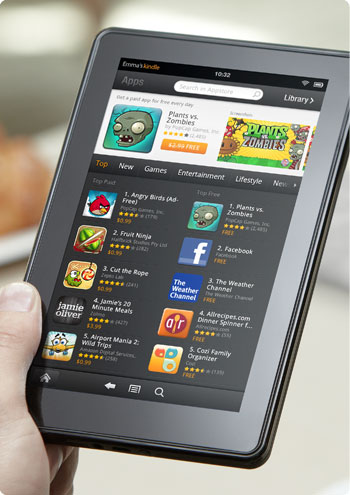
My Nook HD+ has a 9” screen, so it’s bigger than the Nook HD in the sense that it has 2 more inches, but I’m telling you that because there are certain apps that work with 7 inches, but don’t work with 9 inches.  Like The Sims FreePlay and Viggle for example.  The Sims FreePlay is downloadable, you just can’t play it because you get this warning when you try.
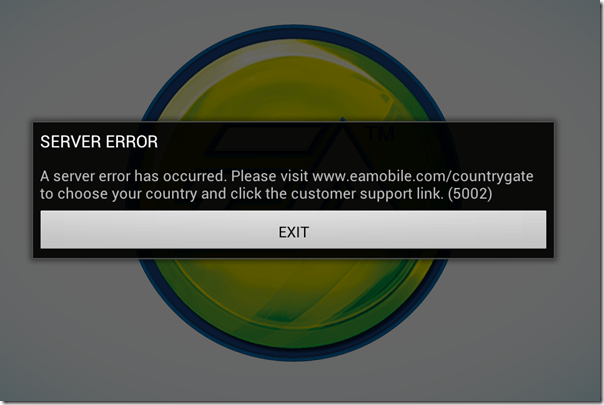
The Sims FreePlay

I am not sure if The Sims FreePlay will even work with a Nook HD 7” tablet.  I know it works with the Kindle Fire because I’ve seen people taking pictures and video of it on that device.  I’m pretty sure it was the 7”, so if it runs on the Kindle Fire 7”, then it probably runs on the Nook HD 7”.  If so or not, please let me know.

Viggle on the other hand doesn’t even show up in the Google Play Store, so they don’t even give you the option.  I know it works on 7” tablets because I installed it on my partner’s tablet to see if I could do trivia when trivia wasn’t giving me any points with my phone.  It installed and looked great too, but the trivia was not working on his tablet any better than it was on my phone.  Although, just because it installed on his tablet doesn’t mean I know if it will install on a Nook HD 7” tablet.

Facebook isn’t great on the Nook HD+ when you use the app.  Using the browser is so much better because you get the full website that you get on the computer, but the only problem I have is when I use another tab to visit another website, or even if I use an app, like if I go check my email, when I come back to the Facebook tab, it goes straight to the mobile version.  If I wanted to use Facebook mobile, I would just use the Facebook app.

The Twitter app that comes with the Nook HD+ from the Nook store isn’t updated, so it’s better to let Google Play update it.  It’s easy to use and if you have multiple twitter accounts, you can switch back and forth very easily.  It’s actually better on the Nook HD+ than it is on my phone.  When I am using @xanapus on my phone, then try to switch over to another twitter name, for some odd reason it switches me back to @xanapus.  It doesn’t do that on my Nook HD+.

I didn’t like the Google+ app on my phone and I rarely ever use it on my computer, but it is great on the Nook HD+.  That’s one of the social media websites that I wanted to start using more often.  It has a much better look than Facebook does in my opinion.  Google+ doesn’t force you to look at ads or suggested posts.

One annoying thing that I noticed is that when I am in my library, I scroll down to My Files and see there are 564 files.  How the heck am I supposed to weed through all of those files to get to the ebooks I have downloaded?  Well, I discovered that if you click the words My Files, it brings up a new window which shows folders.  They are in the Download folder.  I have 6 ebooks that I downloaded from the EverQuest Next website that are fiction based books based on EverQuest the game, but they are all in PDF format.  Ebooks that I’ve downloaded in ePub format will show up with my Nook books, but the PDF files don’t.  I did download an app called File Manager HD which allowed me to create a new folder in my download folder so I could keep the EQN ebooks in there to keep that folder more organized.

PicsArt Photo Studio is a good app that I use on my phone to add stickers and frames and text to my pictures, but it’s such a small screen that sometimes it’s difficult to see what I’m doing.  My Nook HD+ doesn’t have a camera, but I can use Google Drive to retrieve my files.  What I really like most is that I can write on the screen with this.  I can do that on my phone, but it’s too small.

Happy New Year 2014

Okay, so my handwriting isn’t the best, it’s even worse on paper lol.

ChromecastSome useful apps that come with the Nook HD+ include Netflix and Hulu+ and if you have a Google Chromecast, you can watch them on your TV.  You don’t even need to have the Google Chromecast app installed to use it.  I know this because I bought it for my partner and I couldn’t get it to connect to his tablet.  I connected it with my CR-48 aka Chromebook, then was able to connect it to his tablet.  I don’t have the app installed on my Nook HD+ or my phone, but the icon is visible on YouTube, Netflix and Hulu+.  I guess any Android or Apple device that is connected to my network will have that ability.

Of course, other good uses for the Nook HD+ is actually reading a book lol.  You aren’t limited to Nook books either, you can read your Kindle books plus your Google Play books.  In fact, if there is a service that sells ebooks, you can read the books you bought from them, including pdf files and ebooks.  Some writers only publish their ebook with Amazon KDP Select because they get more advertising, and if they chose KDP Select, they can only publish with Amazon for 3 months.  That’s why it’s good to use the Kindle on my Nook, because some ebooks aren’t available on the Nook.

One of the features that I do like is the Nook app “Your Highlights and Notes.”  If you do a lot of highlighting and like to add notes, this is a good thing.  It had all the highlights from the Nook for PC when I got it, but it didn’t show any text.  When I add new highlights, it shows the page number and the first couple of sentences that I highlighted, and if I left a note, it shows my note.  That makes it so much easier to find every highlight and every note on every ebook you own whether it’s downloaded or in the cloud.  Highlighting and leaving notes on my Nook WiFi was so difficult and as soon as I started reading another ebook, all of the highlights and notes disappeared, which was very frustrating.

There is also a Nook app called “Your Lookups” that shows you every word you ever had to find the definition for.  That does come in handy if you ever want to find that specific word again.  The list of words you looked up are on the left, and the word, the book you found it in, the page and the date and time you looked it up are on the right along with the definition of the word.  WOW!  Now you have a record of the date and time you learned a new word.

Anyway, these are some of my thoughts on the Nook HD+.  I like it a lot and I will get a ton of use out of it.  I still have my Nook WiFi and I don’t think I will use it as often for reading ebooks, but if the occasion ever arises when I go outside to read, I will be able to use it.

My recent reward for watching TV

viggle

I bought my HTC One V for Virgin Mobile from Amazon in December and one of the first apps I installed was Viggle because a friend uses it and posted the advertisement on Facebook.  I’m always looking for ways to get rewarded for doing things, like surveys, blogging, tweeting, installing and playing games and whatever else I can do.  Well, Viggle gives you rewards just for watching TV and doing trivia during your shows.

Since December I have been racking up points.  I had over 63,000 points and I was saving it for a really expensive reward, the Kindle Fire or Kindle Fire HD.  The problem is, those are 482,500 and 560,000 points and well, let’s just say if it has taken me 6 months to get 63,000 points, I’m sure it will take me a long time to get the Kindle, so I figured I might as well pick a reward of lesser value for now.  I decided to get the Barnes & Noble $25 gift card for 50,000 points.  This is what I bought.

the hunger games trilogy

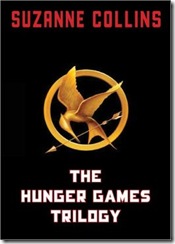
The Hunger Games Trilogy by Suzanne Collins for $24.49.  I waited for a few days after getting my Viggle reward because I wasn’t positive what I wanted.  I can’t recall exactly what made my decide on The Hunger Games, but I suddenly remembered that I wanted to read the books before seeing the movie.

I wanted to buy many ebooks at .99 cents each because then I could buy 25 ebooks, but I think getting this trilogy was better.  It’s not the quantity of the ebooks that matter because chances are I’m not going to have time for all 25 ebooks, and who knows if I will feel like I made a huge mistake because the books aren’t quality writing.  So I’m glad I bought this trilogy rather than a bunch of books I may not like.  Although I’m not positive I will like the hunger games, but I know it is something that I am interested in so I’m sure I will.

I have started reading the first book, but haven’t gotten too far because I just didn’t feel like reading.  I have to be in the mood to be able to really get into it, and I don’t want my lack of interest in reading to make me like or hate a book.  I will wait until I’m ready to start reading it.  I actually have a few other books that I’m halfway through that I would like to finish before starting another story.

Anyway, I just wanted to say that Viggle is a good app and this is proof that you do actually get rewarded for watching TV.

H.T. Night’s 8-Book Vampire Box Set

HT Night

I don’t normally review books or advertise for books unless I really like a book or I know the author personally or on social network websites, but I wanted to type something up for this particular series.

H.T. Night’s 8-Book Vampire Box Set is available for the Kindle and the Nook for only .99 cents as of this posting.  Amazon estimates it at 886 pages and Barnes & Noble doesn’t actually say how many pages it has.  I bought it on my Nook and it actually shows 1921 pages.  What’s interesting, or odd, is that when I turn the page, it will flip about 2 or 3 pages.  I am on page 98 and I hit the button or swipe the screen to flip the page and it will say 100.  I find that unusual behavior for my Nook because sometimes I might be on the same page number for 4 pages.  So my guess is that this author formatted the ebook very strangely to make it show 1921 pages and flip 2 pages at a time.  I formatted mine to be sheet of paper size 8.5 x 11.  This author probably formatted it at 4×6, I’m guessing.

I read some of the reviews on both Amazon and Barnes & Noble and have seen so much negativity towards not just the author, but their writing style.  I agree it’s a bit odd, but everyone has their own writing style and their own skill level, so I am not going to grade this writer because he had the gumption to write a long fiction novel which is more than I can say.  Actually, more than just 1 fiction novel because I see he has many more stories on Amazon.  I do recognize what some of the reviewers are saying though because I see a lot of strange things as well, but I don’t hate it.  I look at it as like one of those B movies that you see from the 60’s and 70’s and even some of the B movies on SyFy like Sharktopus lol.  I don’t mean to sound harsh towards the author, but that’s what it’s like to me.

I haven’t read the entire series, but I’m sure it won’t take very long to read.  It says in the title that it is 8 books, but when you are in the ebook you only see 4 titles.  In the contents you see that it is sectioned into 8 parts. I click Go to > Chapter > eBookVersion1_split_1 (that is actually how it shows up on the contents), it goes right to page 256 which is the 2nd page of chapter 32 of the first book.  I don’t get why this author didn’t format the ebook chapters properly.  It is split up into 8 sections, but there are actually only 4 ebooks in there.  That’s rather misleading.

Here is a picture of my Nook showing the cover page with the title that says it is 8 books on the top and saying it’s only “FOUR NOVELS” with each book title under “VAMPIRES & WEREWOLVES.”  That is not 8 books, so where are the other 4?  You can’t sell a 8-book box set with only 4 books and call it 8 books and section it off into 8 sections.  People aren’t stupid.

ht night nook

Well, it’s only .99 cents on both the Kindle and the Nook so with all of it’s formatting and misleading title saying it’s 8 books when it’s really only 4, it is still an interesting story and it’s easy to read. I actually don’t (or haven’t yet) seen any flaws in the story or seen any misspellings or any other errors so I’m not listening to the negative reviews about that. The formatting doesn’t really bother me as much as it would seem. Perhaps the 8 books were combined so 2 books are actually 1 book, who knows. I find the writing style easy to read and the book is hard to put down. I said it was like a B movie, but it’s really not that bad. I’d say it’s a higher caliber.

I am updating my status on this series on Goodreads and here they are.  I have to admit that I do like this book.  Although, I have noticed a few errors here and there, but it is still good.

Goodreads Updates:

6/29 – “This isn’t going to take very long to read. It’s actually quite addicting. I love that I can actually understand everything and I don’t need to use the dictionary on my Nook lol.”

7/2 – “I just finished the first book Moon Dance and I absolutely loved it. It was so easy to read and very difficult to put down. Now I am about to start the 2nd of 4 books in this “8” book series (LOL) called Vampire Moon. (25% done)”

It’s Totally Tuesday at Rainbow eBooks

I love Tuesdays because that means that Rainbow eBooks has a sale on all of their new releases, which mine happens to be, new that is and on sale at 15% off.  It’s regularly $6.99, but you can buy it today for only $5.94.

Diary of a Gay Nerd by Michel McDonald – Totally Tuesdays at Rainbow eBooks

If you have a Nook just download the epub file, if you have a Kindle, download the mobi file.  If you don’t have an ebook reader then you can download any file, mobi, epub or pdf.  They all work with PC if you have a PC ebook reader.

New Kindle, Kindle Touch and Kindle Fire

Amazon has done it again.  They have surprised us with new Kindle devices.  Not just a replacement for their popular Kindle but 3 all new Kindles.

First there is the Kindle Fire (pic) which is more like a tablet and some people are calling it an iPad killer.  It’s battery lasts 8 hours which is pretty good for what it is.

The specs on the Kindle Fire is an 80GB hard drive for storing 80 apps plus either 10 movies, 800 songs or 6,000 books.  The Kindle Fire has a 7″ vibrant color IPS screen with multi-touch.

I had never heard of an IPS screen before so I had to look it up and I found some information on it on a message board.  This is what someone said it was.

IPS – in-plane switching…. the liquid crystals are aligned horizontally instead of on an angle. This process greatly increases vertical viewing angles. When coupled with the high brightness and contrast of the glaretype displays, color reproduction is almost perfect. Basically it becomes a 1/4″ professional graphics flat CRT monitor…. which is why the display is primarily for those in professional graphics.

Very interesting.

The new Amazon Kindle Fire is $199 and it is a WiFi only device.

The 2nd new Kindle is a smaller priced Kindle with no keyboard.  It is WiFi only, has a 6″ e-ink Pearl screen, 2GB storage for 1,400 ebooks and its battery life is 1 month.

The new $79 kindle doesn’t have a keyboard but it does have a 5-way controller at the bottom for navigating.  With no keyboard I would imagine that it would be a bit difficult to type in the name of a book you are looking for.

I noticed that it allows you to check out books from the library.  That was something that will make it easier on most people who can’t afford to buy a lot of books but don’t want to have to go to the library for their books.  I looked that feature up when I was researching last year and our library is not in the system so it wouldn’t work for me unless they changed that in the last year.

They still have their Kindle with the keyboard which they have 2 versions of, a WiFi only version for $99 and a WiFi and 3G version for $139.  That went way down in price since last year when it was $150 for WiFi only and $200 for 3G.

Now they have a new Kindle touch in WiFi only for $99 and WiFi and 3G for $149.

The battery for both the Kindle Keyboard and Kindle Touch lasts for 2 months which is longer than before.

All of the kindles use the Amazon cloud storage for unlimited amazon content and they have an experimental browser with the exception of the Kindle Fire which uses their new Amazon Silk cloud-accelerated browser.

I remember when e-book readers first came out.  I had just made my new years resolution to start reading in December of 2005.  I saw the Sony reader at Costco for about $500 or $550, I can’t remember.  I do remember thinking how cool it was that they were coming out with them but I didn’t think they would catch on at that price.

I started reading the Harry Potter books in January 2006 and got hooked on reading.  I was reading all the time after that.

Then Amazon came out with their first e-book reader which if I can remember was almost as high as the Sony Reader but eventually they lowered the price down to $250.  Then B&N came out with their Nook after a little controversy with another e-book reader with a color screen at the bottom.  The nook was also $250.

The war was on and every year these 2 rivals have come out with a new version of their e-book reader with a lower price.

The Kindle has dropped from a high $500 all the way down to a low $80.  I never thought the day would come and it has.  Before you know it there will be another Kindle or Nook on the market that will be as low as $50 and every kid will have one in school with their textbooks on them.

My question is, what ever happened to the Sony reader touch?  That was a good one and it’s a shame it’s gone because you could write on the screen.  I seriously thought that the Sony Reader would evolve into the Sony Trapper Keeper where you would have all of your textbooks in there as well as a notebook with tabs for each subject and you could write your notes on a notepaper screen and have it turn it into typed text that you could save.  That would’ve been awesome.

Maybe that will be the next evolution for the Kindle or the Nook, or who knows, maybe even both.  It would be much easier for a child to carry to school rather than a heavy 20lb backpack filled with books and a notebook or a laptop.

Reading is a Skill

I talked to one of my aunts on Facebook this morning about reading a book that she and my uncle had recommended to me in 2006.  I read the first book in the series of a million books (over-exaggerated number) and it was probably the most difficult book I had ever read.  I told her, and I was just saying this as an excuse, that reading is like a skill.  I can’t read an advanced book as a beginner, or even intermediate reader.

This was her response:

“Your analysis of reading being a skill is spot on, as the Brits say. It IS a skill, and the only way to improve that skill is to continually work at it.”

So, it is no longer just an excuse and the only way for me to be able to read those books is to continue to read my immature vampire ebooks to continue to grow as a reader lol.

I actually love reading.  I would say that I used the Harry Potter books as my beginners books and have grown from there.  The Harry Potter books were amazing because they didn’t have big words that I had never even heard in daily use, they were simple words that every person knows.

I think buying the Nook was the best investment towards my “skill” for many reasons like the built-in dictionary for example.  If I don’t know a word I can look it up by either typing the word into the Nook or by placing the cursor next to a word.  This helps me learn what those words mean for the next time I see it.  It helps me grow as a reader.

Eventually I will get to those Belgariad books.  Like I said, I read the first book and as difficult as it was to read, it was just as difficult to put it down because it was such a good story.  I’ve only read the first story and I can’t wait to get to the next one because I have to know what happens next.

I’m in the intermediate stage because the vampire books that I have read have had some pretty big words and I’ve been able to understand without having to look the words up so I feel like I’m almost there.

I was going to make up my own skill level names but I wanted some examples like beginner, intermediate, pro etc. but I actually found that there is in fact a reading level Wiki site.  Wikibooks: Reading Levels.

So here we have pre-reader which are the children’s book which I actually did read as a child until I was maybe 5.  Then there is beginner which is almost similar to children’s books but maybe without pictures.  I’m pretty sure Harry Potter is in this category.  Intermediate which are books that most adults can comprehend and I do believe that the vampire books that I read are intermediate.

The final 2 categories are advanced and professional.  I’m pretty sure the Lord of the Rings and Belgariad are both in the advanced category.  They may be somewhere in between though, I’m not quite sure.

It will take me a bit of time to get to the advanced stage because I haven’t really read that many books but I’m working on it.  The more I read the better I get at it and as long as I continue to read what I’m reading I’m pretty sure I will get up in the ranks and join the rest of the adults my age lol.

Cirque Du Freak eBooks

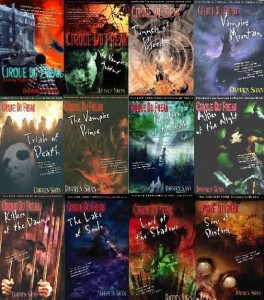
I started reading the Darren Shan “Cirque Du Freak” books late last year on Halloween.  I figured it was time to start a new series of books and since it was Halloween, I wanted it to be some type of horror book and I remembered the Vampire’s Assistant started out as a book so I figured it would be a good read.

The ebooks were only a couple bucks and I figured it would be a very good purchase.  I didn’t read them all right away, I read the first 3 then stopped to pursue other books.  But last month I decided that I wanted to finish them once and for all.

These books are small so it doesn’t take more than a day to read them, less for everyone else who doesn’t have dyslexia.  So it usually takes me 2 days at a couple of hours each day to read them.

The first book was very similar to the movie but with a lot more detail.  At first I thought the movie was all 12 books rolled into a movie but after the first book I realized it wasn’t the case because decades have passed in the book where only maybe months have passed in the movie.  But the movie also didn’t get to the war of the scars either and with Darren and Mr. Crepsley leaving the Cirque at the end of the movie, or rather the next day when Darren has had his rest, it leaves it open for more story which I doubt they will ever tell in movie format.

The books were very good to read and since I had most of the characters in my head from watching the movie I was able to visualize most of them for when I read the books.

I hate giving away plots or story lines because I don’t want to spoil anything for anyone but if you do get a chance to read these please do.

I said the books were a couple bucks, well, unfortunately they raised the price.  eBooks are now $7.99 each but you can buy the actual books in a set for only $35 on Amazon.  That’s only a couple bucks per book and it is so worth it.  I don’t know if $8 is worth it since they are so small though.  I’m just glad I bought the whole series when I did lol.

If you weren’t aware of the story, here is a synopsis from the Cirque du Freak Wiki:

The Vampire’s Assistant is a fantasy-adventure based on the first three books of the series, The Saga of Darren Shan, by author Darren Shan about a teenager who unknowingly breaks a 200-year-old truce between two warring factions of vampires. Pulled into a fantastic life of misunderstood sideshow freaks and grotesque creatures of the night, one teen will vanish from the safety of a boring existence and fulfill his destiny in a place drawn from nightmares.

16-year-old Darren was like most kids in his suburban neighborhood. He hung out with his best friend Steve, got decent grades, and usually stayed out of trouble. But when he and Steve stumble upon a traveling freak show, things begin to change inside Darren. That’s the exact moment when a vampire named Larten Crepsley turns him into something bloodthirsty.

Newly undead, he joins the Cirque du Freak, a touring sideshow filled with monstrous creatures from a snakeboy and a Wolf Man to a bearded lady and a gigantic ringmaster. As Darren flexes his newfound powers in this dark world, he becomes a treasured pawn between the vampires and their deadlier counterparts. And while trying to survive, one boy will struggle to keep their brewing war from devouring what’s left of his humanity.

There is a lot more about the story than in this synopsis but you can find out about it by reading the books.  This synopsis says the movie is based on the first 3 books but that isn’t exactly the truth because so much happens in the 2nd and 3rd book that you never even see in the movie.  If I were you I would just get the books and find out for yourself.  I double dare you.

Nook Replacement

I picked up my Nook on July 1st to load up a new e-book to read and was a bit confused when I noticed what looked like a little bug icon on the screen.  When I turned it on it started doing a system update so I thought that maybe that wasn’t a bug but an asterisk (*) but when the update completed, the symbol was still there.  Then I thought, maybe I have a virus and for some odd reason its showing me a bug icon (LOL).  I haven’t been online with it besides going to the Nook store.  How could I get a virus?

I looked at it in the light and turn it so I can see the screen and I see a little dot on the outside.  What I think happened is that something fell on the screen and that little black bug like image is e-ink from the tiny crack in the screen.  I don’t remember anything falling on it.  I usually have it sitting upright and not laying down on the desk so I don’t know when that happened.  I did have it laying down a few times but it’s not always laying down.

So I called Barnes & Noble and they have me do some troubleshooting.  She has me turn it off then hold the button for 20 seconds 6 times (twice).  Nothing happens because it’s not a software error, it’s a crack on the screen.  I told her that and I guess they have to troubleshoot just to make sure.

Thank goodness I have a warranty to cover this because if I didn’t I’d be stuck with this forever.  She told me that since it is covered on my warranty I’ll get a replacement and it will only take 3 days to get to me.  But before they send a replacement to me they have to take my credit card number so that if they don’t get my Nook within 14 days they can charge my credit card for the replacement.

That was July 1st which was a Friday.  They didn’t actually ship the Nook until July 5th and I’m supposed to get it today, July 8th.  So there is 1 week, I have 1 more week to get my Nook to them.

I had to unregister my Nook and remove everything I put on it like screen saver and wallpaper images and ebooks.  While I was at it I deleted my contacts (which I never did anything with) and all of my shelves.  It’s all ready to go.  It’s basically all in the box waiting to go out.

My replacement Nook finally arrived today and it wasn’t a refurbished one, it’s brand spanking new.  Wow, that was surprising.  I thought for sure it would have a few scratches on the case or there would be some blemish but it’s shiny and new.  It even smells like it just came off the production line.

I waited until now to call UPS to pick it up because I was under the impression that UPS was going to be delivering it.  They sent me a UPS tracking number to track it and it said it was in Bakersfield yesterday.  I figured, I could open the box, take the Nook out and replace it with my Nook, tape the label on it and give it back to the UPS driver to ship out.  But instead, UPS handed it over to the post office to deliver to me today.  So, that went out the window.  I had to call UPS today and they charged me $8.16 on my debit card to pick up despite the UPS label that Barnes & Noble emailed me to print with its own tracking number.  I thought for sure they were paying for the shipping.  Oh well.

I scheduled the pick up with UPS and they are going to come get it on Monday.  The cut off date is Thursday, that will be my 14th day so if they don’t get it by Thursday then I may see a charge on my checking account.  But I’m sure once they get it, they will remove the charge so I’m not worried in the least.

I am very satisfied with my Nook and with the way they handled my situation.  I highly recommend anyone interested in buying an eBook to get theirs from Barnes & Noble.  It doesn’t matter which Nook you buy, know that if anything happens, even the slightest problem, if you have bought a warranty with them you will get a new Nook.

So now I get the fun task of hooking this new Nook up to my computer with the USB cable so I can put my books back in there and my screen saver to match my skin.  Fun times…

All-New Nook – The Simple Touch Reader

Ok now I’m really jealous.  I bought the 2nd generation of the first Nook with the color display at the bottom.  Then a few months later they came out with the Nook Color and now this.

This Nook seems a lot cooler than my Nook because it is e-ink that is touch screen with a battery life of 2 months.  My nook is supposed to be 2 weeks but I’m lucky if I get 1 week.  This new Nook is cheaper at $139, mine was $150 and the Nook color was a whopping $250 which is also what the first gen of the original Nook was so if you waited this long then good for you, you saved a buttload of money.

Edit: The price went down to $99.  They also have the Simple Touch with GlowLight for $119.

If only I had waited a little bit longer.  But that’s ok, I’m very happy with my Nook so I will just wait for it to burn out and hopefully by that time when they come out with their 10th generation of Nook it will be $25 so I can buy as many as I need lol.

The newer features that this Nook has that mine doesn’t which really makes me jealous are the NOOK Friends and the Borrow Library Books feature.  Although, that really doesn’t affect me anyway because your local library has to have that feature available which ours doesn’t so it doesn’t matter for me anyway.  My Nook doesn’t have the Nook Friends feature which upsets my friend Sue because she is unable to add me to her friends list for some reason.  All I can do is add her as a contact but I have yet to use the lend feature anyway.

Check out the Nook Color and the newer Nook Simple Touch at the Barnes and Noble Nook website for all of the other dimensions and features.

If My Nook Has Skin, Is It Alive?

I bought a Skin for my Nook from DecalGirl.com last weekend and it came today.  When I heard the mail drop into the slot earlier I got all excited and ran to the door but the large envelope wasn’t out there so I figured I’d get it tomorrow.  Then the doorbell rang and it was the mail carrier saying she saw it in the back of the truck and drove all the way back over here to deliver it.  I’m so glad she did.

Last night I was getting antsy and went on YouTube to see how easy or difficult putting the skin on a Nook would be and the person who posted a video showed how easy it was, how it’s not sticky at all and it doesn’t stick until you press on it so I had hope that I wouldn’t screw it up.  Well, mine was sticky, so sticky that the backs touched as I was taking it off the sheet it was printed on.  I almost ripped it while trying to take the pieces apart.

Putting it on was really difficult, in fact you can see some white on the sides of the front here and there where there isn’t supposed to be white but I couldn’t help that.  It stretched in some places and there is a crease at the bottom which I’m afraid to fix out of fear that I’m going to stretch it out even more.

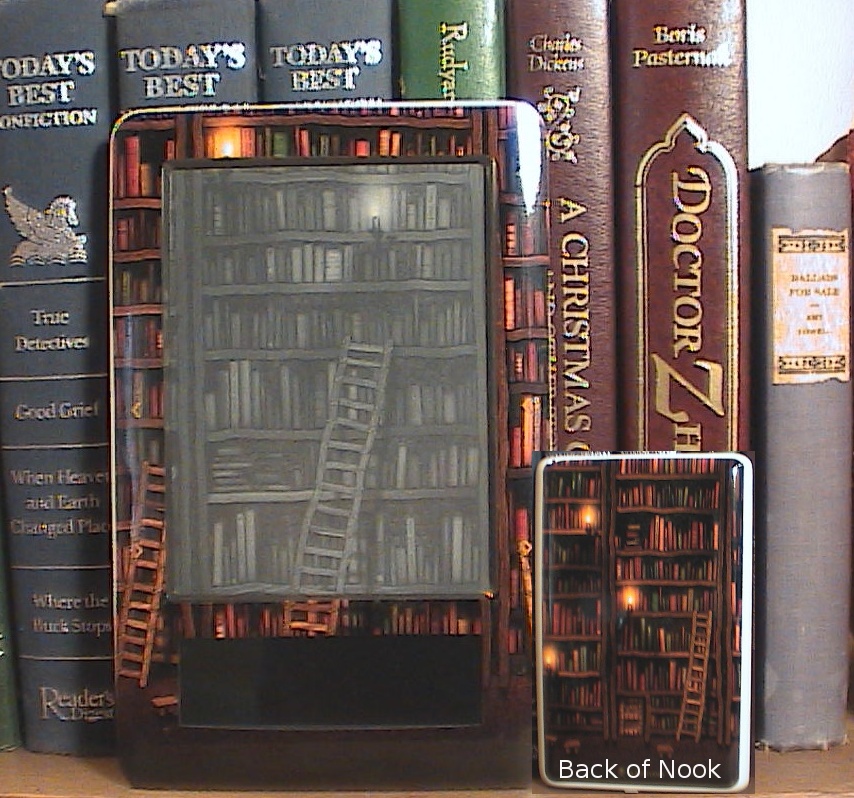
The back on the other hand was as easy as apple pie.  Maybe because it was one solid piece or maybe because the back of the Nook is less shiny and more rubbery than the front of the Nook.  I don’t know, I just know it looks so awesome.  I was getting so sick of looking at the beige color of the Nook, I wanted something that was colorful, although this is really dark it still has color in it.  And it has a library which makes it even cooler to me.  I’ve been wanting to buy this skin for my Nook for such a long time and I thought why not, just do it and I did and I’m so happy I did.

The only downside that I see is when I’m holding it I can feel the edges of the skin on the back since it doesn’t go all the way around.  I made a stand to have it sit on so I don’t have to hold it so I can use that when I’m reading at the desk.  I also made a case for it so I will put it in there when I want to hold it.  Either way it’s a win for me.

Ok now I’m off to read more of this book I’m reading before shows come on.  Later!