No PS4 for Christmas

PS4

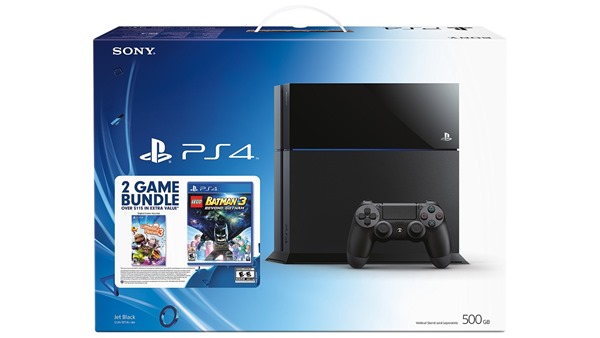
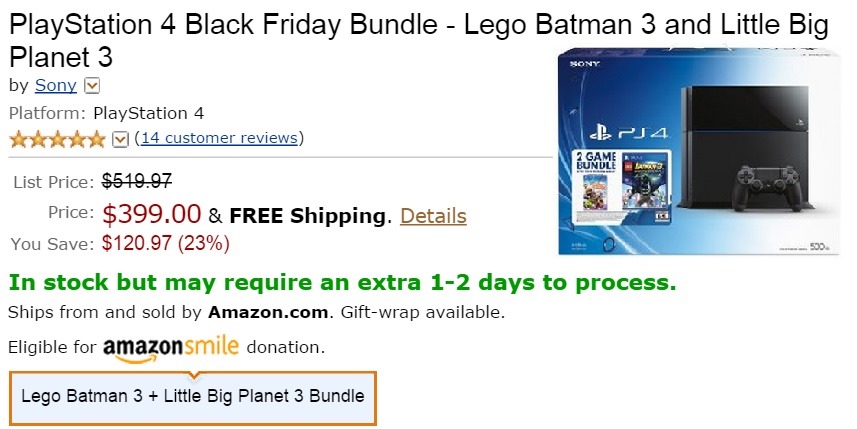
Well, I am a bit sad and disappointed tonight. My dream of getting a PlayStation 4 for Christmas has been squashed. It’s at its lowest price, $399 with FREE shipping on Amazon for Black Friday, but unfortunately, there is no money for it. I highly doubt it will be this cheap for the rest of the month, but it wouldn’t matter anyway because we just don’t have the money for it. I was considering putting it on my credit card, but I don’t want to end up having to pay for the interest. The credit card that I have doesn’t charge interest for 3 months. I could pay $100 off every month, but as it is I already have $200 charged and my limit is only $500. It was a nice dream, but it will have to be put on hold for another time. Perhaps next Christmas.

black friday couponIf for some reason people feel like buying some of my jewelry and/or keychains in My Etsy Shop, then perhaps I might be able to buy it. I have a coupon code for Black Friday for 35% off which is TGIBlackFriday with a minimum purchase of $10. I will have a new holiday coupon available soon.

I have some really good quality items and they are not too expensive. Everything I make is made with love and most everything is custom-made, so it is made however you want it to be made. Think of me as the crafter version of Burger King. Have it YOUR way! It’s not made until you order it, unless it’s already made, and in that case it will be easier for me.

So help a fellow gamer out. All of my shop items make great stocking stuffers, and there is something for everyone. My stud earrings are plastic, so anyone can wear them because plastic is hypoallergenic. My hook earrings (dangle or hoops) are surgical steel hypoallergenic. I’ve tested them out on myself to make absolutely 100% sure they are safe for everyone. I have really bad metal allergies, so if it doesn’t make me break out, then I feel comfortable selling them.

So for now, I will just continue playing with my PSP games. There are still a few I want to buy. I have my PSP Wish List on Amazon and I found out that the digital download versions are cheaper, and I don’t even have to wait for them. For anyone wondering, if I have a PSP, why would I want a PS4? Well, the PSP is nice for playing with on the bicycle trainer and for trips, but I would also love to play the games on my TV. I’ve never owned a TV console. I mean, I had an Atari 2600 in my bedroom when I was 13 in 1983, but that technically was a loan from my parents, and I didn’t have it for very long. I would love to have my very own TV console gaming system to play games in higher definition and to be able to play games with other people. I don’t need it, it’s just something that I wanted because it’s a cool thing.

PS4 for Christmas

ps4

My partner saw a commercial for Xbox One and asked if that’s what I want for Christmas. I told him I don’t want you to buy me an Xbox because they are way too expensive. He asked if I would play it and I said hell yes, but I don’t want you to buy it for me.

Up until that point it never even occurred to me that I might want a video game system for my TV. I mean, I’ve thought about it every now and then, but when I saw how expensive they were, the thoughts faded away. But now I can’t stop thinking about it.

This weekend is Black Friday and Cyber Monday. They are at least 23% off, but even still, they are way too expensive for me. The regular price of a PS4 is $520 and right now they are on sale for $400. That’s a lot of money to save, but $400 is also a lot of money to spend.

And I settled on PlayStation 4 because I already have PSP and they have much different selection than Xbox. For example Xbox doesn’t have Little Big Planet. I have some games that I love for my PSP that they don’t have anywhere else, like Jak and Daxter & Ratchet and Clank. It’s a brand, like Nintendo has Mario and Zelda and you can’t play those anywhere else. This particular game system has the Little Big Planet and Lego Batman 3. I mean don’t get me wrong, I would LOVE either Xbox One or PS4. I would be more than happy with either one of them.

Another reason I settled on the PS4 rather than Xbox One is because of the camera. I checked and the Xbox Kinect is $100 to $200. The PS4 camera is only $40. Huge difference in price. The only reason I would want the camera is so that I could use it for the dance games, which burn calories because it is cardio exercise. The Xbox One Kinect is more than just for exercise, in fact you can control your TV from what I understand, but I would probably never use that. In fact, if I did have that, every time I talked, Chip would ask me who I was talking to, so it’s better that I don’t have a game to talk to lol.

It’s a nice thing to think about, and I even created a Amazon wishlist for PS4, but I highly doubt I will ever be able to buy anything from that wishlist. Maybe one day, but probably not this day, or any time soon. If Santa “made” one for me, and it happened to be under the tree on Christmas morning, then I would be the happiest 44 year-old child the world has ever seen, but I highly doubt that would happen.

The Spark Activity Tracker

VIDEO0026_0000002921

Diet and exercise are very important to me. Since I have Scoliosis, I prefer cycling over any other form of cardio exercise that might hurt my back. I have a mountain bike on a bicycle trainer in our patio and I have a bicycle computer connected to the back wheel. I also use the Noom app on my Barnes & Noble Nook HD+ tablet to log my diet and exercise.

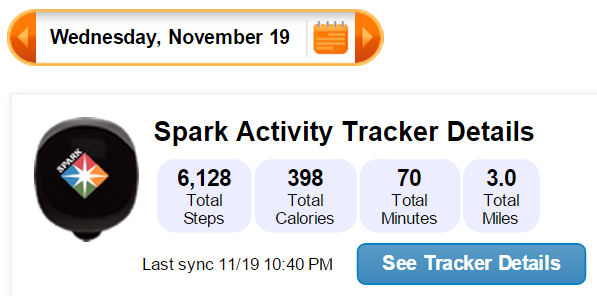
The Noom app added a new feature that allows you to connect your Google Fit account so it can copy all of the cardio information from your Google Fit tracker. I didn’t have a Google Fit tracker, so I went looking for one, however they are very expensive. I went looking for an alternative and found The Spark Activity Tracker from Spark People for only $29.95. It attaches to your shoe or your belt or wherever you want to attach it. It logs your steps and all of your cardio from walking, jogging, running, cycling, elliptical and even when you are just working or shopping. It comes with a USB Wireless Sync Point that allows The Spark to sync when you are in range of your computer where it is plugged in. Once it syncs up with your SparkPeople account, you can then see your progress. It shows daily steps, activity minutes, calories burned and distance covered.

imageUnfortunately The Spark doesn’t connect to the Noom app, but I will be able to use the information from SparkPeople to log my activity to Noom. Perhaps this will be more accurate since it is much newer than my bicycle computer. If The Spark is permanently attached to my shoe, I will never forget it, and the battery will last for a year, so no worries about having to keep it charged. I can also edit the steps in the Noom app so they are the same as in the SparkPeople website.

What I was not expecting was to receive a SparkPeople Exercise DVD that will give me complete weekly workouts for beginners, intermediate and advanced. I am considering buying some weights to go with these workouts. I watched a few of them and they aren’t bad either. I don’t have a lot of space in my bedroom, but I might have just enough to do these workouts.

I was curious to see if The Spark would know the difference between walking and riding my bicycle, and it knew exactly what I was doing because it logged 22 minutes on the bike as “Cycling”. Although, the 2nd day I used it, it logged it as general exercise. I had to reclassify it, and that also affected my steps on the SparkPeople website and app, which gave me more steps. A little strange that I had to do that, but that’s fine.

It’s also interesting how The Spark works. You tap it 5 times and it will show lights to show you how you are doing. If it only has 1 light on the top, you haven’t done anything yet, if it shows half, then you know you’ve still got a ways to go. If all the lights come on, and they blink, then you still have a few minutes of exercise to go. You know you’re finished when all the lights glow and they don’t blink. That’s when you can sigh and say I’m done! And if you meet your goal for the day, the week or the month, you get a trophy. The image at the top of this paragraph is my first trophy which says I met my goal of 6000 steps. I got the same trophy on my 2nd day using it. The trophies are a fun way to encourage you to meet all of your goals. Although, you don’t get an actual trophy, but if you do all of the work and eat right, you get a flat tummy, and isn’t that worth all the trophies in the world?

I was motivated by the Noom and SparkPeople apps, and I was motivated by my bicycle and the bicycle trainer, but even though I had all of those things, I wasn’t 100% motivated. I do feel that this Spark will light a spark under my ass and get me back to work so I can lose this weight. I hope it does.

10 Sizes Bamboo Handle Alumina Head Crochet Hooks Needles 1-6mm

20140829_125720_Android

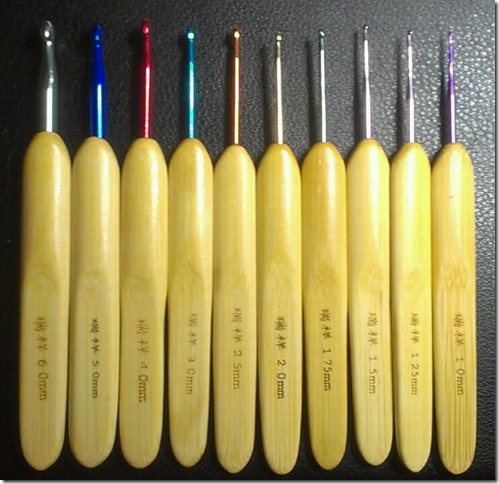
I bought a pack of 10 sizes bamboo handle alumina head crochet hooks needles ranging from 1mm to 6mm on August 16, 2014 and they shipped from China Post and arrived in less than 2 weeks. I received them on August 29, 2014. I am very surprised they arrived so fast because according to the delivery estimate, I should receive them from September 11, 2014 to September 29, 2014.

These are numbered in millimeter and I had to find out from Google what it was that I had. 5 of them are for Filet crochet and 5 of them are for yarn. Although 2 of them are really too small for yarn, but they are too big for filet. The 3 largest sizes are G, H and I which are what I am most interested in anyway. I never do filet crochet because of how difficult that can be, but I was curious to see just how easy or difficult it would be to use them.

20140829_194110_Android

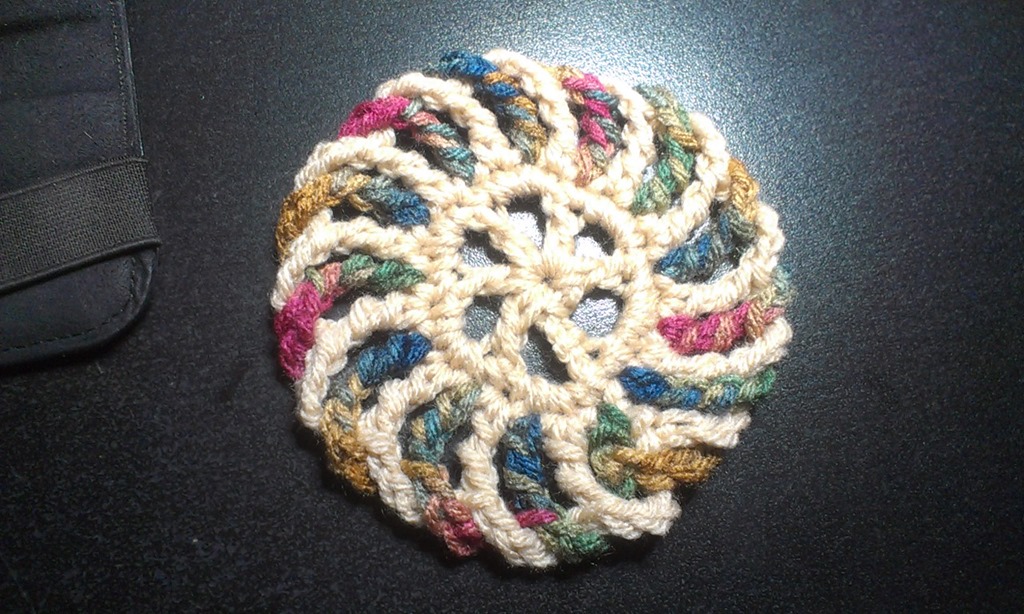
The coaster on the left was made using a size G hook and the one on the right was made with 1.5mm crochet hook. It is about the size of a silver dollar, well, maybe a bit bigger than a silver dollar. It is cute and if it were to be used as a coaster, it would only work for a shot glass, and come on, who uses a shot glass long enough to use a coaster? A friend has already claimed it for herself, in fact, she wants me to make a duplicate and turn them into a pair of earrings lol. Someone else suggested Christmas tree ornament. I have seen several Christmas crochet projects like Christmas trees and Candy Canes, so perhaps that is a good idea to make with filet crochet with embroidery floss and turn them into earrings.

20140829_184500_AndroidI made another coaster with a size I hook, which is the biggest hook they sent me. It’s the same pattern as the peppermint candy, but it’s not peppermint because I didn’t use the white and red, I used tan and Painted Desert. It is a good size bigger than the red and white one and it feels so much softer. I really like the bigger size, but my partner told me that he thinks they should be the smaller ones with the G hook.

How do they feel?

They are really nice to hold. I have carpal tunnel syndrome, so when I crochet, the nerves in my palm pinches and it hurts. My hands get numb whether I’m using regular or ergonomic crochet hooks, so that didn’t change. When I was crocheting with these hooks I wasn’t feeling any pain or pinching but then again I also wasn’t crocheting for a few hours either. I don’t know if using these for an extended period of time will cause the pinching, but I don’t intend on finding out because I won’t go crazy crocheting everything in sight.

So it was a good purchase. I paid $6.23 and got free shipping. I bought them on Smile.Amazon.com and a donation went to DoSomething.org.

My New Kodak Hero 6.1 Office AiO Printer

kodak hero 6.1 AiO printer

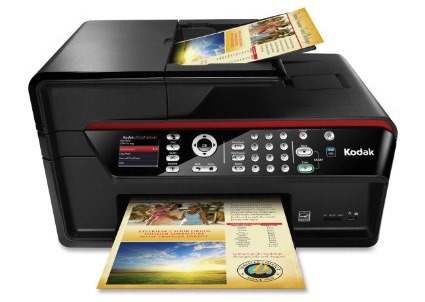
My new refurbished Kodak Hero 6.1 Office AiO printer arrived today and I could not be happier.

The email that I received mentioned that I would not get a new print head or any ink, but since I had just bought a print head and a bunch of ink I should be fine. They also had to send me a new power cable because the one that belonged to my Kodak EasyShare 5300 printer wouldn’t work, but they didn’t charge me for that. They didn’t send me a new USB cable because the one I had would work, and did work. It sure is a good thing I didn’t get rid of my old printer before the new one came, I would’ve been in trouble if I had recycled the USB cable.

There are several features that my old printer did not have, nor have any other printer I have ever had in the last 17 years that I’ve been using computers. Wow, has it been that long already?

2-sided printing: This is a new concept to me. I have heard of it, but have never experienced it. I tried it as a test and was blown away. It was like someone had just shown me the invention of a thing called “sliced bread” and it blew my mind. It printed the 2nd page, then it sucked the sheet back in and it printed the other side. WOW! I’ve never seen anything like it.

Fax Machine: I used to be able to fax when I had Windows 98. I used my scanner to scan the sheet and since my computer was hooked up to a modem for the interwebs, I was able to use the modem to call a phone number. I was also able to receive a fax that would use my printer to print the fax, or I could just view it on my screen. So faxing is not new to me, but when I upgraded to DSL in 2001, I lost the ability to fax. Of course I have not tried that out, but I am sure when the time will come, it will fascinate me to no end.

Wi-Fi and Cloud Printing: When I got my Kodak EasyShare 5300 AiO printer, I read somewhere that there was a printer that you could print to from another computer through the Wi-Fi, but my printer did not have that capability. I found out that I could have bought a USB stick that when plugged in to my other printer would give me that ability, but it was something like $30 – $60, can’t recall the exact amount, but yeah… no. Couldn’t afford that. We didn’t really have Wi-Fi back then anyway, so it didn’t really matter. I looked in to it when we did get Wi-Fi, but the price tag was too high. I have this connected and it’s neat, but I am not quite sure how to print anything from my Nook or my cell phone yet. I went to my Etsy Shop with my Nook and clicked print on a customers receipt, but nothing happened. When I say nothing happened, I don’t mean that nothing printed, I mean that clicking the link didn’t do any good because a window to open a print dialog did not open. I’m sure it would work if I were using a Windows laptop or my Chromebook, but not my Nook. I haven’t tried my phone yet. It did give me an email address that I could send emails to and it would print out the attachments if that’s what I wanted to print, but that’s not exactly the type of thing I want.

kodak graph and line templatePrintable Forms: I actually did not see this one coming from a mile away. I actually found it by accident. I watched videos and never once did they mention you could print graph paper, ruled school paper, shopping lists, to-do lists, tic-tac-toe and sheet music of all things. I printed a sheet of graph paper and the wide ruled school notebook paper  and was completely blown away. It also has narrow ruled. I would be cool if it could suck the sheet back in and print on the other side, but I’m not going to push my luck.

Another feature that sort of blew my mind was the status monitor because it tells me how much paper I have in the printer. I don’t mean the page count, it says like I have 80% of paper in there. I can have 200 sheets in there, which is pretty freaking cool considering my other printers would only hold 30-50 sheets. It also tells me that my black ink is 100% while my color ink is 45% and that 2-sided printing is enabled. The little screen on the front of the printer shows me the image of how much ink and paper I have, but it doesn’t say a percentage. Not that I need to know, but still.

I’m pretty happy and impressed that I got this refurbished printer for only $89.99 plus tax and shipping for a total of $104 and change. It is on Amazon brand new right now for nearly $449.99, 6 new and used for $139.99. So yeah, I think I got a great deal. The newest version, the Hero 9.1 is sold on Amazon used right now for $199.50. It doesn’t have nearly as many buttons, and a giant touch screen, which I am sure would look awesome, but I am happy with what I have.

I loved my Kodak EasyShare 5300 AiO printer, but I really love this new one. It’s a shame that my old printer died on me, but I’m glad it did. I have had many good years with it, but I was due for an upgrade. I hope to have many years with this one and I look forward to my mind being blown away with the next thing when this one dies.

@Kodak Hero 6.1 Ordered

I have some good news for my printer problems. Thankfully I was able to borrow the money to buy a refurbished Kodak Hero 6.1 All-In-One printer. I went back into a chat text with Kodak and gave them the reference number for my previous conversation and of course they told me that to get this, I had to call the number, so I did.

They are sending me a refurbished Kodak HERO 6.1 Wireless Color Printer with Scanner, Copier & Fax. It was $89.99 plus $7.31 tax and $7.50 shipping, so it was $104.80. Not bad considering this printer is on Amazon for $449.99 (price keeps changing so it may be more or less when you click the link.)

The dimensions are around the same, or near the same as what I have now, so I don’t think I will have to worry about that. The woman I spoke with told me that it doesn’t have a power adapter, but they will ship me one. I asked how much that was going to be and she said nothing. Thank goodness because the email I got said the discount on that was $66.50. YIKES! For an adapter and power cord?

Another email I got from them said that this printer will not come with a print head or any printer ink, which kind of sucks, but I think they didn’t include it because I told them that I bought a printer head and more ink on Amazon. So thank goodness those aren’t going to go to waste, but it sucks because I was hoping to have it as a back up. But, ink has already gone through it from when I tried using it on my other printer, so it’s a good thing I am going to be using that because the ink would have dried out making it useless by the time I would actually need it.

I am very happy that this has a fax machine on it because I can count a dozen times when we had to go to a FedEx Kinko’s to fax something. I’ve been asked at least a dozen times if I could receive a fax and I could never say yes, so now I can.

The email I got said

“You will be receiving a replacement printer in 3 to 8 business days. If the printer replacement order is created after 3:30 P.M. Eastern Time (EST), the order will be placed the following business day.”

The woman I spoke with from Kodak told me that she was placing the order now (or when I was on the phone with her anyway) but didn’t mention that because it was after 3pm on Friday that it wouldn’t be placed until Monday, but that’s okay, I’m sure it won’t take that long to get to me. I am sure I will get a shipping confirmation as soon as they ship it out with a tracking number that I can obsess over and check it 20 times a day to see that it hasn’t been updated in hours. I have OCD lol.

So I look forward to receiving a new refurbished printer. It isn’t the newest model which is the 9.1, but I’m flexible. I am happy with what I have. I am sure we will have many years of fun printing, scanning, copying and faxing. It’ll be fun.

Kodak EasyShare 5300 Issues

Chip bought me this printer many years ago for Christmas. I believe it was in 2006 and I was coming home from visiting my aunts in Texas and he surprised me with it when I came home from the airport. But I could be wrong about the year and when he surprised me with it. I do remember that I was coming home from visiting someone and this was my Christmas present, but I digress.

I believe in Kodak. I believe they make a quality product and they don’t sell crap that you only own for a few years and have to buy a new one. I’ve had this printer for a lot longer than I had my HP, Dell and… Oh I can’t seem to remember the name of my very first printer. Every printer I’ve ever owned before this one has let me down. This printer has worked every single time no matter what.

The issue I am having has happened a couple times before and the solution was the same both times. My printer shoots blank sheets out and I do the deep clean and all that does is drain my ink cartridges and then I have to buy more just to have those drain the same way. Both times Kodak sent me a new printer head along with brand new ink cartridges to replace the ones I lost from the deep cleaning.

I’ve often wondered what happens to all the ink or where it goes and this answered my question.

image

This is bad, and for some of reason the sponge material that is under the cartridge touches the paper as you can see here.

image

I wasn’t exactly sure how I could handle this issue. I got ink on my fingers when I removed the paper and was able to wash it off with just water and a wash cloth, so I figured that if it came off my finger so easily, it might come out of that spongey material. I wet some paper towels and let the ink soak into the paper towel, which it did. I had to use another one and then a dry one and it seems to have worked to clean the ink that was drained from my brand new black ink cartridge that by the way I just bought this week at Target. My color cartridge was also full and now they are both empty.

Since a new printer head was the solution before, I figured since I’ve had it for so many years that I would just buy it from Amazon and not ask for a free one it from Kodak. Then again I don’t know if they would give me a free one, they might sell it to me for $50 for all I know. The one I bought on Amazon was only $16 with free shipping if my order was $35 or more. I bought some Kodak compatible ink to replace the ones that I drained from the deep cleaning. They were only $22 and I’m getting 2 XL color and 3 XL black cartridges. My total was $40.

When I was at target buying ink this week, I also bought a new bicycle pump and 2 new tubes. I wanted to buy rechargeable bike lights for $30, but I figured I wouldn’t have enough money for the rest of the month, and now I’m glad I didn’t buy them. The most important thing to me right now is to be able to print receipts and shipping labels for my Etsy shop which is in vacation mode until my printer works again.

It seems that everything is happening to me this month. I’m just waiting for a giant safe or grand piano to fall on my head lol. Let’s just hope the rest of the month doesn’t continue on this path, but just in case it does, I’m laying low.

The Miracle of Walgreen’s Petroleum Jelly

walgreens petroleum jelly

My skin has been so dry since we moved to Bakersfield from Los Angeles in 2000.  My feet were the first things to dry out.  I started buying lotion and would slather that on my cracked big toes and my heels and the backs of my ankles.  Unfortunately, it was never enough.  I would literally use lotion made specifically for dry skin the whole day and my skin would still be dry.  I have spent a lot of money on lotion for dry skin over the years with barely any relief.

I started making keychains and earrings with this stuff called Rexlace and Craftlace, and naturally it took that to dry out both of my index fingers.  My right index finger in particular has been so dry that the hair literally broke off and has not grown back.  All I see in the dryness is stubble that won’t grow.

My doctor gave me an ointment that I was supposed to use 2 to 3 times per day, but naturally it didn’t help at all.  Yesterday we went back to the doctor’s office and he told me to use the ointment he gave me during the day, but to use petroleum jelly at night before I go to bed.  Well, we went to Walgreens to fill our prescriptions and I bought some petroleum jelly.  We came home and despite what the doctor said about using it at night, I decided to just start applying thin amounts of it to my finger throughout the day.  It would sit on my finger until it dried up and then I would spread some more on it.  It’s actually helping.

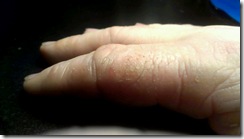
dry fingerI didn’t think to take a before picture because of how horrible it looked.  I was too embarrassed to do that, but here is an after picture.

You can see that my finger is still dry, but what a huge difference from yesterday anyway.  I did apply the petroleum jelly to it last night, a well as to my dry feet, my arms and legs and my face, even though those parts aren’t dry, preventative maintenance.  My mom did that, and I think I should too.

I didn’t know how well this stuff worked at helping dry skin, but I do now and I will continue using it from now on.

Nook HD+ from Barnes & Noble

Nook HD+ from Barnes & Noble

I love my Nook HD+.  I have been having so much fun with it since I got it for Christmas, actually the week before Christmas.  Yeah we don’t conform to the traditions of opening your presents on Christmas day, or even on birthdays.  We open presents the day we get them.  Screw tradition lol.

My Nook HD+ has a 9” screen, so it’s bigger than the Nook HD in the sense that it has 2 more inches, but I’m telling you that because there are certain apps that work with 7 inches, but don’t work with 9 inches.  Like The Sims FreePlay and Viggle for example.  The Sims FreePlay is downloadable, you just can’t play it because you get this warning when you try.
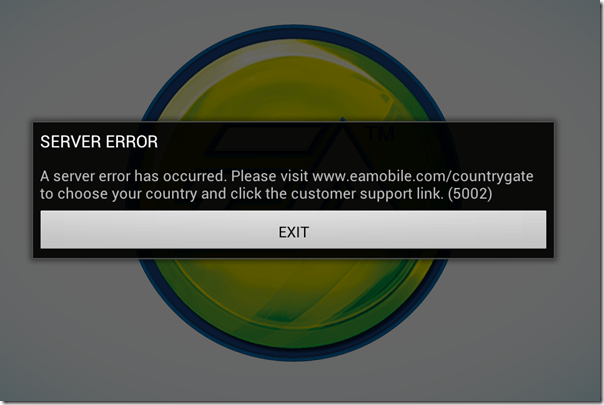
The Sims FreePlay

I am not sure if The Sims FreePlay will even work with a Nook HD 7” tablet.  I know it works with the Kindle Fire because I’ve seen people taking pictures and video of it on that device.  I’m pretty sure it was the 7”, so if it runs on the Kindle Fire 7”, then it probably runs on the Nook HD 7”.  If so or not, please let me know.

Viggle on the other hand doesn’t even show up in the Google Play Store, so they don’t even give you the option.  I know it works on 7” tablets because I installed it on my partner’s tablet to see if I could do trivia when trivia wasn’t giving me any points with my phone.  It installed and looked great too, but the trivia was not working on his tablet any better than it was on my phone.  Although, just because it installed on his tablet doesn’t mean I know if it will install on a Nook HD 7” tablet.

Facebook isn’t great on the Nook HD+ when you use the app.  Using the browser is so much better because you get the full website that you get on the computer, but the only problem I have is when I use another tab to visit another website, or even if I use an app, like if I go check my email, when I come back to the Facebook tab, it goes straight to the mobile version.  If I wanted to use Facebook mobile, I would just use the Facebook app.

The Twitter app that comes with the Nook HD+ from the Nook store isn’t updated, so it’s better to let Google Play update it.  It’s easy to use and if you have multiple twitter accounts, you can switch back and forth very easily.  It’s actually better on the Nook HD+ than it is on my phone.  When I am using @xanapus on my phone, then try to switch over to another twitter name, for some odd reason it switches me back to @xanapus.  It doesn’t do that on my Nook HD+.

I didn’t like the Google+ app on my phone and I rarely ever use it on my computer, but it is great on the Nook HD+.  That’s one of the social media websites that I wanted to start using more often.  It has a much better look than Facebook does in my opinion.  Google+ doesn’t force you to look at ads or suggested posts.

One annoying thing that I noticed is that when I am in my library, I scroll down to My Files and see there are 564 files.  How the heck am I supposed to weed through all of those files to get to the ebooks I have downloaded?  Well, I discovered that if you click the words My Files, it brings up a new window which shows folders.  They are in the Download folder.  I have 6 ebooks that I downloaded from the EverQuest Next website that are fiction based books based on EverQuest the game, but they are all in PDF format.  Ebooks that I’ve downloaded in ePub format will show up with my Nook books, but the PDF files don’t.  I did download an app called File Manager HD which allowed me to create a new folder in my download folder so I could keep the EQN ebooks in there to keep that folder more organized.

PicsArt Photo Studio is a good app that I use on my phone to add stickers and frames and text to my pictures, but it’s such a small screen that sometimes it’s difficult to see what I’m doing.  My Nook HD+ doesn’t have a camera, but I can use Google Drive to retrieve my files.  What I really like most is that I can write on the screen with this.  I can do that on my phone, but it’s too small.

Happy New Year 2014

Okay, so my handwriting isn’t the best, it’s even worse on paper lol.

ChromecastSome useful apps that come with the Nook HD+ include Netflix and Hulu+ and if you have a Google Chromecast, you can watch them on your TV.  You don’t even need to have the Google Chromecast app installed to use it.  I know this because I bought it for my partner and I couldn’t get it to connect to his tablet.  I connected it with my CR-48 aka Chromebook, then was able to connect it to his tablet.  I don’t have the app installed on my Nook HD+ or my phone, but the icon is visible on YouTube, Netflix and Hulu+.  I guess any Android or Apple device that is connected to my network will have that ability.

Of course, other good uses for the Nook HD+ is actually reading a book lol.  You aren’t limited to Nook books either, you can read your Kindle books plus your Google Play books.  In fact, if there is a service that sells ebooks, you can read the books you bought from them, including pdf files and ebooks.  Some writers only publish their ebook with Amazon KDP Select because they get more advertising, and if they chose KDP Select, they can only publish with Amazon for 3 months.  That’s why it’s good to use the Kindle on my Nook, because some ebooks aren’t available on the Nook.

One of the features that I do like is the Nook app “Your Highlights and Notes.”  If you do a lot of highlighting and like to add notes, this is a good thing.  It had all the highlights from the Nook for PC when I got it, but it didn’t show any text.  When I add new highlights, it shows the page number and the first couple of sentences that I highlighted, and if I left a note, it shows my note.  That makes it so much easier to find every highlight and every note on every ebook you own whether it’s downloaded or in the cloud.  Highlighting and leaving notes on my Nook WiFi was so difficult and as soon as I started reading another ebook, all of the highlights and notes disappeared, which was very frustrating.

There is also a Nook app called “Your Lookups” that shows you every word you ever had to find the definition for.  That does come in handy if you ever want to find that specific word again.  The list of words you looked up are on the left, and the word, the book you found it in, the page and the date and time you looked it up are on the right along with the definition of the word.  WOW!  Now you have a record of the date and time you learned a new word.

Anyway, these are some of my thoughts on the Nook HD+.  I like it a lot and I will get a ton of use out of it.  I still have my Nook WiFi and I don’t think I will use it as often for reading ebooks, but if the occasion ever arises when I go outside to read, I will be able to use it.

Toastmaster Bread Box 1155

wheat bread

I took a trip to the thrift store yesterday, well, my intention wasn’t to go to a thrift store, but while I was in the neighborhood, I figured let’s go check to see what they have.  I was actually hoping to find a hot air popcorn popper, but instead I found a bread maker machine.  They had at least 5 of them, but this one had the little paddle inside of it, 2 of the other ones I looked at were missing that.  I didn’t look at the other ones because they were smaller than the one I found.

Okay so I’ve never made bread in my life and I’m 43 years old.  I have always wanted to, but never tried it because I knew it would probably be a lot of work because you have to knead the bread and what not.  I have a habit of burning water, so I was afraid of trying to bake my own bread.  This machine does it all, so there is literally no muss, no fuss.

toastmaster bread box

This is what the Toastmaster Bread Box 1155 looks like.  It was quite disgusting on the inside and outside, but I cleaned it up so it looks practically brand new.  It was only $5.95 plus tax, so how could you not buy it?  I knew I was taking a huge risk because you never know if what you are buying at a thrift store will work, but it works just fine.

The bread maker was cheap, but the ingredients for making wheat bread weren’t.  I went to the store to buy everything I needed for making wheat bread and it came to $30.  Ouch!  But, the good thing is that I will get a lot of bread with those ingredients, so the money I will save will make up for that.

Good wheat bread is expensive and you never really know what is inside your bread, so at least now I know what I am putting into it.  It’s basically water, oil, lemon juice, salt, brown sugar, dry milk, bread flour, whole wheat flour and active dry yeast.  That’s it.  100% whole wheat bread is the same, except I don’t use bread flour and it takes 1 hour longer to make.

White bread is unhealthy, but it’s basically all the same ingredients except there is regular white sugar and you don’t use whole wheat flour.  I don’t plan on making white bread unless it is requested.

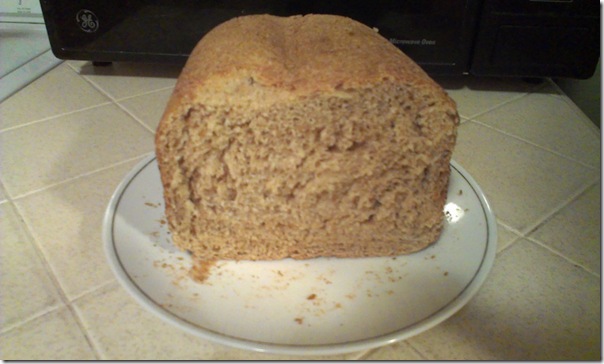
My first time making bread was a success, but I thought I screwed it up because I used the whole wheat setting.  Well, I was making whole wheat bread, so naturally I thought I had to use that setting, but it turns out I only need to use that setting if I am making 100% whole wheat bread with all the ingredients minus the bread flour.  Since I made regular wheat bread, I should have used the basic setting which takes 3 1/2 hours.  Now I know.

I’m particularly excited about making other things with this bread maker like spiced pumpkin bread and banana bread.  The machine didn’t come with a manual or a recipe book, but I did manage to find them online all in 1 pdf file.  The recipe book has many good recipes, but I will probably only make wheat for our bread and the pumpkin and banana bread for special occasions like birthdays and holidays.  They also make great gifts.  Someone gave me homemade banana nut bread for my birthday once and it was AWESOME!  So I plan on doing the same.

So I finally have a bread machine that didn’t break the bank.  What an awesome gift from whoever donated it to the thrift store.  I know it’s an old machine, but it’s still a gift to me since I didn’t have one and couldn’t afford to pay $75+ for a brand new one.