Internet TV

We went to San Diego to visit Chips family this Christmas weekend and we were introduced to a concept that we never even thought of when it comes to watching tv. Cancel our cable and get an internet tv box and watch Netflix and Hulu only.

Ok, I’ve known about Hulu for a few years, I love Hulu for watching shows that I missed when they first aired on tv. When I was a regular user of the site they only had Fox and NBC that I knew of. Whenever I’d miss my CBS, ABC and CW shows I’d go there and they would redirect me to the network website.

We used to get Netflix DVD’s in the mail and I was a member when they first introduced streaming movies on their site. They would only allow you to watch 8 hours of movies per month with the rental membership and that clock was ticking away even when your movie was paused. I would pause it so that it could download because it played faster than it could download. This was when I had a lower DSL speed. So if I let it play in real-time, it would keep pausing which made it very difficult to watch and they only had older movies available for download so it really wasn’t worth my time since they had a very small selection.

What we were told by relatives was that if we had an X-box then we could watch Hulu and Netflix and replace our cable but what they don’t realize is that we don’t have an X-box, Wii or PS3 so we can’t just go out and pay a few hundred dollars for a video gaming system just so we can save money every month on our cable. But I may have found an alternative.
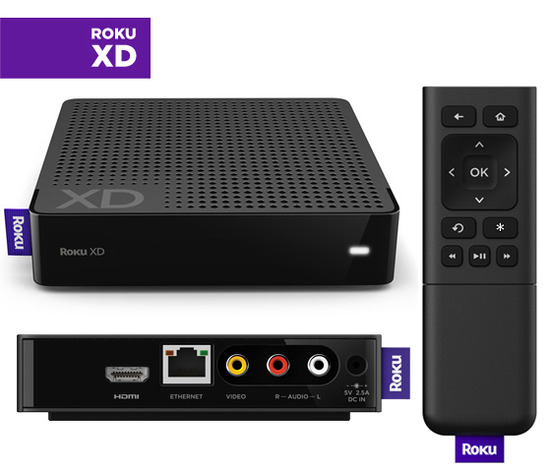
The Roku player is way cheaper than an x-box and it allows you to watch your internet tv shows and movies with Hulu and Netflix as well as many other services. There is no monthly fee with Roku, all you pay for is the monthly fee that the services like Hulu and Netflix charge. Hulu Plus charges $7.99 per month and Netflix charges $9.99 per month. Well, I pay $110 per month for my cable and I hardly ever watch it.

I can watch my shows when they come on at their regular time but sometimes that time isn’t convenient. Also, I ignore the phone when it rings because I don’t want to be interrupted during my shows because if I miss one second of it then I feel lost. Well, this way I can pause it when the phone rings instead.

The downside is that I can’t watch my shows when they air, like when Chuck is on at 8pm on Monday nights, I won’t be able to see it until the next day. I mean, I can deal with that but at the same time, I like to watch it when it comes on, not the next day. The last few seasons I had multiple shows on multiple channels at the same time so some shows I was forced to watch on Hulu the next day which I didn’t mind but it was irritating to have to wait. Also some of my shows weren’t on Hulu, I had to go to the ABC website for Pushing Daisies and the CW website for Smallville.

I have a DVD recorder but ever since they switched over to digital cable they have a block on recorders unless they are DVR recorders. I used to record one show on one channel on a DVD Ram disc while watching another show on another channel while it was on. After my shows were over then I’d watch what I recorded then delete it from the disc. Well, now I can’t even do that so my DVD recorder is a giant $250 paperweight.

Well, we won’t be starting this up right away because we have to order the Roku box for the living room and order the Hulu and Netflix services the day it arrives then we will try it and see if we like it before canceling our cable.

The problem is, I’m still going to have to use my computer to watch my CW shows because I looked on Hulu and they aren’t there. They might be on Netflix, I don’t know because they only have the dvd’s for season 10 of Smallville on their site. It doesn’t look like I can watch ALL of my shows on there which is a real bummer.

Also, sometimes you just like to turn the tv on and watch whatever is on. I don’t know if I want to feel pressured to choose something to turn on then when it’s over I gotta make another decision. At least with Cable you can turn it on a channel and watch whatever is on for a few hours.

I also didn’t see any of my HBO and Showtime shows. True Blood comes on in the summertime and if Hulu doesn’t have it and Netflix doesn’t have the current episodes for streaming then I’m gonna be screwed. I’m gonna have to go to a p2p website and download them. I don’t want to have to do that. I pay for HBO and Showtime each month and I’m gonna lose them over this so that would suck big time.

On one hand I want to save myself some big bucks every month but on the other hand, I’m still gonna have to use the computer to watch certain shows which I don’t like.

But, maybe this will convince me. Like I said, I pay $110 for cable and if we get this then I will only have to pay $18 per month for Hulu and Netflix. That’s a savings of $92 per month, that’s $1,104 per year in savings. Of course that will only go towards buying more groceries every month so that is great for us but not great when I can’t see True Blood.

I have a lot to think about here. Maybe someone can give me their opinions about #1 the Roku box and #2 this whole concept of canceling cable and going with internet tv instead. Please, give me all of your thoughts.

Google Chrome Laptop

Google announced this week on Tuesday that they are going to give 60k laptops away to groups and people so that they can test out the new Google Chrome OS. People aren’t testing the laptop, they are testing the operating system itself. These laptops have a 12.1 inch widescreen monitor, built-in webcam and mic on the top of the screen, 8-hour battery, WiFi and 3G with Verizon where they give you 100mb of data for $9.99 each month for 2 years.

The test itself is only supposed to last for 6 months which makes me wonder if they will be asking for the laptops to be returned but the statement that they are giving you 2 years at $10 a month for 3G tells me that perhaps these laptops aren’t going to be taken away after 6 months. But I can’t tell for sure. I mean, what are they gonna do with 60k used laptops? They can’t sell them and they’re not going to take the time and money to refurbish them are they?

In case you are wondering why I am blogging about this all of a sudden, well, I have one. I signed up to be a beta tester last year but I don’t know if that’s why I got so lucky. I got an email from Google on Wednesday inviting me to apply to get one. Friday morning I went to the grocery store for an energy drink and found it on my doorstep when I came home.

At first I didn’t know what it was because I didn’t order anything. It didn’t even occur to me that I got approved for a laptop. As I’m opening the box I see this diagram of a helmet that an evil scientist mouse would build for world domination. Or at least cat domination. As I opened the box I see the battery pack then the laptop itself.

My first thought was “WOW I was approved? NO FREAKIN’ WAY!”

I took a picture of the keyboard, screen, top and bottom. It looks navy blue in the image for some odd reason when in reality it’s more of a charcoal color. Click it to see it full size which is 1280×768.

By the way, this is not a product review, it’s more of a bragging post :p lol. This is not what is going to be for sale in 6 months when the beta testing will be finished and as I said I am not testing the laptop but the operating system.

One of the rules about being in this program is that I use this as my primary machine. I’m not sure if blogging about it is allowed but since I’ve seen other blogs talking about it and a few YouTube videos (as I write this 1,130 videos) showing it off and people talking about it, I figure it might be ok.  Since this is going to be my primary computer for the next 6 months I figure I might as well talk about it.

I have used Google Chrome as my default browser for over a year now so it’s not a difficult adjustment for me. Although this new keyboard and touchpad are adding to the challenge. I am getting used to it tough.

I have not actually timed it but when you first turn the computer on by either opening the lid or pushing the power button, it gives you this cool Chrome logo then within seconds you are in your login screen.  When I see my image with my Gmail account name, I type in my password and I’m in.  Instant desktop, no waiting.  When I close the lid while it’s turned on then come back to it later, it loads instantly back to where I left off.

My desktop is a Chrome browser like you would see when you first open your browser but it’s always there.  Instead of having the most used websites on that window, it has icons like you would have on your desktop.  There is a new Google Web Store where you can search for extensions, apps and themes.  When you find the one you want, just click install and viola it’s installed.  No muss no fuss.

If it’s an app then you will have a new icon on your “desktop” but if it’s an extension then you will have a new icon on the top of your browser next to the wrench and bug report link.

Since it’s a website based computer, it’s really fast.  I’m telling you, it is so fast that it puts my desktop computer to so much shame.  Like when I watch a YouTube video it’s very smooth.  It plays the video from start to finish without any interruption like my desktop does.  I’ve gotten to the point where I hate watching videos on my computer because of how they keep pausing and I’ve recently reformatted it too so this new laptop is very welcome on my desk.

I haven’t tried the webcam yet but as soon as one of my friends and/or family members logs into Skype then I can try it.  Oh, since Skype is obviously not a web-based app, I had to find a web-based IMing website that allows you to Skype.  I found imo.im in the web store and I’ve been using it for all of my IMing.

I have been able to use the webcam with taking pictures with Picnik so I can tell that the webcam built into the top of the screen isn’t very good quality.  Then again like I said, I am not testing the laptop but more the OS so it doesn’t have to be great quality, although it is much better quality than my current webcam but I digress.

I have had a few crashes but it turns out to be my fault because I’m not used to the touchpad.  It doesn’t have any buttons, it’s just a touchpad.  You can press on it and the whole thing clicks on the bottom but you can also lightly tap on it which is how you click.  The problem I have with it is that it’s so freaking huge that when I type, my hand is constantly moving the cursor and clicking things.  I have to learn to lift my right hand while I type to avoid that.

It’s an awesome computer and I will be very happy with it just as long as they don’t take it away from me lol.  I don’t know how much it is going to cost when they start selling it in the summer of 2011 but it is worth every dime considering it is the easiest computer for anyone to use.  You don’t have to know anything about computers, all you need to know is what website you want to look at.

There is still some time if you want to get in on this.  All you have to do is go to this website http://www.google.com/chromeos/ and apply for the pilot program.  The deadline is 11:59:59 on 12/21/2010.  Good luck.

Scrubbing Bubbles Power Sprayer

Scrubbing Bubbles has really gotten my attention with this miracle product. I know it as the Scrubbing Bubbles continuous sprayer but it’s really known for it’s “extend-a-clean” feature.

Look, I don’t care how long it keeps its surface clean, I’m just impressed that it cleaned my impossible grout. Ever since we moved into Chips moms house in 2004 I have been struggling to find a grout cleaner that works but have been very unsuccessful.

I have tried countless products (which I can’t even think of their names right now) along with elbow grease and a good strong scrub brush and have had no luck. That is until tonight.

I was doing the dishes and I looked into the empty drain board and saw how dirty it was. This happens every so often where the bottom of the silverware part gets all orange and same with the bottom part of the thing and you spray cleaner on it and scrub it with all you’ve got but it just doesn’t come as clean as you would like.  It’s the best you can do so you either live with it or toss it and buy a new one.

I thought, I have this Scrubbing Bubbles continuous sprayer, I wonder… I sprayed it on and went in the bedroom for a few minutes. Went back in there and got a clean wash cloth and started wiping it off. I figured I would have to use the scrubber but I thought, let’s see where this wash cloth takes me. It wiped away as if I was wiping a fresh spill off the counter.

So as I was doing the dishes I thought, I wonder if it will work on the grout on the counters… hmmm let’s see. The grout is really bad, almost black and it looks terrible. Recently I took a picture for a paid blog post for ampm secret menu of a sandwich I created on that counter. I was mortified at it but it was too late, I had already eaten the sandwich by the time I uploaded the picture to the computer. Here it is.

As you can see on the left, the tiles are really bad but on the right they are really clean. I wish that I had known how good this scrubbing bubbles cleaner was BEFORE I took that picture which went on the Facebook page for ampm lol. I was mortified before but now I’m double mortified that it could have been prevented.

Oh well, there’s nothing I can do about it now. You can be damn sure that this is going to be my mission tomorrow, to get the rest of the grout on all the counters this clean.

New Cell Phone from NET10

I was about to start watching Cirque Du Freak earlier today and before I could hit play on the DVD remote control, Darrin told me that he had to go to Sears to pay his Sears card.  While we were there he said “I wonder if they sell cell phones” because he has a job interview tomorrow (he finally got a call back) and if he gets the job then he will need a new cell phone.  My old 2002 Nokia 3390 cell phone isn’t working out anymore.  The battery never keeps it’s charge anymore and it’s just too old for him to look professional.

So we get there and see a display for Verizon with prepaid cell phones and their phone cards.  The phone itself was only $20 but it was only 1 style of phone.  We went downstairs to the electronics department where they have many different wireless providers.  We were looking at the pamphlets for Verizon and the plan was too confusing.  Next to it was Virgin Mobile but they only had expensive phones.  One was a Kyocera Loft and the other was an LG Rumor Touch.  I don’t remember what it was, I do remember how expensive it was though.

Darrin went and got a sales clerk to get the Virgin Kyocera Loft phone out so he could buy it but thought to ask which company was better.  The sales clerk pointed out that each phone call was .25¢ per minute.  That’s a bit much and it was a good thing that he found that because Darrin was about to buy it.

He asked which one has the least cost per minute and the sales clerk pointed out the NET10 display.

It was a good thing that he showed us the Net10 phones because number 1 they were cheaper.  Darrin almost spent $70 on the Virgin Kyocera Loft and he almost spent $100 on minutes for it.

The phone that he did buy was the Samsung T401G which has a slide out QWERTY keyboard.  It was on sale for $59 (normally $79) and he also bought a $60 phone card which is 600 minutes.  He got a bonus of 170 minutes as well when I activated it.

For some reason it didn’t have a memory card so he’ll have to buy that extra if he wants to take pictures.  He just needs it for making/receiving calls at work, he doesn’t need games.  He connected to AOL from his phone already but it used minutes so that’s not a good idea for him.  If he had a monthly plan with unlimited web then that’s one thing but he chose pre-paid.

Text messaging is only 3¢ per text which is ok.  I don’t know who he’s gonna text though since I don’t have a cell phone lol.

I hope that he gets the job, keep your fingers crossed.

Update: He did get the job and he is very happy there.

The Price of Tea

In my blog I talk about things that I find interesting or disturbing. My blog is more like a bad episode of Seinfeld. So… now I’m going to talk to you about the price of tea lol.

I went to the grocery store to buy some tea bags. I grew up on it and I like to make it as an alternative to soda. In my opinion it’s cheaper than anything else out there, all you need is a coffee maker, a tea jar and some sugar or sweetener. My mom used to brew it in the sun but I find it much faster to brew a pot of water in the coffee maker with the tea bags clamped on the coffee pot lid. I had an aunt who used to boil the water on the stove in a large saucepan then steep the teabags in the water then pour it into the jar. I like my way better.

I was a little confused about how much they charge for their teabags though because it didn’t make any sense. I was looking at the 100 count box which was $3.99. Ok that is a bit high but it’s not that bad I guess. But, I don’t need a big box, I just need enough to get by until Next week when I get some money. I looked at the box with 50 bags and it’s $3.49. What? It’s only .50¢ less? Well that’s not right. It’s half the bags, it should be half price right? $2! Then I looked over at the one that only had 25 tea bags and that one was $5.49 WHAT?!? How can it be possible? It has 1 quarter of the bigger box. How can it possibly be more? The box with 25 tea bags should cost $1 not $5.49.

Then I look and see all these boxes that only have like 10 tea bags and they cost more than the box of 100 bags. What is wrong with this picture? Why is tea so expensive when it’s in a smaller package? Why is this big box of 100 tea bags so cheap compared to the other ones? I don’t understand. And the box of 50 and 25 was the same exact brand and same exact flavor as the box of 100 bags.

Lipton, Lipton, Lipton, can we have a chat please? Is there something we can do to fix this? It just doesn’t make any sense what you are doing here. I just don’t see your logic in charging so much money for smaller packaging. It should be less but you charge more. Why? Is it because you are going broke? Is it because the packaging cost more than the tea itself? Maybe we can think of a cheaper way of packaging the tea bags then. I just can’t understand why you would charge so little for 100 bags but then jack up the price for the smaller boxes.

I’ve been a Lipton fan since I was a kid and I remember in my 20’s buying the smaller boxes of 25 bags and they were only $1.50 per box. I’m sure there was a mistake in pricing at the grocery store but it looked like it had the correct label so I don’t know. I just think that it’s a big waste of tea bags and packaging if nobody is going to buy the smaller boxes when they can get the bigger box so cheap. You know what I mean?

Ok, my tea bag rant is over lol. I’m stepping off my soap box now. Carry on.

Yes… that just happened.

Yardsellr Negative Comments

I’ve posted in here several times that I am on Yardsellr now.  Well, I have been noticing some disturbing trends happening over there.  Apparently it’s not just happening to me but other people as well.

People troll the Yardsellr website then leave nasty comments in people ads.  The other day 3 people left negative comments in my Pedi Paws ad saying the product is not worth your money, don’t waste your time etc.  Uh excuse me but I’m trying to sell it.  I don’t care what you think it’s worth.  Don’t go on my ads telling potential customers of mine that it’s a piece of crap and make me lose a sale.

Another person posted a comment on a video game of mine saying the game was gay.  I didn’t delete the comment but then he came back and posted another comment accusing me of deleting his prior comment and saying “gaaaaaaaayyyyyyy”.  Where were these people raised?  In the forest by wolves?  Don’t people have manners anymore?  First off, I didn’t delete your first stupid comment and second of all, I should just delete both your comments on principle.  I don’t even know why I didn’t delete them, I guess I figured if I deleted them I would get more spam in my other ads which I don’t want.

I clicked the “feedback” button so I could make a suggestion that they add a link or button to “report abuse” so that perhaps if a person gets reported enough times, their account might get banned from either commenting or using the website.  That’s when I ran into another persons feedback saying they are having the same issue as me.

Look, I’m all for leaving comments saying a product isn’t worth a damn but do it on a website that actually makes money.  Don’t leave those comments on a website where people are trying to sell their useless crap so they can scrape enough money together to buy groceries or pay their bills.

Besides the report button, I think they should also add a way for me to approve a comment before allowing it to be posted, just like in my blog and/or YouSayToo.  After so many nasty comments I have decided to make it impossible for people who aren’t members of YST to leave a comment and even members comments have to be approved before they be allowed to be seen.  On my blog the comment is not seen period until I approve it and that’s how it should be everywhere.  If I think a comment at Yardsellr is going to help me make the sale then I should be able to approve it but if it’s negative then it’s my prerogative to delete it and I shouldn’t be hassled by people who have too much time and negativity on their hands.

I wish people would grow up and stop with the internet bullying.  It doesn’t serve any purpose to be jackasses online.  My mother used to tell me that if I don’t have anything nice to say then don’t say anything at all.  I know it sounds corny but it’s true and should be applied to the internet too.  And parents, please monitor your children’s activity a little better.

Nook Color with Touch Screen

I think I’m going to have a heart attack and die right now.  I just got an email from Barnes & Noble with this subject:

“Introducing NOOKcolor — The Amazing Sequel to the NOOK You Love.”

Oh really?  Are you joking me?  If they could’ve told me this in September BEFORE I spent $150 on the Nook Wifi, I would’ve had an incentive to wait a little bit longer.  This new NOOKcolor is $249 and has many more features than my current Nook doesn’t have.  Such as it’s a color touch screen, you can see magazines and newspaper in color, kids books come alive at the touch of a finger (like I care) and one thing I saw in the video when I clicked the link in the email is that you can have it read to you and it’s NOT a robot voice like the Kindle.

This one is way better than mine because it can do portrait and landscape which the Kindle can do but the Nook I have can’t.  It has an 8GB card along with the ability to add another.  Mine only has 1GB but I can still add to it.  Although, I don’t see that I would ever need to but with the NOOKcolor I can see needing a bigger card because I’m sure the books with audio are bigger files.

Another cool feature is videos in your books…  In the video they showed a cookbook and you can read the recipe but then the image for it is a video where you can see how to make the recipe.  That would be so cool.  What would be even cooler is newspapers where the image for the article is an actual video of what happened.  The newspaper could set up a news station type set with anchors who read the articles with video of what happened at the scene, just like the news on tv has.  Or a magazine could have a video of the interview with the stars and their ads could be a video commercial.

I see in the Barnes & Noble website a new newsstand which is “coming soon” so I think they are going to add more magazines finally.  Right now they only have a few.  I subscribe to PC Magazine for $1.49 per month (or per magazine) but I was hoping they would have a broader choice.  With the NOOKcolor they might have more magazines and I think that would be great for Darrin who loves to get the magazines from the grocery store.  I think if he had a subscription to them then he would save so much money.  But that means he has to get the new NOOKcolor, or he can use Nook for PC.

Well, it’s obvious that I can’t afford to buy it, I can barely buy groceries right now but who knows, maybe by this time next year they will have a NOOKcolor 2 for $149 that I can save up for.  Hey it could happen.  Last year the Nook was $249 and then it came down to $149 this year and that’s the one I have.  So maybe I’ll bide my time for another year and save money so I can get the NOOKcolor for Darrin for his birthday, that is if they go down.

I don’t have to have color, I really like my Nook.  I think that the new NOOKcolor is an LCD screen, it looks lit up like the little LCD screen at the bottom of mine.  I don’t think I can read from an LCD screen.  It’s too much for my eyes.  Darrin would like that I think, last night he went to read a book on my Nook and he asked me when the screen was going to light up for him to read it.  I had to tell him that it doesn’t light up, it’s e-ink, not LCD.

Windows Live

A couple of years ago I got sick of using Outlook Express as my email client because it didn’t have a junk filter. I started searching for a new email program and after a few failed ones that added banner ads at the bottom of every email I found Windows Live Mail and I’ve been using it ever since.

Today I kept getting these messages saying something about my server not responding and I got sick of it so I thought, I wonder if there is a newer version of Windows Live Mail so I went to Google and found it. I was using the 2008 version and found that there is a 2011 version. Unfortunately for me, that is for Windows Vista and 7 only. They did have a version for XP users which is the 2009 version. Yes, I get to use last years model. But it’s still an upgrade for me considering I’ve been using the 2008 model anyway. I’m still having that issue with the server but it has nothing to do with my email client but more to do with my ISP.

It gets better though because I got a few new programs along with it. Not only did I get Windows Live Messenger — which is basically MSN Messenger which I got with the 2008 version — but I also got Windows Live Call, Family Safety, Photo Gallery and Writer.

Windows Live Call opens Windows Live Messenger so I can only assume you can make Skype like calls. Not video calls, well you can do that too but I mean calls to a persons actual telephone.

Windows Live Family Safety is great for families with children especially if you don’t want your children being exposed to the dangerous world of the internet. It allows you to prevent certain websites from being viewed by anyone on the computer. I haven’t tried it because I’m not a child lol. Well, it’s debatable.

Windows Live Photo Gallery is not unique but it is a useful tool for photographers and anyone who wants to organize their photos, or just look at them. I don’t know. I don’t really have a need for that program.

Windows Live Writer. Now that’s something that I can use because it’s a bloggers tool. It doesn’t have certain things that I would like for it to have like oh I don’t know, a grammar check for example. It has a spell check where it gives you that wavy red underline but nothing for my bad grammar and punctuation. It also has something like 158 plug-ins available that are useful. Some that I already use in my Word Press blog. There are some other plug-ins that I wish were available for it but I’m sure they will become available in the future.

I am using the Windows Live Writer to write this post and if it looks good in my blog then I may consider switching. It works with many websites like WordPress, Blogger, LiveJournal, TypePad, Community Server and many more. I have a Blogger account but I never use it because I hate having to copy/paste posts.

I know I’m late on all of this info but it’s new to me.

Nook Update Coming Soon

I just got this email from Barnes & Noble with some great news about my Nook. Nook 1.5 will be available later next month via wi-fi download or through my computer. I’d personally rather update it with my wi-fi connection rather than having to plug it in to do it but that’s me.

I’m thrilled by everything they will have available because I’m kind of unhappy with certain things.

Ok let’s go down the list shall we? I’m actually ok with the speed of the page turns, they could be a little bit faster but I’m fine with it. It’s actually not that slow but you know, faster is a great idea and I welcome that.

Improved search, I think that means when you type a word it searches that word faster. When I read the Colorado Kid, well, when I finished it rather, I did look up the word Haven and it couldn’t find it but it didn’t take that long to tell me that. I wish that when I’m in the bible I could type in the book, chapter and passage instead of having to scroll through all the chapter numbers until I finally get to the number I want. It would be so much faster if I went to church lol.

Customized library B&N organization. I think that is referring to the B&N library not the My Documents library. That really bites because I have more books that I have from other websites than books that I’ve purchased from Barnes and Noble. I think that they might be saying that all my newspapers will be in “newspapers” and same with magazines and books like you see in the Nook for PC software.

What I want is to have folders in the My Documents folder showing the author’s name or the book series. Then I can go in and find the books easier. This way I can have all of the Xanth books in 1 folder so I don’t have to keep turning the page to find the book that I want to read. Right now I’m deleting books that I’ve already read then adding the next book so I don’t get lost in a sea of titles trying to find the book I want to read.

Password protection doesn’t bother me because nobody uses my Nook. Although I would hope that what that means is when I want to buy a book I would have to enter a password. I would hate it if someone got a hold of my Nook then started buying books left and right and put me in the poor house, well, I’m there, the even poorer house. Actually, I think the even poorer house would be the alley behind Winchell’s.

Sync my last page to other devices, that actually doesn’t sound bad if I had other devices. I guess it would be cool if it were sync’d to the Nook for PC because today I could’ve used that option. I was reading and a letter was shown in the book that I could barely read even with the bifocal part of my glasses. I would’ve loaded the Nook for PC program but I didn’t want to have to find the page. Also that program takes forever to load.

I can’t wait for a few of those much-needed upgrades which I have to wait for a MONTH to get. Why couldn’t they tell me when it happens instead of making me stew for a month? Damn them!