Cloudy Lava Lamp (Updated)

lavalamp

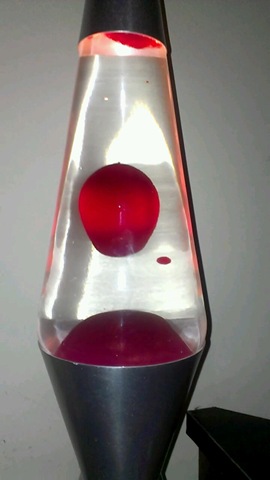
I have enjoyed my lava lamp since I got it for Christmas last year.  It is my very first lava lamp and I sit at my desk chair sometimes staring at it for literally 10-20 minutes.  It is that interesting to me.  What is even more interesting, or probably more disturbing, is the fact that the water used to be crystal clear, and now it’s yellow.  I don’t know why it has turned yellow, but apparently it’s a common problem with lava lamps.

Here is my lava lamp in December 2011 when I first got it, and here it is now in January 2013 a year later.

 lava lamp december 2012 lava lamp january 2013

What a huge difference.  I wonder what would cause the water to turn yellow like that?  I never thought anything of it until I was browsing through the pictures in the My Pictures folder on my computer and came across it.  I then suddenly remembered how clear it used to be.  Naturally I went to Google to research it to see if anyone else has had this issue and to see if there was anything to do about it.  I did find several websites that mentioned it and even a solution.

Update: I deleted everything I had typed out before and retyped it.  I took out those links and here is why.  I followed their instructions which seemed legit to me because more than one website mentioned the same exact thing, but all it did was mess up my lamp.  Here is what it looked like after I tried their fix.

lava very cloudy from salt

I was devastated when this happened to my lava lamp.  The instructions were to let it cool so the wax was solid and open the top of the lava lamp and dump the water out into the sink.  Then put new water from the tap in and swish it around to get all the grease off the walls of the lamp which meant doing that a couple of times.  Then they said to fill it up with tap water and add a couple drops of dish liquid and add a mixture of epsom salt and water with a straw.  Those white flakes in the image to the left is the result of the epsom salt.

I let the lamp cool down and dumped the water out and added new water and more soap, but not the epsom salt and turned it on and there was still epsom salt in the wax at the bottom, so it took several times of rinsing it out to get it back to this…

lava afterI was thrilled beyond belief when the lava lamp was back to normal and the lava was rising.  But then it stopped rising and went back down and never went back up again.  What did I do wrong?  Like an idiot I mixed a tiny amount of epsom salt with a lot of water and added an inch full from a straw and I got that image from above again.  UGH!

That blew my mind that such a tiny amount of epsom salt would do the same thing as a bunch of epsom salt in a smaller amount of water.  I didn’t know what I was supposed to do.  I rinsed it out again and didn’t add ANY salt at all and the lava wouldn’t go up again.  I searched for more instructions because I really want this working again.  I found one guy who made a video and said don’t use too much soap because it will ruin your lava lamp.  He also said to use 1 tablespoon of regular table salt and use the straw to add it, which I did and it still won’t rise.

I’m not sure if every time I had to rinse it out and added more soap if the soap ruined the wax or what, but it’s not rising anymore at all.  I rinsed it out again and didn’t add anything and it is just not working.  I think I screwed it up beyond repair.

Of course I have questions, like did I use the wrong dish liquid?  It’s Palmolive anti-bacterial, maybe it didn’t have enough of the right ingredient.  Maybe I used the wrong epsom salt.  The epsom salt I have is generic and it’s hard as a rock.  I assume it’s because the ziplock bag it is in wasn’t manufactured properly because the zips don’t line up right so air gets in, maybe that’s why it’s hard, maybe moisture got in.  Perhaps if I bought a brand name epsom salt then it might work, but what if I bought some and tried it and it still messed it up?  What if, what if, what if…

Another update:  It works!  Here is a brand new post with a video.

Kinivo BTH220 Bluetooth Stereo Headphone


Kinivo BTH220 Bluetooth Stereo Headphone

My new headphones arrived today and I am beyond excited about them.  At first they didn’t fit me and I was ready to throw in the towel and pack them back up to ship back to where they came from, but I gave them another chance and now they fit me like a glove.

I watched a few YouTube reviews which I know I shouldn’t do because they almost always put the product down and compare them to higher end products, but these were okay and gave it a high rating for its price.  One guy said there was a bit of space where sound escapes or whatever, and that is true, it’s not air tight, but when have headphones ever been air tight?  Who cares!

I did call myself on the phone so I could see if I could hear it ring and I did and it answered like it was supposed to when I pushed the button.  So cool!  That’s the issue I had with my other phone when I was riding my bike.  It would be in my camelbak and I couldn’t get to it in time because I’d have to pull over and take the camelbak off and find it and by then the person hung up or was leaving a message.  Sometimes I’d have it in my pocket in my shorts, but it gets uncomfortable in there and I’m always afraid the phone will drop out as I’m riding and I will never even know.  Nobody ever calls me except for my partner, but he is why I have a cell phone, so if I’m out exercising on my bike, he will be able to get in touch with me, or if I have an accident I can call either him or 911 depending on the severity of the accident.

I activated the voice dialing feature and it asked me to choose between the voice dialer that came with the phone or Robin which is an Android’s Siri challenger (it’s free in the Google Play store).  I chose to use Robin by default because the voice dialer that came with the phone sucks.  It never recognizes what I say.  If I say “Call Home” it calls my friend Ruth lol.  At least Robin understands me.

The sound quality is actually amazing.  I pressed the button once and it automatically started playing music that I had on my phone.  I thought I would have to load the music but I didn’t.  It’s more amazing than I thought it would be.  I press the button once to start and stop the music and when it starts back up again, it continues where it left off.  I loaded Noom to begin an exercise and it started, but I could barely hear the voice talking, which is actually fine by me because I don’t want to hear how fast I’m going or how many calories I’m burning.  Surprise me!  I’m actually going to mute that during workouts.

The headphones are very good and I am so glad I bought them.  They are definitely going to come in handy when I begin cycling this Spring as my cardio to help me lose weight.  I normally ride 22 or 23 miles per day which is a bit much for some, but it’s enough for me.  It’s not too much, I could go more but I just don’t want to.  Obviously I haven’t tried them to receive a phone call on the bike because the bike is missing a back tube, but I will find out in a couple of months and I will try to remember to update this post.

I highly recommend these bluetooth headphones.  Mind you, I base my opinion on wearing them for 10 minutes so this isn’t really a review at all, it’s more of a hey it was awesome for the first 10 minutes, you should try it.

If you do have a pair of these, please do me a favor and comment and tell me how you like them and what you use them for.

Update: I wanted to give an update on these since I’ve had them for a week.  The instructions say to charge it fully, then let it drain completely, then charge it again and drain it again.  Holy crap, that is taking forever to do because the battery seems to go on forever.  I’ve already drained it once and that took at least 3 days to do.  I’m on day 2 of trying to drain the battery for the second time.  The way I’m doing it is to just play music all night long.  Well, it has an 8-hour battery right?  Well, 8 hours pass and it’s still going strong.  I use it the whole day and then play music all night again and it’s STILL going.

One of my concerns when I bought these headphones was that it wasn’t going to last my 2-3 hour bike rides, well that’s out the window because I could probably ride for 3 days straight before the battery died lol.  So no worries there for me now.  That’s actually a relief.  The box says 150 hour standby time and 8 hour talk time, so I’m just guessing that if you don’t use them too often, don’t expect to have to charge them more than once or twice a week, if that.  These are damn good headphones in my opinion.  So worth the $30 I paid.

Oh and one more thing.  The sound is AMAZING!  What is it that the annoying reality celebs say?  AMAZEBALLS?  Well, that it is.  The sound is so awesome and you don’t lose quality from that space between the headphone and your ear.  The headphones seem to be a bit stretched out more than it was when I first opened the package.  It goes back to being small, so it’s stretchy I guess lol.  Stretchy hard plastic.  Yeah.

I was watching a YouTube video with Karl Pfeiffer (Ghost Hunters Academy and Ghost Hunters International) and his voice sounds perfect.  It’s not too loud, it’s not too low, it’s exactly the way it should be.  Before I couldn’t watch his videos because the volume on my monitor sucks, same with my Chromebook.  I can finally hear him with these headphones.

Oh I was told in video reviews that you can fold it and put it in the little pouch that they included with the headphones, but they don’t recommend doing that because the plastic gets too loose when you try to fold it.  It stops snapping into place in other words.  So I’m going to take their word for it and keep them open at all times and never store them in the bag.  I’d rather they be in plain sight anyway.

That’s all for now.

Harmful and Disturbing Images on Facebook

facebook-police

What purpose does Facebook serve for most people?  They get on there to talk to their friends, family, co-workers and classmates.  It’s a great way to keep in touch with everyone, despite those pesky views and opinions that they might have that differs from yours, which can sometimes hurt your or their feelings.  But besides that, it’s a great tool for keeping the lines of communication open.

Pages are different from profiles because they promote books, games, musicians, actors, movies, TV shows, magazines, newspapers, bloggers etc.  You name it, there is a page for it.  There are some pages however that are more of an idea than a brand and anyone can make one and have thousands or millions of fans.  Every time you like their image or status update, all of your friends see it too, which is good for the page because that is how things go viral.  That’s not always a good thing.

There are people out there, very sick, twisted and disturbing people who create a page with the intent of harming others or causing drama to stir the pot.  I have seen and even reported pages because they had pornography (child and/or adult) or they had harmful images like dead animals or even children.  Yes, I said dead children.  Believe me, it’s not an easy thing to talk about, or an easy thing to think about.  I saw that image tonight and when I tried to report it, I got a message saying I couldn’t report it.  I thought that maybe it had been removed, but it hadn’t because I tried looking for it again and it was there.  I finally did report it.

Nobody should have to see such graphic images like that.  I don’t care if it’s an animal rights organization showing pictures of dead animals in a pot (yes, I had to see that image too) or if it’s dead children being posted as a joke just to get a rise out of people.  It’s not a joke, it’s not funny, those were someones children and they died and they are making fun of them and it’s not right.  I don’t want to see that and I don’t want you or your children to have to see it either.

What is happening in the world when people post such horrific graphic content and think it’s funny?  What kind of sick people are out there?  That is not funny at all!  I am avoiding bedtime because I know that I’m going to have nightmares about those children.  I saw a “Faces of Death” video clip many years ago and I had nightmares for weeks.  I am just not mentally prepared to have to see things like that.

I’m sorry, I don’t mean to vent like this but I’m just so disgusted with the human race.  Everyone is entitled to their opinion and free speech and blah blah blah, but there has to be a limit to free speech.  Those “free speech” images shouldn’t be allowed on the internet.

I am not the internet police, but you can be damn sure that I will report as many harmful images or hate speech posts as I can.  I’m mad as hell and I’m not gonna take it anymore!

I honestly feel sick to my stomach right now.

Update:  Okay so I just got an email from Facebook about the image of the dead children.  This is what they said:

“Thank you for your report. We carefully reviewed the photo you reported, but found it doesn’t violate our community standard on graphic violence so we didn’t remove it.”

Really Facebook?  If I was sick to my stomach a few minutes ago when I published this post, you can bet I feel really sick now.  I need to go soak in a hot bath and just meditate for a bit.  I’m out for now.

New Years Resolutions – MyGofer

This is a Sponsored post written by me on behalf of mygofer.com for SocialSpark. All opinions are 100% mine.

Every year we make a new years resolution to do something that will make our lives better and easier.  Eat healthier, lose weight, exercise, quit smoking, quit drinking or whatever it is that you have issues with.  My personal resolution is to lose weight.  I have tried so many things in the past but it’s very difficult to lose weight when all of the weight loss products are so expensive at the grocery store.

I think that the issue that some people have is time management.  You are stuck at work all day long and when you get off work you are too tired to go shopping.  Wouldn’t it be neat if there were an easier way to get all of your shopping done that doesn’t require a lot of your time that you could be spending at home with your family?

MyGofer is a service from Kmart/Sears that will definitely make your life easier.  You go to their website and browse through the products that they have at your leisure, maybe on your lunch break or during down time, or maybe when the boss isn’t looking.  Don’t worry, I won’t tell.  You can browse the website and add items to your list.  When you are ready to make your purchase, simply buy them and drive to the store and either go to the customer service counter or pull up to the designated curbside pickup location and they will hand you your items in bags right in your window as late as 9pm, even on weekends.  It’s really that easy.  There offer same day grocery delivery or shipping them to your home.

I mentioned earlier that I made a resolution to lose weight, well I can do that with my weight loss coach app on my phone, but what I need are the weight loss foods and fitness equipment.  I actually have a bicycle, but I need to buy some accessories for it.  I was looking through their bike accessories and found quite a few things that I need, like some new tubes, those are expensive, but they are cheaper with MyGofer.  I also need a new pump and a new kickstand and I definitely need new brakes.

They have so many departments for you to browse though, like food and groceries, prescriptions, health and wellness, beauty, baby and nursery, pet foods and other departments like home, bedroom, kitchen, electronics, fitness, office, tools… the list really goes on.  There are simply too many departments to list.  If you need it, chances are they have it, and in most cases cheaper than anywhere else.

I think their website is great, but if you aren’t at your computer and you simply want to browse their products and add things to your list  you could download the app on your phone.  They have one for Android, iPhone and Blackberry.  It is definitely something to look into if you are too busy to go shopping.  I mean, it couldn’t hurt, right?  Check it out!

Visit Sponsor's Site

My Weight Loss Journey – Week 2

On January 5th, 2013, I was looking through the Google Play app store on my Android phone for an app to help me lose weight.  I had downloaded a few apps that would help record my walking and bike rides with GPS and would tell me everything my bicycle computer tells me and more, but they didn’t help me record my eating habits or tell me what to eat.  The front page of the app store had a featured app called Noom Coach.  I downloaded it and checked it out and it was way more than I was expecting in an app.  I had the free version with limitations and after only a few days decided that I had to purchase the pro version.  Yes, I was that confident in this app after only a few days.

I am only in my 2nd week with this app and I have already lost 8.4lbs.  I only expected to lose 2lbs a week, so this is quite surprising that I have lost more than double my goal each week.  Then again the first week or two are the easiest, I won’t count my chickens until the 3rd or 4th week.

week 2-1week 2-2

I am over 100lbs overweight and my goal is to just get down to 200lbs which means losing 63lbs.  I have tried to set goals to lose all of the weight before and becoming disappointed when it failed because my goal was set too high.  I have been told to set smaller goals because you reach smaller goals faster.  When the small goal is finished, then I can set another small goal.  Although, setting my goal for more than half of what I need to lose is not quite a small goal, I think that I can reach it because this app is motivating me to.  If it doesn’t then I will adjust my goal to make it easier.

We haven’t been exercising as much as we should.  I could give 2 excuses as to why, but what’s the point?  I mean, I hate to make excuses for why I can’t do something because excuses are why I fail.  These are good ones though.  It’s cold outside and we both have bad backs and it hurts to walk.  There, I said it.  The cold part is a BS excuse, but the back pain is legitimate.  With that said, we have been walking 2 or 3 days a week for maybe 1 mile or more each time.

Arctic Cooling P311 Bluetooth Sports Headset I have way more weight to lose than my partner does.  I was at 263lbs and he was around 200, so I have to do double the work which is why I bought myself a new pair of Arctic Cooling P311 Bluetooth Headset for Sports from Amazon for my HTC One V android phone so that I can ride my bicycle when it starts to get warm outside.  I can keep my phone in my camelbak which will have the Noom app recording my exercise while letting me listen to my music, and the bluetooth will allow me to accept phone calls at the push of a button on the headphones.  Although I’m not sure if it will accept the call automatically or if I have to push the button, I will find out soon enough.  I thought I read in a review that it automatically shuts off the music when a call comes in and resumes when you hang up.

The headphones that I bought aren’t the best, I mean, they didn’t get the best reviews, but they were $30 which is way more than I could afford.  The headphones that are in the $60’s-$100’s range are the best, so I am getting what I paid for.  I saw in one video review that the mic sucks for taking calls while you are on your bike or walking, but are amazing indoors.  I don’t really have much of a choice in the matter, so it’s the best I can do with what money I have available to me.  But it has been my experience that people who do reviews are spoiled with the more expensive products they test, so to them it might be a horrible pair of headphones, but perhaps it will be fine for me.  I can say that because my phone got horrible reviews and it’s way better than they gave it credit for.

Cycling seems to be the best exercise for me because I am sitting which doesn’t hurt my back.  Walking is fine if I walk 1 or 2 miles, but I can ride 23 miles a day on my bicycle which means I can burn more than a quarter of my days meals on the bicycle which will help me lose more weight and will get me to my goal faster.  Not that I want or need to rush anything, but it will help.  It’s too cold now, so I will get to it when it starts warming up in the Spring.  I bought the headphones now so that I could afford to fix my bike next month.  I can’t afford to do both in the same month.  I would also like to buy some bicycle shorts and a bicycle shirt to make riding more comfortable.

I am finally eating healthy and enjoying it.  We have been buying the Weight Watchers frozen dinners at Food Maxx for $1.88 each with a $2 coupon for 10, so we’re saving money on that.  We’re also eating more fruits and vegetables than before, which is a very good thing.  I don’t drink soda (diet or otherwise) very often, so that’s not an issue.  The fruit seems to satisfy my sweet tooth, for now.  I have been looking up recipes for cookies that use bananas and apples so that I can make a very low calorie sweet treat without compromising our diet.  I found a good banana oatmeal cookie recipe that uses applesauce in place of sugar, they even tell you how to make it with real apples.  I think I might try to make those today for our late night snack.  I also bought some bottles of Slim Fast specifically for when we have a chocolate craving, but I have a feeling those won’t last the week.

I know that 8.4lbs isn’t a lot to be blogging about so soon, but it’s a good start and I feel confident that I will keep it up this time.  I will keep this blog updated on my progress every week when I do my weigh-ins too.  Not that anyone really cares, but it will help me to talk about it, even if I am just talking to myself.

Noom Weight Loss Coach

Noom Logo

Okay so you might say that I am a bit excited about weight loss all of a sudden.  On New Years Eve/Day, I decided that I wasn’t going to make a New Years resolution.  I changed my mind when I had my picture taken at IHOP.  I decided that I would make one, but it isn’t to lose weight, but more to change my eating habits to live a healthier lifestyle which will help me lose weight in the long run.  I don’t want to look at it as a diet, but more of a lifestyle change.

I started looking on the Google Play App Store for weight loss apps and found a few that looked good, but they didn’t really do it for me.  I went to the App store and found Noom on the front page.  Since it was recommended, I figured what the heck, let’s give it a go and see how it works.

It’s a free app, but it has limitations because they want you to pay for the service of using the app.  It’s normally $10 a month to go pro, but they have a holiday special right now for only $2.99 a month, $15 a year or $30 forever.  I was going to do the $2.99 a month, but you know how that works, you pay $2.99 and the next month it goes back to it’s regular price of $10 a month.  I figured I’d probably only do this for 1 year, but you never know.  I just want the full version forever without having to worry about paying a monthly or yearly fee.  I figured the $30 price will go up if I don’t do it now, so I paid for it and I love it.

They don’t pressure you to do things you don’t want to do.  They don’t tell you that you can’t have certain foods because telling you what to eat makes people rebel and eat what they want to out of spite.  That’s just what I think, the app didn’t tell me that.  They do give you some good articles to read with very helpful hints and tips and you get points for everything you do.  I am level 4 now.

Here are a few of the features that I love about it.  When you enter your meals, you have the option of scanning the bar code on the box.  That way you don’t have to type it in.  You might think that is lazy, but not really because sometimes it can take a few minutes for the scanner to read the bar code, so I’m sitting there like a dufus holding the phone up against a bar code and it keeps trying to focus, but doesn’t do anything.  If I place the box on something and steady the phone on a flat surface so I’m not shaking it then it might work better.  But I digress.  You can also type in a word like Banana and it asks you if you are eating the size of a golf ball, a tennis ball, a baseball or a fist.  They don’t ask you how much it weighs, just how much food it is.

We have both really changed our eating habits.  We started buying Weight Watchers Smart Ones frozen dinners at Food Maxx for only $1.88 each.  That is a big help because they are nearly twice that at Albertson’s.  We also started buying more fruits and veggies.  I have actually been more motivated to eat fruits and vegetables from Noom.  I took this picture today.

fruit bowl

My problem is that I have a sweet tooth.  I will literally go out and buy candy because I want something sweet all the time.  These don’t compare to candy, but they are sweet and they really help and they are green foods in the Noom app, so they are better.

One of the features of Noom that I really love is the Pedometer.  If I keep my phone on me at all times, either in my hand or my pocket, it counts my steps whether I’m in the app or not.  My phone can be on standby in my pocket and it still counts my steps.  And it has an awesome mapping feature for when I exercise outdoors.  If I go for a walk or a bike ride, it uses the GPS to show me where I am going and it even marks my trail on a map so I know where I went.  That’s really cool.  And it tells me how fast I’m walking or cycling, how many miles and miles per hour and how many calories I’ve burned.  My bicycle computer does that, but what it doesn’t do is show me on the map.  I think when I start cycling again, I’m only going to bring my phone and not the bicycle computer.

Here are some screenshots so you can see what I’m talking about.  If you are looking to lose weight, I strongly recommend Noom.  It’s only available for the Android, sorry iPhone users.

coach logbook history yesterdays meals weight graph  map

Noom is not paying me to write this, I am just very excited about finally having a tool to help me lose weight that actually works without me having to go out of my way to use it.  You don’t have to pay for it, you can still use it for free, but you won’t get all the articles.  It’s a great app, you should try it.

Fun With My New Phone

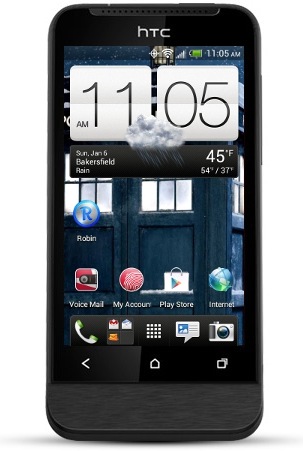
htconev Santa (or as I like him call him, me) gave me an awesome present for Christmas.  My first smart cell phone, a HTC ONE V Android from Virgin Mobile.  My previous phone was a Samsung T401G from Net10 which did absolutely nothing other than texting and making calls.  It did have games and internet, but they both sucked.

This new phone is better than my previous cell phones.  It’s not a high-end phone, but it is to me since I’ve never had a smart phone before.

cruiseSo far I have earned 11,067 Viggle points which I will keep earning and saving up to buy something very expensive.  They have a few cool items like a Kindle Fire, an iPod Touch and an Apple TV.  My partner doesn’t have internet on his TV and he has an iPhone, so perhaps he would appreciate the Apple TV.  I earned the 11K points in just 2 weeks, so can you imagine how many more I will earn by Christmas 2013?

They have one reward in there that is worth 4 million points which is a 4 or 5 night Caribbean, Europe or Bermuda cruise aboard a Royal Caribbean International ship.  Can you imagine winning a cruise just from watching TV?  I have never in my life been on a cruise and I have always wanted to.  I think it would be fun and I could take pictures and video with my new phone and post them daily lol.

I have many apps for losing weight which I haven’t really used because they are for cycling and walking and it’s been too cold (as you can see from the weather on the phone image above).  I will take advantage of them in the spring.  Actually, I may uninstall them because I found one that will do the work of all of them, it’s called Noom and it has a GPS and logs my walk, run, jog, cycling etc.  It’s free, but if I pay for it then it will do more.  One thing I love about it is that I can scan the bar code of the food (box, obviously) I eat so I don’t have to find it manually.  I also have a food scale to keep me honest lol.

There are reading apps like the Kindle and Nook apps as well as Aldiko, but I don’t think I will use it too often because it’s killer on the eyes.  I much prefer reading on my Nook WiFi when I do read because it’s e-ink.

I’ve been playing a few games like Megapolis and The Sims FreePlay and Tetris.  I like games that you play with your finger, but my fingers are too fat so I have a stylus to poke the screen with.

I love how it takes pictures and video.  Pictures are widescreen which is basically 4×6 which my other digital cameras never did.  Not that I ever have pictures developed, but if I did want to have a picture developed, I won’t lose anything when it converts the pic to 4×6.  I love that it has a flash which I also can use with video which again isn’t something my camcorder can do since I don’t have a flash for it.  I also love that I can take a picture and then post it directly to Facebook and Twitter without any steps.  Screenshots too.  I learned that just by pressing the power and the home button, it will take a screenshot which I can share in emails, Facebook and Twitter.

My last phone was okay for making calls, but this is perfect.  It has a speakerphone which only works by turning the phone upside down.  I don’t need to look at the screen while talking so that’s fine.  The 3G is great for internet.  My other phone had internet but it was a crap shoot.  It literally took 5 minutes to load a web page one time, and then it gave me a message that said there wasn’t enough memory, which means it didn’t really load the web page.  So I lost minutes and didn’t get anything in return.

My old phone is in good hands with someone I know.  It’s my partners late cousins life partner.  She had a cell phone, but she doesn’t have it anymore and she told me that this one is better than the other one anyway.  I feel sorry that she has to use it and not an Android, but it still works for phone calls and texting.  It’s not perfect, but it works.

I think I am too spoiled now lol.  I will get a ton more use out of this phone than my last which is a good thing.  I felt really guilty about buying it, but I don’t feel that way anymore.

My New HTC One V for Christmas

MERRY CHRISTMAS!

I got a brand new cell phone for Christmas thanks to IZEA paying me to blog and tweet.  I just love blogging and tweeting for money.  It’s not a very good living, but at least I get some cool things out of it.

It just so happened that when I got my new HTC One V from Virgin Mobile, my partner decided that he wanted to set his computer up and naturally his mouse and keyboard weren’t working, so I gave him mine which meant that I lost my computer.  So I’ve been using my new phone as a computer for a few days now.  I’m not used to using such a small screen so it takes getting used to.  I have my Chromebook, but the WiFi crashes after typing a few words.  I reset it to factory settings, but it still does it.  Resetting it helped make it faster because even clearing the cache and browsing history wasn’t speeding it up, but the WiFi problem still happens, which meant my phone is now my only means of being online.  I’m “borrowing” my keyboard and mouse for this lol.

So after a few days of using it, here are my impressions.  I read a few reviews and watched a dozen video reviews on YouTube before I committed to buying this phone just to make sure it was what I wanted.  Of course, I wanted a better one, but this was what I could afford that I could get before Christmas day.

I was under the impression that it had 4GB onboard, but when I went to install the Sims free play, it said I didn’t have enough room which told me that I only had 1GB available.  I figured I’d be okay until I could buy a MicroSD card, but apparently not.  I am using a 2GB MicroSD card from my previous phone, so that is working for now until I get my new 32GB MicroSD card.

I am very impressed with the performance compared to some of the reviews that I watched.  It’s not slow at all.  I mean, sometimes I have to wait for a page to load or a game to load, but I’m not spoiled with a faster cell phone since this is my very first smart phone so maybe I just don’t know the difference yet.  It is slow however when I am not at home on my WiFi.  We were at the movies yesterday and it took forever for Foursquare to load so I could check in.  It finally checked in by the time we got home.  So the 3G isn’t great so far, but it’s wonderful on our WiFi.  I will have to see how frustrated I am the next time we have a doctor’s appointment lol.

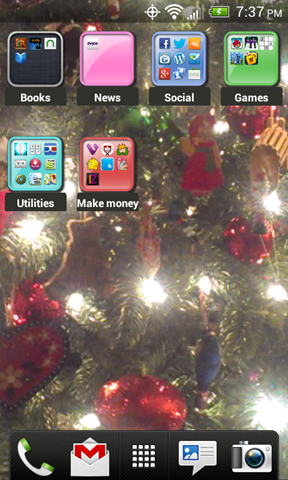
iphone folder screenshot The OS is pretty impressive, well to me anyway.  It has the big clock with the weather, then room for 8 icons underneath.  There are 2 screens to the left and 2 screens to the right.  I decided that I didn’t want a bunch of icons, so I downloaded the iPhone Style Folder app.  I tried another one that allows me to put the icons in folders, but it only allowed me to have one folder, which is not what I was looking for.  This is perfect for me.

Oh and by the way, I downloaded an app to take screenshots and it was nice enough to tell me that my phone already has a way of taking screenshots by simply pressing the power button and then the home button.  So that’s one less app that I have to worry about taking up room or putting a watermark on my screenshot.  The background image is of our Christmas tree btw.

Before I got the phone, I typed out a post about how to make money using your phone.  I installed those apps (as you can see from the folder in the image above) and here are my impressions so far.

1. iPinion was a pain to sign up on because it insisted that my email address was currently being used, but when I tried to get the password, it said that email address wasn’t even in their system lol.  I had to use another email address to sign up with and even then they didn’t have any surveys for me to fill out.  I’m not giving up on it just yet.

2. IconZoomer wants me to take pictures of things like what my fridge, coffee maker, my form of entertainment etc.  But they haven’t paid me in credits for any of the pictures I have taken.  They each say they have so many days left, so maybe when the question expires I might get credit.  If not, delete…

3. CheckPoints wants me to scan barcodes of products at the grocery store, but I am broke so there isn’t a reason for me to go to the grocery store.  I’ll do it when I get some money.  I don’t want to look suspicious if I go in, scan barcodes then leave LOL.

4. ShopKick wants me to go to the mall and walk into specific shops for points, that would be fine if I went to the mall all the time, but I don’t and I don’t think I would be willing to walk around just for this because of my back pain issues.  It’s fine for some people, but not everyone.

5. Cash King wants me to download apps, watch videos and fill out surveys.  I only get 1 video a day to watch so that’s not what I thought it would be.  I downloaded 1 app which is a game which I actually enjoy and it connects to Facebook and is a game people have been wanting me to play anyway.  They don’t have any surveys yet.

6. Viggle is a wonderful app.  All you do is turn on the TV and let Viggle hear what you are watching and you get points which you can use to buy stuff.  They mostly want me to watch college football games on ESPN so I turn it to ESPN and let it hear the game then I just wait for the next one.  They will give you credits for everything you watch, but specific shows they give you bonus points for.  I have almost 2,000 points after just 2 days.  It’s not going to take long to get some decide rewards if I continue to check in and watch videos everyday.

7. Staree is from IZEA and I will never question them, but… what the heck is this app for?  I have taken a few pictures and haven’t gotten any credits lol.  Maybe they will ask you to take pictures… who knows.

One of my favorite features of this phone is how it takes pictures and video.  This doesn’t do 4:3 like most cameras do, it does 16:9.  In fact, I have it set so it takes pictures that are 1280×768 which is the resolution of the wallpaper on my desktop computer.  Videos are 1280×720 which is the same resolution as my HDTV.  Also I am loving the flash lol.  I know it’s funny to hear but every digital camera I have ever had was missing one thing, the flash, so I am in heaven.  It also uses the light from the flash for video which is pretty cool.  My camcorder doesn’t have a light so now when I need to take video at night, I’ll be able to.  Not that I will have a reason, but you never know.

Here are some pictures I have taken with the camera on my new HTC One V.

So I think I will have a lot of fun with this new phone.  It is so much better than my other one and I love that I can post pictures directly to Facebook and Twitter and I can email pictures to myself instead of having to move them to the MicroSD card, then putting it in my printer to copy to the computer.  It sure takes out so many steps.  I also love the voice recognition.  I don’t mind typing, but I make tons of mistakes with the on screen keyboard.  Although, the voice recognition isn’t perfect, but it’s still better than typing.  Yep, this is going to be a beautiful friendship.

Oh and I gave my other phone to someone who really needed a cell phone so that makes me feel really good.

How to make money with your cell phone – 7 apps

AndroidMoney

I have been getting paid to blog for many years using various IZEA websites, such as PayPerPost, SocialSpark and Sponsored Tweets, which by the way is the only reason I was able to buy myself a brand new Android phone for Christmas.

Since I have a new HTC ONE V from Virgin Mobile coming, I figured I would see if I could use that to my advantage to make more money.  The blogging for money is fine, but it has taken a few months worth of blogging and tweeting just to make $80 to buy my new Android phone.  It’s good pay, but it doesn’t come by very easily.

Naturally the first thing I did was go to Google and typed “Make money with android phone” and I found a bunch of things.  IZEA used to have a cell phone app called WeRewards which rewarded you every time you checked in at a store like Target, Walmart, Subway etc. as long as you took a picture of yourself, your receipt, the product and/or the store sign while in the store or in the parking lot.  They closed that down so there is one less thing to talk about, but they did replace it with Staree.

Ok so here are the things I have found.

ipinion 1. iPinion and iPinion+

iPinion is the most sophisticated survey app ever built for smart phones. It has exciting survey questions including several image interaction types. Users can take surveys on the go and earn rewards.  iPinion is non-intrusive, fun to participate and professional.

They have 2 apps and they each got good ratings and reviews, but iPinion+ doesn’t have as many as the other.

iconzoomer 2. IconZoomer

Become Trendspotter at Iconzoomer and receive cash for your photos.

Shoot it – Send it – Earn it

Each week you’ll receive assignments of basic topics such as: “Show us what you are eating for dinner?” or “Show the shoes are you wearing today?”

Pretty straight forward.  They ask you to take a picture, you do and you get paid for it.  That seems pretty good and the ratings and reviews are very good.

checkpoints 3. CheckPoints

Scan barcodes for products like Coca-Cola, Dreyer’s and more in any store for instant rewards! As seen in the Washington Post, NY Times, USA Today and CNN, CheckPoints is the “App That Pays You Back” with free rewards, no matter where you are!

You are going to the store anyway, why not open this app while you are there and scanning barcodes for rewards?  It seems really easy.  This app got a lot of good ratings and reviews.

shopkick 4. ShopKick

This holiday shopping season, join the more than 4 million shopkick users who get rewarded for the shopping they already do. It’s like a rewards program—only better. You get rewarded just for walking into stores like Target, Macy’s, Best Buy, Old Navy, American Eagle and Crate & Barrel. Get even more kicks when you scan items and make purchases. Forget sales and coupons. You can find great discounts and deals in the app. It’s a magical experience, and it’s free.

This is very similar to CheckPoints in the sense that you get rewarded for scanning barcodes, but you also get rewarded merely for walking into a store without doing anything.  So you could basically just go to the mall and walk around with this app loaded and go into the stores that they have listed in the app and start window shopping and scanning barcodes.  They got some good ratings and some reviews.

SwagBucks5. SwagBucks Search Swidget & SwagBucks TV Mobile

The official app from Swagbucks. Earn rewards & prizes by searching on your Android device.

I haven’t had much experience with SwagBucks Search Swidget because when I have tried it, it hasn’t really given me too many rewards.  I think the only way to get your SwagBucks with that is by making a purchase from whatever website you are searching for.  Like if you search for Target and you make a purchase, you get SwagBucks for every dollar that you spend.

SwagBucks TV Mobile on the other hand is a bit different.  You load the app and you choose which type of videos you want to watch and you just sit there and watch videos for however long of a time you have to sit there watching videos I guess.  There are music videos and movie trailers.  It’s a novelty that does wear off and you don’t get that many SwagBucks, but it still counts.  You can’t just load the app and have it run all day and all night because you have to tap the X in the top right of the screen in between videos.

Note that 100 swag bucks is basically $1 so it is a good idea.

Added 8-14-2013

viggle 6. Viggle

Viggle. Check into your favorite shows and get rewarded. Viggle makes TV better.

Watch TV. Get Rewards. Check into your favorite TV shows with Viggle and you’ll get real rewards from brands like Best Buy, Burger King, Fandango, Old Navy and more.

Viggle can automatically identify the show you’re watching. You get Viggle points for every show you watch which you can redeem for real rewards or convert into charitable donations.

Some people are saying bad things about this, like the app doesn’t recognize the show they are watching so they have to type it in manually, and others are saying it doesn’t give you money, you get coupons.  I would say to check it out and if you only get $5 gift cards for Amazon, then at least you are getting something.  I mean who cares if you are getting coupons, it’s the same as cash when you go to use it and you end up saving money on things you already want to buy.  Also, if you feel generous you could give the money to charity.

Update: I can tell you that this is good and you do get real rewards because I got a $25 gift card for Barnes & Noble to buy ebooks.  I used it to buy the Hunger Games ebooks for my Nook.

staree 7. Staree

Use the Staree app to upload photos and videos to your Staree.com profile.

To request a Staree account, please visit our website at http://www.staree.com!

I am loyal to IZEA so I am only adding this because they are an awesome company that always pays you.  They are 100% legit.  I have signed up for Staree and have uploaded a couple of photos, but I don’t know how it really works yet.  But it’s still worth giving a shot.  I really wish they would bring WeReward back though.

erewards icon8. e-Rewards

e-Rewards Mobile is now available for Android- now you can answer surveys and earn Rewards on the go!

I have used e-Rewards for many years and I can say that it is a good tool for making money, although you don’t actually make money so much as you get rewarded for your surveys with gift cards.  Some rewards are better than others, but the only reward that I am interested in is $25 Game Stop gift cards.  They have changed their reward system since the last time I got a $25 gift card for Game Stop.  It used to be that I would have to do $50 worth of surveys to cash in for the $25 gift card, but now you have to do $75 worth, so they are basically charging you $50 to cash in on $25.  I feel that is a huge rip off, but it’s still a reward.

It would be nice if they offered better rewards.  Most of their rewards are for hotels or airline rewards or magazines.  I don’t travel or read magazines, so those rewards are useless.  It would be nice if they had Amazon and Barnes & Noble rewards.

Added 8-14-2013

So these are all of the apps that I plan on installing when I get my new HTC One V from Virgin Mobile.  If you know of any more or better apps for making money please let me know in the comments and I will add them.  These were just all I could find from doing my own research, but I am sure there are better apps out there.

Thank you to IZEA for allowing me to blog for products and websites and paying me for it.  Now I will hopefully be able to make more money from my phone so that I can afford the monthly fee and/or to buy some accessories for it lol.

My New Virgin Mobile Cell Phone

Well I finally did it, I bought a new Android based cell phone from Virgin Mobile.  Well, I bought it from Amazon, but it is a Virgin Mobile phone.

We were at the mall today and they have a Best Buy mobile store where you can buy cell phones from all the different mobile companies, and they had the Virgin Mobile phones, but they were more than they are at the Virgin Mobile website.

Like take this phone, the HTC One V that I just bought on Amazon for example.  At the Best Buy store they were selling it for $149.99.  It’s on the Virgin Mobile website on sale for $99.99 and I told the clerk that.  He scanned the barcodes and he said nope, it’s $149.99.  I told him to check the Virgin Mobile website and he said it’s $149.99.  I knew it was a bad investment to buy it from there because I could have saved $50 by buying it online.  When we came home I checked and sure enough I was right, it was on sale for $99.99.

Before I made the commitment to buy it, I wanted to check with Amazon first to make sure I could get a better deal and it was on sale for $93.41.  So not only did I save money by buying it at home, but I saved nearly $60.  That’s good because I still have to buy the phone card to activate it which is another $35.

This isn’t the phone that I wanted, but it was the phone that I could afford to buy and sometimes we have to make sacrifices like this.  The reason I didn’t want this one was because it doesn’t have a front facing camera which means I can never video chat with it, but that’s why I have a webcam on my Netbook and my Desktop computer.  But it would have been nice to have the front facing camera for those times when I don’t have a mirror and I need to check to make sure I don’t have food on my face when I’m eating.  I know, I’m strange, but that does come in handy lol.  I’m sure the front facing camera wouldn’t be great for taking self pictures anyway since it is probably a 1MP camera and the regular camera on it is a 5MP.

Besides the front facing camera issue, I did like this phone in the reviews that I saw.  It doesn’t perform as great as the most expensive phones, but it does perform well, from what I’ve seen.  I will have to find out for myself.

I didn’t opt for the 1-day shipping for $18, instead I got the 2-day shipping for $10 which means I will get it on Monday, December 24th which means I will get it just in time for Christmas lol.  If I had gotten the free 5-day shipping, I’d have to wait until the end of next week.  I guess that would be ok to wait, but I don’t want to wait lol.

So yay, welcome to the year 2012/13 lol.  I have been using an old type of phone for such a long time that I won’t know what to do with myself.  I’ve never had an android phone so I’ve never known the joys of apps like the rest of the world does.

I will be giving my phone away to someone who needs it which means I will be getting a new phone number.  That kinda sucks but I wasn’t married to the one I have now anyway, I still don’t remember what the number is lol.

So until Monday…