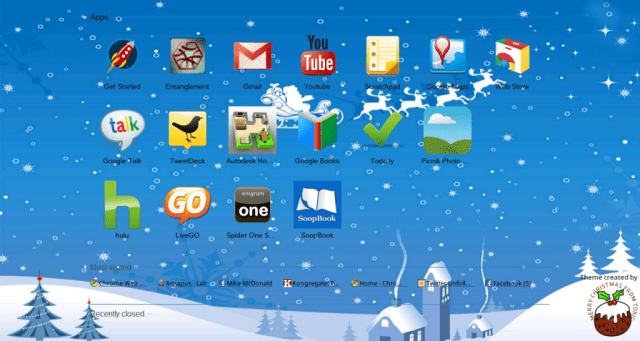
I am really enjoying Google Chrome these days. This is my Google Chrome front page. As you can see I have a few apps and unseen a few extensions.
The apps that you can see are pretty cool. The top ones are what came automatically in the browser and the rest I added. If I can’t use programs on my desktop then I gotta find a way to use them on the browser only laptop.
Typically when you are given things in a new product, the first thing you do is get rid of the junk you don’t want. Well, I did get rid of something. There was an icon for a Poppit game from Pogo but when you click it, it loads the Pogo website with the Pogo logo but the game never loads. So screw it, it’s gone lol.
Entanglement is a really cool game and I like to play it so I kept it. I’m not very good but I’m just a beginner. You gotta start somewhere right?
The Gmail and Google Talk ones I can do without but I’m not going to get rid of them if I may need them one day. Instead of using those, I downloaded the app LiveGO . It allows me access to MSN, Facebook, Twitter, Gmail, Yahoo and AOL/AIM all in one web page. For Facebook MSN, Gmail, Yahoo and AOL, it allows me to get access to my inbox and IM. It doesn’t have MySpace or Skype and I really wish they would get Skype on there so I can use the webcam. The IM’s have the webcam button but it says Coming Soon when you mouse over it. Hopefully they will get that up and running soon. For now I can use Google Talk to video chat, although I haven’t had the opportunity yet as I still don’t have any Gmail friends in all the years I’ve had Gmail.
TweetDeck is great. I’ve used that for Twitter on my Desktop so I now use it on the laptop in browser format instead of the installed version my desktop has. I actually like the browser version because the program takes forever to load and the browser loads instantly.
Autodesk Homestyler is such a cool one. You get a measuring tape and measure the rooms in your house and add rooms in the program according to the measurements. Ok I don’t needthis but it’s neat. I can add furniture to each room so I can make decorating decisions. I’m not a decorator but Darrin is so he can use that.
Google Books I added because I’m a book-worm. Although I have a Nook so I don’t need that but I was using it to look up books. I may get rid of it if I need the space though.
Todo.ly is a to do list lol. Yeah I know, lame. I may get rid of it if I don’t use it that often.
Picnik is for photo editing, although they want you to pay for premium features, I just wanted it so I could use it for the webcam. Since I can’t have Gimp on this laptop I needed something but if I really need to make a graphic I’ll just make it on my desktop.
Spider One Suit FREE … It’s Spider Solitaire lol. I can’t imagine a world where there is no solitaire on a computer.
SoopBook is for writing your own book. You can write it in there and invite people to read it and correct your mistakes. Although I don’t know if I want anyone messing with my autobiography but it’s a good way to write it since I am using this as my primary computer. It also gives me a backup so if my computer crashes then I don’t have to worry about a backup copy.
I haven’t been writing my book at all lately anyway because I’ve been too busy. When I am ready to write again I have SoopBook and/or my desktop to write with. Although I could use SoopBook when we aren’t home and I have the laptop with me so there’s a good reason to keep it for a while.
Do I really need to explain YouTube, Hulu, Google Maps and Scratchpad? I’m sure you know what those are.
I have a few extensions which are on the very top of my browser, to the right of the address bar. I’m using Glue, AOL, Gmail and Yahoo email notifyer so if I’m not in LiveGO then I can see if I have email or not. Then I have Aviary for taking screenshots for blogging (example above).Amplify extension which I use occasionally for blogging and finally After the Deadline which is a great spell/grammar checker, not just for blogging but anywhere you type on the internet.
I am still adding extensions and apps so this is not all I am playing with. There will be more but for now, this is what I’m up to. Playing with and learning how to live with a browser only based laptop, it’s actually not as difficult as it sounds. I’m sure anyone can cut their ties to programs if they really had to. I guess this is an if you were stuck on an island, what program would you bring with you” type of question. Well, in my case I’d have to say the Google Chrome browser would be the only program I need since I can find a way to add all of my programs as web apps.
Ok that’s it for now. I’m tired and my eyes are too blurry from staring at this 12.1 inch laptop screen for the last 16-18 hours lol.




 Xanapus` Lair