Dreamland Crocotta by Karl Pfeiffer

If you are a fan of Ghost Hunters and Ghost Hunters Academy, then you are familiar with GHA season 1 winner Karl Pfeiffer.  He’s not just a famous TV personality but he’s also a writer.  He has written this short story called Dreamland Crocotta.

I didn’t know that he was a writer until he mentioned it on Twitter.  I found his book in the Nook store by searching for his name and he confirmed that this was his book.  It was only $1.99 but well worth the price for the 19 pages that it has.  It seems to only be in e-book format but sold on many different websites.

He used Smashbook to publish it but it’s sold on the Barnes & Noble website (through the Nook or the website), Kobo books (for the Kobo Reader) as well as the Diesel eBooks website.  If you have a Kindle, you might be out of luck as far as buying it through the Kindle store but you might be able to convert it to Kindle format in Calibre.

Synopsis:

“A short story. Overcome by insomnia and depression, Mitch Haloa passes his days alone in his neglected home until he begins speaking to a mysterious voice that creeps within the forest behind his house; A voice that soon haunts his every thought, that prods at the cracks in his already fragile reality; that calls for Mitch to lose himself, to leave one darkness in favor of another…”

It is listed in these categories: creature, dark, horror, insomnia, paranormal, psychological

It is pretty dark but as you read it more you will begin to understand Mitch’s plight, why he is so depressed and why he is hearing voices in the forest behind his house.  You will start to understand a little better why his life has turned in this dark direction.  It may be a short story but it is worth the read.  I applaud Karl on his efforts and look forward to more of his short (or long) stories.

(y) (y)

On a side note, Karl is who got me into wanting to learn how to make those Hemp beaded chokers.  When I first saw him on Ghost Hunters Academy I saw his choker and thought it was so cool.  It wasn’t until he was on Ghost Hunters International that I remembered his chocker.  That night I got on Google and started researching them; what they are called and where to buy them.

I found out that they were hemp and macramé so I started researching that too.  I went to several different websites with macramé patterns until I found a similar necklace.  Then we went to Michael’s where I spent nearly a fortune on hemp and beads trying to recreate his.  Although, it was nearly impossible since I had already forgotten what his looked like, I ended up making my own design.  I also learned how to make the rings and bracelets.  Pretty soon I started looking like a hippy with all my hemp jewelry on.  What I was missing was my tie dye t-shirt and my bald man hippy long hair in the back.

Anyway, I want to thank Karl for broadening my [craft] horizons by wearing his choker on Ghost Hunters lol.  If it wasn’t for him, I probably would’ve never had an interest in adding Macramé to my list of crafts that I do.

Finished One Book, Onto The Next

Well I finished reading the 9th Xanth novel today “Golem in the Gears” and that was the final Xanth novel that was sent to me a few years ago. My friend Alyce who sent them to me didn’t ask for them back, otherwise I probably would’ve put more of a rush into reading them. I’m not going to sell them on Yardsellr though because I don’t know that she won’t want them back eventually.

I have a lot of choices for my next book since I’ve been getting tons of free e-books from Barnes & Noble through the Nook store. Every Friday I go into “The Daily” on my Nook and see their “Free Fridays” from the Unbound Nook and BN EReader blog. I think that I have gotten 3 free e-books so far from the Free Fridays. And actually, you can get tons of free e-books as you are browsing for whatever subject. I can’t count how many free e-books I have gotten that way. This Nook sure has paid for itself with all the free e-books I got out of it.

I have a lot of choices for my next novel to start reading tomorrow and I think it will be the 2nd book in the Belgariad which is “Queen of Sorcery” by David Eddings. I read the first one last month and I think that it’s only right that I read the 2nd one this month and then one every month until I have finished the series. I’ve had these books since 2007 and haven’t even touched them.

I have until next week to finish it so I can buy the 3rd Sookie Stackhouse novel which I plan to read 1 every month until the next season of True Blood starts. I figure it would give me a better insight into the show and the characters. Although, the show is a not even the same as the books. They changed so much for the show by adding or deleting characters and story lines. Even if I do read all the books I’m always going to be surprised in the new plot so the show is actually more of an alternate reality from the books.

You know, ever since I bought this Nook I have been reading every single day. I actually skipped 1 day and it was torture to skip it too, I really genuinely wanted to read lol. It’s so unusual for me to read this much but I guess I figured since I spent so much money on all these books and the Nook I might as well read them.

A friend says she is proud of me for reading so much but is that really something to be proud of someone for? I mean, it’s just reading. Well, I guess her reason for it is more because I refused to read for the first 35 years of my life then all of a sudden I decide I wanted to start reading and now look at me, I’m a book-worm. I know it’s not much but in the last few years I have finished reading 32 books, 10 of them in the last couple months since I bought my Nook. I think it’s pretty good since it takes me 4-5 days to read a 200-300 page novel.

Next month after I read the 3rd Sookie Stackhouse novel I’m going to start to re-read the final Harry Potter novel before I go see it in theaters. That should take longer than 4-5 days unless I spend 8 hours a day reading it just like I did back in 2007 when I read it originally. Although, I’m pretty sure I remember everything that I read the first time so who knows if I really will read it again. I’m not much into repeating the same book.

My aunt says that her daughter-in-law re-reads books all the time, sometimes about 5 times because she always misses stuff the first time. I personally think that if you pay enough attention to the details and not try to read it so dang fast, you might not miss anything. That’s the trouble with reading so fast, you are in such a hurry to read it that you miss a ton of stuff. If you read at a normal pace which takes longer then you will get more out of it. The time it took to read it 5 times, she could’ve just read it at a normal pace one time and gotten more out of the experience of the story she’s reading.

It’s not a race. Who are you trying to impress? Because I’m not impressed when a person tells me that they read an entire book in a few hours because I know they missed a ton of stuff that is important to the story line. If you’re going to be a book-worm then be passionate about what you are reading, not about how fast you read.

Wow, I feel like an after school special.

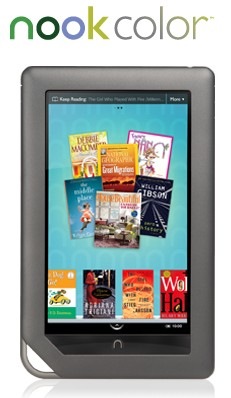
Nook Color with Touch Screen

I think I’m going to have a heart attack and die right now.  I just got an email from Barnes & Noble with this subject:

“Introducing NOOKcolor — The Amazing Sequel to the NOOK You Love.”

Oh really?  Are you joking me?  If they could’ve told me this in September BEFORE I spent $150 on the Nook Wifi, I would’ve had an incentive to wait a little bit longer.  This new NOOKcolor is $249 and has many more features than my current Nook doesn’t have.  Such as it’s a color touch screen, you can see magazines and newspaper in color, kids books come alive at the touch of a finger (like I care) and one thing I saw in the video when I clicked the link in the email is that you can have it read to you and it’s NOT a robot voice like the Kindle.

This one is way better than mine because it can do portrait and landscape which the Kindle can do but the Nook I have can’t.  It has an 8GB card along with the ability to add another.  Mine only has 1GB but I can still add to it.  Although, I don’t see that I would ever need to but with the NOOKcolor I can see needing a bigger card because I’m sure the books with audio are bigger files.

Another cool feature is videos in your books…  In the video they showed a cookbook and you can read the recipe but then the image for it is a video where you can see how to make the recipe.  That would be so cool.  What would be even cooler is newspapers where the image for the article is an actual video of what happened.  The newspaper could set up a news station type set with anchors who read the articles with video of what happened at the scene, just like the news on tv has.  Or a magazine could have a video of the interview with the stars and their ads could be a video commercial.

I see in the Barnes & Noble website a new newsstand which is “coming soon” so I think they are going to add more magazines finally.  Right now they only have a few.  I subscribe to PC Magazine for $1.49 per month (or per magazine) but I was hoping they would have a broader choice.  With the NOOKcolor they might have more magazines and I think that would be great for Darrin who loves to get the magazines from the grocery store.  I think if he had a subscription to them then he would save so much money.  But that means he has to get the new NOOKcolor, or he can use Nook for PC.

Well, it’s obvious that I can’t afford to buy it, I can barely buy groceries right now but who knows, maybe by this time next year they will have a NOOKcolor 2 for $149 that I can save up for.  Hey it could happen.  Last year the Nook was $249 and then it came down to $149 this year and that’s the one I have.  So maybe I’ll bide my time for another year and save money so I can get the NOOKcolor for Darrin for his birthday, that is if they go down.

I don’t have to have color, I really like my Nook.  I think that the new NOOKcolor is an LCD screen, it looks lit up like the little LCD screen at the bottom of mine.  I don’t think I can read from an LCD screen.  It’s too much for my eyes.  Darrin would like that I think, last night he went to read a book on my Nook and he asked me when the screen was going to light up for him to read it.  I had to tell him that it doesn’t light up, it’s e-ink, not LCD.

Nook Study

A friend called me asking about how my Nook works because her son is doing an online college course and is required to buy textbooks but wanted to find out if there were a cheaper alternative. He only gets so much with his grant that he can only afford to pay so much for a textbook.

He had hoped that if he bought a Barnes & Noble Nook that his eTextbooks would be cheaper but I did some research for him while on the phone and found that they do sell textbooks new or used or you can rent them but in actual book format. Not e-book format for the Nook.

Although, they do have a new thing called Nook Study that is a program for your PC or Mac that you download/install and you can buy eTextbooks for 50% less than the actual textbook.

I was looking at the features that they offer such as being able to highlight in many different colors, leaving an asterisk and typing notes as well as bookmarking. Very similar to the actual Nook (although the Nook doesn’t have a color highlight choice or asterisk’s). Many other features like highlighting a word to look it up on Wikipedia, Google, dictionary etc. Printing pages, copying text to your homework, importing notes and many others.

I told him that if he wanted to buy a Nook for reading books that’s fine but don’t waste your money if your purpose is for textbooks because it doesn’t work. With his grant he was able to buy a laptop for taking tests on their website and whatever else they require of him to do there so he can just use that laptop to install Nook Study.

I wish that they had all this technology when I was a kid. It would’ve been a heck of a lot easier for me, who am I kidding, I probably still would’ve ended up the same because of my dyslexia, A.D.D. and learning disability. But who knows, maybe it might have been different. I guess I will never know. Maybe in the next life…

My Free Nook Cover

Last night while we were at Barnes & Noble, after I had already paid for the Nook, Darrin asked if I bought a cover for it. Well naturally I didn’t. I had only saved up just enough money to buy the Nook. I didn’t even buy the extended warranty (which I have 30 days to buy), how could I afford a cover?

We went over to the Nook display and I was looking at their prices. Some of them were $50. Some were as low as $10 but those were rubber and didn’t cover the book like a book cover. I don’t want that. We left with the thought that ‘I will eventually buy one’ in mind.

I’m sitting here looking at the Nook and thinking, I really wish I had a cover for it because now that I’m thinking about it, it starts to worry me. How can I possibly feel safe with the limited warranty that I get if I don’t have a cover to protect it if something happens.

As I’m looking at the covers available I’m noticing that they are basically just cardboard with plastic or fabric sewn onto them. I could do that. Could I do that? Yes, I think I can.

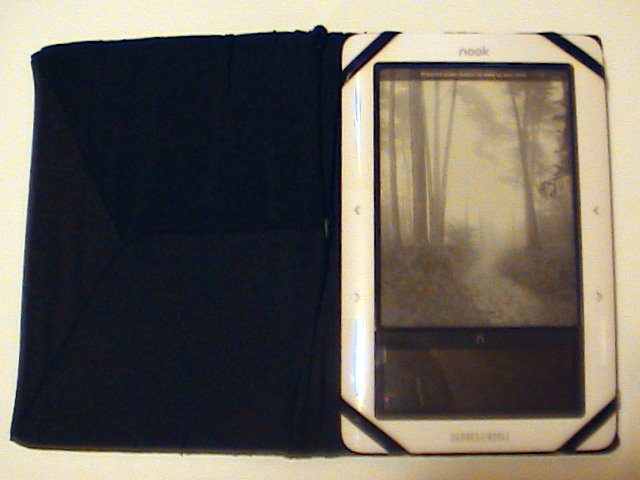
For some odd reason we still have the big box that Chips HDTV came in. The cardboard is really thick but it’s not too thick and it’s not too thin either. I want the cover to be strong enough that it won’t bend easily. I cut the top flap and the side in a book V shape. Although I needed to add another bend because this thing is a bit thick and I need it to wrap around in more of a U shape.

I have these book covers that I bought at the grocery store in 2007 when the final Harry Potter novel came out. Luckily it came out around the same time they started stocking the back to school stuff. It’s a stretchy fabric so it starts out small but stretches enough to fit a big history or science book. I bought 2 of them, black and red. They were cheap so I bought 2. They had some other colors but black and red were my favorite.

I’m really glad I’ve held onto them all these years because I was able to finally utilize one of them. I got the cardboard cut up perfectly so it’s just the right size for the Nook. I stretched the book cover over the cardboard and although it’s a bit long it fits and it kind of looks cool at how loose it is. It looks like it was on purpose that it’s so loose.

Ok, now I have a cover but how the heck is this thing supposed to really hold it? I’m gonna need some corners to hold onto it. How do I do that?

Solution. You know Rexlace? You know, the stuff that you use to make those cool key chains? Well, in 2004 (I think) I remembered how I learned how to make those key chains when I was in the cub scouts and I wanted to see if I could learn again. I bought a bunch of rexlace, even megalace. I thought the megalace would be really cool but it turns out that it was even more difficult to make that I thought.

I’ve held onto all that rexlace and megalace all these years. When I buy craft stuff, I may not use it all up right away but eventually I will have a need for it and tonight I had a need for it.

I have some black megalace and I pulled some of it out and held it up to the corner and measured how much I would need and cut 4 pieces. Ok, I have the pieces but how to sew it on? I started using a needle and thread but that was very difficult and time-consuming and the thread kept breaking.

Solution. I have a sewing awl. AHA! That works perfectly because the needle is thick enough to go through the cardboard and the handle makes pushing it through a breeze and the wax thread is thick enough that it will hold better than plain old sewing thread.

It took me awhile and since the thread was black, the megalace was black and the book cover was black, it made it very difficult to see in the poor lighting in my room. But it worked out. I have my book cover, the nook stays in place and I saved $50.

The only issue that I have is that the cover won’t stay closed so in order for it to stay closed I have to lay it down so that the weight of the Nook lies on the front cover to keep it closed. That’s fine though. I may eventually figure out a way to sew a latch on the front and back, like a buckle or something. I don’t know. I will figure it out, I always do.

So now my Nook is protected when not in use and when in use as well. I am very happy and satisfied with my handy work.

My Nook Observations and Irritations

I finally did it! I finally bought a Barnes & Noble Nook last night. It didn’t take me very long to figure out how it works but here are my observations and irritations.

I bought the first Sookie Stackhouse novel and at first I was put off by the fact that swiping the touchscreen wasn’t working but I finally got it to work and now it works all the time. Sometimes I accidentally brush my finger on it and it turns the page lol. Oops.

I was reading this morning and my dog came to me to pick her up so I sat the Nook down on my desk and when I went to pick it up again I couldn’t turn the page. It was frozen. And that happened to me a few times last night but I didn’t understand why.

My observation from that irritation is that instead of setting it down, I’m gonna have to turn it off with that metal power button on the top and watch it go into screen saver mode then lay it down. When I pick it back up it I have to push the power button again.

I was playing with the Sudoku game last night and having fun actually but sometimes if I pushed the arrow button on the touchscreen on the left side it goes to the menu and I’m forced to start a new game or go into the menu. I think that if I just go into the menu then go back to the game it might continue but that wasn’t the case for me. And when the nook shut down completely when I turned it back on, it erased my game completely forcing me to start over. HOW IRRITATING!

I probably won’t be playing it that often because of that very reason.

It seems to freeze on me a lot and at first I started to think that I may have gotten a defective one but what are the odds that I would get a defective one? I always seem to think that an electronic is defective so I return it for another and it shows the same sign of defectiveness. I don’t want to have to go all that way back to B&N just to suffer the same pains especially if that’s normal for the Nook.

When you are in your B&N library you can choose to see the little covers on the bottom to choose a book to read or you can just push the arrows up or down to choose a book. Although it’s faster to choose from the book covers. However, when you have put your own books in the Nook via the USB cable, you don’t get that option. There are no little book covers. I kind of figured that it wouldn’t show them but that’s fine, I don’t care.

I do like being able to highlight a word or type out a note but unfortunately when you go to highlight things, if it’s down at the bottom you have to push that bottom arrow and it can take forever. That’s one thing that impressed me with the Sony that you could use the stylus to tap on the word but unfortunately the touchscreen makes it hard to read books. Typing is a bit of a chore too because my fingers are so fat that I can’t even see if the letter lit up or not when I press it so I’m constantly having to look up at the e-ink to make sure I pressed it lol. I definitely need a stylus.

I also bought the King James version of the Holy Bible because you never know when you’re gonna need it. Unfortunately, navigation is a biotch. When you go to a book it shows links for all the chapters. If you want chapter 1 then perfect, it’s on that same page but if you want chapter 21 then you gotta push the arrow button twenty million times to get all the way down to 21. Ok so twenty million is an exaggeration but you know what I mean.

Once you finally get to your chapter you just have to turn the page to the verse you want.  That’s a good time to bookmark it for when you are at church and you are supposed to turn to that page.  You can just wake up the Nook and go to your bookmarks.

Highlighting is kind of a bitch if you are highlighting something at the bottom of the page because as with finding the bible chapter you have to press the arrow button many times to get to it before you can start selecting the text.  When you do go to select the text you can highlight it and you have the choice of writing a note or just hitting submit.

Unfortunately, and this is an irritation, you can’t look up your highlighted notes from the beginning of the book.  The only way you will be able to find that note is by making a bookmark.  The Nook for PC software allows you to find all your notes.  I don’t know about the Nook software for other devices such as iPhone, iPad, blackberry etc.

Despite my irritations, I’m glad that I bought it because now I can enjoy reading books that I would otherwise have to read on my computer monitor which is not very comfortable on my eyes or my back.

Barnes and Noble Nook

Well I did it. I bought my Barnes & Noble Nook tonight. I bought the Nook WiFi for $149 because I really don’t want to pay $50 more just for the convenience of having 3G.

I haven’t read anything on it yet as I just bought it but I’ve been playing around with it while it has been charging. The guy at the store told me I should charge it for a few hours before using it but it’s charging very fast. The last time I looked it was at 88% and it’s only been plugged in for 30 minutes. I think they give you a 70% charge because it didn’t start off with 0%.

I didn’t do an “unboxing” video because how many of those are there on YouTube? Hundreds, I don’t want to add to it with more of the same exact thing.

It’s a lot heavier than I was expecting but it isn’t that heavy that it will cause an issue for me.

When I signed into my account and registered my new Nook I went to my library and was surprised to see that all the books in my account were already downloaded into the Nook. I didn’t have to wait at all.

People are always complaining about how long it takes to turn the page in these things, it’s really very fast. The time it takes to change to a new page is the same exact amount of time it takes for me to turn the page in a real book so I don’t see an issue. Also one of the videos I saw on YouTube said that when you change the font size it could take up to 20 or 30 seconds to do that because it has to refresh the entire e-book but that isn’t so with mine, it took the same amount of time as turning a page.

It finally charged to 100% so I plugged the USB cable into my hard drive and it installed the driver immediately. It even popped up the explorer window so I could add my own files to it. I have a few books that I’d like to add to it from Rainbow eBooks and it’s only taken a few seconds to do that. I’m also going to add some 4×6 images for the screen saver. Although they have to be 6×4.

I did the tutorial when it came up and it showed how to do things and one of the things I like was that when you turn the page you could either use those buttons on the right and left or you could just swipe the touchscreen with your finger. Yeah, swiping doesn’t work… That would’ve been cool but it doesn’t work for me.

I loaded a PDF file, that James Potter e-book… yeah… pdf files suck. I’m gonna have to figure out a way to convert that to .epub format so it’s readable. The only way I know how is to use calibre but that has issues but I will figure it out because I really want to read those.

It’s too late at night for me to start reading a new book so I’m going to just wait until I get up in the morning and start reading Dead Until Dark, the first Sookie Stackhouse novel.

My Final Decision – Nook

I’ve made my final decision about which e-book reader I want to buy. I said in my last post about waffling that I really wanted the Kindle because it’s the iPod of the e-book reader world but then last night I found out that Calibre will convert many e-book file formats to the .epub file format.

I’ve literally spent the entire day today trying to figure that program out and came to the conclusion that .epub is the best file for the Nook. When I tried converting my ebooks to .pdb file format (which is Nooks familiar format), the table of contents were always screwed up. It worked but it wouldn’t just say chapter 1, it would have the word Calibre with the chapter title.

The .epub file format works so much better and it’s the first choice in Calibre when you are converting a file so it makes it that much easier.

Of course Calibre probably won’t work with DRM books, the books I buy from Rainbow eBooks don’t have that restriction on them (yet). Although if a book I buy from them is already in the .epub file format then I won’t have to convert any of their books for the Nook. I can just buy,download, upload and read.

Although the book “Fell” did come in epub but it didn’t work on the Nook for PC program. So there is a good chance that I will still have to convert other file formats for the Nook.

And yes, I know, I can do the same thing with the Kindle but I think I’m going to get the Nook WiFi despite the fact that it’s $10 more than the Kindle and if I buy it at Barnes and Noble, chances are I’m gonna pay even more with taxes. The issue that I’m having with the Kindle is how it’s sold out lol. I don’t want to buy a Kindle if I can’t get it for another month. I also don’t want to buy something that I can’t return to the store.

There are a few features of the Nook that I like and don’t care for. For example you can replace the battery, it has an Expandable micro SD slot. I’ve seen in a video how slow the color screen is when sliding your finger to find a book, that is a bit irritating to me but I think I can get past that. The lend feature won’t do me any good but on the other hand who knows what might happen in the future. The very fact that we can walk into a B&N and I can bring a Nook with me and be able to read a book for free for 1 hour is appealing.

The main thing is that I can convert my existing e-books to the .epub format that I can read on a Nook and be able to use the dictionary, look up words, highlight and annotate. That’s all I wanted. That’s all I needed.

If I do get one, I’m going to buy 1 copy of the Los Angeles Times so that Darrin can see if he likes reading it on the Nook. If he does then I’ll get him the monthly subscription.  I’m tired of having to pick up his newspapers lol.  I don’t read so much that I will monopolize it from him, although I can’t say that he won’t monopolize it from me lol.  If that is the case I will suggest he buy himself one with his credit card.

I think I was wrong when I said that the Kindle is the iPod of the e-book world because it’s not sold in stores, it’s only online.  My Dell DJ was only online and they screwed me over on that because I can’t take it to any store to have it fixed but the Nook has a store.  So I think the Nook is really the iPod of e-books.