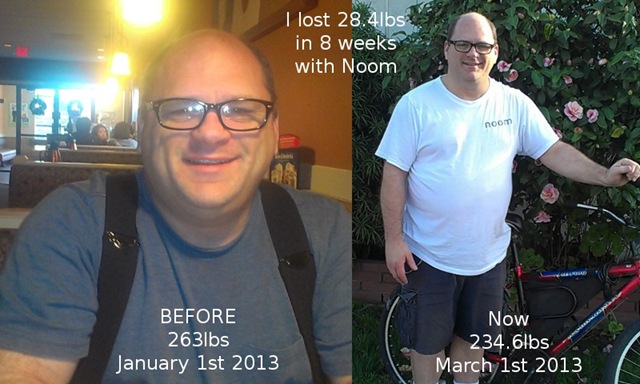
I’ve Lost 28lbs In 2 Months with the @Noom Android App

mid picture

I didn’t think it would be possible for me to be as happy about my body as I am right at this very moment.

My weight loss journey began on January 5th 2013.  I didn’t want to make a cheesy New Years Resolution because every time I do, I don’t keep it.  I was afraid of jinxing myself, so I decided that I wasn’t going to do it.  But then I started thinking about it and figured, what’s the harm in saying I want to lose weight, but not because I feel obligated to make a New Years Resolution, but because I want to lose weight and be healthy.  Not just go on a diet, but try to change my eating habits for good.

As I was looking for a new weight loss app, I found Noom right on the Google Play Store page on my new HTC One V from Virgin Mobile.  It was a free app so I figured what the heck, let’s install it and see what it looks like.  I fell in love with it right away because of all of the things it can do compared with some of the other diet apps I had installed.  I wanted the pro version, so instead of paying a monthly fee for it, I just paid for it for life.  I know, I should have played with it to see how it would work for at least a week or so, but I already knew it was going to help me lose weight, and well, here I am today.

This is only half of my weight loss journey though, not even half yet.  I want to lose 63lbs, so I still have a way to go.

I know people are going to ask what I did to lose 28.4lbs in 2 months.  Well, I logged everything I ate everyday in the Noom app.  They have Green foods, Yellow foods and Red foods.  So say you are eating vegetables like Broccoli or Brussels Sprouts, those are green.  The Weight Watchers Smart Ones frozen dinners are green, and that is what I ate for lunch and dinner every day for the last 2 months.  Basically, I’ve been trying to eat anything and everything that is green, but I have been eating a few yellows and reds here and there because you can have them, just not as much as the greens.

Just to note, I am not just going to eat healthy to help me lose weight.  I am changing the way I think about food and I do plan on continuing to eat healthy after I have lost all the weight because I want to stay healthy.  I do not want to gain the weight all over again.  I’ve also been learning what is in the food that I have been eating that made me fat and that is also my motivation to eat healthy.  They say you can’t teach an old dog new tricks, but this old dog is learning new tricks everyday and will stick with it.

I have been making my own peanut butter and sugar-free strawberry jam and sugar-free applesauce and even making my own banana ice cream.  I have also been finding recipes for healthy treats like cookies made out of fruit and oatmeal.  Those are really good.  I made a recipes page on my website that I thought I’d share.  I’m still adding more when I find them.

The only thing I have not done yet to help me lose weight is exercise, and I have a very good reason.  I have tried to go for walks, and we went out a few times in the beginning, but I have degenerative disc disease in my lower spine which makes walking very painful.  I can ride the bike because I am sitting down, I just can’t walk for too long.  The back wheel on my bicycle kept deflating because the rim tape broke and I didn’t know it, but I have fabric rim tape on it now and the tube is filled with air so I can finally start riding again.  Thankfully my back doesn’t hurt when I’m on the bike.

So, like I said, I am only halfway there.  I just wanted to give an update of my current progress.  See you again when I have lost all 63lbs.

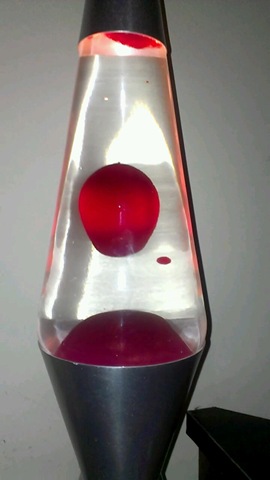
Cloudy Lava Lamp (Updated)

lavalamp

I have enjoyed my lava lamp since I got it for Christmas last year.  It is my very first lava lamp and I sit at my desk chair sometimes staring at it for literally 10-20 minutes.  It is that interesting to me.  What is even more interesting, or probably more disturbing, is the fact that the water used to be crystal clear, and now it’s yellow.  I don’t know why it has turned yellow, but apparently it’s a common problem with lava lamps.

Here is my lava lamp in December 2011 when I first got it, and here it is now in January 2013 a year later.

 lava lamp december 2012 lava lamp january 2013

What a huge difference.  I wonder what would cause the water to turn yellow like that?  I never thought anything of it until I was browsing through the pictures in the My Pictures folder on my computer and came across it.  I then suddenly remembered how clear it used to be.  Naturally I went to Google to research it to see if anyone else has had this issue and to see if there was anything to do about it.  I did find several websites that mentioned it and even a solution.

Update: I deleted everything I had typed out before and retyped it.  I took out those links and here is why.  I followed their instructions which seemed legit to me because more than one website mentioned the same exact thing, but all it did was mess up my lamp.  Here is what it looked like after I tried their fix.

lava very cloudy from salt

I was devastated when this happened to my lava lamp.  The instructions were to let it cool so the wax was solid and open the top of the lava lamp and dump the water out into the sink.  Then put new water from the tap in and swish it around to get all the grease off the walls of the lamp which meant doing that a couple of times.  Then they said to fill it up with tap water and add a couple drops of dish liquid and add a mixture of epsom salt and water with a straw.  Those white flakes in the image to the left is the result of the epsom salt.

I let the lamp cool down and dumped the water out and added new water and more soap, but not the epsom salt and turned it on and there was still epsom salt in the wax at the bottom, so it took several times of rinsing it out to get it back to this…

lava afterI was thrilled beyond belief when the lava lamp was back to normal and the lava was rising.  But then it stopped rising and went back down and never went back up again.  What did I do wrong?  Like an idiot I mixed a tiny amount of epsom salt with a lot of water and added an inch full from a straw and I got that image from above again.  UGH!

That blew my mind that such a tiny amount of epsom salt would do the same thing as a bunch of epsom salt in a smaller amount of water.  I didn’t know what I was supposed to do.  I rinsed it out again and didn’t add ANY salt at all and the lava wouldn’t go up again.  I searched for more instructions because I really want this working again.  I found one guy who made a video and said don’t use too much soap because it will ruin your lava lamp.  He also said to use 1 tablespoon of regular table salt and use the straw to add it, which I did and it still won’t rise.

I’m not sure if every time I had to rinse it out and added more soap if the soap ruined the wax or what, but it’s not rising anymore at all.  I rinsed it out again and didn’t add anything and it is just not working.  I think I screwed it up beyond repair.

Of course I have questions, like did I use the wrong dish liquid?  It’s Palmolive anti-bacterial, maybe it didn’t have enough of the right ingredient.  Maybe I used the wrong epsom salt.  The epsom salt I have is generic and it’s hard as a rock.  I assume it’s because the ziplock bag it is in wasn’t manufactured properly because the zips don’t line up right so air gets in, maybe that’s why it’s hard, maybe moisture got in.  Perhaps if I bought a brand name epsom salt then it might work, but what if I bought some and tried it and it still messed it up?  What if, what if, what if…

Another update:  It works!  Here is a brand new post with a video.

Kinivo BTH220 Bluetooth Stereo Headphone


Kinivo BTH220 Bluetooth Stereo Headphone

My new headphones arrived today and I am beyond excited about them.  At first they didn’t fit me and I was ready to throw in the towel and pack them back up to ship back to where they came from, but I gave them another chance and now they fit me like a glove.

I watched a few YouTube reviews which I know I shouldn’t do because they almost always put the product down and compare them to higher end products, but these were okay and gave it a high rating for its price.  One guy said there was a bit of space where sound escapes or whatever, and that is true, it’s not air tight, but when have headphones ever been air tight?  Who cares!

I did call myself on the phone so I could see if I could hear it ring and I did and it answered like it was supposed to when I pushed the button.  So cool!  That’s the issue I had with my other phone when I was riding my bike.  It would be in my camelbak and I couldn’t get to it in time because I’d have to pull over and take the camelbak off and find it and by then the person hung up or was leaving a message.  Sometimes I’d have it in my pocket in my shorts, but it gets uncomfortable in there and I’m always afraid the phone will drop out as I’m riding and I will never even know.  Nobody ever calls me except for my partner, but he is why I have a cell phone, so if I’m out exercising on my bike, he will be able to get in touch with me, or if I have an accident I can call either him or 911 depending on the severity of the accident.

I activated the voice dialing feature and it asked me to choose between the voice dialer that came with the phone or Robin which is an Android’s Siri challenger (it’s free in the Google Play store).  I chose to use Robin by default because the voice dialer that came with the phone sucks.  It never recognizes what I say.  If I say “Call Home” it calls my friend Ruth lol.  At least Robin understands me.

The sound quality is actually amazing.  I pressed the button once and it automatically started playing music that I had on my phone.  I thought I would have to load the music but I didn’t.  It’s more amazing than I thought it would be.  I press the button once to start and stop the music and when it starts back up again, it continues where it left off.  I loaded Noom to begin an exercise and it started, but I could barely hear the voice talking, which is actually fine by me because I don’t want to hear how fast I’m going or how many calories I’m burning.  Surprise me!  I’m actually going to mute that during workouts.

The headphones are very good and I am so glad I bought them.  They are definitely going to come in handy when I begin cycling this Spring as my cardio to help me lose weight.  I normally ride 22 or 23 miles per day which is a bit much for some, but it’s enough for me.  It’s not too much, I could go more but I just don’t want to.  Obviously I haven’t tried them to receive a phone call on the bike because the bike is missing a back tube, but I will find out in a couple of months and I will try to remember to update this post.

I highly recommend these bluetooth headphones.  Mind you, I base my opinion on wearing them for 10 minutes so this isn’t really a review at all, it’s more of a hey it was awesome for the first 10 minutes, you should try it.

If you do have a pair of these, please do me a favor and comment and tell me how you like them and what you use them for.

Update: I wanted to give an update on these since I’ve had them for a week.  The instructions say to charge it fully, then let it drain completely, then charge it again and drain it again.  Holy crap, that is taking forever to do because the battery seems to go on forever.  I’ve already drained it once and that took at least 3 days to do.  I’m on day 2 of trying to drain the battery for the second time.  The way I’m doing it is to just play music all night long.  Well, it has an 8-hour battery right?  Well, 8 hours pass and it’s still going strong.  I use it the whole day and then play music all night again and it’s STILL going.

One of my concerns when I bought these headphones was that it wasn’t going to last my 2-3 hour bike rides, well that’s out the window because I could probably ride for 3 days straight before the battery died lol.  So no worries there for me now.  That’s actually a relief.  The box says 150 hour standby time and 8 hour talk time, so I’m just guessing that if you don’t use them too often, don’t expect to have to charge them more than once or twice a week, if that.  These are damn good headphones in my opinion.  So worth the $30 I paid.

Oh and one more thing.  The sound is AMAZING!  What is it that the annoying reality celebs say?  AMAZEBALLS?  Well, that it is.  The sound is so awesome and you don’t lose quality from that space between the headphone and your ear.  The headphones seem to be a bit stretched out more than it was when I first opened the package.  It goes back to being small, so it’s stretchy I guess lol.  Stretchy hard plastic.  Yeah.

I was watching a YouTube video with Karl Pfeiffer (Ghost Hunters Academy and Ghost Hunters International) and his voice sounds perfect.  It’s not too loud, it’s not too low, it’s exactly the way it should be.  Before I couldn’t watch his videos because the volume on my monitor sucks, same with my Chromebook.  I can finally hear him with these headphones.

Oh I was told in video reviews that you can fold it and put it in the little pouch that they included with the headphones, but they don’t recommend doing that because the plastic gets too loose when you try to fold it.  It stops snapping into place in other words.  So I’m going to take their word for it and keep them open at all times and never store them in the bag.  I’d rather they be in plain sight anyway.

That’s all for now.

My Weight Loss Journey – Week 2

On January 5th, 2013, I was looking through the Google Play app store on my Android phone for an app to help me lose weight.  I had downloaded a few apps that would help record my walking and bike rides with GPS and would tell me everything my bicycle computer tells me and more, but they didn’t help me record my eating habits or tell me what to eat.  The front page of the app store had a featured app called Noom Coach.  I downloaded it and checked it out and it was way more than I was expecting in an app.  I had the free version with limitations and after only a few days decided that I had to purchase the pro version.  Yes, I was that confident in this app after only a few days.

I am only in my 2nd week with this app and I have already lost 8.4lbs.  I only expected to lose 2lbs a week, so this is quite surprising that I have lost more than double my goal each week.  Then again the first week or two are the easiest, I won’t count my chickens until the 3rd or 4th week.

week 2-1week 2-2

I am over 100lbs overweight and my goal is to just get down to 200lbs which means losing 63lbs.  I have tried to set goals to lose all of the weight before and becoming disappointed when it failed because my goal was set too high.  I have been told to set smaller goals because you reach smaller goals faster.  When the small goal is finished, then I can set another small goal.  Although, setting my goal for more than half of what I need to lose is not quite a small goal, I think that I can reach it because this app is motivating me to.  If it doesn’t then I will adjust my goal to make it easier.

We haven’t been exercising as much as we should.  I could give 2 excuses as to why, but what’s the point?  I mean, I hate to make excuses for why I can’t do something because excuses are why I fail.  These are good ones though.  It’s cold outside and we both have bad backs and it hurts to walk.  There, I said it.  The cold part is a BS excuse, but the back pain is legitimate.  With that said, we have been walking 2 or 3 days a week for maybe 1 mile or more each time.

Arctic Cooling P311 Bluetooth Sports Headset I have way more weight to lose than my partner does.  I was at 263lbs and he was around 200, so I have to do double the work which is why I bought myself a new pair of Arctic Cooling P311 Bluetooth Headset for Sports from Amazon for my HTC One V android phone so that I can ride my bicycle when it starts to get warm outside.  I can keep my phone in my camelbak which will have the Noom app recording my exercise while letting me listen to my music, and the bluetooth will allow me to accept phone calls at the push of a button on the headphones.  Although I’m not sure if it will accept the call automatically or if I have to push the button, I will find out soon enough.  I thought I read in a review that it automatically shuts off the music when a call comes in and resumes when you hang up.

The headphones that I bought aren’t the best, I mean, they didn’t get the best reviews, but they were $30 which is way more than I could afford.  The headphones that are in the $60’s-$100’s range are the best, so I am getting what I paid for.  I saw in one video review that the mic sucks for taking calls while you are on your bike or walking, but are amazing indoors.  I don’t really have much of a choice in the matter, so it’s the best I can do with what money I have available to me.  But it has been my experience that people who do reviews are spoiled with the more expensive products they test, so to them it might be a horrible pair of headphones, but perhaps it will be fine for me.  I can say that because my phone got horrible reviews and it’s way better than they gave it credit for.

Cycling seems to be the best exercise for me because I am sitting which doesn’t hurt my back.  Walking is fine if I walk 1 or 2 miles, but I can ride 23 miles a day on my bicycle which means I can burn more than a quarter of my days meals on the bicycle which will help me lose more weight and will get me to my goal faster.  Not that I want or need to rush anything, but it will help.  It’s too cold now, so I will get to it when it starts warming up in the Spring.  I bought the headphones now so that I could afford to fix my bike next month.  I can’t afford to do both in the same month.  I would also like to buy some bicycle shorts and a bicycle shirt to make riding more comfortable.

I am finally eating healthy and enjoying it.  We have been buying the Weight Watchers frozen dinners at Food Maxx for $1.88 each with a $2 coupon for 10, so we’re saving money on that.  We’re also eating more fruits and vegetables than before, which is a very good thing.  I don’t drink soda (diet or otherwise) very often, so that’s not an issue.  The fruit seems to satisfy my sweet tooth, for now.  I have been looking up recipes for cookies that use bananas and apples so that I can make a very low calorie sweet treat without compromising our diet.  I found a good banana oatmeal cookie recipe that uses applesauce in place of sugar, they even tell you how to make it with real apples.  I think I might try to make those today for our late night snack.  I also bought some bottles of Slim Fast specifically for when we have a chocolate craving, but I have a feeling those won’t last the week.

I know that 8.4lbs isn’t a lot to be blogging about so soon, but it’s a good start and I feel confident that I will keep it up this time.  I will keep this blog updated on my progress every week when I do my weigh-ins too.  Not that anyone really cares, but it will help me to talk about it, even if I am just talking to myself.

Noom Weight Loss Coach

Noom Logo

Okay so you might say that I am a bit excited about weight loss all of a sudden.  On New Years Eve/Day, I decided that I wasn’t going to make a New Years resolution.  I changed my mind when I had my picture taken at IHOP.  I decided that I would make one, but it isn’t to lose weight, but more to change my eating habits to live a healthier lifestyle which will help me lose weight in the long run.  I don’t want to look at it as a diet, but more of a lifestyle change.

I started looking on the Google Play App Store for weight loss apps and found a few that looked good, but they didn’t really do it for me.  I went to the App store and found Noom on the front page.  Since it was recommended, I figured what the heck, let’s give it a go and see how it works.

It’s a free app, but it has limitations because they want you to pay for the service of using the app.  It’s normally $10 a month to go pro, but they have a holiday special right now for only $2.99 a month, $15 a year or $30 forever.  I was going to do the $2.99 a month, but you know how that works, you pay $2.99 and the next month it goes back to it’s regular price of $10 a month.  I figured I’d probably only do this for 1 year, but you never know.  I just want the full version forever without having to worry about paying a monthly or yearly fee.  I figured the $30 price will go up if I don’t do it now, so I paid for it and I love it.

They don’t pressure you to do things you don’t want to do.  They don’t tell you that you can’t have certain foods because telling you what to eat makes people rebel and eat what they want to out of spite.  That’s just what I think, the app didn’t tell me that.  They do give you some good articles to read with very helpful hints and tips and you get points for everything you do.  I am level 4 now.

Here are a few of the features that I love about it.  When you enter your meals, you have the option of scanning the bar code on the box.  That way you don’t have to type it in.  You might think that is lazy, but not really because sometimes it can take a few minutes for the scanner to read the bar code, so I’m sitting there like a dufus holding the phone up against a bar code and it keeps trying to focus, but doesn’t do anything.  If I place the box on something and steady the phone on a flat surface so I’m not shaking it then it might work better.  But I digress.  You can also type in a word like Banana and it asks you if you are eating the size of a golf ball, a tennis ball, a baseball or a fist.  They don’t ask you how much it weighs, just how much food it is.

We have both really changed our eating habits.  We started buying Weight Watchers Smart Ones frozen dinners at Food Maxx for only $1.88 each.  That is a big help because they are nearly twice that at Albertson’s.  We also started buying more fruits and veggies.  I have actually been more motivated to eat fruits and vegetables from Noom.  I took this picture today.

fruit bowl

My problem is that I have a sweet tooth.  I will literally go out and buy candy because I want something sweet all the time.  These don’t compare to candy, but they are sweet and they really help and they are green foods in the Noom app, so they are better.

One of the features of Noom that I really love is the Pedometer.  If I keep my phone on me at all times, either in my hand or my pocket, it counts my steps whether I’m in the app or not.  My phone can be on standby in my pocket and it still counts my steps.  And it has an awesome mapping feature for when I exercise outdoors.  If I go for a walk or a bike ride, it uses the GPS to show me where I am going and it even marks my trail on a map so I know where I went.  That’s really cool.  And it tells me how fast I’m walking or cycling, how many miles and miles per hour and how many calories I’ve burned.  My bicycle computer does that, but what it doesn’t do is show me on the map.  I think when I start cycling again, I’m only going to bring my phone and not the bicycle computer.

Here are some screenshots so you can see what I’m talking about.  If you are looking to lose weight, I strongly recommend Noom.  It’s only available for the Android, sorry iPhone users.

coach logbook history yesterdays meals weight graph  map

Noom is not paying me to write this, I am just very excited about finally having a tool to help me lose weight that actually works without me having to go out of my way to use it.  You don’t have to pay for it, you can still use it for free, but you won’t get all the articles.  It’s a great app, you should try it.

How to make money with your cell phone – 7 apps

AndroidMoney

I have been getting paid to blog for many years using various IZEA websites, such as PayPerPost, SocialSpark and Sponsored Tweets, which by the way is the only reason I was able to buy myself a brand new Android phone for Christmas.

Since I have a new HTC ONE V from Virgin Mobile coming, I figured I would see if I could use that to my advantage to make more money.  The blogging for money is fine, but it has taken a few months worth of blogging and tweeting just to make $80 to buy my new Android phone.  It’s good pay, but it doesn’t come by very easily.

Naturally the first thing I did was go to Google and typed “Make money with android phone” and I found a bunch of things.  IZEA used to have a cell phone app called WeRewards which rewarded you every time you checked in at a store like Target, Walmart, Subway etc. as long as you took a picture of yourself, your receipt, the product and/or the store sign while in the store or in the parking lot.  They closed that down so there is one less thing to talk about, but they did replace it with Staree.

Ok so here are the things I have found.

ipinion 1. iPinion and iPinion+

iPinion is the most sophisticated survey app ever built for smart phones. It has exciting survey questions including several image interaction types. Users can take surveys on the go and earn rewards.  iPinion is non-intrusive, fun to participate and professional.

They have 2 apps and they each got good ratings and reviews, but iPinion+ doesn’t have as many as the other.

iconzoomer 2. IconZoomer

Become Trendspotter at Iconzoomer and receive cash for your photos.

Shoot it – Send it – Earn it

Each week you’ll receive assignments of basic topics such as: “Show us what you are eating for dinner?” or “Show the shoes are you wearing today?”

Pretty straight forward.  They ask you to take a picture, you do and you get paid for it.  That seems pretty good and the ratings and reviews are very good.

checkpoints 3. CheckPoints

Scan barcodes for products like Coca-Cola, Dreyer’s and more in any store for instant rewards! As seen in the Washington Post, NY Times, USA Today and CNN, CheckPoints is the “App That Pays You Back” with free rewards, no matter where you are!

You are going to the store anyway, why not open this app while you are there and scanning barcodes for rewards?  It seems really easy.  This app got a lot of good ratings and reviews.

shopkick 4. ShopKick

This holiday shopping season, join the more than 4 million shopkick users who get rewarded for the shopping they already do. It’s like a rewards program—only better. You get rewarded just for walking into stores like Target, Macy’s, Best Buy, Old Navy, American Eagle and Crate & Barrel. Get even more kicks when you scan items and make purchases. Forget sales and coupons. You can find great discounts and deals in the app. It’s a magical experience, and it’s free.

This is very similar to CheckPoints in the sense that you get rewarded for scanning barcodes, but you also get rewarded merely for walking into a store without doing anything.  So you could basically just go to the mall and walk around with this app loaded and go into the stores that they have listed in the app and start window shopping and scanning barcodes.  They got some good ratings and some reviews.

SwagBucks5. SwagBucks Search Swidget & SwagBucks TV Mobile

The official app from Swagbucks. Earn rewards & prizes by searching on your Android device.

I haven’t had much experience with SwagBucks Search Swidget because when I have tried it, it hasn’t really given me too many rewards.  I think the only way to get your SwagBucks with that is by making a purchase from whatever website you are searching for.  Like if you search for Target and you make a purchase, you get SwagBucks for every dollar that you spend.

SwagBucks TV Mobile on the other hand is a bit different.  You load the app and you choose which type of videos you want to watch and you just sit there and watch videos for however long of a time you have to sit there watching videos I guess.  There are music videos and movie trailers.  It’s a novelty that does wear off and you don’t get that many SwagBucks, but it still counts.  You can’t just load the app and have it run all day and all night because you have to tap the X in the top right of the screen in between videos.

Note that 100 swag bucks is basically $1 so it is a good idea.

Added 8-14-2013

viggle 6. Viggle

Viggle. Check into your favorite shows and get rewarded. Viggle makes TV better.

Watch TV. Get Rewards. Check into your favorite TV shows with Viggle and you’ll get real rewards from brands like Best Buy, Burger King, Fandango, Old Navy and more.

Viggle can automatically identify the show you’re watching. You get Viggle points for every show you watch which you can redeem for real rewards or convert into charitable donations.

Some people are saying bad things about this, like the app doesn’t recognize the show they are watching so they have to type it in manually, and others are saying it doesn’t give you money, you get coupons.  I would say to check it out and if you only get $5 gift cards for Amazon, then at least you are getting something.  I mean who cares if you are getting coupons, it’s the same as cash when you go to use it and you end up saving money on things you already want to buy.  Also, if you feel generous you could give the money to charity.

Update: I can tell you that this is good and you do get real rewards because I got a $25 gift card for Barnes & Noble to buy ebooks.  I used it to buy the Hunger Games ebooks for my Nook.

staree 7. Staree

Use the Staree app to upload photos and videos to your Staree.com profile.

To request a Staree account, please visit our website at http://www.staree.com!

I am loyal to IZEA so I am only adding this because they are an awesome company that always pays you.  They are 100% legit.  I have signed up for Staree and have uploaded a couple of photos, but I don’t know how it really works yet.  But it’s still worth giving a shot.  I really wish they would bring WeReward back though.

erewards icon8. e-Rewards

e-Rewards Mobile is now available for Android- now you can answer surveys and earn Rewards on the go!

I have used e-Rewards for many years and I can say that it is a good tool for making money, although you don’t actually make money so much as you get rewarded for your surveys with gift cards.  Some rewards are better than others, but the only reward that I am interested in is $25 Game Stop gift cards.  They have changed their reward system since the last time I got a $25 gift card for Game Stop.  It used to be that I would have to do $50 worth of surveys to cash in for the $25 gift card, but now you have to do $75 worth, so they are basically charging you $50 to cash in on $25.  I feel that is a huge rip off, but it’s still a reward.

It would be nice if they offered better rewards.  Most of their rewards are for hotels or airline rewards or magazines.  I don’t travel or read magazines, so those rewards are useless.  It would be nice if they had Amazon and Barnes & Noble rewards.

Added 8-14-2013

So these are all of the apps that I plan on installing when I get my new HTC One V from Virgin Mobile.  If you know of any more or better apps for making money please let me know in the comments and I will add them.  These were just all I could find from doing my own research, but I am sure there are better apps out there.

Thank you to IZEA for allowing me to blog for products and websites and paying me for it.  Now I will hopefully be able to make more money from my phone so that I can afford the monthly fee and/or to buy some accessories for it lol.

Could the Star Trek comm badge become a reality?

tng comm badges

I saw a picture on Facebook today of the Starship Enterprise from the original series, but it was all made of Christmas lights.  That got me thinking about comm badges.  I consider myself to be a nerd, but I don’t have a Star Trek uniform or a comm badge, so perhaps I should either buy one, or turn in my nerd membership card.

As I was browsing Google, it came to me.  I wonder if they make a Bluetooth enabled comm badge that looks exactly like the Star Trek comm badge that actually works with your phone.  Most phones now have voice recognition right?  So I wonder if they have made a comm badge that when you tap it, you can say “Call Aunt Louise” and it places the call.

comm badge

Guess what… I found it!  It’s not exactly what I had in mind, but it is a step in the right direction.  This is called “CommBadge” and it works with your iPhone and Android phone using BlueTooth technology.  It isn’t in the shape I was hoping, but how can I expect them to legally use that licensed design without incurring lawsuits?

This is a start up company, so they don’t actually sell these yet, but if they can get their funding with Indie GoGo, then they will be able to make and sell these and perhaps every person in the world will have one.  They have 10 days as of this posting and have only raised $18k of $100k, so unless people help them out, we will probably never see this awesome design.

May I convince you?  They have several different models.  One without anything that just has the regular features, then they have others that have a badge holder for work and one that has the retractable badge holder for perhaps those who need to swipe their badge.  It all does the same thing whether you have the badge holder or not and that is almost exactly what you think the Star Trek comm badge would do.

You press the button (the speaker) and you hear that iPhone Siri ding ding sound and you tell it what you want and it responds without you ever having to take your phone out of your pocket.  Android has something similar to Siri, but they don’t show that in the video (below).  You can tap the CommBadge and say “Call Sally” and it will dial her number and you and everyone else around you can hear Sally answer the phone and talk and you can talk back to her.  I assume when the conversation is over you hang up by pressing the button again.

What is more exciting is that you can chat with your phone just like you normally do.  Like my partner likes to talk to his iPhone to text people.  He will say “Text Mike” and then he will say what he wants to tell me and the words spell out on the screen.  I assume it would do the same thing, without you having to look at it.  Of course Siri’s voice recognition software isn’t exact every time so there might be some confusion when I receive the actual text, but I won’t know until this thing ever comes out.

I am also assuming that you can get directions too, but I don’t think Siri will tell you to go here and turn there and get you to your destination just by using the CommBadge.  I have tried it by looking at the phone and there weren’t any turn by turn directions from Siri, I had to actually look at the screen.  But that would be cool if she gave you a heads up while you were driving without looking.

Anyway, here’s the video, perhaps if you like it you might want to help their cause to get this thing started.  I’m sure whatever you donate, you will get that product if and when they launch it.  I think it’s awesome and I would help if I had the money, but it’s Christmas.  How do they expect people to have money this month?  I mean seriously lol.

Tell me what you think.  Would you use this?  If I had an android phone, I certainly would.

Quest for Glory Collection

quest_for_glory_collection

I bought the Quest for Glory collection some time in the late 90’s and I never got to play it because by the time I finally got to it, I had already upgraded to Windows XP and it wasn’t compatible.  I was frustrated to say the least, but I kept the CD’s just in case one day I might be able to play it.  Well, that day has finally arrived.

A few days ago I was flipping through my CD book looking for a CD with a backup file and I saw all of my Sierra games, mind you, I see them all the time and I usually just ignore them and keep looking for what I was searching for.  But this time was different for some reason because I was still in website refurbishing mode.  I figured, the Sierra games were such a huge thing in my life, I might as well add them to my website, and that got me really thinking about playing them again.  I actually tried installing it, but when the installation program was running the tests to see if my computer was fast enough, it ended up crashing.  I guess it was too fast.

I went to Google and typed “Sierra installers” and I found a website which I blogged about and I found and installed the Quest for Glory collection, but there were still problems with it.  There are 4 games in the collection and the first game has 2 versions; EGA and VGA.  I immediately ran the VGA version because that is obviously a better quality, but it crashed when it got to the character selection screen.  I ran the EGA version and that ran fine, but the quality was really horrible, like 1985 horrible lol.  I checked the rest of the games and the 2nd one was fine, the 3rd one wouldn’t even let me see the Sierra logo, it just crashed upon loading the game, and the 4th one loaded without a hitch.

After a few days, I had the realization that if I did decide to play these games, I would have to play the crappy graphics version that was similar to the original King’s Quest games, and there’s nothing wrong with that, I played those crappy graphic versions lol.  But I feel that if I have a good version, why waste time on a crappy one right?  I also had the realization that I would miss out on the third game.  Yesterday I did realize that I could fix the problem.  These installers have a program that allows you to configure the games before you play them since they use DOSBox.  I did that last night by changing a setting, and the 2 that didn’t run, finally run.

Here is the solution if anyone else has an issue with the Sierra installers.  If you go into the start menu and go to Sierra then mouse over to the Quest for Glory collection (or any collection for that matter) then click “Configure Quest for Glory Games.”  It runs sort of like an installation, but it doesn’t install anything.  It asks you which games you want to configure and you check the ones you want and uncheck the ones you don’t want to fix.  The next screen has the options, output is automatically on Overlay, so change it to the next one down which is OpenGL.  That’s it.  If that’s not good enough, change it to the next thing down.  OpenGL works for me, so I’m going with that.  I didn’t change that on all of the games, just those two that crashed on me.  Although, if the other ones run fine, but then crash at one point, then I will probably end up having to change their settings too.

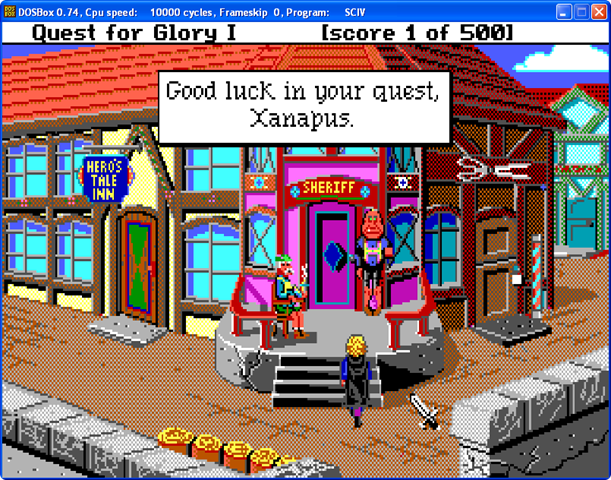
So yeah, here are 2 images which show the EGA and the VGA version of the 1st Quest for Glory game.  The differences are night and day.  You tell me, which would you prefer to play?

QfG1 QfG1vga

My Old Sierra Games

Does anyone remember Sierra Online Entertainment?  I certainly do.  How could I ever forget?  They were the very first computer based video games I had ever played, and that was in the 80’s and 90’s.

I played King’s Quest IV: The Perils of Rosella on my old Apple //e that I bought from my brother-in-law in 1989 for $750.  It didn’t have a tower with a motherboard or a hard drive, because it got destroyed before I bought it.  Long story, it was my friends fault lol.  Anyway, I remember that this was the very first game I bought and I had so much fun with it.  I sold the computer a few years later.

In 1997 when I bought my very first Windows-based computer, I wondered if they still sold it, so I looked and found the King’s Quest Collection at a computer store for $20 and I bought it.  I also bought many other Sierra game collections and loved them all.

I have been very hard at work rebuilding my old website to make it new and fresh, and while looking in my CD book for a CD with a backup file, I came across all of my old Sierra games and it occurred to me that maybe I should make a page that showed all of them and mention how much fun I had playing them, so I did.

Shiver’s 2 is one of the games that I couldn’t remember playing.  I have the 2 cd’s, but I just don’t have any memory of playing it.  I tried to install it, but it wouldn’t let me.  Every attempt at installing it resulted in a crash.  I didn’t give up though, I did a Google search looking for Sierra installers and I actually found a website.

New Installers for Sierra Games.  I installed the King’s Quest collection using their installer and it worked.  Although some of the games crashed, not all of them did.  I ran the 4th and 5th game, but the 7th one crashed.  I even had it install Mixed Up Mother Goose and I tried playing it, but it wouldn’t do it.  I think the reason is because it needs to be in 256 colors.  I can only do 16 and 32 bit.  I do remember when I played some of those games in the 90’s that I had to physically change my resolution to 256 colors before I could run the game.  I don’t think I will play them so I uninstalled it.

They had the Shiver’s 2 installer and I was successful in installing it, but here is my issue, when I run the game, it’s mostly video footage and it freezes up on me.  I can hear the sound perfectly, but the video freezes up too much.  It’s basically unplayable with my computer.

There are a few games that I never got to play, like the Police Quest Collection and the Quest for Glory Collection, so I may end up trying to install those and see what happens.  If they play then they play, if they don’t then they don’t.

I did have to install 2 programs for this.  DOSBox and ScummVM.  I’ve heard of DOSBox, but not the ScummVM one.  There is one annoying thing though.  I have avast anti-virus, and every time I tried running one of the games, avast would pop up on my screen saying it had never heard of Sierra, so it was checking it to see if it was a virus.  So I would suggest if you do have these Sierra games and intend to play them and you have avast, you could either wait for it to allow you to run it, or just close avast down.  I mean, you won’t need the internet with these games, usually, so you don’t have to worry about getting a virus.  If it only hassled me once then I’d say let it add that particular game to its list of approved programs, but if it does it every time then it’s annoying, shut it down.

I will try to play those other games and if/when I do, I will update my Sierra page on my website.

My New Website

new website home

My website has been under construction for quite some time now.  I’ve been trying to think of something interesting to do with it.  My problem was, I had so much crap in my old website that I felt overwhelmed.  It’s kind of like I had a hoarding problem, but I was hoarding old images and old information that is no longer relevant.  I decided the best thing I could do was to back everything up on my computer, then delete it all on the website and start from scratch, and this is the result.

The index page is just an image that says welcome to the page, I didn’t take a screenshot because it’s a temporary image.  I will have to work on that page some more.  The home page is like a Windows desktop with icons and wallpaper.  I wanted to make it so that no matter what screen resolution you are using, you could see the full image and it will resize when you resize the browser.  It’s also stationary so when you are scrolling through a page, the wallpaper is always there.  Although the icons on the home page don’t go down that far that you need to scroll if you are using Google Chrome with a resolution of 1280×768 if you have a widescreen monitor, and 1024×768 if you don’t.  Of course the wallpaper is 1280×768 so if you don’t have a widescreen monitor, the wallpaper is squished lol.

Right now (in October) there is a picture of 2 pumpkins for Halloween, but I will change it for each holiday.  I figured it would be easier to use a desktop image for the home page than to have to keep changing the theme for the whole site every holiday.  When I was using FrontPage themes, I would have to change the theme, and then go to each individual page and adjust things.  Sometimes it could take hours or days, so this is just one page I have to change the wallpaper on.
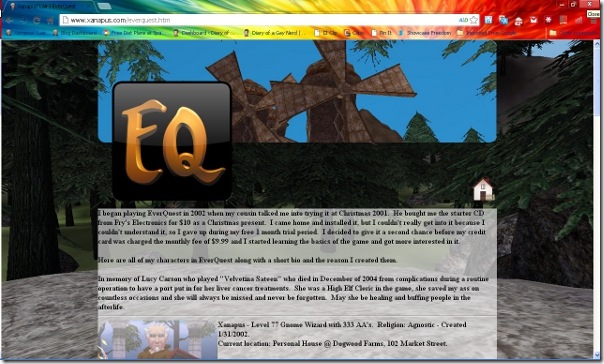
new website eqWhen you click one of the icons on the home page, you will get a page that looks like this.  I decided that I wanted to emulate the Facebook Timeline idea, but with a thinner banner and a 256×256 icon which is the same one you see on the “desktop.”  The game pages (EQ, EQ2, LOTRO and DCUO) all look the same where you see a 256×256 icon of all of my characters images with a bio.  I also thought it would make them more interesting if I gave them a story.  I haven’t finished them all, but I’m working on it.

I don’t really have to have all of this information out there, but it’s fun.  Even if nobody ever looks at it, it’s still something that makes me happy.

I haven’t quite figured out what I want to do with the crafts page, whether I want to add patterns or just images of the things I have made in the past, or both.  I am still waiting for inspiration.  My Holiday page is still empty, but I am working on that.  I made the icon with 4 holidays, Halloween, Thanksgiving, Christmas and New Years, but I mean what information could I possibly have for anything but Halloween?  All I have are my pumpkin pictures, so perhaps I will change that to a Halloween only page.

Update, I made the change already.

I would love to get some feedback, so please tell me if you like it or hate it and why.