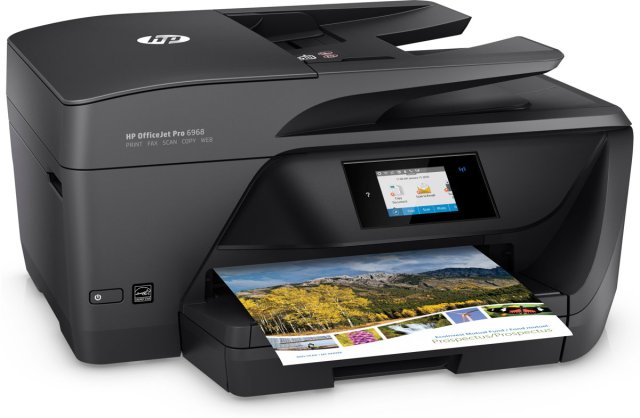
HP OfficeJet Pro 6968 Not Printing Color (SOLVED)

hp OfficeJet Pro 6968

It has truly been one of those days. I don’t know what happened, but all of a sudden today my printer decided it just wasn’t interested in printing color. I had a order that I was working on last night for my Etsy shop, and the person paid for her bracelet today when I reminded her of the link, and my printer kept printing the receipt in black and white. I was in a straight on panic. I did what I could today, but it still didn’t want to print, so I said fine, whatever, just give me a receipt. Then another order came in and again, black and white only.

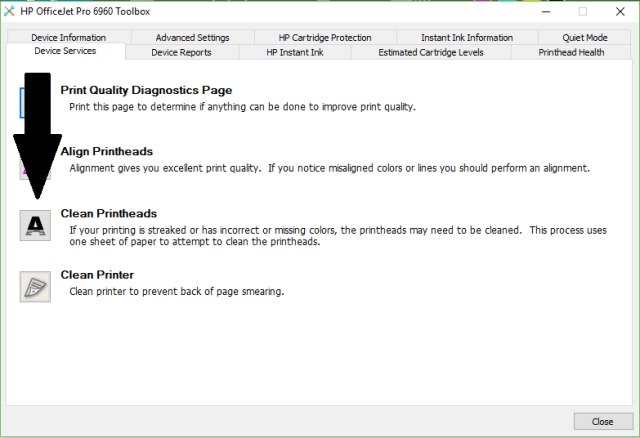
I’ve spent the entire day trying to get my printer to print in color. I cleaned the print heads at least 5 times, but nothing worked. Finally I decided you know if this last time doesn’t work then I just don’t know what I’m going to do. It cleaned the print heads, then printed out a sheet with only the black, but this time I noticed it ask if I wanted a 2nd level cleaning. I thought yeah ok, yeah you do that. I let it do a 2nd level cleaning and it printed color. It asked if I wanted a 3rd level cleaning, and I probably should have done that, but I thought you know, at least it’s printing, so let’s just stop here, and I am glad I did because I printed out some cards that I use to hang my bracelets with and it actually printed in full color just like normal, except it looked better than before.

So there you have it. If and when you have this problem with this printer, and you probably will, clean the print heads and let it do a 2nd level cleaning. If you still don’t get color in your printout, do a 3rd level cleaning. I hope someone was able to benefit from my misfortune.
2018-03-05

More Kodak Problems

Darrin bought me my Kodak EasyShare 5300 printer for Christmas in 2007.  In July 2008 I started having issues with it.  Here is my post in August for that:

Kodak All-In-One Printer

It’s happening again.  11 months after my issue originally started which was 6 1/2 months after getting it.  It’s not printing certain colors at all, it’s printing white lines in the pictures but here is a new issue, the black ink looks smudged like someone ran their hand across the paper after I printed something out.

I emailed Kodak support again to find out if they will help me the same way they did last year which was by sending me a new print head with new black and color ink cartridges.  I’m hoping they will honor their product by sending this to me again.  If not then I will just get another printer (when I can lol).

I have never had this issue with any other printer that I’ve had in my life.  My first printer was, well that was a dot matrix printer in 1989 lol.  I had nothing but problems with the paper slipping, it was back when the paper was all attached and it had those holes on both sides.  Anyway, my next printer which was in 1997 was an Epson printer, never had an issue with it.  That is until I spilled my beer on my desk and it got into the printer.  Then I bought an HP and I never had problems with it.  Then my next one after that was a Dell all-in-one printer.  The only issue I had with that was that they didn’t sell their ink at the store, only online.  Then Darrin bought me this and this is the 2nd time I’ve had the same issue.

I would still recommend the Kodak EasyShare all-in-one printers because I really like how it has the SD card slot on the front so I don’t have to upload my pictures from my camera to the computer just to be able to print a picture to a 4×6 glossy sheet of photo paper.  And I like how their software has the Kodak auto fix or whatever it’s called.

I also love that their ink is cheaper than other brands.  The black is $10 and the color is $15.  The ink package I just bought from Wal-Mart was $27 with taxes and it had 1 black and 1 color cartridge in the box.  Very inexpensive.  My Dell ink was $21 for the black and $25 or something for the color so I was spending almost $50 on ink.

I’m waiting for their response so hopefully it will be positive and not them saying well since this is your 2nd issue you have to buy a new print head but instead ok, we will send it right out to you.  I will edit this post when I get the email.

Edit: I got the email from them saying they are going to send me a new print head.  YAY!

The Bokni Magus

Well, I finally got my character back up in level so he is back to where he was last night.  I’m even back to the mob boss I was at last night who kept killing me which eventually lead me to exit the game and start playing the other one.

I’m back to him and I thought that the only thing that would help me was my ranged weapon but I shot at him over and over and over until all my ammo was gone and had used up almost all my HP potions and I still died.  That guy just won’t die.

What I’ve read other say in message boards is that the only way to kill this guy is to run around the edge of the walls until he stops to recharge his mana or whatever then try to kill him.  I’m not sure if that will do me any good because he heals so fast.  Even if I did wait for him to gain more mana then try to attack he’d probably gain his mana fast enough to heal himself and I’d never kill him.

I read that it took 1 person 2 weeks to finally off this guy.  Someone said try the multi-player mode and get help with it but most of the people chatting in the multi-player chat room are little children from the way they are talking to each other.  You know the way kids talk to each other, 1 insult after the other.  Yeah OK, some adults are like that too so I’m not sure who is who anymore lol.

I’m going to try one of the techniques I’ve read about tomorrow.  For now my left hand is hurting me from the analog stick thingy.