Nook HD+ Unlock Your eBook Prompt

nook unlock ebook

I went into a slight panic attack yesterday when I saw this message. I highlight several eBooks in my Nook, and I was looking for one particular highlight so I could copy the quote. I saw the quote in the “Your Highlights and Notes” app on my Nook HD+ and clicked open, but it wouldn’t because the eBook was no longer downloaded. I guess after so much time, your eBooks get deleted from your tablets to save room for more stuff, and to read them again you simply download them again. I can see that being a good thing, but I personally don’t want to have to do that. If I decide I will never need the book again then I will archive it, but otherwise, I see no reason removing it from my Nook.

This is my issue with this particular problem. I bought this particular eBook when I bought my very first Nook back in 2007, or was it 2008? I can’t recall, which brings me to my next point, the credit card number that was used is long gone since it is long expired and I was issued a new card. My credit card or debit card number changes from year to year or every couple of years, that is of course depending on if I lost my card and had to get a new one. At any rate, the card I have now is definitely not the same card I had way back when I bought this particular eBook. So how the heck am I supposed to download this again if I don’t have that old credit card number?

So this is what I did. I went to Google and typed “Nook Unlock Your eBook” and found a website that said to archive that eBook, then make it active again. I had to use my computer for this because I wasn’t sure if I knew my Nook password lol. It’s stored in my computer rather than my Nooks browser because I very rarely visit the Nook website. I went to Nook.com and clicked MY NOOK at the top, then signed in and clicked My Library. Then I found the eBook and clicked move to archive. Then I had to scroll up and tick where it says Show Active Items or Archived, and clicked Archived. I found the eBook and clicked Move to Active. I was able to download it without issue on my Nook HD+ after that.

I’m sure no one has had this issue, but just in case someone has and haven’t a clue what to do, this should help, at least I hope it does. If it did, let me know.

Happy reading! Smile

Nook HD+ from Barnes & Noble

Nook HD+ from Barnes & Noble

I love my Nook HD+.  I have been having so much fun with it since I got it for Christmas, actually the week before Christmas.  Yeah we don’t conform to the traditions of opening your presents on Christmas day, or even on birthdays.  We open presents the day we get them.  Screw tradition lol.

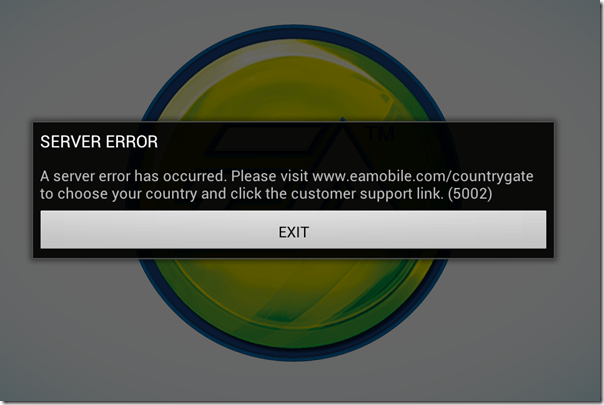
My Nook HD+ has a 9” screen, so it’s bigger than the Nook HD in the sense that it has 2 more inches, but I’m telling you that because there are certain apps that work with 7 inches, but don’t work with 9 inches.  Like The Sims FreePlay and Viggle for example.  The Sims FreePlay is downloadable, you just can’t play it because you get this warning when you try.
The Sims FreePlay

I am not sure if The Sims FreePlay will even work with a Nook HD 7” tablet.  I know it works with the Kindle Fire because I’ve seen people taking pictures and video of it on that device.  I’m pretty sure it was the 7”, so if it runs on the Kindle Fire 7”, then it probably runs on the Nook HD 7”.  If so or not, please let me know.

Viggle on the other hand doesn’t even show up in the Google Play Store, so they don’t even give you the option.  I know it works on 7” tablets because I installed it on my partner’s tablet to see if I could do trivia when trivia wasn’t giving me any points with my phone.  It installed and looked great too, but the trivia was not working on his tablet any better than it was on my phone.  Although, just because it installed on his tablet doesn’t mean I know if it will install on a Nook HD 7” tablet.

Facebook isn’t great on the Nook HD+ when you use the app.  Using the browser is so much better because you get the full website that you get on the computer, but the only problem I have is when I use another tab to visit another website, or even if I use an app, like if I go check my email, when I come back to the Facebook tab, it goes straight to the mobile version.  If I wanted to use Facebook mobile, I would just use the Facebook app.

The Twitter app that comes with the Nook HD+ from the Nook store isn’t updated, so it’s better to let Google Play update it.  It’s easy to use and if you have multiple twitter accounts, you can switch back and forth very easily.  It’s actually better on the Nook HD+ than it is on my phone.  When I am using @xanapus on my phone, then try to switch over to another twitter name, for some odd reason it switches me back to @xanapus.  It doesn’t do that on my Nook HD+.

I didn’t like the Google+ app on my phone and I rarely ever use it on my computer, but it is great on the Nook HD+.  That’s one of the social media websites that I wanted to start using more often.  It has a much better look than Facebook does in my opinion.  Google+ doesn’t force you to look at ads or suggested posts.

One annoying thing that I noticed is that when I am in my library, I scroll down to My Files and see there are 564 files.  How the heck am I supposed to weed through all of those files to get to the ebooks I have downloaded?  Well, I discovered that if you click the words My Files, it brings up a new window which shows folders.  They are in the Download folder.  I have 6 ebooks that I downloaded from the EverQuest Next website that are fiction based books based on EverQuest the game, but they are all in PDF format.  Ebooks that I’ve downloaded in ePub format will show up with my Nook books, but the PDF files don’t.  I did download an app called File Manager HD which allowed me to create a new folder in my download folder so I could keep the EQN ebooks in there to keep that folder more organized.

PicsArt Photo Studio is a good app that I use on my phone to add stickers and frames and text to my pictures, but it’s such a small screen that sometimes it’s difficult to see what I’m doing.  My Nook HD+ doesn’t have a camera, but I can use Google Drive to retrieve my files.  What I really like most is that I can write on the screen with this.  I can do that on my phone, but it’s too small.

Happy New Year 2014

Okay, so my handwriting isn’t the best, it’s even worse on paper lol.

ChromecastSome useful apps that come with the Nook HD+ include Netflix and Hulu+ and if you have a Google Chromecast, you can watch them on your TV.  You don’t even need to have the Google Chromecast app installed to use it.  I know this because I bought it for my partner and I couldn’t get it to connect to his tablet.  I connected it with my CR-48 aka Chromebook, then was able to connect it to his tablet.  I don’t have the app installed on my Nook HD+ or my phone, but the icon is visible on YouTube, Netflix and Hulu+.  I guess any Android or Apple device that is connected to my network will have that ability.

Of course, other good uses for the Nook HD+ is actually reading a book lol.  You aren’t limited to Nook books either, you can read your Kindle books plus your Google Play books.  In fact, if there is a service that sells ebooks, you can read the books you bought from them, including pdf files and ebooks.  Some writers only publish their ebook with Amazon KDP Select because they get more advertising, and if they chose KDP Select, they can only publish with Amazon for 3 months.  That’s why it’s good to use the Kindle on my Nook, because some ebooks aren’t available on the Nook.

One of the features that I do like is the Nook app “Your Highlights and Notes.”  If you do a lot of highlighting and like to add notes, this is a good thing.  It had all the highlights from the Nook for PC when I got it, but it didn’t show any text.  When I add new highlights, it shows the page number and the first couple of sentences that I highlighted, and if I left a note, it shows my note.  That makes it so much easier to find every highlight and every note on every ebook you own whether it’s downloaded or in the cloud.  Highlighting and leaving notes on my Nook WiFi was so difficult and as soon as I started reading another ebook, all of the highlights and notes disappeared, which was very frustrating.

There is also a Nook app called “Your Lookups” that shows you every word you ever had to find the definition for.  That does come in handy if you ever want to find that specific word again.  The list of words you looked up are on the left, and the word, the book you found it in, the page and the date and time you looked it up are on the right along with the definition of the word.  WOW!  Now you have a record of the date and time you learned a new word.

Anyway, these are some of my thoughts on the Nook HD+.  I like it a lot and I will get a ton of use out of it.  I still have my Nook WiFi and I don’t think I will use it as often for reading ebooks, but if the occasion ever arises when I go outside to read, I will be able to use it.

Glowing Review from Marguerite Labbe

I woke up this morning and immediately turned on my computer so I could check my email while I ate my breakfast and I came across an email from my favorite author Marguerite Labbe.  She posted a review of my book on her blog and I was so beyond excited because I wasn’t sure how people would feel about reading my book, but apparently it’s good.

Marguerite Labbe is an award-winning M/M author.  She wrote those gay vampire books that I love so much starting with  “My Heart Is Within You.”  I really love to read supernatural fiction, especially when they have vampires, ESPECIALLY when they are gay vampires lol.  She really knows how to capture the raw sexuality of two hot gay men better than I have ever even experienced.  Let’s just say that I had to take several bathroom breaks when I read her book.

MargueriteLabbe.com: Diary of a Gay Nerd by Michel McDonald

TUESDAY, FEBRUARY 7, 2012

Diary of a Gay Nerd by Michel McDonald

“I’ve had a hard time putting into words how I felt when I read Michel’s memoir.  Many parts struck a chord in me from my own childhood, though I was far luckier than Michel was and I didn’t have the added alienation of being gay.  I’ve known Michel for several years now, ever since he picked up my vampire trilogy and we started talking.  In that time, I’ve found him to be a very kind, passionate and determined man.  After reading his memoir I have to add brave to that as well and not just for what he endured and overcame.  To be able to write something like this, with such unflinching honesty, takes a rare kind of person.  Michel doesn’t gloss over his own mistakes, but puts them out there just as baldly as the abuse he went through.

“I am honored to know such a man and call him my friend.”

How awesome is that?  When I first read her book after buying it from Rainbow eBooks, I knew I had to find her on Twitter and tweet her telling her how awesome her book was.  I was surprised that she responded, but equally surprised that she continued talking to me through Twitter.  We have been talking ever since.  I think Twitter is one of the most amazing online services ever invented.

Thank you Marguerite Labbe for writing this review.  I have added it to the Barnes & Noble website btw.

It’s Totally Tuesday at Rainbow eBooks

I love Tuesdays because that means that Rainbow eBooks has a sale on all of their new releases, which mine happens to be, new that is and on sale at 15% off.  It’s regularly $6.99, but you can buy it today for only $5.94.

Diary of a Gay Nerd by Michel McDonald – Totally Tuesdays at Rainbow eBooks

If you have a Nook just download the epub file, if you have a Kindle, download the mobi file.  If you don’t have an ebook reader then you can download any file, mobi, epub or pdf.  They all work with PC if you have a PC ebook reader.

Reading My Book On An iPhone/iPod

Want to read my new book “Diary of a Gay Nerd: Life After Child Abuse, It Gets Better!” but don’t have a Nook or a Kindle but have an iPhone or an iPod?  Not to worry, that is why I published my book with RainboweBooks.com.

You actually don’t have to have a Kindle to be able to buy Amazon ebooks, or a Nook to buy Barnes & Noble ebooks.  You can download the app for your phone and create an account and start buying ebooks.  That way if you decide later that you want to buy a Nook or a Kindle, you already have an account and books in your library.  But if that is not what you want then you can also use iBooks from the app store.

What you do is simply download iBooks from the app store and install it.  Now go to RainboweBooks.com on your computer and buy my book.  Now download it in .epub format.  Open iTunes and drag the file from your computer into iTunes and a new item will show up called Books.  Plug your iPhone or iPod into your computer via the USB cable.  When iTunes finds your device, simply drag the book file to the device and it will upload it.  Disconnect from the USB and open the iBooks app and viola it’s in your bookshelf.  Open, read and enjoy.

You may notice that the book is going to be well over 1000 pages, but that is because it only shows one or two paragraphs.  The book is actually only 296 pages in e-book format but the iPhone/iPod cannot show the full page and if it did you would need a microscope to read it.

So there are your simple instructions.  I hope you enjoy my book on your Apple product.

My Book is Coming Soon…

I have finally published my book.  It will take anywhere from 24 to 72 hours for it to be reviewed before it will be ready for sale so I would count on January 6th as my official publish date.  Keep your eyes crossed for that one.

I had a hard time getting an author picture because we just couldn’t find a good location to take it, so I recycled a picture from 2005 lol.  I know it’s cheating but it’s a really good picture.

Of course it will be in black and white in the paper book and on all e-ink e-book readers, it will be in color in the color e-book readers, tablets and phones.  I am just happy that I didn’t have to pose cause I really don’t like to fake a smile when someone can’t figure out how to push the button.

You have no idea how much anxiety I had to push the “publish” button.  I finally just clicked it and covered my mouth with both of my hands as if I accidentally clicked it.  I spent seven months working on it, it’s now or never.

So my new website for the book www.diaryofagaynerd.com is up and running with a picture of the book along with buttons to click to buy the book, to follow me on twitter, like me on Facebook, to get a GetGlue sticker and to come here, although only three buttons work because I have to get the links when the book has been published.  I will be offering a GetGlue sticker, but I have to wait for the book to be on the GetGlue site first.

You know how anxious you are on Christmas eve, or the day before your birthday, or the day before you go to Disneyland?  Yeah… that’s me right now.

Publishing My Book

The time has finally come for me to announce that my book is FINALLY FINISHED!

Seven months of hard work has finally paid off.  Not only have I learned how to write, but I have also learned how to grammar… wait no that’s bad grammar!  But seriously, my grammar has greatly improved, compared to when I started writing anyway.

The only thing that is preventing me from publishing my book now is an author picture.  I don’t want to publish it until I can get dressed up in my gay uniform, that being my “Legalize Gay” t-shirt that I got from the Human Rights Campaign from when I volunteered with them a few months ago at the gay pride here in Bakersfield.  Although I am not set on that shirt as being the only thing in the photo, I may bring a dress shirt.  Who knows, I may combine them and wear the dress shirt unbuttoned on top of the Legalize Gay shirt.  We’ll see.

I was going to use my own domain xanapus.com as the hub, but decided to buy a new domain name www.diaryofagaynerd.com with links to Amazon, Barnes & Noble, Rainbow eBooks, GetGlue, Facebook, Twitter and here.  Of course I’m paying every month for 1 single html page lol.  That doesn’t seem fair since I have a lot of space over here, but whatever.

Oh I mentioned GetGlue, yeah I haven’t really talked to them yet but I sent a tweet to one of the GetGlue people that I know.  I want to offer a sticker for my readers.  I already have the sticker made, I just need to give them the file so they can give it to people when they check-in.  Although I don’t know if a lot of writers offer stickers for books, maybe I’m the first.  Wouldn’t that be awesome if I were?  How cool would that be?  I’m a GetGlue pioneer LMAO.

So I will just focus my energy now on getting that picture so I can publish it.  Hopefully tomorrow, but no promises.

I do have future plans for another book, actually a series of fictional stories about my character Xanapus from the game EverQuest.  Of course I won’t be able to write about Norrath, I will have to make up my own fantasy world.  That will just make it more fun to write if I make things up as I go.  I will probably start the first story with a short story to make sure I know how to write fiction, of course I will be taking a course on writing fiction first.  It was one thing to write an autobiography because I didn’t have to make anything up, a story based on one single character living in a world that doesn’t exist yet is going to be the difficult part.  If I can write a short story with one little tiny quest, then we will see if I have what it takes to write a 200-300 page novel, 8 of them in total to be exact.  Yes, I am aiming high lol.  Don’t hold your breath…

Until tomorrow when I have more news about the book that I already wrote…

Book Cover

I have been going crazy making all of these book covers for the paper book, the Nook and the Kindle.  I made a banner for my blog, iPhone icon, even a few iPhone/iPod wallpaper images lol.  I am even thinking about making a sticker to offer people when they check in to my book on the GetGlue website.

My bubble has burst though and I may have to rethink the whole texture part of the rainbow colors because the spine of the book won’t be textured, it will be a solid color.  Although that doesn’t really matter to me, it is a bit upsetting that I won’t have that one thing to make it match.  But do I really need it to be textured?  Hell yes I do!  It’s what makes it unique.  Whatever, I’m probably going to redesign it again before I publish it, I mean it is going to be forever and I don’t want to make something that I may regret forever just because the spine isn’t the same as the book.  I’m mostly designing it for ebooks, not paper books, but since I am offering that option, it has to look right everywhere else.

Tomorrow is another day so I will focus on trying to make it work then.

Header and Page Number Issues in OOo Resolved

Yesterday I posed a question about header and page number issues in OpenOffice.org. How will I be able to add page numbers for book, but starting on chapter 1?  Also, how will I be able to add headers to the top of the pages that will allow me to add the author name and book name, without having that on the same page of each chapter?

The problem that I am having is that I am using OpenOffice because it’s free.  I can’t afford Microsoft Office so I’m using an alternative.  Unfortunately, my alternative isn’t helping me when I need it.  Oh sure I was able to type out my book, but when it comes to headers and page numbers I can’t figure it out.

I am using CreateSpace to publish my book in paper book format.  In order for me to do so, I have to format my document file for 5″ x 8″ and I must have headers and so on.  They have a very good template and I wanted to use that but I also wanted to figure it out on my own, or at least get some help which I never got.  I decided today that I would use the template and see how that would work and it’s working fine for me.

Then my next obstacle was that this template only has 10 chapters, my book has 41, so I will have to find a way to add more chapters and I did.  Copy and Paste.  I just copied the first 10 chapters and pasted them, then copied one final chapter and pasted that too and all of the formatting pasted as well.

But, now I face another issues, I can’t save my file because that removes the formatting lol.  The only way to do it is to just do it all in one day without saving anything.  I just have to copy and paste all 41 chapters one at a time, then when I am finished, save the whole thing as a PDF file.

I was hoping to have it ready to publish this Friday, but not making any promises, and unfortunately it’s probably going to take a few more days after that.  Hopefully next week, but again, no promises.  I am just waiting for feedback from people who are reading it is all.  I also want to publish some quotes from a couple of people who are writers who I sent the book to.

So here’s to next week, cheers!

My Book Is Finally Finished, but…

My book is finally finished being edited and is ready to be published.  It took me 2 months to write it, but then it took me another 4 months to edit it.  I have been working for at least 8 hours a day to get it right so there are no mistakes.  It is ready, but not ready because I may have made a mistake with the copyright.

I copyrighted it on November 28th 2011 and I uploaded my unfinished book and the cover, but haven’t taken any other action, besides uploading the current revision of course.  I’m not sure if I was supposed to mail it to them or not.  It still says pending so I’m not sure when it will be completed.  I don’t want to take any chances with it so I won’t publish it until the copyright has gone through.

I said I was going to publish it tomorrow, January 1st 2012, but now I have to wait until January 2nd when I can call the copyright office and talk to someone.  This really sucks but my hands are tied.

That will give me another opportunity to read the book one last time to make absolutely sure there are zero mistakes.  It sucks because I have read my book about 20 or 30 times.  I have never read a book this many times before, and since it’s my life story, I have to relive it again every time I read it.  I just want to be done with it and move on.

Anyway, I will update this on Monday when I have spoken to someone at the copyright office.  If my claim has expired because I didn’t mail a printed copy, then I will have to copyright it again and mail it to them and wait for god only knows how much longer before I can publish it.  I’m sure it won’t take that long though, I’m hoping I can upload it on Monday when I get off the phone with them.  I can’t make any promises though.

Now that I am finally finished editing, I can finally enjoy playing Lord of the Rings Online again.  WOOHOO!