The Sims FreePlay January 22 Update

The Sims FreePlay

The Sims FreePlay has finally given us an update and not everyone is happy about it. Well, I should say they aren’t happy because EA still has not addressed some of the issues that some of us are having with the game.

There are really only two issues that I am having, like not being able to log in to Facebook in the game which would allow me to access the party boat to claim daily prizes based on how many Facebook friends I have who also play the game. It also allows me to visit those friend’s neighborhoods and interact with their Sims characters. They have tasks that you have to perform to earn a special currency called SP’s to spend on specific items in the store. If I cannot earn that currency then I will not be able to buy those items.

The other issue that I am having is that I cannot play the game on my new Nook HD+ that I got for Christmas. I have been playing this game on my Android phone since last year and I’m perfectly okay with playing it on there because that is mainly the only reason I even use my phone anymore. Ever since I got my Nook, I’ve uninstalled most of the apps that I used to use on a daily basis because they were causing The Sims FreePlay to constantly crash. Since I can use those apps on my new Nook, I don’t need them on my phone anymore.

Some people are reporting problems that they are having that I don’t seem to be having. They are also really irate that EA has not addressed their complaints.  Here are just 2 comments. I blurred out their names for their own protection.  The first one is negative, the 2nd one, well, if you can understand what that person is saying then you decide lol.  That person is having issues that I am not having.

sims freeplay comments

You know, I am just as miffed as the next person, but let us all have a little perspective here. This is a free game. You don’t pay for it, you get to play it for as long as you want for free. There are premium items you can buy with real life money, but you don’t have to buy them if you don’t want to. Be lucky they are giving us all of these updates because their other game The Sims 3 which is also available for your Android device will cost you $6.99 and from what I have read in the comments there, that game doesn’t have nearly as many cool features and items as the FreePlay game has.

Also, you should be so lucky to have your Android phone or tablet because there are many people in this world who don’t have such luxuries. There are children who are being abused by their parents, some even murdered. There are entire families who are starving and sleeping in the streets because they aren’t as lucky as you. There are people in this world who are being molested, raped and murdered.

There are teenagers who are kicked out of the house and end up living on the streets for years simply because they came out of the closet to their parents. There are gay kids being targeted, beat up, some even raped and then murdered in Russia because Vladimir Putin gave them the okay by making being gay illegal. There are gay people living in Uganda who are being murdered or raped, or both. And finally, there are people being stoned to death in the Arab countries for the same reason, because they are gay. So chill out, it’s just a silly little game. Count your lucky stars that you even have the money to play the game on your expensive little toy.

I am just as miffed at EA because the Facebook issue started when they put out the Halloween update and I have waited all this time and was let down yesterday when I couldn’t log in with the new update. I understand how frustrating it is. I was also let down when I couldn’t play it on my Nook, but even if I could play it on my Nook, if I can’t log in to Facebook to upload my progress, then how will I be able to continue from where I left off on my phone when I try to play it on my Nook?

Someone told me to just buy a Kindle. Um… I have a Nook. I can’t just go out and say “hey take my Nook and give me a Kindle.” It doesn’t work that way. My Nook is a Nook HD+ with 32 GB which only cost $150. The Kindle Fire equivalent is $444 (see below). So yeah, I will not be buying a new Kindle just so I can play The Sims FreePlay. Even if I did, I still have the Facebook issue. If I can’t back up my game, then what point is getting a Kindle Fire to play it on?

kindle fire hdx

One person even said to just go out and buy the cheap Kindle Fire. Again, even at the low price of $139, I still have the Facebook issue to deal with. Besides, why do these people think I have money lying around that I can just go out and buy all these new things? I just cancelled HBO and Showtime because I needed that extra $30 a month. How am I supposed to go out and buy a second tablet that I will only use to play The Sims with? I put $20 into savings and had to take it back out just to buy groceries. Come on, think it through people.

At any rate, I will continue to wait and hope that EA will fix these issues and I will continue not complaining because there is more to life than just a silly little game. I will continue playing it on my phone and be happy that I even have that luxury. How happy you ask? This happy…

sims freeplay shirt

Nook HD+ from Barnes & Noble

Nook HD+ from Barnes & Noble

I love my Nook HD+.  I have been having so much fun with it since I got it for Christmas, actually the week before Christmas.  Yeah we don’t conform to the traditions of opening your presents on Christmas day, or even on birthdays.  We open presents the day we get them.  Screw tradition lol.

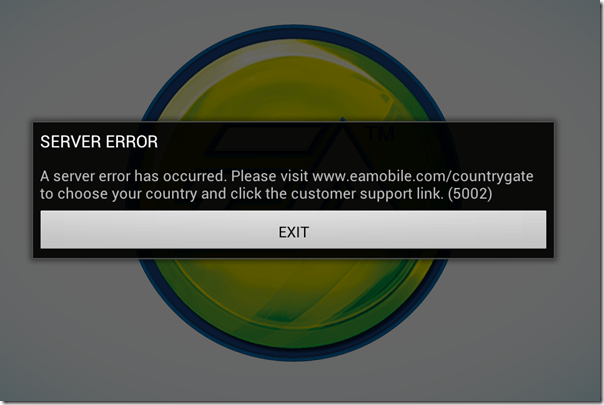
My Nook HD+ has a 9” screen, so it’s bigger than the Nook HD in the sense that it has 2 more inches, but I’m telling you that because there are certain apps that work with 7 inches, but don’t work with 9 inches.  Like The Sims FreePlay and Viggle for example.  The Sims FreePlay is downloadable, you just can’t play it because you get this warning when you try.

The Sims FreePlay

I am not sure if The Sims FreePlay will even work with a Nook HD 7” tablet.  I know it works with the Kindle Fire because I’ve seen people taking pictures and video of it on that device.  I’m pretty sure it was the 7”, so if it runs on the Kindle Fire 7”, then it probably runs on the Nook HD 7”.  If so or not, please let me know.

Viggle on the other hand doesn’t even show up in the Google Play Store, so they don’t even give you the option.  I know it works on 7” tablets because I installed it on my partner’s tablet to see if I could do trivia when trivia wasn’t giving me any points with my phone.  It installed and looked great too, but the trivia was not working on his tablet any better than it was on my phone.  Although, just because it installed on his tablet doesn’t mean I know if it will install on a Nook HD 7” tablet.

Facebook isn’t great on the Nook HD+ when you use the app.  Using the browser is so much better because you get the full website that you get on the computer, but the only problem I have is when I use another tab to visit another website, or even if I use an app, like if I go check my email, when I come back to the Facebook tab, it goes straight to the mobile version.  If I wanted to use Facebook mobile, I would just use the Facebook app.

The Twitter app that comes with the Nook HD+ from the Nook store isn’t updated, so it’s better to let Google Play update it.  It’s easy to use and if you have multiple twitter accounts, you can switch back and forth very easily.  It’s actually better on the Nook HD+ than it is on my phone.  When I am using @xanapus on my phone, then try to switch over to another twitter name, for some odd reason it switches me back to @xanapus.  It doesn’t do that on my Nook HD+.

I didn’t like the Google+ app on my phone and I rarely ever use it on my computer, but it is great on the Nook HD+.  That’s one of the social media websites that I wanted to start using more often.  It has a much better look than Facebook does in my opinion.  Google+ doesn’t force you to look at ads or suggested posts.

One annoying thing that I noticed is that when I am in my library, I scroll down to My Files and see there are 564 files.  How the heck am I supposed to weed through all of those files to get to the ebooks I have downloaded?  Well, I discovered that if you click the words My Files, it brings up a new window which shows folders.  They are in the Download folder.  I have 6 ebooks that I downloaded from the EverQuest Next website that are fiction based books based on EverQuest the game, but they are all in PDF format.  Ebooks that I’ve downloaded in ePub format will show up with my Nook books, but the PDF files don’t.  I did download an app called File Manager HD which allowed me to create a new folder in my download folder so I could keep the EQN ebooks in there to keep that folder more organized.

PicsArt Photo Studio is a good app that I use on my phone to add stickers and frames and text to my pictures, but it’s such a small screen that sometimes it’s difficult to see what I’m doing.  My Nook HD+ doesn’t have a camera, but I can use Google Drive to retrieve my files.  What I really like most is that I can write on the screen with this.  I can do that on my phone, but it’s too small.

Happy New Year 2014

Okay, so my handwriting isn’t the best, it’s even worse on paper lol.

ChromecastSome useful apps that come with the Nook HD+ include Netflix and Hulu+ and if you have a Google Chromecast, you can watch them on your TV.  You don’t even need to have the Google Chromecast app installed to use it.  I know this because I bought it for my partner and I couldn’t get it to connect to his tablet.  I connected it with my CR-48 aka Chromebook, then was able to connect it to his tablet.  I don’t have the app installed on my Nook HD+ or my phone, but the icon is visible on YouTube, Netflix and Hulu+.  I guess any Android or Apple device that is connected to my network will have that ability.

Of course, other good uses for the Nook HD+ is actually reading a book lol.  You aren’t limited to Nook books either, you can read your Kindle books plus your Google Play books.  In fact, if there is a service that sells ebooks, you can read the books you bought from them, including pdf files and ebooks.  Some writers only publish their ebook with Amazon KDP Select because they get more advertising, and if they chose KDP Select, they can only publish with Amazon for 3 months.  That’s why it’s good to use the Kindle on my Nook, because some ebooks aren’t available on the Nook.

One of the features that I do like is the Nook app “Your Highlights and Notes.”  If you do a lot of highlighting and like to add notes, this is a good thing.  It had all the highlights from the Nook for PC when I got it, but it didn’t show any text.  When I add new highlights, it shows the page number and the first couple of sentences that I highlighted, and if I left a note, it shows my note.  That makes it so much easier to find every highlight and every note on every ebook you own whether it’s downloaded or in the cloud.  Highlighting and leaving notes on my Nook WiFi was so difficult and as soon as I started reading another ebook, all of the highlights and notes disappeared, which was very frustrating.

There is also a Nook app called “Your Lookups” that shows you every word you ever had to find the definition for.  That does come in handy if you ever want to find that specific word again.  The list of words you looked up are on the left, and the word, the book you found it in, the page and the date and time you looked it up are on the right along with the definition of the word.  WOW!  Now you have a record of the date and time you learned a new word.

Anyway, these are some of my thoughts on the Nook HD+.  I like it a lot and I will get a ton of use out of it.  I still have my Nook WiFi and I don’t think I will use it as often for reading ebooks, but if the occasion ever arises when I go outside to read, I will be able to use it.

My Year In Review

my year in chalkboard

before and after morro bay 2013 was a very good year for me.  I started out not wanting to make a new years resolution out of fear of the disappointment that would always come from breaking it.  I decided to make one after a few days, and I stayed with it, well, until July anyway.  I said I wanted to lose weight and I did.  By July I had lost 70lbs with an android app called Noom, but then the weight stopped dropping and I gained 10lbs back, but fluctuated throughout the rest of the year.  I started out the year at 264lbs, went down to 194lbs and as of today I am 205lbs.  I will make another resolution to get back on my diet so I can get down to the weight that I wanted to get down to.  I know how to do it, I just need the willpower.

xray1 On March 16th I had an accident while riding the bicycle home from the grocery store at night and I broke my arm.  It was the ball of my left arm that fits into the shoulder socket.  I didn’t have a cast, instead all I was given was a sling from the emergency room.  By that time I had already lost 35lbs, and as you can already tell from the previous paragraph, the broken arm didn’t stop me from reaching my weight loss goal.

etsy banner While I was recovering from my broken arm, I decided that I wanted to start a new craft.  Well, it wasn’t really a new craft, it was an old craft that I learned when I was 9 and in the Cub Scouts.  I had some materials, so I wanted to use them up by making a couple of keychains.  I had so much fun that I decided that I wanted to learn a more complicated pattern.  I got so good at it and I was having so much fun that I ended up with about 40 keychains, so I opened up an Etsy shop.  I started out with keychains, and I added dangle keychain style earrings, studs and hoops and I already have plans on making and selling dream catcher earrings.

On June 26th, the Supreme Court of the United States ruled DOMA to be unconstitutional and Prop 8 was finally repealed.  HURRAY!  What a glorious day that was for the gay community in California.  In fact, 18 (or 19) states made gay marriage legal in 2013 and legal on a federal level.  The reason I said or 19 is because Wikipedia doesn’t include DC, but says eighteen states AND District of Columbia.  Whatever.  18 or 19, it’s still a huge victory for us.  Illinois is in that 18, but theirs isn’t legal until June 2014.

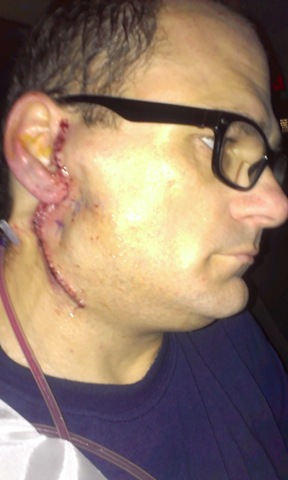
IMAG2002 In late July I started having pain in my parotid gland, which happens at least 2 or 3 times a year for I want to say the last 10 years, but I am not positive.  It’s been going on for a very long time.  The parotid gland is the saliva gland and for some reason the saliva doesn’t release into my mouth, instead something blocks the way and it swells up to the size of a golf ball or bigger.  I try to milk it so the saliva goes into my mouth, and that does work, but it hurts really bad.  The doctors usually give me an antibiotic and it clears up in a week, but this time it didn’t clear up.  My doctor sent me to an ear, nose throat doctor and to have an ultrasound which showed that I had a stone inside of my parotid gland.  The ENT doctor sent me to have a cat scan with contrast which showed that I had several stones in both of my parotid glands, but the ones on the right side were much bigger than the left.  I had surgery on November 20th to remove my parotid gland.  The area is still numb and I was told it will probably be numb for another couple or few months.  YAY!

My back has caused me tons of pain for so many years and this summer I finally found out what was causing it.  Apparently I have scoliosis in my spine.  I told my aunt about it and she told me that my great-grandmother was born with scoliosis and she lived her entire life with it.  I remember she had a hump on her back, that was the scoliosis.  My doctor sent me to physical therapy for a month and that halted the pain, but it didn’t correct anything.  I have an appointment in January to start treatment up again, and it’s a good thing too because the pain is already starting to come back.  My first treatment was a shock, no, seriously, they put these electrodes on my back and it shot electricity to my nerves to dull them.  They had me do exercises for half an hour and then they would give me a deep tissue massage. The electrode was only applied to me on the first visit, all the other appointments were just me laying on the table doing exercises and then massages.  The last couple appointments didn’t include a massage.

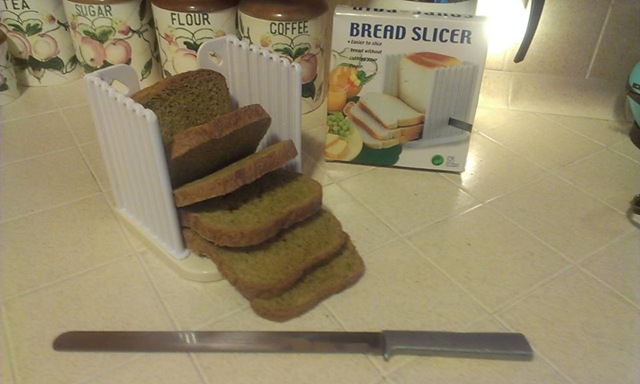
bread slicer pumpkin bread We went to a thrift store in October and I found a bread machine for only $6.  I can’t say I have ever had homemade bread before, like ever, so that was quite an experience.  I did learn that I was doing it wrong for a very long time when I had such a horrible stomachache which felt like I had a 10lb brick sitting in my stomach.  Apparently the bread was too dry.  I read the instructions.  It clearly stated that I was to use exact measurements, no more, no less, so I was only doing what I was told to do, but apparently rules are made to be broken.  Now the bread is light and fluffy and it actually tastes better than store bought bread.  My favorite bread to make is Spiced Pumpkin Bread with raisins.  Have you ever had a ham sandwich or a peanut butter and strawberry jam sandwich with pumpkin bread with raisins?  It’s quite awesome.  Although I will have to cut back on the bread when I start my diet up again.

We also helped feed a couple of neighbors for Thanksgiving and Christmas, which frankly is what the holidays are all about.  It’s nice to receive presents, but it’s even nicer to do a good deed for someone.  I guess those were our good deeds for the year.

Of course we exchanged presents.  I got a Nook HD+ 32GB tablet from my partner, and I gave him a Google Chromecast so he can watch Netflix and YouTube from his tablet, plus I got him Netflix.

I don’t know what will happen in 2014, but I’m sure it will be as memorable as 2013.  Merry Christmas and Happy New Year to you all!

Nook HD+ for Christmas

desktop landscape

I was totally not expecting this, but my partner bought me a Nook HD+ 32GB for Christmas. I was saving money to buy an Amazon Kindle Fire because I thought it was better than a Nook tablet. I had no idea that the Nook tablet had the Google play store now. So I changed my mind, but was still saving the money and was expecting that I would finally have the money saved by my birthday in June. I told my partner what I was planning, and I think he took that as a hint. It wasn’t, but hey, I’m not complaining lol.

I have a Nook WiFi, which is still very nice to have for when I want to read a book in the sunlight. That doesn’t happen very often, but it does happen. You can’t see a tablet screen in sunlight which is what makes a e-ink screen superior than a tablet in that sense.

I was saving up for the 7″ screen with only 8GB, but when we were at the Barnes & Noble store he saw the two screens next to each other and decided for me that the 9″ screen was better, and that 32GB would also be way better than only 8GB which I highly agree with. The price however was a huge difference. The 7″ tablet was only $129 and the 9″ was $179. I agree that the one he bought me is better though, and I probably would have regretted not getting the bigger one.

library portrait There was a problem with my new Nook though. The first day was okay, but the second day wasn’t. The screen started freaking out on me. It would move side to side on its own and it would drop app icons onto the desktop from the carousel at the top. It also went into my library and started downloading books and magazines from the cloud. I saw it in the Nook store and freaked out that it would start making executive decisions on what it thought I should start reading.
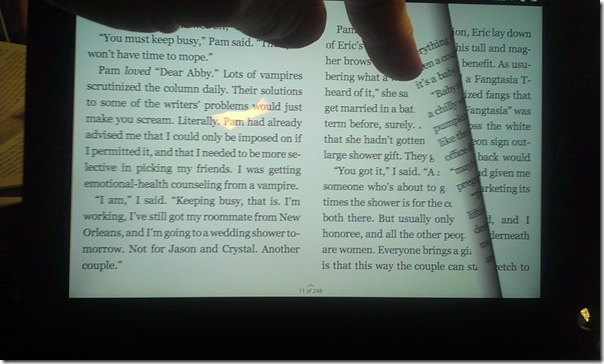
I called the store and tried to explain to them what was happening, but the tech didn’t get it right away. She eventually understood and walked me through resetting it to factory and told me if I had any more problems to bring it in for another one. It did, and so we went in the very next day. It was a good thing too because they were on sale, so they gave my partner the difference, which was $32. Not bad eh? Instead of being $179, it was only $149.

So yeah, the Nook HD+ 32GB was a very good thing. I’ve been putting my computer in sleep mode while I use the Nook as a computer. No sense in using electricity if I’m going to use a tablet instead of a computer. I am disappointed that I can’t play the Sims FreePlay on it though. I’ve been playing that on my cell phone for a year now and it gets frustrating when it crashes constantly. I would love to free up some space on my phone and play it on a bigger screen.

landscape book

I was worried that I wouldn’t be able to read books on the screen because I much prefer either paper or e-ink, but it’s actually not that bad to read from. I’ve been reading in landscape mode and it reads just like a book, it even looks like a book when you turn the page. The reason I’m reading in landscape mode is because of the case I have. It’s much easier for me to read with the Nook sitting on my desk than it is to hold it on my hand.

I am very happy with my gift. I’m even happier that I didn’t have to save the money for it because I can’t save money very easily because it always goes into the groceries. I’m even happier that the replacement didn’t freak out like the first one lol.

We didn’t buy the case in the store because I thought they would be expensive, so I bought it on Amazon for $11 with free shipping.  Not a bad price.  I found out that the cases they have in the store are only $15, but I am very happy with the case that I have because it rotates so it can stand in portrait or landscape mode.

We don’t conform to the rules of opening your Christmas presents ON Christmas day.  Screw that noise lol.  We will open our presents when we gosh darn well please thank you very much.  The present I bought for him wasn’t quite as expensive though, it was the Google Chromecast for $35.  He can use it to watch Netflix or YouTube directly from his tablet.  My second gift for him was Netflix itself, which we both can enjoy from our tablets and the Blu-ray player.

Recovering from Surgery

I am still recovering from surgery.  Been laying in bed reading the 12th Xanth book “Man From Mundania”.  The meds make me very sleepy though, so it’s hard to concentrate, but I do my best.  My face around my ear and my ear are still numb and it feels very odd to be numb and itchy at the same time.  I’ve never had surgery so naturally I had no idea what this would be like.

There is a tube sticking out of my neck to drain the fluids that I was only supposed to have for 1 week, but since the doctor is only there on Fridays and they are closed the day after Thanksgiving, I have to have the tube for 2 weeks.  It doesn’t bother me, but I was hoping to not have it any more than I have to because it hurts sometimes when I accidentally pull on it.  It’s also very disgusting lol.  We usually go to Golden Corral on Thanksgiving because it’s easier to have them do all the work, but with the stitches and the tube, I just can’t see me walking around a restaurant filling my plate without feeling like I’m being stared at and judged.  I already had someone blatantly staring at my stitches while talking to me and seeing the disgusted look on his face which made me never want to leave the house again.

I honestly don’t mind the cooking and cleaning, but since it is just the two of us and we really don’t need to cook that much food, it doesn’t make much sense buying and cooking so many different dishes.  I think if we can just get some chicken for the crock pot, a couple of potatoes and a couple of yams and a pumpkin pie we should be fine.  That’s really all I care to eat anyway.

I haven’t been eating as much as I normally have been.  I don’t know if it’s the medicine, but I’m just not hungry which means I am losing weight.  Yes, I have literally lost 6lbs since Wednesday.  I love knowing that I am losing weight, but not because the medicine is making me sick, but because I’m eating right and trying to lose weight.  I don’t know if that makes sense.

Well, I really just wanted to do a status update, but I was up to 3 paragraphs and I figured it was big enough for a blog post so I switched over to blogging lol.  I’m finished so back to bed for me.

H.T. Night’s 8-Book Vampire Box Set

HT Night

I don’t normally review books or advertise for books unless I really like a book or I know the author personally or on social network websites, but I wanted to type something up for this particular series.

H.T. Night’s 8-Book Vampire Box Set is available for the Kindle and the Nook for only .99 cents as of this posting.  Amazon estimates it at 886 pages and Barnes & Noble doesn’t actually say how many pages it has.  I bought it on my Nook and it actually shows 1921 pages.  What’s interesting, or odd, is that when I turn the page, it will flip about 2 or 3 pages.  I am on page 98 and I hit the button or swipe the screen to flip the page and it will say 100.  I find that unusual behavior for my Nook because sometimes I might be on the same page number for 4 pages.  So my guess is that this author formatted the ebook very strangely to make it show 1921 pages and flip 2 pages at a time.  I formatted mine to be sheet of paper size 8.5 x 11.  This author probably formatted it at 4×6, I’m guessing.

I read some of the reviews on both Amazon and Barnes & Noble and have seen so much negativity towards not just the author, but their writing style.  I agree it’s a bit odd, but everyone has their own writing style and their own skill level, so I am not going to grade this writer because he had the gumption to write a long fiction novel which is more than I can say.  Actually, more than just 1 fiction novel because I see he has many more stories on Amazon.  I do recognize what some of the reviewers are saying though because I see a lot of strange things as well, but I don’t hate it.  I look at it as like one of those B movies that you see from the 60’s and 70’s and even some of the B movies on SyFy like Sharktopus lol.  I don’t mean to sound harsh towards the author, but that’s what it’s like to me.

I haven’t read the entire series, but I’m sure it won’t take very long to read.  It says in the title that it is 8 books, but when you are in the ebook you only see 4 titles.  In the contents you see that it is sectioned into 8 parts. I click Go to > Chapter > eBookVersion1_split_1 (that is actually how it shows up on the contents), it goes right to page 256 which is the 2nd page of chapter 32 of the first book.  I don’t get why this author didn’t format the ebook chapters properly.  It is split up into 8 sections, but there are actually only 4 ebooks in there.  That’s rather misleading.

Here is a picture of my Nook showing the cover page with the title that says it is 8 books on the top and saying it’s only “FOUR NOVELS” with each book title under “VAMPIRES & WEREWOLVES.”  That is not 8 books, so where are the other 4?  You can’t sell a 8-book box set with only 4 books and call it 8 books and section it off into 8 sections.  People aren’t stupid.

ht night nook

Well, it’s only .99 cents on both the Kindle and the Nook so with all of it’s formatting and misleading title saying it’s 8 books when it’s really only 4, it is still an interesting story and it’s easy to read. I actually don’t (or haven’t yet) seen any flaws in the story or seen any misspellings or any other errors so I’m not listening to the negative reviews about that. The formatting doesn’t really bother me as much as it would seem. Perhaps the 8 books were combined so 2 books are actually 1 book, who knows. I find the writing style easy to read and the book is hard to put down. I said it was like a B movie, but it’s really not that bad. I’d say it’s a higher caliber.

I am updating my status on this series on Goodreads and here they are.  I have to admit that I do like this book.  Although, I have noticed a few errors here and there, but it is still good.

Goodreads Updates:

6/29 – “This isn’t going to take very long to read. It’s actually quite addicting. I love that I can actually understand everything and I don’t need to use the dictionary on my Nook lol.”

7/2 – “I just finished the first book Moon Dance and I absolutely loved it. It was so easy to read and very difficult to put down. Now I am about to start the 2nd of 4 books in this “8” book series (LOL) called Vampire Moon. (25% done)”

My Cromebook WiFi Works Again

I believe it was in mid January when I started having connection issues with my Cromebook (CR48) and couldn’t fix it.  I’m still not sure what happened but I was very frustrated that I couldn’t use it anymore.  It became a paper weight on my desk.  The 3G worked, but the WiFi kept disconnecting.

This is what happened.  I would be typing (as I am doing now) and suddenly lost my connection.  I noticed that my words weren’t coming out right, instead other words were being selected and deleted with every key I hit.  I would look over at the WiFi icon next to the clock and it showed that it was trying to connect, then I’d see an X.  The only way I was able to continue with my blog post, tweet, Facebook update or IM conversation was to turn 3G on.  I’d have to save my work or put the person I was talking to on hold and reboot.  At first rebooting helped, but it would disconnect again.  I got to the point that I just stopped turning it on.

What happened today was I went to play with my PSP and wondered if there was an update available.  I tried to log in to my network and it wouldn’t let me.  I noticed that it said my network was not compatible.  That didn’t make sense since Chips iPhone and my Nook haven’t had any issue logging into the network.  I loaded the Linksys EasyLink Advisor program and went into the security settings and it gave me an error.  I starting thinking that maybe that was the reason I was having issues, so I reinstalled the WPA security and viola, my Chromebook is online with no issues.

I have typed this entire post on my Chromebook without one disconnect.  Before that would have been impossible since as soon as I started typing the WiFi would disconnect.  The problem has been solved and I hope someone who is also having issues might see this and check their own network security settings.  Good luck!

It’s Totally Tuesday at Rainbow eBooks

I love Tuesdays because that means that Rainbow eBooks has a sale on all of their new releases, which mine happens to be, new that is and on sale at 15% off.  It’s regularly $6.99, but you can buy it today for only $5.94.

Diary of a Gay Nerd by Michel McDonald – Totally Tuesdays at Rainbow eBooks

If you have a Nook just download the epub file, if you have a Kindle, download the mobi file.  If you don’t have an ebook reader then you can download any file, mobi, epub or pdf.  They all work with PC if you have a PC ebook reader.

Reading My Book On An iPhone/iPod

Want to read my new book “Diary of a Gay Nerd: Life After Child Abuse, It Gets Better!” but don’t have a Nook or a Kindle but have an iPhone or an iPod?  Not to worry, that is why I published my book with RainboweBooks.com.

You actually don’t have to have a Kindle to be able to buy Amazon ebooks, or a Nook to buy Barnes & Noble ebooks.  You can download the app for your phone and create an account and start buying ebooks.  That way if you decide later that you want to buy a Nook or a Kindle, you already have an account and books in your library.  But if that is not what you want then you can also use iBooks from the app store.

What you do is simply download iBooks from the app store and install it.  Now go to RainboweBooks.com on your computer and buy my book.  Now download it in .epub format.  Open iTunes and drag the file from your computer into iTunes and a new item will show up called Books.  Plug your iPhone or iPod into your computer via the USB cable.  When iTunes finds your device, simply drag the book file to the device and it will upload it.  Disconnect from the USB and open the iBooks app and viola it’s in your bookshelf.  Open, read and enjoy.

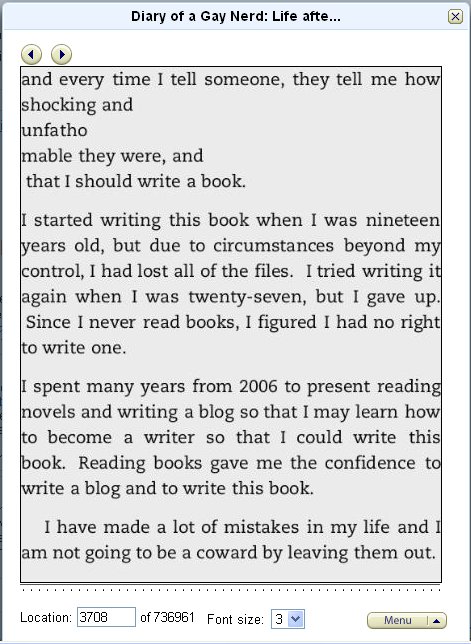
You may notice that the book is going to be well over 1000 pages, but that is because it only shows one or two paragraphs.  The book is actually only 296 pages in e-book format but the iPhone/iPod cannot show the full page and if it did you would need a microscope to read it.

So there are your simple instructions.  I hope you enjoy my book on your Apple product.

My book is almost ready to publish, only one tiny issue left…

My book files came back to me a couple of days ago (two beta readers as I like to call them) with highlights of things for me to fix.  I have read my book at least 30 times and I was just getting so sick of reading it and they wanted to read it so I figured they could read it early, but I’d love to have bug reports.

So I went through the highlights which weren’t all that major.  I missed a few capitalizations and punctuation issues.  There were also a few words where I forgot to add a letter, like instead of writing the word “from” I wrote “for”, don’t ask why lol.

As I was getting the paper book put together with all of my corrections made, I noticed a little issue which turned out to be a major issue.  There were grey boxes where spaces were supposed to go.  It wasn’t everywhere, but it was annoying that there were so many.  I was able to delete them as I went, but that didn’t help because it was still messed up.

The paper book got put together and turned in to check for errors, which I’m happy to report weren’t any.  I converted the .odt file to epub and was going to publish to Amazon for the Kindle and Barnes & Noble for the Nook.  It looked great on the Nook, but the Kindle wasn’t doing so good.  Here is what I was seeing…

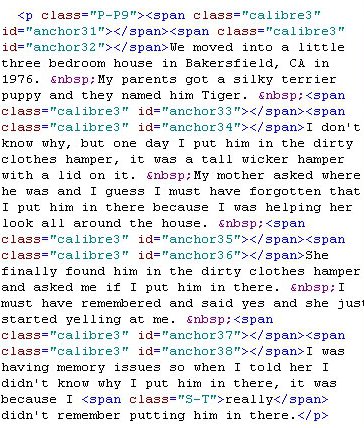
You see the top paragraph?  It’s not exactly a paragraph is it?  That was what happened because of the square boxes.  Also look at the other paragraphs, they weren’t indented, except for the last one.  I went into Sigil to look at the html code of the chapters and this is what I saw.

That is supposed to be a little paragraph.  Those <.span.> things were out of control.  That is what was causing the text to move down.  So the only way for this to work is to cut all that crap out.  I tried to do find and replace, but unfortunately each one of those lines has its own number so it’s not like I can replace all of them throughout the entire document, they have to be deleted one at a time.  ANNOYING!

I worked for 8 hours to get rid of them and then discovered that if I converted the file to .html, it got rid of all that.  So that was a waste of time, but it was a learning experience.

I fixed all of the capitalization and punctuation issues, but I have a feeling I am still missing something so I’m going to have to read the whole thing again.  It sucks but I don’t want to publish a book that isn’t right.

I said I would get it published by January 1st and here we are nearing February and it still isn’t ready to publish.  I don’t know how long it will take but I will get it out there eventually.