Haven’t Been Blogging Much Lately

I don’t know why I haven’t been blogging much at all lately.  Ever since I got my Nook I have been reading constantly, even more than I used to read when all I had were just books.

But, the novelty will wear off soon I’m sure and I will go back to the way things were and feel as though the Nook is just another thing in my life instead of the only thing in my life.

When I first bought my PSP it was the same way.  I was constantly playing video games.  I couldn’t care less about anything else going on around me lol.

Anyway, I do have many books that I’m planning to read, when I say many I mean over 100 but I’m pretty sure that I will have to take days off here and there because of how horrible my eyes are.  The more I read, the worse my eyes get.  Or… I wonder if the more I read, the more my eyes will get accustomed to reading?  I hope the latter.

eBook Conversion and Creation Made Simple

I have been wracking my brain trying to figure out how to fix the James Potter fan books for my Nook. The James Potter Series of fan books by Norman Lippert based on the J.K. Rowling Harry Potter series are only downloadable in PDF format from the website.

So what needs fixed? If I try to read a PDF file on my Nook, it turns whatever page that has an image into an image itself making it unreadable.

How can I fix this that will be less work for me? That has been the question on my mind for days and I finally figured it out tonight.

First I used Calibre to convert the PDF file to ePub file for Nook. Then I went into Sigil, I opened the ePub file that Calibre created.

Here is the tricky part that I didn’t understand at first. What I had to do was find the Prologue page, highlight the word Prologue then made it Header 2 and same with all the chapters. That will help the e-book reader find where the chapters are to create a table of contents.

The first letter of the first paragraph of the Prologue page and every chapter thereafter is missing. Why? Because in the PDF file that letter is bigger than all the rest so when Calibre converted the PDF file to ePub it lost those letters.  I had to figure out what the letter was then type it in.

Page numbers are all over the entire document which means I had to click Edit then Find and type in the first number (1) and find it then I could either replace it with nothing or when it found the number I could click it and delete it manually. Then 2, then 3, etc. Sometimes the number would be mixed in a paragraph and the rest of the paragraph was down on the next line so I had to bring it up.

Yes, it’s a huge pain in my rear but I really want to read these books.

There are a lot of .xhtml files so what I’ve done is when there is a new chapter I click the Sigil logo which is the create chapter button which basically creates a new .xhtml page. The previous page that I had just edited all the numbers out of is now its own chapter in its own file so I renamed that file to Prologue.xhtml. This makes it easier for me to go back to each chapter if I need to edit them further.

This is a painstaking process and it has taken me a couple of hours just to do 10 chapters and I have several more chapters to do tomorrow but I am willing to put in the work to get this done because I really want to read these books. It’s just too bad that the author of these great fan based novels didn’t think to create a file for every persons needs for e-book readers. .ePub is the most common e-book file there is, much easier than a PDF file. I mean seriously, who wants to stare into their LCD screen for hours reading an e-book?

I seriously hope that these books are worth the effort I’m putting into them.

Another thing about editing an e-book is that I didn’t know how to create a chapter that didn’t start with the word “Chapter”, I thought it HAD to have the word Chapter but apparently it doesn’t because these chapters don’t. Also the Prologue page isn’t called Chapter and now it shows up in the table of contents in the Nook for PC program.

So, I have a ton of work ahead of me tomorrow to get the rest of the first James Potter novel converted to .ePub so that I can read it.

This also helps me with my own e-book that I am writing. I wasn’t sure how to create the chapters and now that I have this new information I can do it without any issue and actually I think I might just write the darn thing in Sigil instead of using MS Word. I think it will make it so much easier to write.

I can also now write my Cookbook with diabetic recipes from the SparkPeople website that I can store in my Nook so when I need to find a recipe I can find it easily. What will make it easier is being able to make a chapter named “Entrée’s”, “Sandwiches”, “Salads” etc. instead of Chapter 1…

Thanks Sigil for making my life so much easier.

My First Nook Book Completed – Dead Until Dark by Charlaine Harris

Well I finally did it. I finished reading my very first Nook book which was Dead Until Dark by Charlaine Harris. It’s the first Sookie Stackhouse novel that True Blood is based upon.

The first e-book I ever read was on my computer last month but this is the first e-book that I’ve read on my new Nook. It was certainly an interesting experience.

It took me 4 days which is the usual for me if I read 2 or more chapters per day. The first day I read 2 chapters, the 2nd day 2 chapters, yesterday 2 chapters then today, the 4th day I read the final 5 chapters.

I did get many chances to look up the definitions of many words which thrilled me to no end because I just can’t stand reading a book and not knowing what the meaning of a certain word is. I start feeling stupid because I don’t understand. I dismiss it without even trying to find out then I’m lost.

What’s even funnier is that while I was reading this entire book, I was reading it with a southern accent in my head with the characters voices/accents. And each character had a different accent so I had to keep switching voices and accents. Sometimes I had to cheat and look at who was talking before reading the paragraph so I could make sure that I wasn’t using Sookies voice for Arlene or Eric’s voice for Bill etc. But it didn’t end there because when I would talk to people either on the phone or even talking to Darrin or the dog I would still have a little trace of that southern accent.

What was cool about this book was that while I was reading it I already knew what was going to happen before it happened because I’ve seen the show and I remembered it. Unfortunately, some of the things changed.

SPOILER ALERT!!!

Like for example, Tara Thornton and her mother were not in the book, Miss Jeanette wasn’t in there and she didn’t die at the end in Andy’s car and Bill never turned Jessica and he never went on trial, instead he got some kind of vampire promotion in the vampire world that he lives in. Also, there was another vampire named Bubba who was never in the show and he was there when Sookie was getting beat up by Rene who didn’t even die at the end of the book.

My friend Alyce told me that this book was not like the shows and I thought that she was saying that it wasn’t like the shows meaning it had nothing to do with Bon Temps and Bill and Sookie etc. But what she meant was that it read for Sookies point of view the entire time and so you never read anything that happened to anyone in this book that was not around Sookie.

In other words, you are reading from her viewpoint and no one else. Since she can’t see what’s happening to other people, neither can we (as the reader).

I definitely enjoyed it even though it was very different from the show in that respect. I feel like I got a taste of an alternate True Blood. Which by the way, they never mentioned the words “True Blood”. They always said “synthetic blood” and Bill apparently hated it, he preferred to drink Sookie instead.

I loved this book and can’t wait for the next one. I plan on buying each book once every month until June and by then I will be on the 10th book. I don’t want to read all of the books at once, I have many other books that I want to read of different stories so I have to give those books a chance too.

Google Queues

I don’t know if I am just very late to the game but thanks to reading the PC Mag on my new Nook, I am a little bit more educated than I was before I got it.

I read an article in the PC Mag about a new (or is it new?) thing from Google called Gpanion which is very handy. It’ basically has these app icons (like apple iPhone apps) that open a website for certain google websites. Like your email, calendar, youtube, maps… etc.

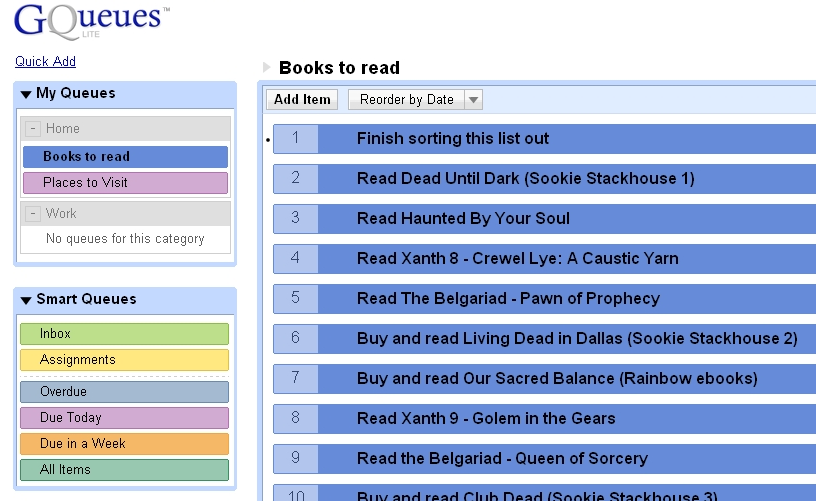
One of those things in there is called GQueue. What that is, is if you have a ton of things that you need to get done you type them out with a date that it needs to be completed by and as you get that item done you check it and that item disappears forever. Be careful you don’t prematurely uncheckulate it because it is a disappointment when you have to reenter the monster back in.

I am not ashamed to show mine here. It’s not showing up in my screen so I’ll see what happens when I publish this post. But it should show you a list of the books I have in my queue. I have not bought all of them whether I said so or not but that list is only 1/4 filled. I decided I would finish it later since I have to get to bed.

Which reminds me, tootles. Goodnight. See ya’ll in the morn when I try to finish it.

My Nook Battery

Before I go on a rant, I would just like to say that I love my Nook. I’ve had nothing but fun with it since I got it on Friday night. Yes, I have had some irritations but the more I play with it the more I understand it and love it.

With that said, I just want to say how I am questioning their “10-day battery life” statement. I’ve only had it since Friday night which is when I first charged it. The next day the battery had started going down so I plugged it in again so I am really counting from that moment which would be Saturday afternoon when it was at full capacity which for some odd reason was only 97% when the light went off and it stopped charging.

So that would be 3 days that I have been playing with it when it went from 97% battery life down to 24%. It’s supposed to be 10 days, not 3.

Note that they said 10 days IF the wi-fi is turned off. The Kindle wi-fi has a 30 day battery with wi-fi turned off and it only uses the battery when you turn the page right? So I think that this is 10 days because every time you have to look up a word it turns the LCD screen on which uses battery so that’s why instead of 30 days it’s only 10 days.

How much time do they estimate per day that you should use the Nook to give you 10 days of battery power? 1 hour per day? 2 hours?

Maybe I’m using it more than they would have estimated that a person would use it and that’s why it’s sucking so much energy from the battery.

I think what’s happening is that every time I don’t understand a word I look it up which turns the LCD on. And before I start reading I usually go into the daily to see what they have in there. I pick up my Nook several times per day and look at stuff in the Nook store. So maybe I am over using it.

I mean it doesn’t really bother me that much that it’s only been 3 days and I’ve already used 75% of the battery because I can certainly plug it in every few days. It’s the principle that they say “10 days” without a charge that gets me because I’m seriously wondering just how long they expect a person would be using this thing.

Look, I’m a reader, I love to read… a lot. I’m gonna be using this thing for hours at a time, maybe 4-6 hours per day. It’s gonna get its use whether I’m reading a book, magazine or newspaper or just browsing the Nook store. So I guess if I over use it like that I’m gonna have to expect to charge it every few days.

I guess I’ll just have to deal with it lol.

PC Magazine for Nook

Last night I was thinking about the customer reviews on PCMagazine for Nook and then I was thinking about how they gave the Los Angeles Times such a bad review but I bought an issue at .75¢ to see for myself and it wasn’t as bad as they made it out to be. So I thought, why not try the 14 day trial for PC Magazine. I only get 1 magazine a month and I have 14 days to cancel, I get to sample a free magazine at no cost to me and I don’t have to keep paying.

I could have bought the 1 issue at $2.49 and been out a couple bucks just to check out how it looks or I could get the trial and not lose anything. I am so glad I chose the latter because it is very nicely done. The subscription is only $1.49 per month or per magazine if you will and I get it automatically on the first of every month. Not bad.

I used to get PC World magazine years ago and I had that subscription for I think 10 years but canceled because I couldn’t afford it anymore. Also I had stopped reading it so every issue that came to the house got ignored. I might look at a couple of articles but I didn’t really give much time to it as I used to. They didn’t want to let me go, they fought for me but I had made my mind up, I just couldn’t afford it. Eventually they gave up. If they had PC World for Nook I would gladly start my subscription back up.

I read a few articles this morning of the PC Magazine and although they were good, they weren’t as good as PC World. But it’s the best that I can get for $1.49 per month and since it’s the only PC magazine that is in e-subscription for the Nook then it’s all I got.

Nook Fun

I’ve been having a bit of fun with my new Nook. Since I’ve learned what makes it freeze I have learned to avoid certain ways of handling it and it hasn’t frozen all day.

Today I read 2 more chapters from “Dead Until Dark” and I finally came across a word that I wasn’t sure about. I’d heard it before but wasn’t quite sure what it’s meaning was for that particular sentence and/or circumstance. I happily touched the screen to make it light up and inthe menu was able to put the cursor in front of the word to look it up.

Don’t ask me what the word was because now I forgot but then I found 2 more words and although the definition of the 3rd one didn’t make much sense I just happily kept reading.

Reading with such big text means I have to turn the page a lot more than if I were reading an actual book but I don’t mind waiting the 1 second it takes for the screen to refresh.

When I was finished reading for the day I decided to crop and resize some images that I found on a website called nook-Look. They are True Blood images and I don’t know why they weren’t cropped or resized properly to 600×800 but whatever. I put them on the Nook and went to the settings and made them my screen saver. Every time I turn it off (or in standby) it loads 1 image. The next time it loads a different image. It keeps loading a different image in the folder that you have chosen and then eventually goes back to the very first image.

I was looking at one of the images and it was basically all black, it was an image of a werewolves eyes with the true blood logo at the bottom but the image was all black except for the eyes and the logo. It then occurred to me that “screen burn” might happen. You know when you have an image on the screen for so long then the next time you turn it on you see that image all the time because it got burned into the screen.

I decided to go searching the internet and found a nook message board and apparently I wasn’t the only one who was concerned about it because there was an active post.

Fortunately they said that e-ink screens don’t do that like an LCD screen might. WHEW!

So after I got that off my mind I was able to move on to other things and started looking around for Xanth images so that when I read the next Xanth novel I can use that for my screen saver too. Unfortunately I couldn’t find very many, only a few really. I did find enough that I am satisfied though.

I went back to that nook-look site and started going crazy downloading different screen savers lol. I think that I will not put too many on there until I am ready for them. I know they don’t take up too much space but still, I think that I’d rather not take up any more space than I really have to until I really need to.

One cool thing that I did find while browsing the Nook store via the Nook is they have some books listed through Google books and they were all free. I wasn’t expecting that. Although I didn’t download anything because I have enough books in my queue as it is but knowing that I have the option available makes me happy.

Oh and the Lend feature, I don’t know if I mentioned before but it’s kind of bogus. You can only lend a lendable book to 1 person… ever. Once they borrow it, when they lose it and it’s back on my Nook they and nobody else can ever borrow it again. It becomes unborrowable forever. That sucks so I really have to pick and choose who I lend anything to because what if I lend it to someone who decides they don’t have time to read it but then someone who actually wants to read it can’t have it because I lent it to some dipwad who couldn’t be bothered. Like I said before… LOTTERY lol.

I changed my “I am reading…” widget in my sidebar to the anobii.com image of my current book reading because for some strange reason the e-book pages are different from an actual book. Like Dead Until Dark has like 336 pages but in my Nook it only has 222 pages. So if I say I’m on page 92 you might think I haven’t gotten very far but really I have. Also, there are some books that can’t be listed through that widget that I have to enter manually in anobii. And anyway, who really needs to know what page I’m on? I mean sheesh.

So if you see the book that I am currently reading then you’ll know I’m still on that one but I highly doubt anyone really cares lol.

In my previous post I spoke of how I made my own book cover for my Nook. Well, a friend of mine who sent me all the Xanth novels in the mail last year also sent me a “Mighty Bright” lightwhich clips on the book but I thought I couldn’t use it any more because it might crush the Nook lol. Well, I was pleased to know that it clips to the cardboard of my book cover right behind the Nook. So it’s centered in the middle of the top of the Nook allowing me the brightest of lights to read in my poorly lit bedroom.

Well, tomorrow is another day to explore more of my new toy hehe. My ambien are kicking in so I better go to bed. Tootles!

Dead Until Dark by Charlaine Harris

One of the books that I bought for my new Nook is the first Sookie Stackhouse novel, Dead Until Dark by Charlaine Harris.

I wasn’t going to start reading it until today because I got my Nook late at night, after 8pm, and it usually takes me awhile to read a chapter and I didn’t want to read it until I had a fresh start early in the day. However, I was impatient so I started reading it.

One of the reasons I wanted to read it is because it’s the first True Blood novel. I knew that it would be different from the actual show because people keep telling me that it has more detail and that’s almost always the case with books. A friend of mine told me that they are nothing like the show and that it has nothing to do with True Blood.

I’m a little confused why she told me that because as I was reading half of the first chapter last night, it seemed to me that not only was this exactly like True Blood but it was almost the first episode verbatim. In fact, it was the first episode verbatim.

The end of the chapter didn’t give me a cliffhanger like the first episode did, Bill fed Sookie and she got better after being beat up by the “Rat’s” and he confessed to her that he killed them. In the show, at the end of the first episode, she’s getting beat up and they go to credits then the 2nd episode he saves her.

I’m very happy that this first novel is turning out to be exactly what I had hoped it would be but I’ve only read chapter 1 so far. While I’m reading it I had the actual voices and accents of the characters from the tv show playing out each scene in my head with visuals.

When I’m reading I try to give the characters voices that I would imagine that they sound like but sometimes if I can’t imagine it then it’s just my own voice in my head. But I do try to picture the characters and their surroundings as I’m reading because it gives me a better idea of what I’m reading so I understand it better.

Sometimes I can’t and it confuses me and I tend to take longer reading but it seems that since I already have a visual from True Blood on HBO I tend to be able to read faster.

One of the things I do hate about reading and is why it took me 35 years to start reading is that books have big words and it seems like you would need a college education to understand what you are reading. What I like about these books are that I have not come across this issue. Although, now that I have a Nook if I do come across a word like that then I can look it up and get the definition then continue reading.

Obviously this is not a book review and who the hell am I to give one, I’m just saying I’m reading it now and I’m very happy with it and happy I have it on my Nook.

Los Angeles Times for Nook

One of the reasons I wanted to buy the Nook is so that I could get Darrin a subscription to the Los Angeles times. A monthly subscription is only $10 but he buys it every day despite him having a subscription to the Bakersfield Californian. He reads BOTH! If he got the Nook subscription he would save $20 per month because they cost $1 per day and $2 on Sundays.

I was looking at the customer reviews on the Barnes and Noble website for the Los Angeles Times for Nook and because customers had given them such a bad review I decided that I wouldn’t get it.

Although, now that I have my Nook I still wanted to see what it would look like so I bought todays paper for .75¢.

You know it’s not that bad. The customer reviews said that they don’t have chapters but they do. The chapters are the different sections of the newspaper like Calendar, Sports etc.

The front page shows what I assume to be the main article that you see on the front of the actual newspaper, the headliner. It’s not the entire article, it’s a picture then a title and the first paragraph from the article. If you want to read it you can push the little button on the touchscreen for opening a book, although in this case it’s opening an article or you just push the buttons on the side to turn the page for more articles which have the same deal. You aren’t forced to read any article you don’t want, just turn the page until you find the one you want to read then click it to read.

I read a few articles already and it actually reads very well. I’m glad that I was persistent enough to actually buy an article before giving up on the whole idea.

Although, Darrin still doesn’t want it. He much prefers to read the actual paper. But that’s good for the Los Angeles times because they are still making money off him with the $8 a week he spends on the paper.

And they say print is dead, HA it’s alive and kicking in this household.

Barnes and Noble Nook

Well I did it. I bought my Barnes & Noble Nook tonight. I bought the Nook WiFi for $149 because I really don’t want to pay $50 more just for the convenience of having 3G.

I haven’t read anything on it yet as I just bought it but I’ve been playing around with it while it has been charging. The guy at the store told me I should charge it for a few hours before using it but it’s charging very fast. The last time I looked it was at 88% and it’s only been plugged in for 30 minutes. I think they give you a 70% charge because it didn’t start off with 0%.

I didn’t do an “unboxing” video because how many of those are there on YouTube? Hundreds, I don’t want to add to it with more of the same exact thing.

It’s a lot heavier than I was expecting but it isn’t that heavy that it will cause an issue for me.

When I signed into my account and registered my new Nook I went to my library and was surprised to see that all the books in my account were already downloaded into the Nook. I didn’t have to wait at all.

People are always complaining about how long it takes to turn the page in these things, it’s really very fast. The time it takes to change to a new page is the same exact amount of time it takes for me to turn the page in a real book so I don’t see an issue. Also one of the videos I saw on YouTube said that when you change the font size it could take up to 20 or 30 seconds to do that because it has to refresh the entire e-book but that isn’t so with mine, it took the same amount of time as turning a page.

It finally charged to 100% so I plugged the USB cable into my hard drive and it installed the driver immediately. It even popped up the explorer window so I could add my own files to it. I have a few books that I’d like to add to it from Rainbow eBooks and it’s only taken a few seconds to do that. I’m also going to add some 4×6 images for the screen saver. Although they have to be 6×4.

I did the tutorial when it came up and it showed how to do things and one of the things I like was that when you turn the page you could either use those buttons on the right and left or you could just swipe the touchscreen with your finger. Yeah, swiping doesn’t work… That would’ve been cool but it doesn’t work for me.

I loaded a PDF file, that James Potter e-book… yeah… pdf files suck. I’m gonna have to figure out a way to convert that to .epub format so it’s readable. The only way I know how is to use calibre but that has issues but I will figure it out because I really want to read those.

It’s too late at night for me to start reading a new book so I’m going to just wait until I get up in the morning and start reading Dead Until Dark, the first Sookie Stackhouse novel.