Book Cover

I have been going crazy making all of these book covers for the paper book, the Nook and the Kindle.  I made a banner for my blog, iPhone icon, even a few iPhone/iPod wallpaper images lol.  I am even thinking about making a sticker to offer people when they check in to my book on the GetGlue website.

My bubble has burst though and I may have to rethink the whole texture part of the rainbow colors because the spine of the book won’t be textured, it will be a solid color.  Although that doesn’t really matter to me, it is a bit upsetting that I won’t have that one thing to make it match.  But do I really need it to be textured?  Hell yes I do!  It’s what makes it unique.  Whatever, I’m probably going to redesign it again before I publish it, I mean it is going to be forever and I don’t want to make something that I may regret forever just because the spine isn’t the same as the book.  I’m mostly designing it for ebooks, not paper books, but since I am offering that option, it has to look right everywhere else.

Tomorrow is another day so I will focus on trying to make it work then.

Beard Beanie

I saw this on Attack of the Show today. At first I couldn’t stop laughing because of how silly it looks but it occurred to me that maybe it might be a good idea in really cold climates.  Instead of having to wear a ski mask you could wear a beard beanie.  I mean, if someone sees you walking down the street in a ski mask they might think that you’re gonna rob them but if they see this guy, they’re just gonna think he has a beard.

I think it is inventive and I endorse it lol.

Their website is http://beardbeanie.com/ and apparently they started on Etsy.  I’ve never even seen a beard beanie until today and even though I think it’s cool, it’s still a bit silly.  I mean, they sell them for $50, who is going to pay $50 to wear a crocheted beard?

With that in mind, I decided to go on a little pattern hunt since I can crochet.  I found a few websites actually.  Here is my favorite one and it’s a free pattern on Ravelry.  The pattern was written by Jen Spears and I have already made the beard so I know it’s a good pattern.  You can also substitute the yarn for fun fur so it looks more like a beard.

I also found a Santa Hat and Beard pattern on the Red Heart website.  This pattern seems a bit complicated because of the way you have to crochet to the right instead of the left.  I haven’t tried it but I’m sure once I get the hang of it I might find it to work easier.

I was thinking of using the Santa beard pattern with the brown yarn instead of the white and putting that on a regular hat.  I like the Santa beard because it has more texture to it and it looks more believable than the other ones.  Ok so it’s not really believable but you know what I mean.

Then again, when the heck am I ever going to wear one of these?  Probably never so why bother right?  Even though I will probably only wear it once right after I make it then put it in a drawer forever, it would be funny just to see what it would look like on me just once.  And who knows, I might wear the Santa one every year for shits and giggles.

New Blog Banner

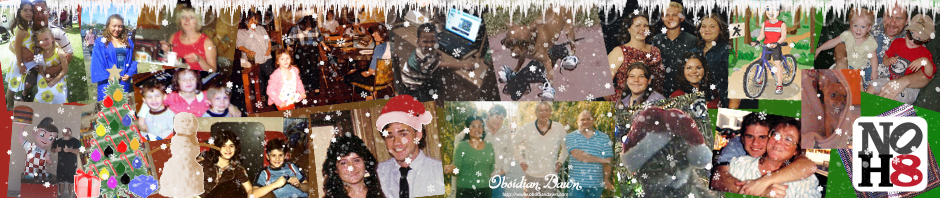
I am not a graphics designer but I do try to make all of my own graphics because I really can’t afford to pay a graphics designer to do it for me. I usually like to have a whole new banner image for the holidays and I think I’ve finally gotten my banner the way I want it.

I’m using GIMP as my Photoshop program and I’m using brushes for all of my other graphics like the Christmas decorations and snow from Obsidian Dawn.

I’m not very good at it yet but I think it’s fun working with brushes. The only issue I had with these particular brushes is that when you click the brush pattern onto the image, it’s very light. You can’t even see it unless you click it several times and even then it loses all of the details and texture in the image. What I have figured out is that if I make it white then click it on the image about 10 times, it gives me a base, that way I can use a color and click it down again and you can see it better.

Take the Snowman for example. I created a layer for the snowman then I used white and I created my base then I erased the arms.  I created another layer but moved that layer down under the white layer and I used a dark brown color then stamped the snowman back down about 10 times. That way you can see the arms but not the dark brown snowman because that was all hidden behind my white base. Then to give it texture I just stamped it down (still with the brown) on top of itself on the base layer. The only issue is that in the Obsidian Dawn website when they show the snowman in the image for all the brushes, he has a red scarf. I really don’t care about his scarf but it would be nice to be able to just stamp it once and have all the details like the red scarf.

I did the same thing with the Christmas tree (although it may be a little bit overkill), all the decorations, the presents and the Santa hat on my head in the picture of me when I was 16. Then I added the snowflakes and then the snow but I didn’t click many times, I only clicked once for the snowflakes and the snow because I didn’t want it to overpower the image.

You can go to the Obsidian Dawn website and download some brushes for your own graphics. They have tutorials for using these brushes in Photoshop and Gimp but they are mostly for Photoshop which is why I’m still clueless. Maybe they work better in Photoshop than they do in Gimp so you don’t have to go that extra mile that I have to go. Who knows. Actually tell me if you know so I can beat my head against the wall if I’m doing it the hard way lol.

I hope that some day I might get better at using GIMP because I really love creating my own graphics. Maybe some day I might be so good that I can start making desktop themes to add to my downloads page. Probably not so don’t hold your breath on that one.