Patriotic keychains and flag lanyards

I have been having a blast playing with lanyards lately. I made quite a few keychains in the DNA pattern with many different colors and I have made a couple different patriotic keychains as well as an American flag. Take a look.

image

The flag isn’t perfect, as nothing really is in this world, but I like it anyway. The problem that I had was with the transition to the blue. I can change the colors in the DNA keychains no problem, but adding the blue to this flag was the most difficult thing I’ve ever tried to do.

Someday I will try to make another one, but for now this will have to do. I really love the keychains though.

My motivation for making these patriotic lanyard projects is the 4th of July of course. I like to make something for every holiday. Actually, flag day is coming so this works for that day too. I think an American flag works for many holidays throughout the year.

Anyway, I hope it’s pleasing. I plan on making more of the keychains as soon as I get more hooks. I think people will like them. I hope anyway.

Too Fat for a Hat?

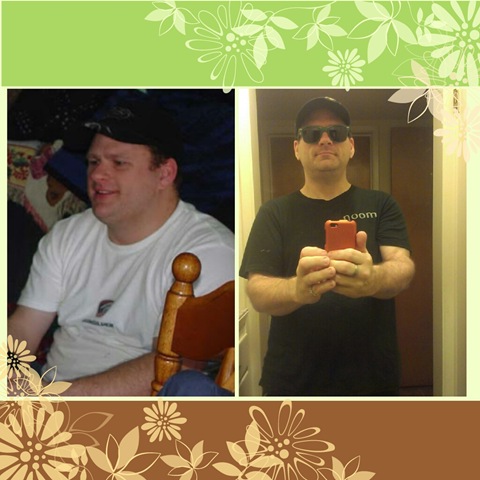
wearing a hat before and after

I wore baseball caps throughout my childhood and teen years, I even wore a hat when I worked in the fast food industry as a teenager and in my early 20’s. When I started to go bald, I wore a hat for two reasons, one because my skin burns easily and two because I didn’t want anyone to see that I was bald lol. I mean, I wasn’t hiding it because it’s a fact of life, but I just didn’t like it, so I would hide it.

I stopped wearing hats right after I got this hat for Christmas one year. When I saw the picture of me wearing my Christmas present and how fat I was, I resigned myself to the fact that I didn’t look good in hats anymore. Some people can pull certain looks off, and I was always able to pull off wearing a baseball cap, but I was convinced those days were gone. I would look at myself in the mirror with this and my other hats, and I just didn’t like the way I looked in them.

Today I was preparing myself to go on a walk and regretting it because it is supposed to be 102°F today. I wanted to see if I looked okay in a hat, so naturally this being the nicest and the least beat up hat that I had, I tried it on and was surprised at how loose it was. I had to adjust the velcro so it would be tighter on my thinner head. I had no idea that my head had actually shrunk that much. I looked in the mirror and I wasn’t very happy until I put on the Noom sunglasses. That’s when it all came together.

So I’m going to start wearing a hat again when I go for my walks because I am very concerned about skin cancer, especially since I burn so easily. I actually don’t think I look bad at all anymore in a hat. Even without the sunglasses, I think I look okay.

Week 23 with @Noom

week 23 profile

Today is the first day of my second week with my second goal and I have lost less than 2lbs.  I was so hoping to lose 2lbs or more.  On the last day of my first goal I was 200lbs on a Friday, two days later on Sunday, I weighed 199 and a day or two later 198.  So, to still be at 198 sucks.  If I was 198 on a Tuesday, then wouldn’t you think that by Saturday I would be 197 or 196?

I am not going to stress myself out over this because at least I lost weight this week.  I could have hit a plateau and I could still be 200lbs, or worse, so I am going to take this as a positively as I can.

My profile says that I have 0 workouts per week, and that is because I never plan a workout since I don’t have a bicycle.  My back is always in pain and if I decide I want to go for a walk then I will do it, but I don’t want to feel pressure to do it by my phone.  I have an app called Squats that is constantly beeping and reminding me to do squats, but I am always in too much pain to even get out of my chair or get out of bed, so I just ignore the reminder.  When I do go for a walk, I am in agony the entire time.

My pain:

I have not really explained the pain I feel with degenerative disc disease.  I am not a scientist or a doctor, so I can’t really know for sure that this is happening, but with degenerative disc disease, your discs are well, degenerating, they are wearing out, they are thinner than they are supposed to be so it feels like my spine bones are grinding together.  It feels like I am getting 10 shots all in the same spot all at the same time.  I also have nerve damage in my back, so I can’t feel the skin on my back, so when I am touching my back in the area that I am having pain, it’s like I am touching someone else’s skin.  I wish that it was in reverse, where I can feel the skin but not the pain in my spine, but it is what it is.

So now you know what happens when I try to take a walk.  I go out and I am fine for the first 5 minutes, but then my pain starts to come on gradually, by 20 minutes the grinding is intense.  These walks might take 30 to 40 minutes so you can only imagine how I am feeling by the time I get home.  Oh and that’s only 2 miles by the way.  It’s not really that far.  This is what my walk looks like.

walk 2013-06-08_10-45-10

This is the last walk I went on.  I went to the post office to drop off a package, and then I decided to just keep walking.  You can see where it says Oleander/Sunset, that’s where I live, where I started walking, the bottom right is the post office.  I went South to the post office, then West, then North, then East and then South to come back home.  That is a typical walk, and that is only 2.07 miles.

It’s not a lot of distance, but it’s way too much for my back to handle.  I insist on walking this far because I want to succeed.  No pain, no gain, right?  Although the pain they are referring to is from muscle tearing while you are working out, not your spine grinding, but still.

I would love to go for walks everyday and for a lot more distance than just 2 miles, but it’s just too painful, so I can only do it a couple or a few times per week.  I wish that I could fix my bicycle or buy a new one, but I just can’t afford it right now, so walking is my only cardio option for now.

I am hoping to lose more than just 1.8lbs next week, but I am not going to put pressure on myself if I don’t because I can only do so much with what I have.  Like I have said in the past, at least I haven’t hit a plateau or gone back up in weight.  Let’s see where I am at next Saturday.

A message from the American Osteopathic Association

This is a Sponsored post written by me on behalf of Michaelbeitz for SocialSpark. All opinions are 100% mine.

Are you aware that more than 100 million Americans live in constant chronic pain from sitting in their office desk chair?  70% of them sit in their desk chairs for more than 5 hours per day and 2 in 5 wouldn’t even consider getting out of their chair to talk to a co-worker, they probably chat on the phone or send each other text messages.  That’s how lazy electronics are making us, but I’m sure they would just rather not get up because they are in too much pain, and I can certainly understand that because I am one of them.  I have been diagnosed with Degenerative Disc Disease and I am in constant agony, so much that even prescription strength Ibuprofen won’t help.

The American Osteopathic Association is helping Americans avoid and prevent pain in the workplace by showing some stretch exercises that you can do at your desk chair to help relieve some of the pain.  Take a look.

I did do those exercises and I will start doing those stretches because I am sick of being in pain every minute of every day with no help from medication.  There is something you can do to help your back pain.  Get up and get some exercise.  Go to the office kitchen (if any) and wipe down the counters or make a new pot of coffee.  Sweep and mop the floor, even if it isn’t your job.  Instead of sending your co-worker a text message or calling them, go talk to them in person.  When you are sitting in your desk chair, don’t slouch, sit up straight.  There are lots of things you can do to help your pain, so why not help yourself by being more active?  Visit the American Osteopathic Association for more information.

Visit Sponsor's Site

Scan Your Barcodes and Save Meals with Noom

noom scanner

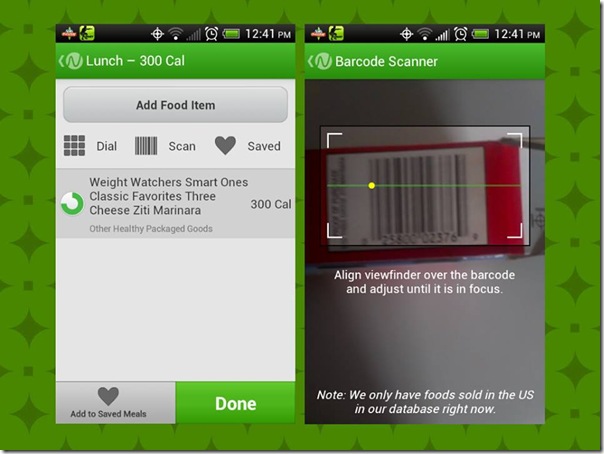
Did you know that with Noom, you could scan barcodes from the boxes of food that you eat?  Two people have told me that they didn’t even know you could scan the barcodes to enter the food that they eat for their meals.

Yesterday I was talking with someone on Facebook and she told me that she had no idea, so I took a screenshot like the one on the left in the image above, and told her to look at the buttons below “Add Food Item” that say Dial, Scan and Saved.  I told her that all she has to do is click Scan and the image to the right will come up.  It scans the barcode and this was the result of the barcode you see in the picture.  “Weight Watchers Smart Ones Classic Favorites Three Cheese Ziti Marinara” for 300 calories.

I have known about it since I first started using Noom because the scan button is in plain sight, so it was a no brainer to me.  That’s not meant as an insult by the way, I just see things more than most do.  I am very visual, I look at everything.  Have you seen the show The Mentalist?  I’m like that guy, I look at everything.

Did you also know that you could save your meals too?  When you enter certain items like for example, if you are making a peanut butter and jelly (or jam) sandwich, you scan the bread, the jar of peanut butter and the jar of jelly or jam, but you don’t want to have to do that every time you eat a sandwich, so after you enter all the information, click “Add to Saved Meals” at the bottom and type PB&J, so the next time you eat that, just click “Saved” at the top and find PB&J, click it and it will automatically add it for you.  It’s really that easy.

So there you have it, the barcode scanner and saving meals with Noom.  You’ve been looking at it everyday and you didn’t even notice it lol.  I hope this helps.

SD card unexpectedly removed…

SD card unexpectedly removed

Has anyone ever seen this issue before?  If you have an Android phone and a SanDisk memory card, you probably have.

So this is my problem today, well, last night anyway.  It was 8 p.m. and I was logging into The Sims FreePlay to send my 7 p.m. and 9 p.m. Sims to work.  As it was starting to load, it crashed to the home screen and I see this message “SD card unexpectedly removed.”  What the…?

I rebooted the phone and tried to load the game and got this message again, and again, and again.  I Googled the problem and read in a few forums that my microSD card is most likely no good and that I would need to buy a new one.  Well, I bought this card in January, how could it be bad after only 5 months?

One of my concerns was that I might have lost all of my pictures, because I never backed any of them up.  Some of them have automatically been privately synced onto Facebook, but not all of them, so if I lost all of my other images, I was going to be very disappointed.  I went into the pictures and they all had that triangle with the explanation point.  FRAK!  I rebooted the phone and they were all there, but then they disappeared… they came back and I was able to upload everything album by album onto Google Drive.  WHEW!

So another one of my concerns was that I haven’t backed up the Sims FreePlay in a few days, so all of the work that I have done will disappear and I will have to continue from where I left off the last time I backed it up to the cloud, which backs it up on Facebook.  Fortunately the game loaded last night and I was able to do a backup, but then this morning I got the “SD card unexpectedly removed” issue again, so I knew that I wasn’t out of the woods just yet.

This morning I went into the app management screen and saw that all of the apps on the microSD card were showing their icons, except for The Sims FreePlay.  Knowing that it was backed up on Facebook, I uninstalled the game and tried to reinstall it.  The first attempt wasn’t successful because it told me that it couldn’t install it, but then I tried it again and it worked.  I was able to send my 10 a.m. Sims to work on time.

I really don’t care if I have to buy a new microSD card, that is unimportant, what is most important to me is that I don’t lose my pictures, and I haven’t so I’m okay with it.  I only paid $20 for it which was a good price considering the Best Buy Mobile store at the mall was charging $35 for the PNY 32GB microSD card and $70 for the SanDisk 32GB microSD cards.  That is a lot of money.  Too much for my blood.

Last night after I backed up all of my pictures on Google Drive, I went through my apps and uninstalled a bunch that I never used that were on the microSD card.  I don’t know how many apps I uninstalled, but it was a lot.  I’ve been messing around with it after I reinstalled The Sims FreePlay today, and after rebooting it a couple of times found that one app is showing up weird in the App Management screen, so I uninstalled it.  I moved a lot of apps to the phone so that I don’t lose the data so those are fine.

Everything seems to be okay with The Sims FreePlay now after I have rebooted the phone and tried to go into the game.  I’m sure I don’t even have to buy a new card, but just in case I do, I will be very careful to back everything up.  Like if I take a picture, I will back it up with Google Drive and if I play The Sims FreePlay, I will upload my data to the cloud just to make sure I don’t lose any progress.  If I have to buy a new microSD card then no problem, but for now I don’t think I have to worry about it.

Have you had these same issues?  If so, what was your solution?  Enquiring minds want to know!