The Sims FreePlay January 22 Update

The Sims FreePlay

The Sims FreePlay has finally given us an update and not everyone is happy about it. Well, I should say they aren’t happy because EA still has not addressed some of the issues that some of us are having with the game.

There are really only two issues that I am having, like not being able to log in to Facebook in the game which would allow me to access the party boat to claim daily prizes based on how many Facebook friends I have who also play the game. It also allows me to visit those friend’s neighborhoods and interact with their Sims characters. They have tasks that you have to perform to earn a special currency called SP’s to spend on specific items in the store. If I cannot earn that currency then I will not be able to buy those items.

The other issue that I am having is that I cannot play the game on my new Nook HD+ that I got for Christmas. I have been playing this game on my Android phone since last year and I’m perfectly okay with playing it on there because that is mainly the only reason I even use my phone anymore. Ever since I got my Nook, I’ve uninstalled most of the apps that I used to use on a daily basis because they were causing The Sims FreePlay to constantly crash. Since I can use those apps on my new Nook, I don’t need them on my phone anymore.

Some people are reporting problems that they are having that I don’t seem to be having. They are also really irate that EA has not addressed their complaints.  Here are just 2 comments. I blurred out their names for their own protection.  The first one is negative, the 2nd one, well, if you can understand what that person is saying then you decide lol.  That person is having issues that I am not having.

sims freeplay comments

You know, I am just as miffed as the next person, but let us all have a little perspective here. This is a free game. You don’t pay for it, you get to play it for as long as you want for free. There are premium items you can buy with real life money, but you don’t have to buy them if you don’t want to. Be lucky they are giving us all of these updates because their other game The Sims 3 which is also available for your Android device will cost you $6.99 and from what I have read in the comments there, that game doesn’t have nearly as many cool features and items as the FreePlay game has.

Also, you should be so lucky to have your Android phone or tablet because there are many people in this world who don’t have such luxuries. There are children who are being abused by their parents, some even murdered. There are entire families who are starving and sleeping in the streets because they aren’t as lucky as you. There are people in this world who are being molested, raped and murdered.

There are teenagers who are kicked out of the house and end up living on the streets for years simply because they came out of the closet to their parents. There are gay kids being targeted, beat up, some even raped and then murdered in Russia because Vladimir Putin gave them the okay by making being gay illegal. There are gay people living in Uganda who are being murdered or raped, or both. And finally, there are people being stoned to death in the Arab countries for the same reason, because they are gay. So chill out, it’s just a silly little game. Count your lucky stars that you even have the money to play the game on your expensive little toy.

I am just as miffed at EA because the Facebook issue started when they put out the Halloween update and I have waited all this time and was let down yesterday when I couldn’t log in with the new update. I understand how frustrating it is. I was also let down when I couldn’t play it on my Nook, but even if I could play it on my Nook, if I can’t log in to Facebook to upload my progress, then how will I be able to continue from where I left off on my phone when I try to play it on my Nook?

Someone told me to just buy a Kindle. Um… I have a Nook. I can’t just go out and say “hey take my Nook and give me a Kindle.” It doesn’t work that way. My Nook is a Nook HD+ with 32 GB which only cost $150. The Kindle Fire equivalent is $444 (see below). So yeah, I will not be buying a new Kindle just so I can play The Sims FreePlay. Even if I did, I still have the Facebook issue. If I can’t back up my game, then what point is getting a Kindle Fire to play it on?

kindle fire hdx

One person even said to just go out and buy the cheap Kindle Fire. Again, even at the low price of $139, I still have the Facebook issue to deal with. Besides, why do these people think I have money lying around that I can just go out and buy all these new things? I just cancelled HBO and Showtime because I needed that extra $30 a month. How am I supposed to go out and buy a second tablet that I will only use to play The Sims with? I put $20 into savings and had to take it back out just to buy groceries. Come on, think it through people.

At any rate, I will continue to wait and hope that EA will fix these issues and I will continue not complaining because there is more to life than just a silly little game. I will continue playing it on my phone and be happy that I even have that luxury. How happy you ask? This happy…

sims freeplay shirt

Post to Google+ from Facebook Mobile

google plus

Google+ has been available for quite some time now and I finally figured out how to share to it from Facebook. I have searched high and low for apps or websites that allow you to post to Facebook, Twitter and Google+ all in one app or website. I finally found it from within the Facebook mobile app itself. Although, it’s not an automatic sharing option, but it will allow you to share pictures easily.

This is a picture of my dog Flower. I wanted to share it on Google+ so all I did was click the 3 little dots and click Share, then a little window pops up and I click Google+ and viola, it allows me to share it. You can also email it, tweet it, share it on Facebook, put the image in your Google Drive… however you want to share it.

Screenshot_2014-01-22-18-02-12Screenshot_2014-01-22-18-02-24 Screenshot_2014-01-22-18-03-15

The same works for websites, all you do is click the 3 dots at the top right of the Google Chrome browser, assuming that is the browser you have installed, then click Share and choose Google+.

Screenshot_2014-01-22-18-43-01 Screenshot_2014-01-22-18-37-56

These screenshots were taken on my Nook HD+, but this option is also available on my Android phone as well. If you are using a computer, this isn’t going to help you very much, but if you are using an Android based tablet or phone, this works for you. I don’t know if this works with the iPhone because I don’t have an iPhone, so if it does work for you then let me know in the comments.

I can’t see how this will work with plain old status updates. The share button for status updates will only allow you to share it in your Facebook timeline or page. For that you will just have to select your text (tap and hold until the text is selected, then drag the bars to select all the text you want), copy it and then go to Google+ to create a post and paste the text.

Perhaps the day will come when your Facebook status updates will automatically get posted to Google+ just as they get tweeted automatically, but until then, this is your best option that I can think of that won’t cost you any money.

I hope this helps.

Weight loss progress

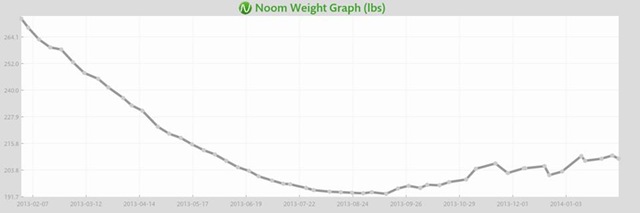
noom weight graph

I started using Noom in January 2013 and I successfully lost 70lbs in the first 7 months, but then I hit a plateau, as you can see in my weight graph.  I tried to maintain my weight, which was 194lbs, but I had a hard time.  The holidays came and I had gained about 20lbs.  I have been saying 15lbs because I seem to get to 208 to 210lbs and stay there, but occasionally it will go up to 213 or 214.

My New Year’s Resolution again was to get down to 150 which is my ultimate goal weight.  I said 57lbs, that was because when I made the new goal, I was 207lbs.  People are always telling me that 150 is too thin, but they don’t realize is that when I was 150lbs before I gained all this weight, I could still pinch an inch or so, so 150lbs wasn’t that thin for me.  I could probably get down to 140, but I won’t go that far.  If I get down to 160 and I’m happy, then I will stay there, but I would really love to get down to 150.

I don’t have the same willpower that I had a year ago, but I am working on that.  I just can’t seem to recall what I did exactly.  I mean, I remember that I cut out bread, which I have decided to do again, I cut out sweets, which I have had a difficult time with because it is shoved in my face at every turn.  I am trying to control my willpower.  I cut out soda and other high calorie drinks.  I don’t really drink soda too often and when I do it’s usually diet coke, but I even cut that out of my diet.  Let’s see, I cut out all high calorie snacks last year, but I don’t seem to be following, but I’m trying.  Okay, enough is enough!  No more crap food!  No See’s candy, no pudding snack packs, no cheese nips or pretzels!

I have gone down a few pounds though.  I weighed myself today at 205lbs so I know I am going to succeed if I try.  I’ve been eating a bowl of mixed cereals (rice chex, honey nut Cheerios and bran flakes) with a sliced banana and vanilla flavored light almond milk for breakfast.  I bought some Progreso light soup which is 70, 80 and 100 calories per serving, and that seems to be filling.  For dinner I’m eating the Weight Watchers Smart Ones frozen dinners.  I tend to be more hungry at night than I do in the morning for some odd reason, but I’m trying to keep my snacking down.  I will eat some fruit or veggies if I do snack.  We bought a bag of red apples at Dollar General for $1.95.  You can’t beat that price.

Anyway, I am trying at least.  The Noom app will ask me to weigh myself every few days, so I’ve been doing that and my weight has pretty much stayed the same, 208, but now it’s 205 so I look forward to what I will be the next time it asks.  Last year I only weighed myself on Fridays, but this year I will weigh in when it asks me to.

I’m rambling lol.  I just wanted an excuse to blog because I haven’t been blogging lately.  Anyway, tootles!

The Miracle of Walgreen’s Petroleum Jelly

walgreens petroleum jelly

My skin has been so dry since we moved to Bakersfield from Los Angeles in 2000.  My feet were the first things to dry out.  I started buying lotion and would slather that on my cracked big toes and my heels and the backs of my ankles.  Unfortunately, it was never enough.  I would literally use lotion made specifically for dry skin the whole day and my skin would still be dry.  I have spent a lot of money on lotion for dry skin over the years with barely any relief.

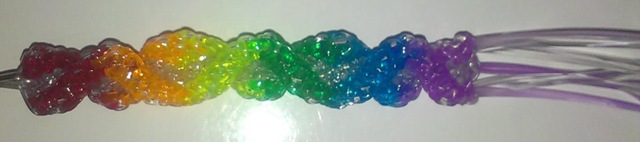
I started making keychains and earrings with this stuff called Rexlace and Craftlace, and naturally it took that to dry out both of my index fingers.  My right index finger in particular has been so dry that the hair literally broke off and has not grown back.  All I see in the dryness is stubble that won’t grow.

My doctor gave me an ointment that I was supposed to use 2 to 3 times per day, but naturally it didn’t help at all.  Yesterday we went back to the doctor’s office and he told me to use the ointment he gave me during the day, but to use petroleum jelly at night before I go to bed.  Well, we went to Walgreens to fill our prescriptions and I bought some petroleum jelly.  We came home and despite what the doctor said about using it at night, I decided to just start applying thin amounts of it to my finger throughout the day.  It would sit on my finger until it dried up and then I would spread some more on it.  It’s actually helping.

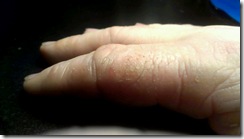
dry fingerI didn’t think to take a before picture because of how horrible it looked.  I was too embarrassed to do that, but here is an after picture.

You can see that my finger is still dry, but what a huge difference from yesterday anyway.  I did apply the petroleum jelly to it last night, a well as to my dry feet, my arms and legs and my face, even though those parts aren’t dry, preventative maintenance.  My mom did that, and I think I should too.

I didn’t know how well this stuff worked at helping dry skin, but I do now and I will continue using it from now on.

First Weigh In of 2014

noom2014

Today was my first official weigh in for 2014.  When I decided to start my diet up again as my new year’s resolution for 2014, I was 213lbs and I wanted to drop a few pounds before officially starting, so I did and now I am down to 207lbs.  See?  I’m serious about this!

My goal last year was just to get down to 200lbs and I did that by my birthday, but I ended up going down to 193lbs which brought my weight loss to 70lbs.  This time I want to get down to 150lbs which means if my official weigh in is 207lbs, then I have 57lbs to lose.  I’m not positive 150lbs is the right weight for me since people insist that it’s not realistic because that is way too thin for me, but I’m 5’7” and the ideal weight for my height is 150lbs, and that was what I used to weigh, and I could still pinch an inch, so I wasn’t skinny by any means.  Although, I have built up a lot of muscle since I weighed 150lbs, so perhaps 150lbs would be too thin.  I don’t know so I will decide when to stop when I get to whatever weight that proves to be too thin.

So the image you see above is my weigh in screenshot from the Noom app on my Nook HD+.  I will take screenshots every Friday when I weigh in and I will post them on my Noom page.  According to the weight graph, I should be at 150lbs by September 28, 2014.  Last year it told me that I would be at my goal by September (or was it November?  I can’t recall) and I was at my goal by June.  Perhaps I will be at my new goal by June again.  That would be awesome because that would make the perfect birthday present to myself.

I will be using the waist graph in the Noom app, but I won’t be doing screenshots of it because I think that’s overkill.  I mean, most people probably don’t give two shits about my weekly weigh in, so I’m sure the waist graph doesn’t make any difference lol.  I barely care about it, but I use the waist graph because it would be neat to know how fat I was in inches from January 2013 when I weighed 263lbs compared to what my inches will be when I get down to 150lbs (hopefully in June).

Anyway, I don’t think I will be writing a blog post every weigh-in day, because I’m sure that’s too boring for people.  Instead I will just upload the screenshot on my Noom page.  I may blog here and there about this and that.  So… until then.

Nook HD+ from Barnes & Noble

Nook HD+ from Barnes & Noble

I love my Nook HD+.  I have been having so much fun with it since I got it for Christmas, actually the week before Christmas.  Yeah we don’t conform to the traditions of opening your presents on Christmas day, or even on birthdays.  We open presents the day we get them.  Screw tradition lol.

My Nook HD+ has a 9” screen, so it’s bigger than the Nook HD in the sense that it has 2 more inches, but I’m telling you that because there are certain apps that work with 7 inches, but don’t work with 9 inches.  Like The Sims FreePlay and Viggle for example.  The Sims FreePlay is downloadable, you just can’t play it because you get this warning when you try.
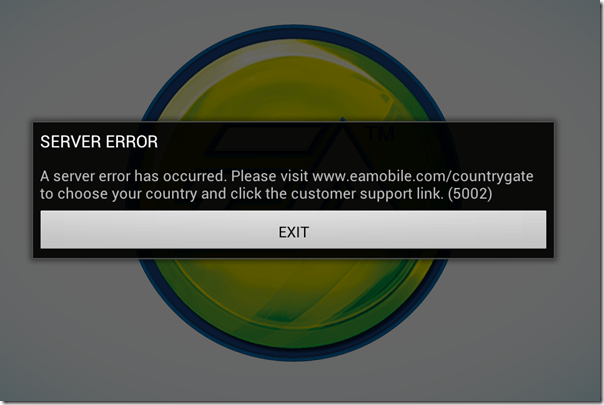
The Sims FreePlay

I am not sure if The Sims FreePlay will even work with a Nook HD 7” tablet.  I know it works with the Kindle Fire because I’ve seen people taking pictures and video of it on that device.  I’m pretty sure it was the 7”, so if it runs on the Kindle Fire 7”, then it probably runs on the Nook HD 7”.  If so or not, please let me know.

Viggle on the other hand doesn’t even show up in the Google Play Store, so they don’t even give you the option.  I know it works on 7” tablets because I installed it on my partner’s tablet to see if I could do trivia when trivia wasn’t giving me any points with my phone.  It installed and looked great too, but the trivia was not working on his tablet any better than it was on my phone.  Although, just because it installed on his tablet doesn’t mean I know if it will install on a Nook HD 7” tablet.

Facebook isn’t great on the Nook HD+ when you use the app.  Using the browser is so much better because you get the full website that you get on the computer, but the only problem I have is when I use another tab to visit another website, or even if I use an app, like if I go check my email, when I come back to the Facebook tab, it goes straight to the mobile version.  If I wanted to use Facebook mobile, I would just use the Facebook app.

The Twitter app that comes with the Nook HD+ from the Nook store isn’t updated, so it’s better to let Google Play update it.  It’s easy to use and if you have multiple twitter accounts, you can switch back and forth very easily.  It’s actually better on the Nook HD+ than it is on my phone.  When I am using @xanapus on my phone, then try to switch over to another twitter name, for some odd reason it switches me back to @xanapus.  It doesn’t do that on my Nook HD+.

I didn’t like the Google+ app on my phone and I rarely ever use it on my computer, but it is great on the Nook HD+.  That’s one of the social media websites that I wanted to start using more often.  It has a much better look than Facebook does in my opinion.  Google+ doesn’t force you to look at ads or suggested posts.

One annoying thing that I noticed is that when I am in my library, I scroll down to My Files and see there are 564 files.  How the heck am I supposed to weed through all of those files to get to the ebooks I have downloaded?  Well, I discovered that if you click the words My Files, it brings up a new window which shows folders.  They are in the Download folder.  I have 6 ebooks that I downloaded from the EverQuest Next website that are fiction based books based on EverQuest the game, but they are all in PDF format.  Ebooks that I’ve downloaded in ePub format will show up with my Nook books, but the PDF files don’t.  I did download an app called File Manager HD which allowed me to create a new folder in my download folder so I could keep the EQN ebooks in there to keep that folder more organized.

PicsArt Photo Studio is a good app that I use on my phone to add stickers and frames and text to my pictures, but it’s such a small screen that sometimes it’s difficult to see what I’m doing.  My Nook HD+ doesn’t have a camera, but I can use Google Drive to retrieve my files.  What I really like most is that I can write on the screen with this.  I can do that on my phone, but it’s too small.

Happy New Year 2014

Okay, so my handwriting isn’t the best, it’s even worse on paper lol.

ChromecastSome useful apps that come with the Nook HD+ include Netflix and Hulu+ and if you have a Google Chromecast, you can watch them on your TV.  You don’t even need to have the Google Chromecast app installed to use it.  I know this because I bought it for my partner and I couldn’t get it to connect to his tablet.  I connected it with my CR-48 aka Chromebook, then was able to connect it to his tablet.  I don’t have the app installed on my Nook HD+ or my phone, but the icon is visible on YouTube, Netflix and Hulu+.  I guess any Android or Apple device that is connected to my network will have that ability.

Of course, other good uses for the Nook HD+ is actually reading a book lol.  You aren’t limited to Nook books either, you can read your Kindle books plus your Google Play books.  In fact, if there is a service that sells ebooks, you can read the books you bought from them, including pdf files and ebooks.  Some writers only publish their ebook with Amazon KDP Select because they get more advertising, and if they chose KDP Select, they can only publish with Amazon for 3 months.  That’s why it’s good to use the Kindle on my Nook, because some ebooks aren’t available on the Nook.

One of the features that I do like is the Nook app “Your Highlights and Notes.”  If you do a lot of highlighting and like to add notes, this is a good thing.  It had all the highlights from the Nook for PC when I got it, but it didn’t show any text.  When I add new highlights, it shows the page number and the first couple of sentences that I highlighted, and if I left a note, it shows my note.  That makes it so much easier to find every highlight and every note on every ebook you own whether it’s downloaded or in the cloud.  Highlighting and leaving notes on my Nook WiFi was so difficult and as soon as I started reading another ebook, all of the highlights and notes disappeared, which was very frustrating.

There is also a Nook app called “Your Lookups” that shows you every word you ever had to find the definition for.  That does come in handy if you ever want to find that specific word again.  The list of words you looked up are on the left, and the word, the book you found it in, the page and the date and time you looked it up are on the right along with the definition of the word.  WOW!  Now you have a record of the date and time you learned a new word.

Anyway, these are some of my thoughts on the Nook HD+.  I like it a lot and I will get a ton of use out of it.  I still have my Nook WiFi and I don’t think I will use it as often for reading ebooks, but if the occasion ever arises when I go outside to read, I will be able to use it.

New Year, Noom Me… Again

Noom Logo

What do we always do on January 1st?  We make a new years resolution.  What is the number one resolution?  Say it with me.  To lose weight.  I did just that in 2013 with Noom and I plan on doing it again starting today.

We have already been to Food Maxx to buy our Weight Watchers Smart Ones frozen dinners which is what helped me to lose 70lbs in 2013.  We also have our frozen veggies and fruit in the fruit bowl.  I start physical therapy on January 3rd and I will most likely ride my bike to get there and use the Noom cardio trainer app to log my bike ride and my PT.  I took the Noom app off my phone and put it on my Nook HD+ because I like the bigger screen and because I need the space on my phone.

Like i said, last year I was lucky enough to lose 70lbs and every week I had weight loss, and no gain.  I would love to do the same exact thing this year, but even I know that is nearly impossible.  If you try hard to do something you did before, you won’t do it and you will become frustrated and you will end up doing the opposite, so I’m just going to relax and hope for the best.  If it happens, it happens, if it doesn’t, it doesn’t.  But I hope it does lol.

So from right this moment, every breakfast I will measure the exact amount of cereal and pour the exact amount of soy milk and slice exactly 1 banana into it for breakfast.  For my snacks I will stick with fruits and lunch and dinner I will try to stick with veggies and the weight watchers meals.  That is how I did it in 2013.

It’s not difficult to do something if you set your mind to it.  I said that I will NOT eat chocolate or cookies or ice cream, and I kept my word.  Instead of eating those bad things, I substituted them for fruits.  Instead of eating chocolate ice cream, I chopped and froze a banana or cantaloupe and blended them in the food processor and made my own healthier ice cream.  Instead of eating store-bought cookies, I made my own from a recipe that I found.  In fact, here are all of my healthy recipes that I found and altered to make them healthy.

I don’t drink soda or any alcoholic beverages, so that’s a blessing, but I do drink coffee with creamer and no calorie sweetener.  I did okay on the diet last year with the coffee, so that’s not a problem.  I tried to drink water, but I just can’t stand plain old water.  I drink Crystal Light, or well the Food Maxx generic version of it anyway.  It’s 5 calories per 8oz which is not too bad.  Although people are always telling me to cut out the sweeteners and blah blah blah, but again, 70lbs last year speaks for itself.

Anyway, so that’s my plan and I am hoping to drop down to 160lbs this time.  I would like to get down to 150lbs, but I’m just going to try for 160 and see how that goes.  If I find myself wanting to drop another 10lbs then I will.  Once I get to my main goal then I will continue using the Noom app to maintain my weight.  And of course I will start blogging every weigh in day again.  My weigh in days in 2013 were Fridays, so how does Friday sound?  Sounds good to me.  So it’s settled.  This coming Friday will be my first official weigh in and blog post.

My Year In Review

my year in chalkboard

before and after morro bay 2013 was a very good year for me.  I started out not wanting to make a new years resolution out of fear of the disappointment that would always come from breaking it.  I decided to make one after a few days, and I stayed with it, well, until July anyway.  I said I wanted to lose weight and I did.  By July I had lost 70lbs with an android app called Noom, but then the weight stopped dropping and I gained 10lbs back, but fluctuated throughout the rest of the year.  I started out the year at 264lbs, went down to 194lbs and as of today I am 205lbs.  I will make another resolution to get back on my diet so I can get down to the weight that I wanted to get down to.  I know how to do it, I just need the willpower.

xray1 On March 16th I had an accident while riding the bicycle home from the grocery store at night and I broke my arm.  It was the ball of my left arm that fits into the shoulder socket.  I didn’t have a cast, instead all I was given was a sling from the emergency room.  By that time I had already lost 35lbs, and as you can already tell from the previous paragraph, the broken arm didn’t stop me from reaching my weight loss goal.

etsy banner While I was recovering from my broken arm, I decided that I wanted to start a new craft.  Well, it wasn’t really a new craft, it was an old craft that I learned when I was 9 and in the Cub Scouts.  I had some materials, so I wanted to use them up by making a couple of keychains.  I had so much fun that I decided that I wanted to learn a more complicated pattern.  I got so good at it and I was having so much fun that I ended up with about 40 keychains, so I opened up an Etsy shop.  I started out with keychains, and I added dangle keychain style earrings, studs and hoops and I already have plans on making and selling dream catcher earrings.

On June 26th, the Supreme Court of the United States ruled DOMA to be unconstitutional and Prop 8 was finally repealed.  HURRAY!  What a glorious day that was for the gay community in California.  In fact, 18 (or 19) states made gay marriage legal in 2013 and legal on a federal level.  The reason I said or 19 is because Wikipedia doesn’t include DC, but says eighteen states AND District of Columbia.  Whatever.  18 or 19, it’s still a huge victory for us.  Illinois is in that 18, but theirs isn’t legal until June 2014.

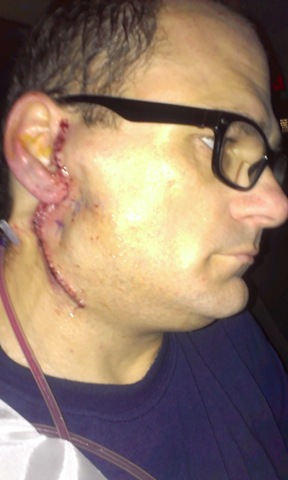
IMAG2002 In late July I started having pain in my parotid gland, which happens at least 2 or 3 times a year for I want to say the last 10 years, but I am not positive.  It’s been going on for a very long time.  The parotid gland is the saliva gland and for some reason the saliva doesn’t release into my mouth, instead something blocks the way and it swells up to the size of a golf ball or bigger.  I try to milk it so the saliva goes into my mouth, and that does work, but it hurts really bad.  The doctors usually give me an antibiotic and it clears up in a week, but this time it didn’t clear up.  My doctor sent me to an ear, nose throat doctor and to have an ultrasound which showed that I had a stone inside of my parotid gland.  The ENT doctor sent me to have a cat scan with contrast which showed that I had several stones in both of my parotid glands, but the ones on the right side were much bigger than the left.  I had surgery on November 20th to remove my parotid gland.  The area is still numb and I was told it will probably be numb for another couple or few months.  YAY!

My back has caused me tons of pain for so many years and this summer I finally found out what was causing it.  Apparently I have scoliosis in my spine.  I told my aunt about it and she told me that my great-grandmother was born with scoliosis and she lived her entire life with it.  I remember she had a hump on her back, that was the scoliosis.  My doctor sent me to physical therapy for a month and that halted the pain, but it didn’t correct anything.  I have an appointment in January to start treatment up again, and it’s a good thing too because the pain is already starting to come back.  My first treatment was a shock, no, seriously, they put these electrodes on my back and it shot electricity to my nerves to dull them.  They had me do exercises for half an hour and then they would give me a deep tissue massage. The electrode was only applied to me on the first visit, all the other appointments were just me laying on the table doing exercises and then massages.  The last couple appointments didn’t include a massage.

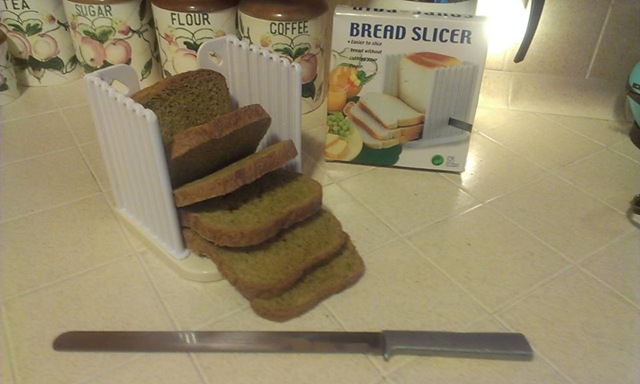
bread slicer pumpkin bread We went to a thrift store in October and I found a bread machine for only $6.  I can’t say I have ever had homemade bread before, like ever, so that was quite an experience.  I did learn that I was doing it wrong for a very long time when I had such a horrible stomachache which felt like I had a 10lb brick sitting in my stomach.  Apparently the bread was too dry.  I read the instructions.  It clearly stated that I was to use exact measurements, no more, no less, so I was only doing what I was told to do, but apparently rules are made to be broken.  Now the bread is light and fluffy and it actually tastes better than store bought bread.  My favorite bread to make is Spiced Pumpkin Bread with raisins.  Have you ever had a ham sandwich or a peanut butter and strawberry jam sandwich with pumpkin bread with raisins?  It’s quite awesome.  Although I will have to cut back on the bread when I start my diet up again.

We also helped feed a couple of neighbors for Thanksgiving and Christmas, which frankly is what the holidays are all about.  It’s nice to receive presents, but it’s even nicer to do a good deed for someone.  I guess those were our good deeds for the year.

Of course we exchanged presents.  I got a Nook HD+ 32GB tablet from my partner, and I gave him a Google Chromecast so he can watch Netflix and YouTube from his tablet, plus I got him Netflix.

I don’t know what will happen in 2014, but I’m sure it will be as memorable as 2013.  Merry Christmas and Happy New Year to you all!

Google Chromecast

Chromecast

I didn’t know what to get my partner for Christmas because he doesn’t seem to show any interest to anything.  Everyone has a hobby of some sorts, but not him, so buying presents is difficult.  Last month he bought a new tablet from Verizon and I remember seeing the ads for Chromecast, so I figured this would make the perfect gift for him so he could watch Netflix and YouTube on his HDTV.

Chromecast Icon CircledOf course when it came, I couldn’t get it working.  I thought the setup would be easy, but it was anything but.  His tablet recognized it, but wouldn’t connect with it.  I decided that he could use my CR-48 (Chromebook) to watch Netflix, so I installed the extension and it recognized the Chromecast and connected instantly.  I went back to his tablet to the Chromecast app and it was already connected there too.  Despite the fact that I never even installed the Chromecast app on my Nook HD+, I see the Chromecast connect icon on Netflix and YouTube.

When I bought the Chromecast through the Google Play Store, I read the reviews and saw a couple of people bitching about the fact that you cannot watch home videos or pictures you have taken with your phone or tablet, but I found that to be false.  If you own a Chromecast, when you go to the Google Play Store on your device you will see a category with apps made specifically for Chromecast.  There is an app called avia which says you can share your personal photos, videos and music on the big screen.  The app is free, but it might be limited because it says “In-app purchase of $2.99  gives you Chromecast support, casting to DLNA enabled devices, access to Dropbox, support for themes and removes all ads.”  As with everything in life, read the reviews and decide for yourself.  There is only one app that will allow you to share your personal photos and videos… for now.

Loading the Chromecast is simple.  When you want to watch something, just click the Chromecast icon so it streams to your TV, then hit the play button and it will automatically switch to the Chromecast.  When you are done, you will have to get the remote control that came with your TV to switch the input back to the cable.  It’s actually very easy.

It’s a great device for those who don’t have an internet streaming device like the Apple TV, Roku or a Blu-ray player, it’s also cheaper at only $35.

Here are a couple of screenshots of YouTube and Netflix with the Chromecast icon.

Chromecast YouTube Chromecast Netflix

New problem seems to be no problem

I mentioned in a previous post that I was having complications from my recent surgery to remove my parotid gland. The problem was that I am still generating new saliva which is causing some pain when it fills up too much and because it doesn’t drain into my mouth, but instead my neck.

I have an update on the issue. It doesn’t seem to be getting too big and I can feel it drain on its own without me having to push on it to milk it, for the lack of a better word. How it does it is very strange, it feels like sweat is running down my face along the scar along my ear. Although I am not positive that that is what it is, that could just be my scar tingling as it has been doing. I am feeling it right now as I type this because I just ate a bowl of cereal which generated some saliva in the gland.

I actually don’t know where the saliva would drain from that gland.  When I have pushed on it before, I feel a vein bulge inside of my mouth which is near where the parotid gland used to be in front of my earlobe, so it is possible that there is a vein, or tube or whatever you want to call it that allows the saliva to travel to reach its destination to release somewhere.  Perhaps that was releasing into my parotid gland which would release into my mouth, or perhaps it had a tube in common with the parotid gland, which is now gone since the parotid gland is gone.

So I don’t think that I have much to worry about. It seems to be correcting itself, despite how freaking strange it feels lol.

december 18 2013 When I look into a mirror I don’t even notice it much anymore. I mean, I see a little lump, but it looks normal considering there is still a hole beside it. The hole isn’t even that noticeable anymore. I mean, when I look at it in the mirror with a shadow on it, it’s very noticeable, but I just took a picture using the flash and you can barely see it. All you can really see is the scar, which seems to stand out along my neck. When I touch it with my fingers I can still feel a hole, but it does seem to be filling in.  When you look at the image to the left you can definitely see where the saliva is filling up in the saliva gland which has no exit into my mouth, but instead in my neck.  It’s that little marble sized ball.

I will definitely be speaking to my doctor about what is happening because he told me that there was a collection of “spit” (his words) that has collected and it will be absorbed into my body, but it’s nothing to worry about.  The very fact that it is still collecting, or generating new “spit” that is draining into my neck seems like it should be something that I should worry about, but I am sure it is hardly a problem considering if it were draining into my mouth, I would end up swallowing it, so it ends up being absorbed into my body regardless of how or where it drains, so again, I don’t see that much of a problem.

So that seems to be it for now.  My appointment with the surgeon isn’t until March, but my next appointment with my regular doctor is in January. I will mention it to both doctors and if it is an issue then I will post another update, otherwise I don’t see much of a reason to add another update on this because it doesn’t seem to be causing as much of a problem.