HP OfficeJet Pro 6968 Not Printing Color (SOLVED)

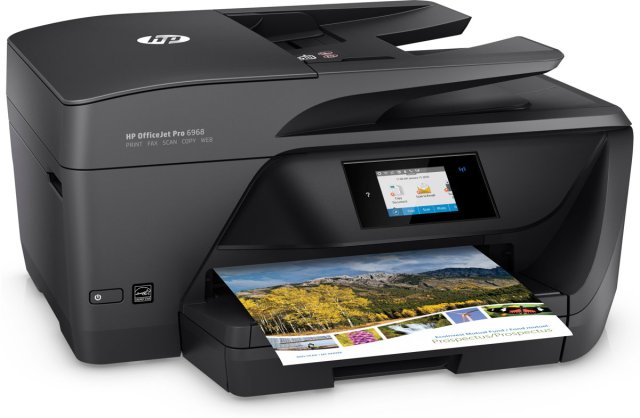
hp OfficeJet Pro 6968

It has truly been one of those days. I don’t know what happened, but all of a sudden today my printer decided it just wasn’t interested in printing color. I had a order that I was working on last night for my Etsy shop, and the person paid for her bracelet today when I reminded her of the link, and my printer kept printing the receipt in black and white. I was in a straight on panic. I did what I could today, but it still didn’t want to print, so I said fine, whatever, just give me a receipt. Then another order came in and again, black and white only.

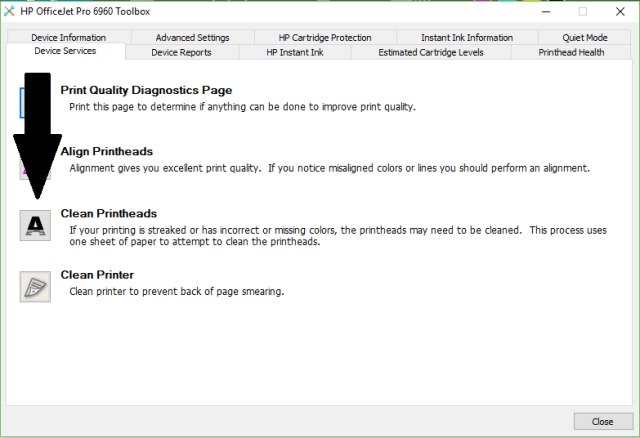
I’ve spent the entire day trying to get my printer to print in color. I cleaned the print heads at least 5 times, but nothing worked. Finally I decided you know if this last time doesn’t work then I just don’t know what I’m going to do. It cleaned the print heads, then printed out a sheet with only the black, but this time I noticed it ask if I wanted a 2nd level cleaning. I thought yeah ok, yeah you do that. I let it do a 2nd level cleaning and it printed color. It asked if I wanted a 3rd level cleaning, and I probably should have done that, but I thought you know, at least it’s printing, so let’s just stop here, and I am glad I did because I printed out some cards that I use to hang my bracelets with and it actually printed in full color just like normal, except it looked better than before.

So there you have it. If and when you have this problem with this printer, and you probably will, clean the print heads and let it do a 2nd level cleaning. If you still don’t get color in your printout, do a 3rd level cleaning. I hope someone was able to benefit from my misfortune.

2018-03-05

No More @Kodak Printer

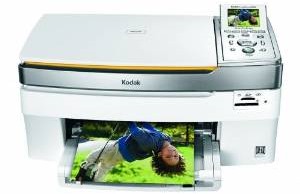
kodak easy share all in one 5300

I have had my Kodak EasyShare 5300 All-in-One printer for many years. My partner bought it for me the year it came out. He bought it on one of those home shopping shows with a credit card. I believe it was the NBC home shopping channel.  I’ve had issues before and Kodak has sent me a new print head and it fixed it, in fact that happened twice. This time my issue is that it wasn’t printing anything, I was getting blank sheets. I figured the same problem was happening so I bought a new print head from Amazon along with more ink which I paid $40 for. Yeah, um… that still didn’t work.

I went to the Kodak website for help. I clicked the contact button and I spoke with a Kodak tech support via instant message through their website. I told them what happened and that I bought a new print head and new ink and I was getting blank sheets. He told me after about 20 minutes that it sounds like a hardware issue. In all fairness, my printer is pretty old. I would say it is about 6 to 8 years old, so I am sure it is just ready to die lol. He told me that he can offer me a refurbished Kodak Hero 6.1 for $89.99. I don’t have the money now, I have spent $55 this month on a print head and ink, so I can’t possibly afford to spend any more money considering I am down to about $15 in the bank and $15 on PayPal and I need every dime I can get to buy groceries, and we’re only in the middle of the month.

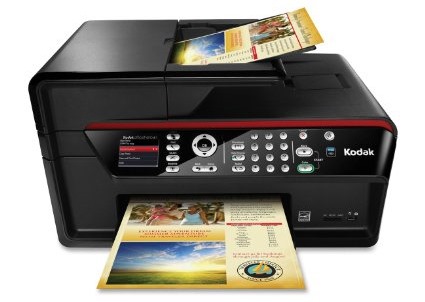
kodak hero 6.1

This is the Hero 6.1. It is a nice printer. Not only does it print and scan, but it also works as a copier and it has a fax machine in it and it is wireless, which means we can print from our respective tablets. But, without money, there is no way I can afford this.

I had to close my Etsy shop because I can’t print shipping labels or receipts. I reopened it because I really need the money to survive this month. $30 isn’t going to go very far. When someone buys something on my Etsy shop, they will get a receipt via email so I really don’t have to print a receipt, and I can bring all packages to the post office to mail them, it will cost me twice as much in postage, but I am still in business without my printer.

I told the Kodak tech support guy that I can’t buy the printer now, but I would love to have the option next month when I have the money and asked if I could still buy it and he said to keep the chat reference number and to open a new support chat and mention the reference number when I am ready, which I will.

After I left the chat I tried printing again and it did print the demo sheet, but it was all blue. I tried to print the calibration sheet and it printed it with the blue and the red, although it was more pink. It didn’t print any other color. I tried printing the back of my friendship bracelet business cards which is all black text and it was a blank sheet. I tried it 5 more times and got 5 more blank sheets. I definitely need a new printer.

The Hero 6.1 is $366 on Amazon and they sell the refurbished ones for $100 so $11 less is good. I would have to pay for taxes and shipping, so I’m sure it would come to about $110 to $120, but that is still better than $366. Who knows if I will be able to buy it though. If I get a bunch of orders then I might be able to (hint hint wink wink).

Leggo my ebook

I feel so stupid for waffling so much on this issue. I want a Kindle real bad because it’s the iPod of the e-book reader world. When I got my mp3 player I bought the Dell DJ but I was stupid, I should’ve gotten an iPod. Now, Dell doesn’t support fixing the Dell DJ. Heck, they don’t support anything with that product anymore. They won’t give you software updates, firmware updates, nothing. Not even tech support. They won’t even help me get a battery that works. I’m on my own with that and I can’t even find a company that will send me one that fits. I bought one in July and it still hasn’t shown up. I did get a refund though.

I got a tweet from Sony when I asked someone on Twitter if I should get Kindle or Nook and Sony said to get Sony Reader. So I thought ok I’ll check out their website. I did look at the Sony Pocket reader and although they have a good e-book reader it’s not as good as the touch BUT I did see some video reviews on that and they say that you can barely read the screen because of the touch feature. Also I can just see the screen getting so marked up from using that stylus pen that I won’t be able to read anyway. You know I’m gonna be drawing on it all the time on the books and on the drawing screen.

The Sony touch is what I really want BUT I wish they had an online store that I can buy books wirelessly through the reader and not have to plug it in every time I want to buy a book. I don’t want to be visiting family and have to use their computer to buy a book and have to install the software on someone elses computer. Ya know?

In their tweet, Sony told me about being able to check out library books and so I downloaded their software to check it out and went to the library link and they said I can only check out library books if I have a library card which I do for the Kern County Library which unfortunately is not in their system. So that feature is 100% useless for me.

The review I watched, the e-book reader was flawless but then when I watched another video, the Sony touch was slow to turn the page. He would swipe the screen and the page didn’t turn at all. He had to swipe again and other times he swiped the screen and it took 10 seconds to turn the page. I am way too impatient to wait 10 seconds for the page to turn.

Also, they said that they do supply a USB for it but that’s it. No A/C adapter for charging. Hello? They said that is a $30 accessory. What? Seriously? Although I did read that it uses the PSP power cable which I do have but I find that ridiculous that they are charging so much money for an e-book reader and they won’t even supply you a freaking a/c adapter.

The Sony touch has some good and bad and the bad outweigh the good for me.

I really want a nook or kindle because of the wi-fi feature and online store. I don’t care about 3G, I really don’t. I just want to be able to connect with a WiFi connection at home or at a friend’s house using their WiFi or if we’re out and about then I can use the public WiFi at a Starbucks or McDonald’s.

The Nook has the lend feature which is totally useless to me as well. I don’t know anyone who has a Nook and I highly doubt that me buying a Nook is going to bring me Nook buddies. Also the little screen on the Nook is too slow for me.

Although, the good thing about the Nook is that if I have an issue with it I can just bring it to a Barnes and Noble and maybe they can help me with it. I do want to go to a Barnes and Noble to play with one to see how fast or slow it is. Not just the color screen but page turns and startup and all. I want to be convinced with a in store demonstration.

If I don’t like it then I will go Kindle. But, there are still 2-3 weeks to waffle er um I mean decide.

Tech Support…

A friend sent this email to me today, it’s hilarious.  I’m copying and pasting it into this blog post, editing it a bit to make it easier to read.  This ought to give you a good chuckle.

This ought to make you feel better about your computer skills!

Tech support: What kind of computer do you have?

Customer: A white one…

Customer: Hi, this is Celine .. I can’t get my diskette out.

Tech support: Have you tried pushing the Button?

Customer: Yes, sure, it’s really stuck.

Tech support: That doesn’t sound good; I’ll make a note.

Customer: No , wait a minute. I hadn’t inserted it yet… it’s still on my desk… sorry…

Tech support: Click on the ‘my computer’ icon on to the left of the screen.

Customer: Your left or my left?

Tech support: Good day. How may I help you?

Male customer: Hello… I can’t print.

Tech support: Would you click on ‘start’ for me and….

Customer: Listen pal; don’t start getting technical on me! I’m not Bill Gates..

Customer: Hi, good afternoon, this is Martha, I can’t print. Every time I try, it says ‘Can’t find printer’. I’ve even lifted the printer and placed it in front of the monitor, but the computer still says he can’t find it.

Customer: I have problems printing in red..

Tech support: Do you have a color printer?

Customer: Aaaah………………..thank you.

Tech support: What’s on your monitor now, ma’am?

Customer: A teddy bear my boyfriend bought for me at the 7-11.

Customer: My keyboard is not working anymore.

Tech support: Are you sure it’s plugged into the computer?

Customer: No. I can’t get behind the computer.

Tech support: Pick up your keyboard and walk 10 paces back.

Customer: ! OK

Tech support: Did the keyboard come with you?

Customer: Yes

Tech support: That means the keyboard is not plugged in. Is there another keyboard?

Customer: Yes, there’s another one here. Ah that one does work..

Tech support: Your password is the small letter ‘a’ as in apple, a capital letter V as in Victor, the number 7.

Customer: Is that 7 in capital letters ?

Customer: I can’t get on the Internet.

Tech support: Are you sure you used the right password?

Customer: Yes, I’m sure. I saw my colleague do it.

Tech support: Can you tell me what the password was?

Customer: Five dots.

Tech support: What anti-virus program do you use?

Customer: Netscape.

Tech support: That’s not an anti-virus program.

Customer: Oh, sorry… Internet Explorer.

Customer: I have a huge problem. A friend has placed a screen saver on my computer, but every time I move the mouse, it disappears.

Tech support: How may I help you?

Customer: I’m writing my first email.

Tech support: OK, and what seems to be the problem?

Customer: Well, I have the letter ‘a’ in the address, but how do I get the little circle around it?

A woman customer called the Canon help desk with a problem with her printer.

Tech support: Are you running it under windows?

Customer: ‘No, my desk is next to the door, but that is a good point. The man sitting in the cubicle next to me is under a window, and his printer is working fine.’

And last but not least…

Tech support: ‘Okay Bob, let’s press the control and escape keys at the same time. That brings up a task list in the middle of the screen. Now type the letter ‘P’ to bring up the Program Manager.’

Customer: I don’t have a P.

Tech support: On your keyboard, Bob.

Customer: What do you mean?

Tech support: ‘P’…..on your keyboard, Bob.

Customer: I’M NOT GOING TO DO THAT!